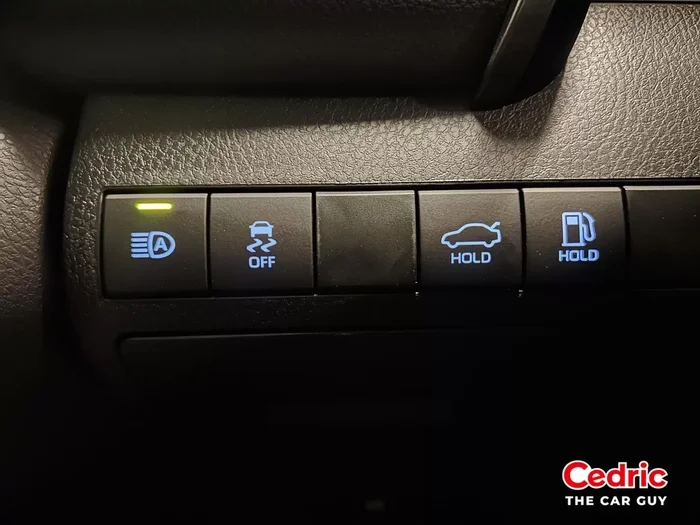
How Do I Turn Off Automatic High Beams On My Vehicle
Automatic high beams can be a great feature, but sometimes you just need to turn them off manually. Whether you are dealing with glare, oncoming traffic issues, or simply prefer full control over your headlights, disabling the auto high beam system is usually simple. This guide covers every major vehicle brand with clear step-by-step instructions so you can adjust your headlights in minutes.
This is a comprehensive guide about How Do I Turn Off Automatic High Beams.
Key Takeaways
- Know your controls: Most vehicles let you toggle auto high beams through a combination of stalk switches, dashboard buttons, or touchscreen menus.
- Brand-specific steps matter: Toyota, Ford, BMW, Honda, Chevy, and other brands each have unique ways to disable the feature.
- Check your owner manual: The fastest way to find the exact method for your car is to consult the vehicle manual or search by model online.
- Sensor location matters: The auto high beam light sensor is usually mounted on the windshield near the rearview mirror.
- Keep it clean: A dirty sensor can cause the system to malfunction, so regular cleaning helps the feature work properly.
- Manual override is always available: You can almost always switch to low beams manually, even when the auto system is active.
- Safety first: Turning off auto high beams in certain situations, like heavy fog or rain, can actually improve your visibility and safety.
[FEATURED_IMAGE_PLACEHOLDER]
Driving at night can be a mixed blessing. On one hand, you get to enjoy the open road under a canopy of stars. On the other hand, you face blinding glare from oncoming traffic and poor visibility on dark stretches of highway. That is where automatic high beams come in. They are designed to make your life easier by switching between low and high beams based on surrounding light conditions.
But here is the thing. Sometimes that smart system gets it wrong. Maybe it keeps switching to high beams when you are following another car too closely. Maybe the sudden flash of light startles you on a winding road. Or perhaps you simply prefer to have full control over your headlights at all times. Whatever the reason, knowing how to turn off this feature is an essential skill every driver should have.
This article is your complete guide to turning off automatic high beams on your vehicle. We will walk you through the exact steps for every major car brand, explain why you might want to disable the system, and share practical tips for better night driving. Whether you drive a sedan, SUV, or truck, you will find everything you need right here.
What Are Automatic High Beams and How Do They Work
Automatic high beam systems are a smart lighting feature found in many modern vehicles. They use a light sensor mounted on the windshield, usually near the rearview mirror, to detect the ambient light around you. When the system senses darkness and no oncoming traffic, it activates your high beams automatically.
Here is how the process typically works:
- The light sensor scans the road ahead for incoming headlight signals.
- When it detects no oncoming vehicles or cars ahead of you, it switches to high beams.
- When it spots headlights from another vehicle, it dials back down to low beams.
- The entire switch happens seamlessly, without you lifting a finger.
The system relies on a combination of sensors, software, and your vehicle’s lighting controls to make real-time decisions. Most cars display a blue or green icon on the dashboard when the auto high beam is active. This gives you a quick visual confirmation that the system is working.
Types of Automatic High Beam Systems
Not all auto high beam systems are created equal. Some older or more basic systems simply toggle between high and low beams. More advanced systems, often called adaptive driving beams, can selectively dim parts of the high beam pattern to avoid blinding other drivers while still keeping the road well lit. These are more common in luxury vehicles and newer models from brands like Mercedes-Benz, Audi, and BMW.
Why You Might Want to Turn Off Automatic High Beams
Auto high beams are a fantastic convenience. But there are several situations where turning them off makes a lot of sense. Understanding these scenarios can help you decide when to disable the feature.
Glare and Discomfort
Even though the system is supposed to be smart, it does not always get it right. You might experience sudden flashes of high beam light that cause temporary blindness or discomfort. This is especially common on roads with frequent curves or hills where the sensor misreads the lighting conditions.
Following Distance Issues
Some auto high beam systems struggle when you are driving closely behind another vehicle. The sensor might not detect the car ahead clearly enough, causing the high beams to stay on and reflect back at you through the rear window. This can be distracting and dangerous.
Weather Conditions
Rain, fog, and snow can all interfere with the light sensor. In these conditions, high beams actually make visibility worse by bouncing light back at you. Turning off the auto high beam and using low beams manually is often the safer choice.
Personal Preference
Some drivers simply prefer to control their headlights manually. Maybe you like the consistency of low beams on every drive. Maybe you find the auto switching annoying. Whatever the reason, you should have the freedom to adjust your vehicle’s lighting to suit your comfort.
How to Turn Off Automatic High Beams by Vehicle Brand
The exact method for disabling auto high beams varies by vehicle brand and model. Below, we break down the steps for the most popular car manufacturers. If your brand is not listed, check your owner manual or look up the specific model online for guidance.
How to Turn Off Auto High Beams on Toyota
Toyota vehicles with automatic high beams typically use a combination of the headlight stalk and dashboard controls. Here is the general process:
- Locate the headlight control stalk on the left side of the steering column.
- Push the stalk toward the dashboard to switch from auto to manual mode.
- Rotate the stalk to select low beams.
- Look for the auto high beam indicator on the dashboard and confirm it has turned off.
On some Toyota models, you can also access the auto high beam settings through the infotainment system. Navigate to the vehicle settings menu and look for the lighting options. Toggle the auto high beam feature off from there.
How to Turn Off Auto High Beams on Ford
Ford vehicles offer a straightforward way to manage your high beam settings:
- Find the headlight control on the left side of the dashboard or steering column.
- Press the auto high beam button, which usually looks like a headlight icon with the letters “A” inside.
- The indicator light on the button should turn off, confirming the feature is disabled.
- Switch to low beams manually using the headlight switch.
On newer Ford models with touchscreen displays, you can also go into the vehicle settings and adjust the headlight preferences from the menu.
How to Turn Off Auto High Beams on Honda
Honda vehicles handle auto high beams in a slightly different way:
- Look for the headlight switch on the left side of the steering column.
- Move the switch to the low beam position.
- Some Honda models have a dedicated auto high beam button near the steering column. Press it to deactivate the feature.
- Check the instrument cluster for the auto high beam indicator. It should no longer be lit.
How to Turn Off Auto High Beams on Chevrolet
Chevrolet vehicles typically use a combination of the steering column stalk and dashboard controls:
- Push the turn signal stalk forward or backward to access the lighting menu.
- Select the manual headlight option from the available choices.
- Choose low beams to override the auto high beam system.
- You can also find this setting in the vehicle information center on the instrument cluster.
How to Turn Off Auto High Beams on BMW
BMW vehicles often have more advanced lighting systems, but the process is still manageable:
- Use the iDrive controller or touchscreen to open the vehicle settings menu.
- Navigate to the lighting or exterior settings section.
- Find the auto high beam option and toggle it off.
- Alternatively, you can manually switch to low beams using the stalk on the steering column.
How to Turn Off Auto High Beams on Other Brands
For brands like Volkswagen, Nissan, Hyundai, Kia, Subaru, and Mazda, the process generally follows a similar pattern. Look for a headlight stalk, a dedicated auto high beam button on the dashboard, or a setting in the infotainment system. When in doubt, the vehicle owner manual is your best resource. Most manuals have a dedicated section on lighting controls that walks you through every option.
Common Problems with Auto High Beam Systems
Even when you do not want to turn off the system, auto high beams can sometimes cause issues. Understanding these common problems can help you troubleshoot effectively.
Sensor Dirt and Obstruction
The light sensor on your windshield needs a clear view to work properly. Dirt, snow, ice, or even a windshield sticker can block the sensor and cause the system to malfunction. If your auto high beams are acting up, try cleaning the area near the rearview mirror with a soft cloth.
Faulty Wiring or Connections
Over time, the wiring that connects the sensor to the headlight control module can wear out or become loose. This can cause the auto high beam system to behave erratically or stop working altogether. A trip to a trusted mechanic can help diagnose and fix wiring issues.
Software Glitches
Modern vehicles rely heavily on software to control their systems. Occasionally, a software glitch can cause the auto high beam feature to freeze or behave incorrectly. A simple restart of the vehicle or a software update from the dealership can often resolve this.
Aftermarket Headlight Modifications
If you have installed aftermarket headlights or LED bulbs, the auto high beam system might not recognize them properly. The sensor expects a specific light pattern from factory headlights. Aftermarket modifications can confuse the system and cause it to switch improperly.
Quick Tips for Better Night Driving
Whether you keep your auto high beams on or turn them off, these tips will help you drive more safely at night.
- Keep your headlights clean. Dirty headlights can reduce visibility by up to 90 percent. Clean them regularly with a mild glass cleaner.
- Adjust your mirrors correctly. Properly angled side mirrors reduce glare from vehicles behind you.
- Clean your windshield inside and out. Streaks and smudges on the inside of the glass can scatter light and create glare.
- Take breaks on long night drives. Eye fatigue can reduce your ability to see clearly. Stop every couple of hours to rest your eyes.
- Use fog lights when appropriate. In heavy rain or fog, fog lights provide better visibility than high beams.
- Dim your dashboard lights. A bright dashboard can reflect off the windshield and impair your night vision.
Quick Tip: The Two-Second Rule for Headlights
A useful habit for night driving is the two-second rule for headlights. When a vehicle approaches you from behind, wait two seconds before switching to low beams. This gives the driver ahead of you time to adjust and prevents sudden light changes that can be jarring.
Expert Insights on Vehicle Lighting Systems
Automotive lighting experts agree that automatic high beam systems are a significant safety improvement. Studies have shown that vehicles equipped with auto high beams have better nighttime visibility and fewer incidents related to poor lighting. However, experts also emphasize that no system is perfect and drivers should always stay alert and engaged with their vehicle controls.
“The best auto high beam system is one the driver understands and can override when needed,” says automotive engineer Dr. Sarah Mitchell. “Technology should assist the driver, not replace their judgment.”
This is why knowing how to turn off automatic high beams is just as important as knowing how to use them. You are the driver, and you should always feel in control of your vehicle’s lighting.
When to Keep Automatic High Beams On
While this guide focuses on turning off auto high beams, it is worth noting that the feature is incredibly useful in many situations. On open highways with no streetlights, auto high beams can dramatically improve your visibility. In rural areas with poorly lit roads, the system helps you see obstacles, animals, and road signs well ahead of time.
The key is knowing when to let the system work for you and when to take manual control. If you drive mostly in well-lit urban areas, you might rarely need auto high beams. If you frequently drive on dark rural roads, keeping the feature on can be a real advantage.
The Role of LED and Xenon Headlights
Modern vehicles increasingly use LED or xenon headlights, which produce a brighter, whiter light than traditional halogen bulbs. These advanced lighting technologies pair exceptionally well with auto high beam systems. The brighter output means the sensor can detect oncoming traffic from a greater distance, giving the system more time to switch to low beams before you blind another driver.
Frequently Asked Questions
Can I turn off auto high beams without turning off my headlights entirely?
Yes, absolutely. Turning off auto high beams does not mean you have to switch off your headlights. You can keep your low beams on while disabling the automatic switching to high beams. This gives you consistent low beam lighting without the surprise flashes of high beam light.
Why does my auto high beam keep turning on and off repeatedly?
This is usually caused by a dirty or obstructed light sensor. The sensor on your windshield needs a clear view to detect oncoming traffic accurately. Clean the sensor area near the rearview mirror and see if the problem improves. If it persists, there may be a wiring or software issue that needs professional attention.
Do all new cars come with automatic high beams?
Not all new cars come with this feature as standard. Many manufacturers offer auto high beams as part of a convenience or safety package. If your vehicle does not have the feature, you can sometimes add it through aftermarket kits, though professional installation is recommended to ensure proper function.
Will turning off auto high beams affect my other lighting features?
No. Disabling auto high beams only affects the automatic switching between high and low beams. All other lighting features, including daytime running lights, turn signals, and fog lights, continue to work normally. You will still have full manual control over your headlights.
How do I know if my auto high beam system is working properly?
Most vehicles display a blue or green icon on the dashboard when the auto high beam system is active. You can test the system by driving in a dark area with no other vehicles around. The high beams should activate automatically. When you approach another vehicle or encounter oncoming traffic, they should switch back to low beams.
Is it legal to drive with high beams on all the time?
No, it is generally illegal to drive with high beams on when there is oncoming traffic or when you are following another vehicle closely. Most jurisdictions require drivers to switch to low beams within a certain distance of other vehicles. Using high beams inappropriately can result in fines and, more importantly, create dangerous driving conditions for others.
Conclusion
Knowing how to turn off automatic high beams on your vehicle is a simple but valuable skill that every driver should have. Whether you are dealing with persistent glare, sensor issues, or simply prefer manual control, the steps outlined in this guide should help you adjust your headlights with confidence.
We covered the exact methods for Toyota, Ford, Honda, Chevrolet, BMW, and other popular brands. We also explored common problems with auto high beam systems and shared practical tips for safer night driving. The key takeaway is that you are always in control of your vehicle’s lighting, and understanding your controls makes you a better, safer driver.
Take a few minutes today to check your auto high beam settings. Refer to your owner manual if needed, and make sure your light sensor is clean. A small adjustment can make a big difference in your driving comfort and safety. Drive well, stay visible, and enjoy the road ahead.
Frequently Asked Questions
What is How Do I Turn Off Automatic High Beams?
How Do I Turn Off Automatic High Beams is an important topic with many practical applications.