How Do You Reset Bluetooth in Your Car Step by Step
Resetting Bluetooth in your car is easier than most people think. This step-by-step guide walks you through every method, from a simple restart to a full factory reset. You will learn how to fix common Bluetooth problems, pair new devices, and keep your car’s wireless connection running smoothly. Whether your Bluetooth connection is glitchy or completely dead, we have you covered.
Bluetooth lets you stream music, take calls, and use navigation without touching your phone. It is one of the most useful features in modern cars. But sometimes, it just stops working. Maybe your Bluetooth connection drops randomly. Or perhaps your car stereo refuses to find your phone at all. Whatever the problem, resetting Bluetooth often fixes it fast.
This guide will show you exactly how to reset Bluetooth in your car, step by step. We cover every method from the easiest soft reset to a full factory reset. You do not need to be a mechanic or a tech expert. Just follow along, and your wireless connection will be back in no time. If your car audio system is acting up, this article is for you.
Key Takeaways
- Soft Reset First: Always try the simplest reset method before moving to advanced steps.
- Delete and Re-pair: Removing the device from your car and re-pairing solves most issues.
- Factory Reset Works Wonders: A full factory reset clears all Bluetooth memory and restores defaults.
- Check for Software Updates: Outdated infotainment software often causes Bluetooth problems.
- Restart Your Phone Too: A simple phone restart can fix the connection just as well.
- Avoid Common Mistakes: Keep devices close during pairing and avoid interference from other electronics.
📑 Table of Contents
Why Does Bluetooth Stop Working in Cars?
Bluetooth problems happen more often than you might think. Understanding the cause helps you pick the right fix. Here are the most common reasons your Bluetooth connection fails.
Software Glitches
Like any technology, car infotainment systems have software. Sometimes that software hits a bug. A simple glitch can make your Bluetooth not working even when nothing is wrong with the hardware. This is the number one reason people need a reset.
Memory Overflow
Your car’s Bluetooth system remembers devices it has paired with. Over time, this list gets long. A crowded memory can slow things down or cause connection drops. Clearing old pairings frees up space and often fixes the issue.
Outdated Software
Car manufacturers release updates for their infotainment systems. These updates fix bugs and improve Bluetooth performance. If your system is out of date, it may struggle to connect to newer phones or devices.
Interference from Other Devices
Other wireless devices near your car can interfere with Bluetooth. USB chargers, dash cams, and even other phones can create signal noise. This makes it harder for your car stereo to hold a steady connection.
Hardware Issues
Sometimes the problem is physical. A damaged antenna or a loose wire inside the dashboard can kill your wireless connection. If none of the software fixes work, a hardware problem might be the cause.
How to Reset Bluetooth in Your Car Step by Step
Now that you know why Bluetooth fails, let us fix it. Below are the most effective methods, ordered from simplest to most advanced. Try each one in order. Most people find their fix in the first two steps.
Step 1: The Simple Restart
A restart is the easiest and most overlooked fix. It clears temporary memory and refreshes the Bluetooth module. Think of it like restarting your computer when it acts slow.
Here is how to do it:
- Turn off your car and remove the key from the ignition.
- Open the driver’s door and wait 60 seconds.
- Close the door and start the car again.
- Go to your Bluetooth settings and try connecting your phone.
This simple trick works surprisingly often. If your Bluetooth connection was just stuck, a restart will bring it back to life. Many people skip this step, but it saves time in the long run.
Step 2: Turn Bluetooth Off and On
If a restart does not work, try toggling Bluetooth off and on. This refreshes the connection without losing any saved pairings.
On most cars, you can do this by going to Settings > Bluetooth > Toggle Off. Wait 10 seconds, then toggle it back on. On your phone, do the same thing. This ensures both sides of the wireless connection are starting fresh.
Some cars also let you turn Bluetooth off from the steering wheel controls. Check your owner’s manual if you are not sure where the setting lives. This method is quick and takes less than a minute.
Step 3: Delete the Paired Device and Re-Pair
This step fixes the majority of persistent Bluetooth issues. When you delete a device and re-pair it, you clear any corrupted pairing data. Your car and phone will create a fresh connection from scratch.
Here is the process:
- Go to your car’s Bluetooth settings menu.
- Find your phone in the list of paired devices.
- Select it and choose “Delete” or “Forget Device.”
- On your phone, go to Bluetooth settings.
- Find your car and tap “Forget This Device” or “Unpair.”
- Turn Bluetooth off on both devices. Wait 15 seconds.
- Turn Bluetooth back on. Put your phone in discoverable mode.
- Select your car from the list of available devices on your phone.
- Enter the PIN if prompted. Most cars use 0000 or 1234.
Once paired, test your connection by playing music or making a call. If your car audio system connects and streams audio without interruption, you are all set. This method solves about 70 percent of Bluetooth problems.
Step 4: Clear All Paired Devices
Sometimes one bad pairing corrupts the entire Bluetooth memory. In that case, you need to clear all saved devices and start fresh.
Go to your car’s Bluetooth settings and look for an option like “Clear All Devices” or “Reset Pairing List.” This wipes every paired device from the system. You will need to re-pair your phone and any other devices you use regularly.
Before you do this, make sure you know your phone’s Bluetooth PIN. Some cars also let you reset the entire infotainment system, which clears everything including your radio presets. Only do this if clearing paired devices alone does not work.
Step 5: Perform a Factory Reset on the Infotainment System
A factory reset is the most powerful fix available. It restores your car’s entire system to its original out-of-the-box settings. This clears all Bluetooth memory, app data, and system settings.
The process varies by car brand and model. Here are general steps:
- Press and hold the power button on your infotainment screen for 10 to 15 seconds.
- Look for a “Factory Reset” option in the Settings menu.
- Some cars require you to press a specific button combination on the stereo unit.
- Confirm the reset when prompted. The screen may go black for a few minutes.
- Once the system restarts, go through the initial setup process again.
Important: A factory reset erases all your saved data. You will need to reconnect your phone, reset your radio stations, and reconfigure your preferences. Use this method only when all other steps fail. If your car has no power at all after a reset, check your fuse box or consult a professional.
Many people worry that a factory reset will void their warranty. It does not. Resetting your infotainment system is a standard troubleshooting step recommended by every car manufacturer.
Step 6: Update Your Car’s Software
Outdated software is a hidden cause of Bluetooth problems. Car makers release updates that fix bugs and improve compatibility with new phones.
Check for updates by going to Settings > System > Software Update. If your car supports over-the-air updates, you can download them directly. Some brands require a visit to the dealer for updates. Check your manufacturer’s website for details.
Keeping your infotainment system up to date is one of the best ways to prevent future Bluetooth issues. Think of it like updating your phone. It keeps everything running smoothly.
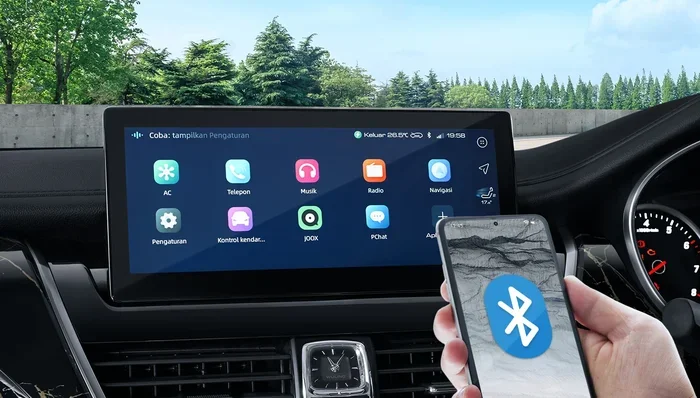
How to Pair Your Phone After a Reset
After resetting Bluetooth, you need to pair your phone again. Here is a quick walkthrough that works for most cars.
- Start your car and go to the home screen of your infotainment system.
- Tap the Settings icon. Look for Bluetooth or Connections.
- Turn Bluetooth on in your car.
- On your phone, open Settings and tap Bluetooth.
- Make sure Bluetooth is turned on and your phone is visible to other devices.
- Your car should appear in the list of available devices on your phone. Tap it.
- Your car may display a pairing request. Tap “Pair” or “Accept.”
- Enter the PIN if required. Common PINs are 0000, 1234, or 1111.
- Wait a few seconds for the connection to establish.
- Test by playing music or making a call.
Once paired, your car should automatically connect to your phone every time you start the engine. If it does not, go back to your Bluetooth settings and make sure the “Auto Connect” option is turned on.
Common Bluetooth Problems and Quick Fixes
Not all Bluetooth issues need a full reset. Here are some common problems and their quick fixes.
| Problem | Quick Fix |
|---|---|
| Phone does not show up in car Bluetooth list | Turn on discoverable mode on your phone |
| Music keeps cutting out | Move your phone closer to the car antenna |
| Call audio works but music does not | Check media audio toggle in Bluetooth settings |
| Car connects but no sound comes through | Check the volume and media source on your car stereo |
| Bluetooth connects but there is a delay | Restart both your phone and car infotainment system |
| Old phone connects instead of new one | Delete the old phone from the car’s Bluetooth memory |
These quick fixes save a lot of time. Try them before jumping to a full reset. Many people overcomplicate simple Bluetooth issues when a one-minute fix would do the job.
Tips to Keep Your Car Bluetooth Running Smoothly
Prevention is always better than cure. Follow these tips to keep your Bluetooth connection strong and reliable.
- Restart your phone weekly. This clears temporary bugs that can affect Bluetooth performance.
- Delete old paired devices. Keep your car’s Bluetooth memory clean by removing devices you no longer use.
- Update your phone and car software. Updates fix known bugs and improve compatibility.
- Keep your phone charged. A low battery can weaken the Bluetooth signal and cause dropouts.
- Avoid placing your phone under a seat or in the glove box. The Bluetooth antenna works best when the phone is visible and close to the dashboard.
- Limit the number of connected devices. Too many devices can overload the Bluetooth module and cause conflicts.
- Turn off Bluetooth when not in use on long trips. This reduces strain on the system and can prevent random disconnections.
These simple habits go a long way. Most Bluetooth problems come from neglect. A little maintenance keeps everything running like new.
When to See a Professional
Most Bluetooth issues resolve with a reset or re-pairing. But sometimes, the problem is deeper than software. You should see a professional if:
- Bluetooth still does not work after a factory reset.
- Your car stereo shows no Bluetooth option in settings at all.
- You hear static or buzzing even after re-pairing your device.
- Other car electronics also stop working at the same time.
- Your car cranks but won’t start after attempting a system reset.
A trained technician can check for hardware problems like a faulty Bluetooth antenna or a damaged infotainment unit. They can also run diagnostic tests that are not available to the average user. Do not hesitate to get help if the problem persists. It could save you time and money in the long run.
Sometimes electrical issues in your car can cause broader problems beyond just Bluetooth. For example, if you notice your car won’t start then starts later, it could be related to the same electrical system that powers your infotainment and Bluetooth features. A professional inspection can catch these issues early.
Final Thoughts
Resetting Bluetooth in your car does not have to be stressful. Start with the simplest fix, and work your way up only if needed. Most of the time, a quick restart or a delete-and-re-pair solves the problem completely. Keep your software updated and your paired devices clean to avoid future issues.
Your car’s Bluetooth connection is designed to make your drives more enjoyable. When it works, you can stream your favorite music, take hands-free calls, and use navigation without distraction. When it fails, it can be incredibly frustrating. But now you have the tools to fix it yourself, quickly and confidently.
Remember, technology is not perfect. Even the best car entertainment system needs a reset now and then. The key is knowing how to do it without stress. Bookmark this guide and come back anytime your Bluetooth acts up. With these steps, you will be back to seamless wireless connection in minutes.
Frequently Asked Questions
How long does it take to reset Bluetooth in a car?
A simple restart takes about one minute. Deleting and re-pairing a device takes 3 to 5 minutes. A full factory reset can take 10 to 15 minutes depending on your car model. Most Bluetooth issues are fixed in under five minutes.
Will resetting Bluetooth delete my phone contacts?
No. Resetting Bluetooth only affects your car’s wireless connection settings. Your phone contacts, photos, and apps are completely safe. The reset only clears paired device information from your car’s infotainment system.
Why does my Bluetooth keep disconnecting after I reset it?
Frequent disconnections after a reset often point to interference or a weak signal. Move your phone closer to the car’s antenna and remove other wireless devices from the area. If the problem continues, your car may need a software update or a hardware check.
Can I reset Bluetooth without turning off my car?
Yes, you can toggle Bluetooth off and on while the car is running. However, a full system restart works better when the car is turned off. For a factory reset, always follow the manufacturer’s instructions, which usually require the car to be off.
Do I need any special tools to reset Bluetooth in my car?
No special tools are needed. You only need your phone and access to your car’s infotainment settings. If a factory reset is required, you may need your car’s PIN or a specific button combination. Your owner’s manual will have those details.
Is it safe to factory reset my car’s infotainment system?
Yes, it is completely safe. A factory reset does not damage your car or void your warranty. It simply restores the system to its original settings. Just be aware that you will lose all saved Bluetooth pairings, radio presets, and personal settings after the reset.
=== CONCLUSION ===
Resetting Bluetooth in your car is a simple process that anyone can do. Whether you choose a soft restart, a delete-and-re-pair, or a full factory reset, this guide gives you every tool you need. Start with the easiest method and work your way up. Most Bluetooth problems disappear after just a few minutes of troubleshooting.
Keep your car audio system updated, your paired devices clean, and your phone charged. These small habits prevent most Bluetooth issues before they start. And if nothing works, do not be afraid to visit a professional. Sometimes a hardware issue needs expert hands.
Your car’s Bluetooth is there to make your life easier. When it works right, you barely think about it. When it breaks, it is annoying. But now you know exactly how to fix it. Follow these steps, stay patient, and your wireless connection will be back up and running in no time.
=== INTERNAL LINKS ===
For more car troubleshooting help, check out these related articles: