Can You Turn Off Rear Cross Traffic Alert on Your Vehicle
Many drivers ask about whether they can turn off rear cross traffic alert on their vehicle. The short answer is yes, most vehicles allow you to disable this feature through your infotainment or settings menu. However, safety experts strongly recommend keeping rear cross traffic alert active because it helps prevent costly accidents and saves lives.
Key Takeaways
- It can be disabled: Most modern vehicles let you turn off rear cross traffic alert through the infotainment system or vehicle settings menu.
- Safety comes first: Disabling this feature increases your risk of being involved in a low-speed collision, especially in parking lots.
- Process varies by brand: The steps to turn off the system differ between Toyota, Honda, Ford, BMW, and other manufacturers.
- Temporary vs permanent: You can usually toggle it on and off without permanently removing the feature from your vehicle.
- Sensor maintenance matters: Dirty or blocked sensors can cause false alerts, which is often why drivers want to disable the system in the first place.
- Insurance and warranty impact: Turning off safety features may affect your insurance rates or vehicle warranty in some cases.
- Expert consensus: Automotive safety professionals overwhelmingly advise keeping rear cross traffic alert enabled for maximum protection.
📑 Table of Contents
- Can You Turn Off Rear Cross Traffic Alert on Your Vehicle?
- What Is Rear Cross Traffic Alert?
- Why Would You Want to Turn Off Rear Cross Traffic Alert?
- How to Turn Off Rear Cross Traffic Alert
- Rear Cross Traffic Alert vs. Other Safety Features
- Common Mistakes When Disabling the System
- Expert Tips for Managing Your Vehicle Safety Alerts
- Impact on Insurance and Warranty
- Conclusion
Can You Turn Off Rear Cross Traffic Alert on Your Vehicle?
If you have ever pulled out of a parking spot and heard an annoying beep from your dashboard, you are not alone. Drivers across the country ask the same question: can you turn off rear cross traffic alert? The good news is that most modern vehicles do allow you to disable this feature. But before you go ahead and hit that button, there is a lot you need to know.
Rear cross traffic alert is a safety system that uses sensors to detect vehicles approaching from the sides when you are reversing. It is part of a broader group of driver assistance features designed to reduce accidents in parking lots and tight spaces. While some people find the alerts helpful, others find them irritating or unnecessary. Understanding how the system works and what happens when you disable it is crucial for every driver.
In this guide, we will walk you through everything. You will learn how the system works, why you might want to turn it off, step-by-step instructions for different car brands, and why experts say you should probably leave it on. Let us dive right in.
What Is Rear Cross Traffic Alert?
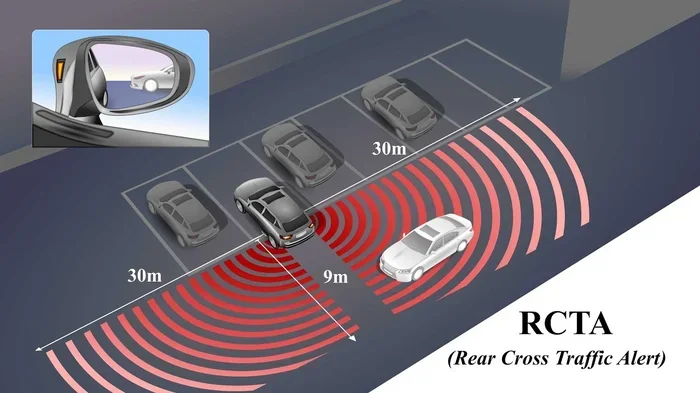
Rear cross traffic alert is a driver assistance technology that warns you about vehicles approaching from either side when you are backing up. It is sometimes called a cross traffic warning system or rear cross traffic warning. The system relies on radar or ultrasonic sensors mounted in the rear bumper.
How the System Works
When you shift your car into reverse, the sensors activate. They scan the area behind and to the sides of your vehicle. If another car, pedestrian, or obstacle is detected, the system triggers an alert. This usually comes as a flashing light on the dashboard and an audible beep. Some vehicles also vibrate the steering wheel or seat to get your attention.
The sensors typically cover a range of about 10 to 20 feet behind the vehicle. They work best at low speeds, usually under 8 miles per hour. This makes them perfect for parking lots, driveways, and crowded urban areas. The system is closely related to blind spot detection technology, but it focuses specifically on the rear area.
What Triggers the Alert?
Several things can set off the rear cross traffic alert:
- Another vehicle approaching from the left or right side behind you
- A pedestrian walking behind your car
- A bicycle or motorcycle coming through a parking lot
- Stationary objects in some vehicle models
- Fast-moving objects detected by the radar
The system is smart enough to distinguish between moving and stationary objects in most cases. It prioritizes moving threats because those pose the greatest collision risk. However, the system is not perfect. Sometimes it produces false alerts, which brings us to a common reason drivers want to disable it.
Why Would You Want to Turn Off Rear Cross Traffic Alert?
It might sound risky, but there are some legitimate reasons drivers choose to disable this feature. Let us look at the most common ones.
False Alerts and Sensor Interference
One of the biggest complaints about rear cross traffic alert is false alerts. The system can sometimes beep when there is nothing there. This happens when the sensors get dirty, covered with mud or snow, or when tall objects like planters or bollards confuse the radar. Heavy rain and snow can also affect sensor accuracy.
If you experience constant false alerts, it is natural to want to turn the system off. But before you do that, try cleaning the sensors first. A quick wipe with a soft cloth can often fix the problem. The sensors are usually located near the rear parking sensors or hidden behind the bumper cover.
Frequent Reversing in Controlled Areas
Some drivers spend a lot of time reversing in very controlled environments. Think of a private driveway with no traffic or a personal garage. In these situations, the cross traffic warning system might feel unnecessary. The driver already knows the area well and has clear visibility.
Personal Preference and Comfort
Simply put, some drivers just do not like the beeping. It can become annoying during daily commutes. If you have a strong sense of your surroundings and feel confident in your reversing skills, you might simply prefer to drive without the alert. This is a matter of car technology customization and personal comfort.
Aftermarket Modifications
Some drivers install aftermarket backup camera systems or custom sensor setups. These can sometimes conflict with the factory rear cross traffic alert system. In such cases, disabling the original system might be necessary to avoid conflicting signals or confusing alerts.
How to Turn Off Rear Cross Traffic Alert
Now let us get to the practical part. The exact steps vary depending on your vehicle make and model. However, the general process is similar across most brands. Here is a step-by-step guide.
Method 1: Through the Infotainment System
Most modern vehicles let you control driver assistance features through the central touchscreen. Here is the general process:
- Start your vehicle and make sure it is in Park.
- Open the infotainment or settings menu on your touchscreen.
- Look for a section labeled “Driver Assistance,” “Safety Features,” or “Vehicle Settings.”
- Find the option for “Rear Cross Traffic Alert” or “Rear Cross Traffic Warning.”
- Toggle the switch to Off.
- Confirm your choice when prompted.
This method works for most Toyota, Honda, Ford, Chevrolet, and Hyundai models. The exact wording in the menu may differ, but the path is usually similar. Some vehicles also allow you to adjust the sensitivity level instead of fully disabling the system. This can be a great middle ground.
Method 2: Through the Steering Wheel Controls
Some vehicles, especially luxury brands like BMW and Mercedes-Benz, let you toggle safety features using buttons on the steering wheel. You can usually scroll through the dashboard menu using the arrow keys and select the rear cross traffic alert option. Press the confirm button to turn it off.
Method 3: Through a Physical Button
A few vehicles have a dedicated physical button for the rear cross traffic warning system. This button is usually located near the center console, close to the parking brake or drive mode selector. Pressing it once will usually toggle the system on or off. Look for an icon that looks like a car with sound waves coming from the rear.
Brand-Specific Instructions
Here are some quick tips for popular brands:
- Toyota: Go to Settings Vehicle Settings then Safety or Driver Assistance. Toggle Rear Cross Traffic Alert off.
- Honda: Access the Settings menu on the infotainment screen. Navigate to Driver Assistance and find the Rear Cross Traffic option.
- Ford: Press the Settings icon on SYNC. Go to Pre-Collision Assist or Driver Assist Features. Disable Rear Cross Traffic Warning.
- BMW: Use the iDrive controller to navigate to Settings Vehicle Security and then disable the Rear Cross Traffic function.
- Chevrolet: Open the Settings menu on the infotainment system. Select Safety and then toggle off Rear Cross Traffic Alert.
Always check your owner manual if you cannot find the setting. The manual will give you the exact path for your specific model and year.
Can You Permanently Remove the System?
Technically, yes. You can have a mechanic physically disconnect or remove the sensors and disable the module. However, this is not recommended for most drivers. It is much better to use the software toggle. That way, you can easily reactivate the feature whenever you want. Permanently removing the system can also affect your vehicle safety technology warranty and insurance coverage.
Rear Cross Traffic Alert vs. Other Safety Features
Understanding how rear cross traffic alert compares to other safety systems can help you make better decisions about what to keep on and what to turn off. Here is a comparison of common collision avoidance system features.
| Safety Feature | What It Does | Can You Turn It Off? |
|---|---|---|
| Rear Cross Traffic Alert | Detects vehicles approaching from the sides while reversing | Yes, through infotainment or settings menu |
| Blind Spot Detection | Warns about cars in your blind spots while driving forward | Yes, usually through a button on the mirror or settings |
| Backup Camera | Shows what is directly behind your vehicle | No, this is usually always active in reverse |
| Adaptive Cruise Control | Maintains speed and distance from vehicles ahead | Yes, can be turned off via steering wheel controls |
| Automated Emergency Braking | Applies brakes automatically to prevent a collision | Sometimes, depending on the manufacturer |
| Lane Departure Warning | Alerts you when you drift out of your lane | Yes, usually through the settings menu |
As you can see, most driver assistance features can be turned off. However, some, like the backup camera, are always active. The automated emergency braking system may also be locked on by some manufacturers because it is considered critical for safety.
Common Mistakes When Disabling the System
Disabling rear cross traffic alert sounds simple, but drivers often make mistakes that cause problems. Let us look at the most common ones.
Forgetting to Reactivate It
You turn it off in a parking lot and then forget. A few days later, you are reversing in a busy area and suddenly realize the system is off. This is more common than you think. Always make a mental note when you disable the feature. Better yet, only turn it off when you absolutely need to and reactivate it right after.
Not Cleaning the Sensors First
Before you disable the system, always check the sensors. A dirty sensor is the most common cause of false alerts. Use a soft cloth and mild soap to clean the rear bumper area. Avoid harsh chemicals that could damage the sensor coating. Regular sensor maintenance can solve most alert issues without needing to turn anything off.
Assuming It Is Off When It Is Still Active
Some drivers think they turned off the rear cross traffic warning but actually just silenced the audio alert. The visual alert on the dashboard may still be active. Check both the audio and visual settings before concluding the system is fully disabled.
Disabling It on All Drivers
Some vehicles allow you to disable the feature for your specific driver profile but not for other users. If you share the car with family members, they might still have the system active. Check the user profile settings to make sure the change applies to the right person.
Ignoring Warning Messages
When you disable rear cross traffic alert, your car will usually show a warning message on the dashboard. Do not ignore this. The message is there to remind you that a safety feature is currently inactive. Some vehicles will show the warning every time you start the car until the feature is reactivated.
Expert Tips for Managing Your Vehicle Safety Alerts
You do not have to choose between total silence and constant beeping. Here are some expert tips for getting the best experience from your vehicle safety technology.
Adjust Sensitivity Instead of Disabling
Many vehicles let you adjust how sensitive the rear cross traffic alert is. Instead of turning it fully off, try lowering the sensitivity. This reduces false alerts while still giving you protection. It is the best of both worlds.
Keep Your Sensors Clean
Make it a habit to wipe down your rear sensors every few weeks. Snow, mud, ice, and even dust can affect performance. A clean sensor means fewer false alerts and more reliable detection. This simple step can save you from unnecessary frustration.
Use the System as a Backup, Not a Replacement
Never rely solely on rear cross traffic alert to prevent accidents. Always check your mirrors, look over your shoulder, and use your backup camera in addition to the alert. The system is a helper, not a substitute for attentive driving. Think of it as an extra pair of eyes, not a replacement for your own.
Update Your Software Regularly
Many modern vehicles receive software updates that improve the accuracy of safety features. Check with your dealer or infotainment system for available updates. An outdated system might produce more false alerts than a current one. Software updates can also improve how the system distinguishes between real threats and harmless objects.
Know When to Reactivate the System
If you disable the feature in a quiet area, remember to turn it back on when you move to a busier location. A good rule of thumb is: keep it on in public parking lots, shopping centers, and any area with foot traffic. You can safely disable it in private driveways or empty areas where you have full visibility.
Consult a Professional if Needed
If you are having persistent issues with the rear cross traffic alert system, do not try to hack or bypass it yourself. Visit a certified mechanic or your dealership. They can diagnose the problem properly and fix it without compromising your safety. DIY fixes can sometimes cause more harm than good, especially with complex safety feature settings.
Impact on Insurance and Warranty
Another thing to consider before disabling rear cross traffic alert is the potential impact on your insurance and warranty. Some insurance companies offer discounts for vehicles equipped with active safety features. Turning off driver assistance features might mean losing those discounts. It is worth checking with your insurance provider before making any changes.
Regarding warranty, most manufacturers cover the safety systems as part of the vehicle warranty. If you have a mechanic physically disconnect or modify the system, it could void part of your warranty. Always check the terms before making hardware changes. Using the built-in software toggle is the safest way to disable the feature without voiding anything.
Conclusion
So, can you turn off rear cross traffic alert on your vehicle? Yes, you absolutely can. Most modern cars make it easy through the infotainment system, steering wheel controls, or a dedicated button. The process differs by brand, but the general steps are straightforward and simple to follow.
However, just because you can turn it off does not mean you should. The rear cross traffic alert system is a proven safety tool that helps prevent low-speed collisions, reduces insurance claims, and saves lives. If you are dealing with false alerts, try cleaning your sensors or adjusting the sensitivity before fully disabling the system. Only turn it off when you truly need to, and always remember to reactivate it when you return to busier areas.
Your safety and the safety of others around you should always come first. Use rear cross traffic alert as a helpful backup, combine it with your own awareness, and enjoy the confidence that comes with having an extra layer of protection. Stay safe out there and happy reversing.
Frequently Asked Questions
Can I permanently disable rear cross traffic alert?
Yes, you can permanently disable it by having a mechanic disconnect the sensors or module. However, this is not recommended because it removes an important safety feature and may void your vehicle warranty. The software toggle is a better option since it can be easily reversed.
Will turning off rear cross traffic alert affect my insurance?
It might. Some insurance companies offer discounts for vehicles with active safety features. Disabling rear cross traffic alert could mean losing those discounts. Contact your insurance provider to find out how disabling safety features impacts your specific policy.
Why does my rear cross traffic alert keep beeping when nothing is there?
False alerts are usually caused by dirty sensors, heavy rain, snow, or tall objects near the rear bumper. Try cleaning the sensors with a soft cloth first. If the problem continues, check for sensor damage or visit a mechanic for diagnostics.
Can I adjust the sensitivity of rear cross traffic alert instead of turning it off?
Yes, many vehicles let you adjust the sensitivity level. This reduces false alerts while keeping the system active. Check your infotainment settings under the Driver Assistance or Safety section to find the sensitivity controls for your specific vehicle.
Is rear cross traffic alert the same as blind spot detection?
No, they are different systems. Rear cross traffic alert detects vehicles approaching from the sides when you are reversing. Blind spot detection warns you about cars in your blind spots while driving forward. Both are valuable collision avoidance system features that serve different purposes.
Should I keep rear cross traffic alert on or off in a private driveway?
In a private driveway with no traffic and clear visibility, you can safely turn off the rear cross traffic alert. However, always reactivate it when you drive to public areas, parking lots, or any place where other vehicles and pedestrians might be nearby.