Can You Turn Off Rear Cross-Traffic Alert Yes Heres How
Yes, you can turn off rear cross-traffic alert on most vehicles. This safety feature helps drivers when backing up, but some people find it annoying or unnecessary in certain situations. We will show you exactly how to disable it on popular car brands and explain when it makes sense to do so.
Have you ever backed out of a parking spot and heard that annoying beeping sound over and over again? That is your rear cross-traffic alert doing its job. But what if you are tired of it? Can you turn off rear cross-traffic alert? The short answer is yes. Most modern vehicles let you disable this feature with just a few taps on your screen or a quick button press. In this guide, we will walk you through exactly how to do it on different car brands. We will also cover why you might want to turn it off, whether it is safe, and what you need to know before making any changes to your vehicle settings.
The rear cross-traffic alert system has become a standard feature in many cars today. It uses sensors to detect vehicles or objects coming from the sides when you are reversing. For some drivers, this is a lifesaver. For others, it can feel like too much noise and unnecessary warnings. Whether you are dealing with constant false alarms or you simply prefer a quieter driving experience, knowing how to manage this car safety feature gives you more control over your vehicle.
Key Takeaways
- You can turn off rear cross-traffic alert: Most vehicles allow you to disable this feature through the settings menu or a physical button.
- Different brands use different methods: Toyota, Honda, Ford, BMW, and Chevy all have their own steps to access the setting.
- Disabling it is generally safe: But you lose an extra layer of protection when backing up, especially in parking lots.
- Common reasons to disable it: False alarms, frequent driving in tight spaces, or personal preference are the top reasons drivers turn it off.
- You can usually re-enable it anytime: The process to turn the feature back on is just as simple as turning it off.
- Check your owner manual first: Every vehicle model is different, and your manual will have the most accurate instructions.
📑 Table of Contents
- What Is Rear Cross-Traffic Alert and How Does It Work?
- Why Would You Want to Turn Off Rear Cross-Traffic Alert?
- Can You Turn Off Rear Cross-Traffic Alert on Different Car Brands?
- Step-by-Step Guide to Disabling the System
- Common Mistakes When Turning Off Rear Cross-Traffic Alert
- Is It Safe to Disable Rear Cross-Traffic Alert?
- How to Know if Your Rear Cross-Traffic Alert Is On or Off
- Frequently Asked Questions About Rear Cross-Traffic Alert
- Final Thoughts
What Is Rear Cross-Traffic Alert and How Does It Work?
Understanding the Basics of the System
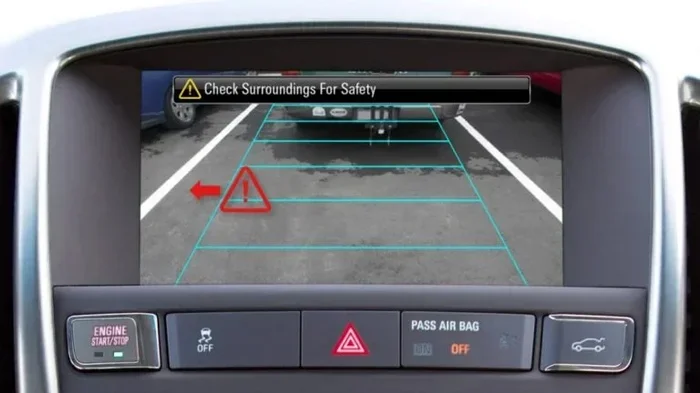
The rear cross-traffic alert is a driver assistance technology designed to help you when you are backing up. It works alongside your backup camera and parking sensors to give you a fuller picture of what is behind your car. When you shift into reverse, the system activates and scans the area to the left and right rear of your vehicle.
Most systems use radar sensors mounted in the rear bumper. These sensors send out signals that bounce off approaching objects. When something is detected moving toward your car from the side, the system triggers an alert. This might be a warning sound, a flashing light on the dashboard, or a message on the infotainment screen.
The system is especially useful in parking lots. When you are backing out of a tight spot, your visibility is limited. The crossing traffic warning can alert you to cars, pedestrians, or other objects that you might not see in your mirrors or on the backup camera.
How It Differs from Blind Spot Monitoring
It is easy to confuse rear cross-traffic alert with blind spot monitoring, but they are not the same thing. Blind spot monitoring watches the lanes beside you while you are driving forward. The rear cross-traffic system focuses on the area behind your car when you are reversing.
Some vehicles combine these systems into one package. Others treat them as separate features with their own settings. Understanding this difference helps you know exactly which vehicle safety system you are adjusting when you go into your car settings.
Why Would You Want to Turn Off Rear Cross-Traffic Alert?
False Alarms and Sensor Sensitivity
One of the most common reasons drivers want to know how to turn off rear cross traffic alert is false alarms. The system can be overly sensitive in some situations. For example, if you are backing out of a parking spot near a wall with a pole nearby, the sensors might trigger even though there is no real danger.
These constant beeps can become frustrating. Over time, some drivers start to ignore the warnings altogether. That defeats the purpose of having the feature in the first place. If the alerts are not accurate, it makes sense to consider disabling the system.
Driving in Tight or Crowded Areas
Another reason drivers disable this feature is the environment they drive in regularly. If you live in a busy urban area with narrow streets and lots of foot traffic, the backup alert might go off constantly. Delivery drivers, rideshare drivers, and people who park in crowded lots often deal with this issue.
In these situations, the alerts can feel more like noise than helpful guidance. Some drivers prefer to rely on their own mirrors and the backup camera alone. They find that turning off the rear cross-traffic warning system gives them a more relaxed reversing experience.
Personal Preference and Driving Style
Not everyone needs every safety feature active all the time. Some drivers are experienced and confident in their reversing skills. They feel that the driver assistance technology gets in the way rather than helping. Personal preference plays a big role in whether someone wants to keep the system on or turn it off.
There is no shame in customizing your vehicle to match your comfort level. Modern cars are designed to be flexible. You can always turn the feature back on if you change your mind or find yourself in a situation where it would be helpful.
Can You Turn Off Rear Cross-Traffic Alert on Different Car Brands?
The process to disable the rear cross-traffic alert varies by car brand and model. Below, we cover the steps for the most popular brands. Always double-check your owner manual for your specific vehicle.
How to Turn It Off on Toyota
Toyota vehicles with the Toyota Safety Sense package include rear cross-traffic alert as part of the system. To turn it off, start by pressing the settings button on your infotainment screen. Navigate to the vehicle settings menu. Look for the driving assistance or safety options section. You should find a toggle for rear cross-traffic alert. Switch it off, and the system will be disabled. On some Toyota models, you can also hold the blind spot monitor button on the steering wheel for a few seconds to access quick settings.
How to Turn It Off on Honda
Honda vehicles use the Honda Sensing suite of safety features. To disable the rear cross-traffic alert, press the setup button on the steering wheel. Scroll to the vehicle settings option. Choose the driver assist feature settings. Look for the rear cross-traffic monitor setting and turn it off. On older Honda models, the option might be located under the main display settings instead. The process is straightforward and usually takes less than a minute.
How to Turn It Off on Ford
Ford vehicles with the Ford Co-Pilot360 system include rear cross-traffic alert. To turn it off, go to the SYNC infotainment system. Tap the settings icon. Scroll down to the driver assistance section. Find the rear cross-traffic alert option and toggle it off. Some Ford models also allow you to access this setting through the vehicle menu on the instrument cluster display. The exact path may vary slightly depending on your Ford model year.
How to Turn It Off on BMW
BMW vehicles use the iDrive infotainment system. To disable the rear cross-traffic alert, press the menu button on the iDrive controller. Go to the vehicle settings menu. Select the driving assistance or safety options. Look for the rear cross-traffic alert setting and switch it off. BMW models with the head-up display may also show the alert settings there. The iDrive interface can vary between models, but the general path remains similar across most BMW vehicles.
How to Turn It Off on Chevrolet
Chevrolet vehicles with the Chevrolet Safety Assist package include rear cross-traffic alert. To turn it off, press the settings button on the infotainment screen. Navigate to the vehicle preferences or safety settings. Find the rear cross-traffic alert option and toggle it off. On some Chevy trucks and SUVs, the setting may be located under the camera or parking assist menu instead. Check your specific model for the exact location.
Step-by-Step Guide to Disabling the System
While the exact steps vary by vehicle, here is a general guide that applies to most cars with this feature. Follow these steps to turn off your rear cross-traffic alert.
- Park your vehicle in a safe, stationary location. Make sure the engine is running and the car is in park.
- Press the settings button on your infotainment screen or steering wheel controls.
- Navigate to the vehicle settings or safety and driver assistance menu.
- Look for the rear cross-traffic alert option. It may be listed under blind spot monitoring or parking assist settings.
- Toggle the switch to off. Some vehicles require you to confirm the change with a prompt on the screen.
- Test the change by shifting into reverse in a safe area. The alert should no longer activate.
If you cannot find the setting, consult your vehicle owner manual. The manual will have detailed instructions specific to your make and model. You can also search online for your exact vehicle year and the phrase “turn off rear cross traffic alert” to find model-specific guides.
Quick Tips for Finding the Setting
- Use the search function on your infotainment screen if available. Type “cross traffic” or “alert settings” to find it faster.
- Check the steering wheel controls. Some brands put quick-access buttons for safety features right on the wheel.
- Look in the vehicle manual app if your car has one. Many newer vehicles offer digital manuals through the infotainment system.
- Contact your dealership if you are still having trouble. They can walk you through the process over the phone or in person.
Common Mistakes When Turning Off Rear Cross-Traffic Alert
Confusing It with the Backup Camera
One common mistake is thinking that turning off the rear cross-traffic alert also turns off the backup camera. These are two separate systems. Disabling the alert does not affect your backup camera feed. You will still see the rear view on your screen when you shift into reverse.
Turning Off the Wrong Setting
Another mistake is accidentally turning off the wrong safety feature. Some vehicles group rear cross-traffic alert with blind spot monitoring under one menu. Make sure you are disabling the correct setting. Read the on-screen labels carefully before making any changes.
Forgetting to Re-Enable It
Some drivers turn off the alert and forget about it. Months later, they wonder why they are not getting warnings when backing up. If you disable the feature, make a mental note or set a reminder to check the setting periodically. You might want to turn it back on when driving conditions change, like when you start using a new parking lot or your driving routine shifts.
Not Checking After a Software Update
Modern vehicles receive over-the-air software updates from time to time. These updates can sometimes reset your settings to default. After a software update, check that your alert system settings are still configured the way you want them. This is an easy mistake to make and one that catches many drivers off guard.
Is It Safe to Disable Rear Cross-Traffic Alert?
The Safety Trade-Off
Disabling the rear cross-traffic alert means you lose an extra layer of protection. The system is designed to detect objects and vehicles that might be in your path when you are backing up. Without it, you rely solely on your mirrors, the backup camera, and your own observation skills.
For most drivers, this is still safe. Experienced drivers who check their mirrors and look over their shoulders can reverse safely without the alert. However, the system does provide value in situations where visibility is poor or when you are in a hurry and might not check as thoroughly as you should.
When It Is Safe to Keep It Off
There are situations where keeping the system off makes sense. If you drive in an open parking lot with clear sightlines, the risk of crossing traffic is lower. If you are reversing slowly and taking your time, the alert may not add much value. In these cases, turning it off is a reasonable choice.
However, if you frequently drive in crowded parking lots, tight residential streets, or areas with lots of pedestrians, keeping the feature on is a safer option. The vehicle safety systems in modern cars are there to help, not to annoy you. Consider your daily driving environment before deciding to disable the alert permanently.
Expert Insights on Customizing Safety Features
Automotive safety experts generally agree that drivers should customize their vehicle settings to match their comfort level and driving habits. However, they also recommend keeping core safety features active whenever possible. If you turn off the rear cross-traffic warning system, consider keeping other features like the backup camera and parking sensors enabled. This gives you a balanced approach between safety and convenience.
Some experts also suggest adjusting the sensitivity of the system rather than turning it off completely. A few vehicle models allow you to reduce the sensitivity of the sensors so you get fewer false alarms but still receive warnings for genuine hazards. Check if your vehicle offers this option before deciding to fully disable the feature.
How to Know if Your Rear Cross-Traffic Alert Is On or Off
After making changes to your settings, you should verify that the system is in the state you want it to be. Most vehicles provide a visual indicator on the dashboard or infotainment screen when the rear cross-traffic alert is active. When you shift into reverse, look for an icon or message that shows the system is working.
If you have successfully turned the feature off, that indicator should not appear when you are in reverse. Some vehicles also display a small message on the instrument cluster confirming the status of the crossing traffic warning. If you are unsure, try reversing slowly in a safe area and see if the alert activates.
Troubleshooting Tips
- If the alert still goes off after you turned it off, restart your vehicle. Sometimes the system needs a full reboot to apply the new settings.
- Check for any pending software updates. Outdated software can cause settings to behave unexpectedly.
- If the problem persists, visit a dealership or qualified mechanic. There may be a sensor or module issue that needs professional attention.
- Make sure you are not accidentally using a different driving mode. Some vehicles have sport or off-road modes that can affect how safety features behave.
Frequently Asked Questions About Rear Cross-Traffic Alert
Can You Turn Off Rear Cross-Traffic Alert on All Vehicles?
Most modern vehicles allow you to turn off rear cross-traffic alert, but not all of them do. Some budget or older models may not have the option to disable the feature. High-end vehicles and newer models almost always include this setting. Check your owner manual or infotainment system to confirm whether your specific vehicle supports it.
Does Turning Off Rear Cross-Traffic Alert Affect Other Safety Features?
No, turning off rear cross-traffic alert does not affect other safety features. The backup camera, parking sensors, and blind spot monitoring continue to work normally. Each safety system operates independently, so disabling one does not impact the others. This makes it safe to customize your alert settings without worrying about losing other protections.
Will Turning Off the Alert Void My Vehicle Warranty?
No, turning off the rear cross-traffic alert will not void your vehicle warranty. Adjusting driver assistance settings is a normal part of using your vehicle. Warranty issues only arise from mechanical failures or improper repairs. You can freely enable or disable safety features without any impact on your coverage.
How Do I Know if My Rear Cross-Traffic Alert Is Working?
To test the system, shift into reverse in a safe area and have someone walk behind your vehicle from the side. The alert should activate when they enter the sensor zone. You should hear a beep and see a warning on your dashboard or infotainment screen. If nothing happens, the system may be turned off or there could be a sensor issue that needs checking.
Can I Adjust the Sensitivity Instead of Turning It Off Completely?
Some vehicle models allow you to adjust the sensitivity of the rear cross-traffic alert rather than turning it off entirely. This is a great middle-ground option. You can reduce false alarms while still keeping some level of protection. Check your vehicle settings or owner manual to see if this option is available for your specific model.
Is Rear Cross-Traffic Alert Worth Keeping Enabled?
For most drivers, keeping the rear cross-traffic alert enabled is worth it. The system provides valuable warnings that can prevent costly accidents and injuries. Parking lot collisions are common, and this feature helps you avoid them. However, if the alerts are causing constant frustration or false warnings, turning it off is a reasonable choice. The best decision depends on your driving environment and personal comfort level.
Final Thoughts
So, can you turn off rear cross-traffic alert? Absolutely. Whether you are dealing with false alarms, driving in a crowded area, or just prefer a quieter experience, you have the ability to disable this feature on most vehicles. The process is simple and usually takes just a few minutes. Just remember that this rear cross-traffic alert is a helpful safety tool, and turning it off means you are taking on more responsibility for checking your surroundings when you reverse.
Use the steps in this guide to find the right setting for your vehicle. Adjust your alert system settings to match your driving style and comfort level. And if you ever change your mind, you can always re-enable the feature just as easily. Your vehicle is designed to work the way you want it to, and knowing how to manage these settings puts you in full control of your driving experience.
Take a few minutes today to explore your vehicle settings. You might discover other features you did not know were adjustable. Customizing your car to fit your needs is one of the best parts of owning a modern vehicle. Stay safe, stay informed, and enjoy the drive.