How Do I Turn On Forward Collision Avoidance Assist
Forward Collision Avoidance Assist is a smart safety feature that helps you avoid front-end crashes. In this guide, you will learn exactly how to turn on Forward Collision Avoidance Assist in any vehicle. We cover step-by-step instructions, common problems, and expert tips for all major car brands.
You are driving down the highway. Traffic slows suddenly. You are looking at your phone for just a second. Before you can react, your car beeps loudly. The steering wheel vibrates. The brakes pulse gently. This is Forward Collision Avoidance Assist at work. It is one of the most important active safety features in modern vehicles today.
If you have never used this feature, you are not alone. Many drivers buy cars with this technology but never activate it. They do not know where the button is. They do not know what the settings mean. That is exactly why we wrote this guide. By the end of this article, you will know exactly how to turn on Forward Collision Avoidance Assist in your car. We will walk you through every step. You will also learn how the system works, how to fix common issues, and how to get the most out of this life-saving technology.
Let us be clear about something important. Forward Collision Avoidance Assist is not a replacement for safe driving. It is a helper. It gives you an extra layer of protection when your attention slips for a moment. It is designed to warn you and, in some cases, apply the brakes automatically. But it works best when you stay alert and keep your eyes on the road. Think of it as a co-pilot that never sleeps.
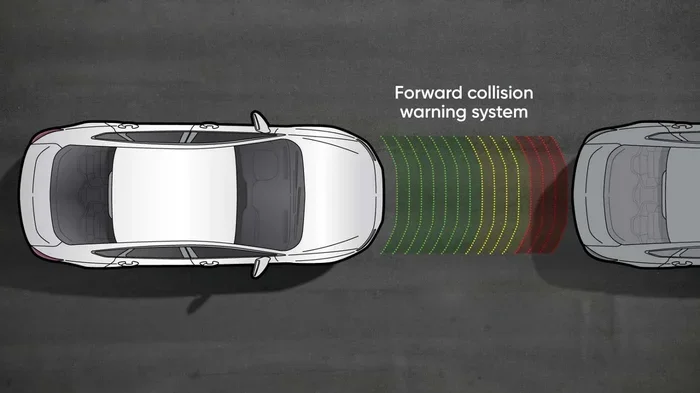
The system uses a combination of radar sensors and cameras mounted near the front of your vehicle. These sensors constantly monitor the distance between your car and the vehicle ahead. When the system detects a potential crash, it gives you a warning first. If you do not respond, it can apply the brakes to reduce the impact or avoid the collision entirely. This crash avoidance technology has been proven to reduce rear-end collisions significantly.
Now, let us get into the practical part. How do you actually turn this feature on? The answer depends on your vehicle brand and model. But do not worry. We have you covered with detailed instructions for the most popular car manufacturers. You will also find tips on adjusting settings, troubleshooting problems, and understanding what each warning means.
Key Takeaways
- Easy Activation: Most vehicles let you turn on Forward Collision Avoidance Assist through the steering wheel controls or the infotainment screen.
- Brand-Specific Steps: The process varies by manufacturer, so we cover Hyundai, Kia, Ford, Toyota, and more.
- Sensor Maintenance Matters: Dirty or blocked sensors can prevent the system from working properly.
- Customizable Settings: Many cars let you adjust sensitivity levels and warning preferences.
- Works with Other Safety Features: Forward Collision Avoidance Assist often pairs with automatic emergency braking and adaptive cruise control.
- Common Issues Are Fixable: Most problems are simple to resolve, like a blown fuse or a dirty sensor.
📑 Table of Contents
- What Is Forward Collision Avoidance Assist?
- How to Turn On Forward Collision Avoidance Assist by Brand
- Adjusting Forward Collision Avoidance Assist Settings
- Common Problems When Turning On Forward Collision Avoidance Assist
- Expert Tips for Getting the Most from Forward Collision Avoidance Assist
- How Forward Collision Avoidance Assist Compares to Other Safety Systems
- Why Forward Collision Avoidance Assist Matters
What Is Forward Collision Avoidance Assist?
Before you learn how to turn it on, it helps to understand what it does. Forward Collision Avoidance Assist (often called FCAS or FCA) is a driver assistance feature. It uses sensors and cameras to detect objects ahead of your vehicle. When it senses a potential collision, it alerts you and can take corrective action.
How the System Works
The system relies on two main components. The first is a forward sensing camera, usually located near the rearview mirror. The second is a radar sensor in the front bumper. Together, these components create a real-time picture of the road ahead. They measure the speed and distance of vehicles in front of you.
When the system detects that you are closing in on another vehicle too quickly, it triggers a warning sequence. First, you will see a visual alert on the dashboard. Then, you will hear an audible beep. The steering wheel may vibrate. If you still do not react, the system can apply the brakes automatically. Some systems also tighten the seatbelts to prepare for impact.
Key Components of the System
- Radar Sensor: Measures distance and relative speed of vehicles ahead.
- Forward Sensing Camera: Detects lane markings, vehicles, and obstacles.
- Control Module: Processes sensor data and decides when to warn or brake.
- Brake Actuator: Applies braking force automatically when needed.
- Warning System: Includes visual, audible, and haptic alerts.
Understanding these components helps you troubleshoot issues later. If the system is not working, one of these parts may be dirty, damaged, or disconnected. We will cover troubleshooting in detail later in this guide.
How to Turn On Forward Collision Avoidance Assist by Brand
The activation process varies from car to car. Below, we break down the steps for the most popular brands. Check your owner’s manual if your vehicle is not listed here.
Hyundai and Kia Vehicles
Hyundai and Kia vehicles make it very easy to activate Forward Collision Avoidance Assist. Here is how you do it:
- Start the engine and make sure the car is in Park.
- Look at the steering wheel. Find the Driver Assistance button. It usually has a car icon with lines in front of it.
- Press the button once to turn on the system.
- Check the instrument cluster. You should see a green icon indicating the system is active.
- Press the button again to adjust settings like sensitivity level.
Some Hyundai and Kia models also let you access the settings through the infotainment screen. Go to Settings > Driver Assistance > Forward Collision Avoidance Assist. From there, you can toggle the system on or off and adjust how sensitive the alerts are.
Ford Vehicles
Ford calls its system Pre-Collision Assist with Automatic Emergency Braking. The steps are slightly different:
- Start the vehicle.
- Use the steering wheel controls to find the Safety Connect or ADAS button.
- Navigate to the Driver Assistance menu on the touchscreen.
- Select Pre-Collision Assist and toggle it on.
- You can also adjust the warning sensitivity from low to high.
Ford vehicles give you a lot of control over how the system behaves. You can choose whether you want early warnings or delayed warnings. You can also turn on or off the automatic braking component separately.
Toyota and Lexus Vehicles
Toyota and Lexus use a system called Preliminary Safety System or Toyota Safety Sense. Here is how to activate it:
- Start the engine.
- Locate the Safety Sense or TRAC OFF button near the steering column.
- Press and hold the button for three seconds.
- The dashboard display will show the system status.
- Use the steering wheel arrows to navigate to the settings menu.
Toyota vehicles also allow you to customize the collision mitigation settings. You can adjust how aggressively the system brakes and whether it provides audible warnings.
BMW and Mercedes-Benz
Luxury brands like BMW and Mercedes-Benz offer more advanced versions of this technology. Their systems are often called Active Collision Warning or Collision Avoidance Assist.
- BMW: Go to the iDrive menu. Select Driving Assistance > Forward Collision Warning > Active.
- Mercedes-Benz: Use the steering wheel buttons to navigate to SETTINGS > Assistance > PRE-SAFE > Forward Collision Warning. Toggle it on.
These brands often include the system as part of a larger driver assistance package. The activation steps may vary slightly depending on the model year and trim level.
General Steps for Most Vehicles
If your vehicle is not listed above, here are some general steps that work for most cars:
- Check the steering wheel for a Driver Assistance or Safety button.
- Look for a car icon with lines or a collision warning symbol.
- Access the infotainment screen and search for Driver Assistance Settings.
- Toggle Forward Collision Avoidance Assist to the on position.
- Confirm the system is active by checking the dashboard display.
Adjusting Forward Collision Avoidance Assist Settings
Turning the system on is only half the battle. Most vehicles let you fine-tune how the system behaves. This is where you can really make it work for your driving style.
Sensitivity Levels
Many cars offer three sensitivity levels for the collision avoidance system:
- Low: The system only activates in emergency situations. You get fewer false alerts but less protection.
- Medium: The default setting for most drivers. It provides a good balance of warnings and intervention.
- High: The system activates early and often. Great for heavy traffic or new drivers.
If you find the system beeping too often, try lowering the sensitivity. If you want maximum protection, set it to high. You can always change it later based on your driving conditions.
Warning Types
Most systems let you choose which types of warnings you receive:
- Visual Alerts: A warning icon appears on the dashboard or heads-up display.
- Audible Alerts: A beep or chime sounds to get your attention.
- Haptic Alerts: The steering wheel or seat vibrates to warn you.
You can usually enable or disable each type separately. This is helpful if you find audible alerts annoying on long drives but still want the visual warnings.
Automatic Braking Settings
Some vehicles let you control whether the system applies the brakes automatically. You can usually choose from these options:
- Warn Only: The system alerts you but does not brake.
- Warn and Brake Light: The system flashes the brake lights to warn the driver behind you.
- Full Automatic Braking: The system applies the brakes if you do not respond.
For maximum safety, we recommend keeping automatic braking enabled. However, if you drive in areas with a lot of stop-and-go traffic, you might prefer the “Warn Only” mode to avoid unnecessary hard braking.
Common Problems When Turning On Forward Collision Avoidance Assist
Sometimes the system refuses to turn on. This can be frustrating, but it is usually easy to fix. Here are the most common issues and their solutions.
Dirty or Blocked Sensors
The most common reason the system does not work is dirty sensors. The radar sensor in the front bumper and the camera near the rearview mirror can get covered with dirt, snow, or ice. When the sensors cannot see clearly, the system disables itself.
Fix: Clean the front of your car gently with a soft cloth. Pay special attention to the area near the bumper and the camera lens. In winter, clear all snow and ice from the front of the vehicle before driving.
System Disabled by Error
Sometimes the system detects a fault and disables itself automatically. You might see a warning message on the dashboard like “Forward Collision Assist Unavailable.”
Fix: Turn the car off and wait 30 seconds. Restart the engine. If the message persists, check the fuse box for a blown fuse related to the ADAS system. If you are not comfortable doing this, visit a certified mechanic.
Aftermarket Accessories Interference
Aftermarket accessories like bull bars, license plate frames, or radar detectors can block the sensors. This prevents the forward collision warning system from working properly.
Fix: Remove any accessories that are near the front sensors or camera. If you must keep them, make sure they are installed in a way that does not block the sensor’s view.
Software Needs an Update
Like any computer system, the collision avoidance technology in your car can become outdated. Manufacturers release software updates that fix bugs and improve performance.
Fix: Visit your dealership or check your owner’s manual for instructions on how to update the system software. Some newer vehicles can update over Wi-Fi automatically.
Expert Tips for Getting the Most from Forward Collision Avoidance Assist
Now that you know how to turn on the system and fix common problems, let us talk about how to use it effectively. These expert tips will help you get the most out of your driver assistance feature.
Keep Your Sensors Clean
Make it a habit to clean the front of your car regularly. A quick wipe-down of the sensors and camera takes only a few minutes. It can prevent hours of frustration when the system is not working.
Understand the Limitations
The system does not work perfectly in all conditions. Heavy rain, fog, and direct sunlight can interfere with the sensors. The system may also struggle in very low light or when road markings are unclear. Always stay alert and do not rely solely on the technology.
Pair It with Adaptive Cruise Control
For the best experience, use Forward Collision Avoidance Assist together with adaptive cruise control. Adaptive cruise control maintains a safe following distance. The collision avoidance system adds an extra layer of protection. Together, they make highway driving much safer and less stressful.
Practice in a Safe Environment
If you are new to this technology, practice in a safe, open area first. Drive in a parking lot or quiet street. Get used to the warning sounds and vibrations. This will help you understand how the system reacts so you are not surprised when it activates in real traffic.
Read Your Owner’s Manual
We know it sounds boring, but your owner’s manual is the best resource. It contains brand-specific instructions, diagrams, and troubleshooting tips. Every vehicle is slightly different. The manual will help you understand exactly what your system can and cannot do.
How Forward Collision Avoidance Assist Compares to Other Safety Systems
It is easy to confuse Forward Collision Avoidance Assist with other safety features. Let us clear up the differences so you understand exactly what you are using.
| Feature | What It Does | Does It Brake Automatically? |
|---|---|---|
| Forward Collision Avoidance Assist | Detects potential frontal collisions and warns the driver | Yes, in most systems |
| Forward Collision Warning Only | Alerts the driver to a potential crash | No |
| Automatic Emergency Braking | Applies the brakes without driver input | Yes |
| Pedestrian Detection | Detects pedestrians in the vehicle’s path | Yes, in most systems |
| Adaptive Cruise Control | Maintains a safe following distance | No (adjusts speed only) |
As you can see, Forward Collision Avoidance Assist is a combination of several features. It includes warnings, automatic braking, and sometimes pedestrian detection. It is one of the most comprehensive front crash prevention systems available today.
Why Forward Collision Avoidance Assist Matters
Rear-end collisions are the most common type of car accident. According to the National Highway Traffic Safety Administration, they account for nearly one-third of all crashes. Forward Collision Avoidance Assist directly addresses this problem. It gives you an extra set of eyes on the road. It reacts faster than any human could. The system can detect a sudden slowdown in traffic and apply the brakes in milliseconds.
Studies have shown that vehicles equipped with collision avoidance technology have significantly lower crash rates. The Insurance Institute for Highway Safety reports that cars with forward collision warning and automatic emergency braking have 50% fewer rear-end collisions. This is not just a convenience feature. It is a life-saving technology.
If your car has this feature but it is turned off, you are missing out on a significant layer of protection. Take a few minutes today to turn it on. Adjust the settings to match your driving style. And make a habit of keeping the sensors clean and the software updated.
Remember, Forward Collision Avoidance Assist works best when you are an active, engaged driver. It is not a substitute for paying attention. It is a backup. A safety net. Use it wisely, and it will help keep you and your passengers safe on every trip.
Now that you know how to turn on Forward Collision Avoidance Assist, you are ready to hit the road with confidence. Take a moment to activate the system in your vehicle today. Your future self will thank you.
Frequently Asked Questions
Can I turn off Forward Collision Avoidance Assist while driving?
Yes, you can turn it off while driving in most vehicles. However, we strongly recommend keeping it on at all times. The system is designed to help you avoid accidents, and turning it off removes an important layer of protection. If you need to disable it temporarily, you can usually do so through the steering wheel controls or the infotainment screen.
Why does my Forward Collision Avoidance Assist keep turning off by itself?
This usually happens because the sensors are dirty or blocked. Snow, ice, mud, or even a dirty license plate frame can interfere with the system. It can also happen if there is a software glitch or a blown fuse. Clean the sensors first, then restart the vehicle. If the problem continues, visit a dealership for a diagnostic check.
Does Forward Collision Avoidance Assist work at all speeds?
Most systems work at speeds above 5 mph. Some advanced systems work at highway speeds and can detect vehicles slowing down or stopped ahead. Check your owner’s manual for the specific speed range of your vehicle’s system.
Can I adjust how sensitive the Forward Collision Avoidance Assist is?
Yes, most vehicles allow you to adjust the sensitivity. You can usually choose between low, medium, and high settings. Higher sensitivity means the system will warn you earlier and more frequently. Lower sensitivity reduces false alerts but provides less early warning.
Is Forward Collision Avoidance Assist the same as automatic emergency braking?
They are related but not the same. Forward Collision Avoidance Assist includes warnings and can apply the brakes automatically. Automatic emergency braking is a specific component that applies the brakes without any driver input. Many vehicles combine both features into one integrated system.
How do I know if Forward Collision Avoidance Assist is active?
Look at your dashboard display. When the system is active, you will see a green or blue icon that shows a car with lines in front of it. If the system is off, the icon will be gray or not visible. If you see a warning message, the system may have been disabled due to a sensor issue.
=== CONCLUSION ===
Learning how to turn on Forward Collision Avoidance Assist is one of the simplest things you can do to improve your safety on the road. It takes just a few minutes, and the steps are different for every car brand. We covered Hyundai, Kia, Ford, Toyota, BMW, Mercedes-Benz, and general steps that work for most vehicles.
Remember to adjust your sensitivity settings, keep your sensors clean, and pair the system with adaptive cruise control for the best results. If you run into problems, check for dirty sensors, software updates, or interference from aftermarket accessories. Most issues are easy to fix on your own.
Forward Collision Avoidance Assist is a powerful crash avoidance technology that can save your life. Do not let it sit unused in your vehicle. Take a few minutes today to activate it, explore the settings, and make it part of your daily driving routine. Your safety is worth it.