How Do You Reset the Oil Change Light After an Oil Change
Resetting your oil change light is a quick and easy task you can do at home in just a few minutes. After you get your oil changed, the maintenance reminder stays on until you manually reset it. This guide walks you through the exact steps for most vehicles so your dashboard stays accurate and your car runs smoothly.
Key Takeaways
- Resetting the oil change light is different for every car brand but usually involves a few button presses on the steering wheel or dashboard.
- You should reset the light only after a full oil change with fresh oil and a new filter.
- Most vehicles use the trip meter or info stalk to access the oil life system reset menu.
- Forgetting to reset the light can cause confusion about when your next oil change is due.
- Some cars need a diagnostic tool if the standard reset method does not work.
- Keeping a maintenance log helps you track oil changes and avoid missed resets.
📑 Table of Contents
- How Do You Reset the Oil Change Light After an Oil Change
- Why Does the Oil Change Light Come On
- How to Reset the Oil Change Light: General Steps
- Brand-Specific Reset Instructions
- Common Mistakes When Resetting the Oil Change Light
- When to See a Mechanic for Help
- Tips to Keep Your Oil Change System Accurate
- Conclusion
How Do You Reset the Oil Change Light After an Oil Change
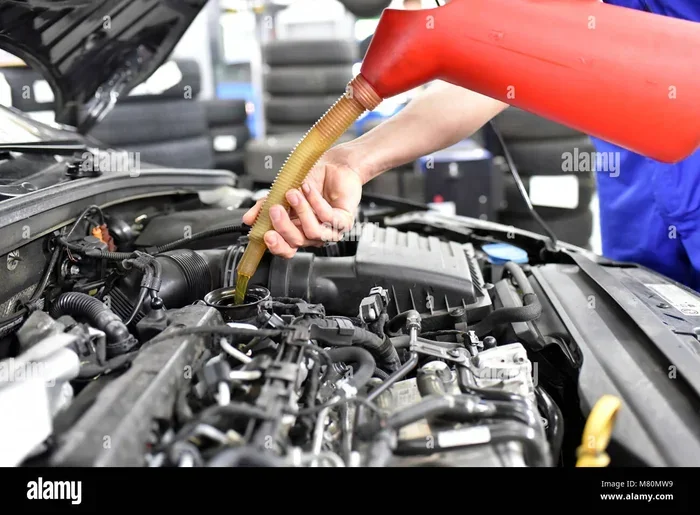
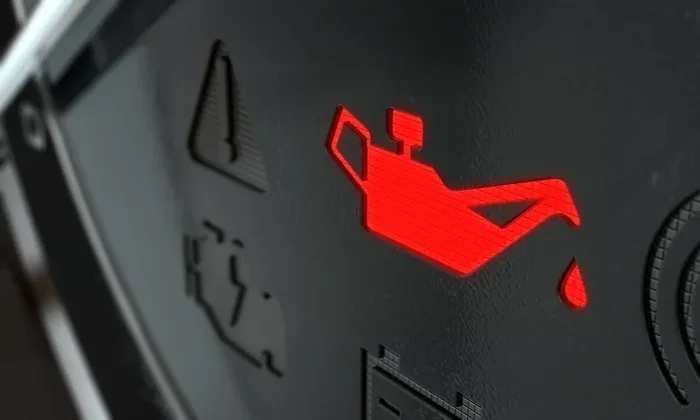
You just got your oil changed. Fresh oil is now flowing through your engine, and your car is running better than ever. But then you look at the dashboard and see that little oil can icon still staring back at you. It is frustrating. You did the right thing by getting the oil changed. So why is the light still on?
The answer is simple. The oil change light does not turn off by itself. You need to reset it manually. This is true for almost every car on the road today. Whether you drive a Toyota, Honda, Ford, Chevrolet, or anything else, the process is similar once you know what to do.
In this guide, we will walk you through the exact steps to reset the oil change light after an oil change. We will cover the most common methods, brand-specific steps, and tips to avoid common mistakes. By the end, you will feel confident handling this yourself the next time you are under the hood.
Resetting the oil change light is one of the simplest maintenance tasks you can do. It takes less than five minutes in most cases. You do not need any special tools. And you do not need to visit a mechanic just for this. Let us get into it.
Why Does the Oil Change Light Come On
Before we dive into the reset process, it helps to understand why the light comes on in the first place. Most modern cars have something called an oil life monitor. This is a smart system built into your vehicle. It tracks your driving habits and engine conditions to estimate when the oil needs to be replaced.
How the Oil Life Monitor Works
The oil life system does not just count miles. It looks at several factors to decide when your oil is worn out. These factors include:
- Engine temperature — Hotter engines break down oil faster.
- Driving conditions — Stop-and-go traffic is harder on oil than highway driving.
- Idle time — Long periods of idling can degrade oil quality.
- Distance driven — Miles still matter, even if the system uses more than just mileage.
Once the system decides the oil is no longer performing well, it triggers the dashboard warning light. This is your signal that an oil change is due. The light usually looks like an oil can symbol. On some cars, it says “CHANGE OIL” or “SERVICE DUE.”
It is important to note that the oil change light is different from the check engine light. The check engine light warns about a broader range of problems. The oil change light is specifically tied to your maintenance schedule. If you are unsure whether a light is the oil indicator or something else, it is always a good idea to check your owner’s manual or ask a trusted mechanic.
How to Reset the Oil Change Light: General Steps
Most cars follow a similar process to reset the oil change reminder. The exact buttons you press may vary, but the general idea is the same. Here is the basic approach that works for the majority of vehicles.
Step 1: Turn the Ignition to the On Position
Do not start the engine. Just turn the key to the “ON” position or press the start button without pressing the brake pedal. You want the dashboard lights to come on, but the engine should stay off. This puts the car in what is often called the “accessory” or “run” mode.
If your car has a trip meter on the instrument cluster, this is where you will navigate to find the reset option. Some vehicles display the oil life percentage right on the main dashboard screen.
Step 2: Find the Reset Button or Steering Wheel Controls
Look for a small button labeled “RESET” near the instrument cluster. On many cars, this is also the button you use to reset the trip odometer. In newer vehicles with steering wheel controls, you may need to use the arrows on the left side of the steering wheel to scroll through the menu options.
Press and hold the reset button for a few seconds. On some models, you need to hold it for up to 10 seconds until the display starts blinking or the percentage drops to zero.
Step 3: Turn the Ignition Off and Back On
After you see the display reset, turn the ignition off. Wait a few seconds. Then turn it back on to the “ON” position. The oil change light should now be off. If it is still on, try the process again. Sometimes it takes two cycles to clear the maintenance reminder.
Step 4: Verify the Reset Was Successful
Once the light is off, start the engine and take a short drive. The oil life system should now begin counting from 100 percent again. If your dashboard has a trip computer, check the display to confirm the oil life percentage has reset. This is a good way to make sure the reset actually worked.
Brand-Specific Reset Instructions
Every car maker has its own way of handling the oil change light reset. Here are the steps for some of the most popular brands. These instructions cover the most common models, but always double-check with your owner’s manual if you are unsure.
How to Reset the Oil Change Light on a Toyota
Toyota vehicles are known for having a straightforward reset process. Here is how to do it:
- Turn the ignition to the “ON” position without starting the engine.
- Press the trip meter reset button until you see the oil life indicator on the display.
- Hold the reset button for more than five seconds.
- The display should start blinking.
- Turn the ignition off and then back on to complete the reset.
If the oil change light is still on after this, repeat the process. Some Toyota models also let you reset through the steering wheel controls on the left side of the wheel.
How to Reset the Oil Change Light on a Honda
Honda makes the reset process pretty easy too. Here are the steps:
- Press the steering wheel MENU button until the maintenance display appears.
- Use the steering wheel arrows to select “Oil Life System.”
- Press and hold the ENTER button for about 10 seconds.
- The display will show “Reset?” — press ENTER again to confirm.
- Turn the ignition off and then back on to verify the reset.
Honda’s oil life monitor is one of the more intuitive systems. The percentage drops as you drive, and resetting it is just a few button presses.
How to Reset the Oil Change Light on a Ford
Ford vehicles use a slightly different approach depending on the model year:
- Use the steering wheel arrows to navigate to the “Vehicle Info” menu.
- Scroll down to “Maintenance” and select it.
- Find the “Oil Life System” option.
- Press and hold the OK button to reset.
- The system should return to 100 percent after you cycle the ignition.
For older Ford models without a digital display, you may need to use the trip odometer reset stalk. The process involves turning the ignition on and pressing the stalk until the indicator resets.
How to Reset the Oil Change Light on a Chevrolet
Chevrolet trucks and cars also have a simple reset process:
- Turn the ignition to the “ON” position.
- Press the trip button on the steering wheel until you see the oil life system.
- Hold the trip button for more than five seconds.
- The display should show the oil life resetting to 100 percent.
- Turn the ignition off and back on to confirm.
If these steps do not work for your specific Chevy model, check the owner’s manual. Some newer models with touchscreen displays have a slightly different menu path.
Common Mistakes When Resetting the Oil Change Light
Resetting the oil change light seems simple, but people make mistakes all the time. Here are the most common ones you should avoid.
Resetting Before the Oil Change Is Complete
This is the biggest mistake. Do not reset the light before the new oil is actually in the engine. The oil life system tracks oil condition, not just time since the last reset. If you reset before adding fresh oil, the system will think you just had an oil change and will not remind you again for a long time. This can lead to running old oil past its useful life.
Forgetting to Check the Oil Level
Resetting the light is not the same as checking the oil level. After an oil change, always use the dipstick or the digital oil level display to confirm the oil is at the right amount. Too much oil or too little oil can both cause problems. A low oil level can trigger warning lights that have nothing to do with the maintenance reminder.
Using the Wrong Reset Method
Not all cars use the same reset process. If you follow the wrong instructions, you might reset the wrong system or nothing at all. Always refer to your vehicle’s owner’s manual or look up the specific reset method for your make and model. If you recently bought a used car and do not have the manual, you can usually find the instructions online for free.
Ignoring Other Warning Lights
The oil change light is just one of many dashboard indicators. If you reset the oil light but other lights remain on, those are separate issues that need attention. For example, if your car won’t start right after turning it off, that could be a different problem entirely unrelated to the oil change light. Similarly, if you notice your car misfiring, that is a serious issue that needs immediate attention. Always pay attention to what your dashboard is telling you.
Not Keeping a Maintenance Log
It is easy to forget when you last changed your oil, especially if you reset the light without writing it down. Keeping a simple log of oil changes helps you stay on track with your maintenance schedule. You can use a notebook, a phone app, or even a note on your dashboard. This is especially helpful if you do your own oil changes at home.
When to See a Mechanic for Help
Most of the time, resetting the oil change light is something you can handle on your own. But there are situations where you should get professional help.
If the light keeps coming back on after you reset it, there may be a deeper issue. The oil pressure sensor could be malfunctioning. Or there could be a problem with the oil life monitor system itself. In these cases, a mechanic can run a diagnostic check and pinpoint the problem.
Also, if you are uncomfortable working with your car’s dashboard controls, there is no shame in asking for help. Many quick-lube shops will reset the light for you as part of the oil change service. Some car dealerships will do it for free if you bought the vehicle from them.
It is also worth noting that some older vehicles do not have an oil life monitor at all. These cars use a simple mileage-based reminder system. If your car falls into this category, you just need to reset the trip odometer at each oil change. The process is even simpler than what we described above.
Tips to Keep Your Oil Change System Accurate
Once you have successfully reset the oil change light, you want to keep it working properly. Here are some tips to help you stay on top of your vehicle maintenance.
- Reset the light every time you get an oil change — no exceptions.
- Use the recommended oil type for your vehicle. Check your owner’s manual for the right viscosity, such as 5W-20 or 0W-20.
- Keep track of your mileage between oil changes. Most cars need an oil change every 5,000 to 7,500 miles.
- Do not ignore other dashboard warnings. If something else lights up, get it checked.
- Set a phone reminder for your next oil change date. This helps you stay ahead of the schedule.
- Check your oil level monthly even if the light is not on. Prevention is always better than repair.
Following these simple tips will keep your engine running smoothly and your maintenance schedule on track. A well-maintained car is a reliable car, and resetting the oil change light is one of the easiest ways to stay on top of things.
Remember, if you ever find yourself dealing with other car warning lights, you are not alone. Many drivers face similar questions every day. For instance, if you ever wonder whether you can drive your car with a warning light on, the answer depends on the specific light and your vehicle. Always use good judgment and prioritize safety.
Conclusion
Resetting the oil change light after an oil change is a quick and easy task that every car owner should know how to do. It takes just a few minutes, and it keeps your maintenance reminder accurate and your oil life system functioning properly. Whether you drive a Toyota, Honda, Ford, Chevrolet, or any other brand, the steps are straightforward once you know them.
Follow the general steps we outlined, check your brand-specific instructions, and avoid the common mistakes we highlighted. Your car will thank you with better performance and a longer engine life. And remember, keeping up with regular vehicle maintenance is one of the best things you can do to avoid costly repairs down the road.
Now that you know how to reset the oil change light, you can handle it yourself the next time you get an oil change. No more staring at that little oil can icon on your dashboard. Just a few button presses, and you are done. Happy driving!
Frequently Asked Questions
Can I drive my car if the oil change light is still on?
You can usually drive a short distance with the oil change light on, but you should get the oil changed as soon as possible. The light means your oil life system has determined the oil is due for replacement. Continuing to drive with old oil can cause engine wear over time. If you are unsure about your specific situation, it is always best to consult your owner’s manual or a trusted mechanic.
How often should I reset the oil change light?
You should reset the light every single time you get an oil change. The oil life system tracks oil condition based on driving habits, and resetting it after each oil change ensures the reminder stays accurate. If you skip the reset, the system will not know the oil has been changed and the light will stay on or come back on prematurely.
What if the oil change light will not reset?
If the light will not reset after following the correct steps, there may be an issue with the oil pressure sensor or the oil life monitor system. Try cycling the ignition off and on a couple of times. If it still does not work, take your car to a mechanic or dealership. They can run a diagnostic scan and identify the problem. Sometimes a faulty sensor simply needs to be replaced.
Do I need any special tools to reset the oil change light?
No, you do not need any special tools for most vehicles. The reset is done through the steering wheel controls, instrument cluster buttons, or infotainment system. All you need is access to the ignition. If your car requires a diagnostic scanner, a basic OBD2 tool is inexpensive and widely available at auto parts stores.
Will resetting the oil change light affect my warranty?
No, resetting the oil change light has no effect on your warranty. The light is simply a reminder tool, not a warranty component. However, it is important to keep records of your actual oil changes, as some warranties require proof of regular maintenance. Always follow the maintenance schedule outlined in your owner’s manual to keep your warranty valid.
Can I reset the oil change light myself or do I need a mechanic?
You can absolutely reset the oil change light yourself. The process is designed to be simple enough for any car owner. Most vehicles use steering wheel buttons or dashboard controls that anyone can operate. If you are not comfortable doing it, most oil change shops and dealerships will reset the light for free as part of the service. There is no need to pay extra for this simple task.