Can I Start My RAV4 With My Phone Heres How to Do It
Yes, you can start your Toyota RAV4 with your phone using the Toyota app and digital key features. This guide walks you through setting up phone-based ignition, remote start, and smart connectivity for your RAV4. You will learn the requirements, step-by-step instructions, and helpful tips to get your RAV4 running from your smartphone.
Have you ever stood outside your Toyota RAV4 on a cold morning and wished you could just start it from your phone? Maybe you want to warm up the cabin or cool down the seats before you even touch the door handle. The good news is that starting your RAV4 with your phone is not only possible but also really convenient.
The Toyota RAV4 has evolved into a smart, connected SUV that works seamlessly with your smartphone. Whether you drive a gas-powered RAV4 or a RAV4 hybrid, Toyota has built in features that let you control your vehicle right from your pocket. In this guide, we will walk you through everything you need to know about starting your RAV4 with your phone, what you need to set it up, and how to make the most of these smart features.
We will cover the Toyota app setup, digital key functions, remote start capabilities, and common troubleshooting tips. By the end of this article, you will know exactly how to get your RAV4 running using just your phone. Let us dive in.
Key Takeaways
- Phone-based ignition is possible: The Toyota app lets you start your RAV4 remotely using your smartphone.
- You need the right setup: A compatible RAV4 model, the Toyota app, and a linked Toyota account are essential.
- Digital key features add convenience: You can use your phone as a key fob for lock, unlock, and start functions.
- Hybrid RAV4 models work too: Both gas and hybrid RAV4 versions support phone-based start features.
- Smart connectivity is expanding: Toyota continues to add new smartphone integration features to the RAV4 lineup.
📑 Table of Contents
- Can You Start a Toyota RAV4 With Your Phone?
- How to Set Up Phone-Based Ignition for Your RAV4
- Using Your Phone as a Digital Key
- Remote Start: Warming Up or Cooling Down Your RAV4 From Anywhere
- Smart Car Features That Work With Your Phone
- Troubleshooting Common Issues With Phone-Based Start
- Is Starting Your RAV4 With Your Phone Safe?
- Frequently Asked Questions
- Final Thoughts
Can You Start a Toyota RAV4 With Your Phone?
The short answer is yes. Toyota has equipped the RAV4 with smartphone connectivity features that allow you to start the engine, lock and unlock the doors, and even check your vehicle status from your phone. This is all made possible through the Toyota app and the Toyota Connected Services platform.
But not every RAV4 model supports every feature. The capabilities depend on your model year, trim level, and whether your vehicle has the right technology package installed. Newer RAV4 models from 2019 and later generally have better smartphone integration than older versions.
What You Need to Start Your RAV4 With Your Phone
Before you can use your phone to start your RAV4, you need a few things in place. Here is a simple checklist:
- A compatible RAV4 model: Most RAV4 models from 2019 onward support phone-based start features. Check your specific model to confirm.
- The Toyota app: This free app is available for both iPhone and Android devices. You can download it from the App Store or Google Play.
- A Toyota Connected Services subscription: Some features require an active subscription. The app will guide you through setup and subscription options.
- A stable internet connection: Both your phone and your RAV4 need internet access for the app to communicate with your vehicle.
- A registered Toyota account: You need to link your RAV4 to your Toyota account through the app.
Once you have these items ready, the setup process is straightforward. Open the Toyota app, sign in to your account, and follow the on-screen prompts to pair your RAV4 with your phone. The app will walk you through each step, so it is hard to get lost.
How to Set Up Phone-Based Ignition for Your RAV4
Setting up phone-based ignition on your RAV4 takes just a few minutes. Here is the step-by-step process to get it working.
Step 1: Download and Install the Toyota App
Go to your phone’s app store and search for the Toyota app. Download and install it on your device. Make sure your phone operating system is up to date to avoid any compatibility issues.
Step 2: Create or Sign Into Your Toyota Account
Open the app and create a Toyota account if you do not already have one. You will need your vehicle identification number (VIN) and some basic personal information. If you already have an account, simply sign in.
Step 3: Link Your RAV4 to the App
Follow the prompts to connect your RAV4 to the app. You may need to enter your VIN or scan a QR code found in your owner’s manual. The app will verify your vehicle and link it to your account.
Step 4: Enable Remote Start
Once your RAV4 is linked, go to the app settings and enable the remote start feature. You may need to activate a Toyota Connected Services subscription if it is not already active. The app will guide you through this process.
Step 5: Test the System
Try starting your RAV4 from the app before you actually need it. Stand in a safe location and use the remote start button in the app. Wait for the confirmation message that the engine has started. This test run helps you feel confident before you rely on it in real situations.
Using Your Phone as a Digital Key
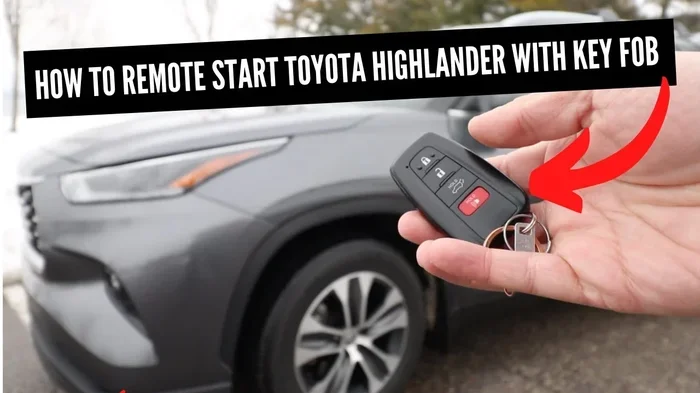
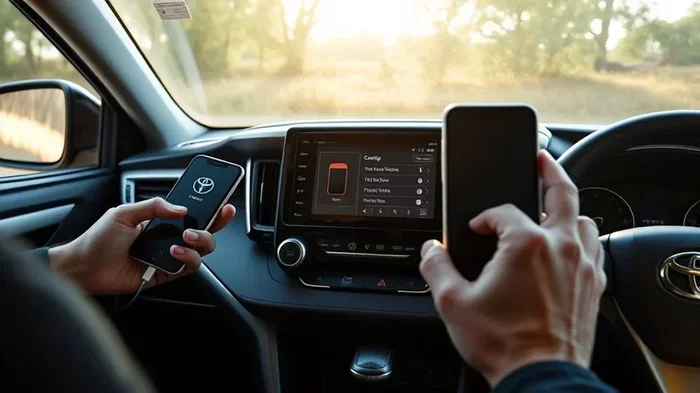
One of the coolest features of the modern RAV4 is the ability to use your phone as a digital key. This means you can lock, unlock, and start your RAV4 without ever taking a physical key fob out of your pocket.
The digital key feature uses Bluetooth Low Energy (BLE) technology to communicate with your vehicle. When your phone is within range of the RAV4, the car detects it and allows you to operate the vehicle. It works similarly to how a wireless key fob works, but your phone does the job instead.
How to Set Up the Digital Key
Setting up the digital key is easy. Open the Toyota app, go to the digital key section, and follow the on-screen instructions. You will need to hold your phone near the door handle or the key reader inside the car to register it. Once registered, your phone becomes a fully functional key.
What You Can Do With the Digital Key
The digital key gives you a lot of control over your RAV4. Here are some things you can do:
- Lock and unlock your doors: Just tap the lock or unlock button in the app.
- Start the engine: Use the app to start the RAV4 remotely or from inside the vehicle.
- Share access with others: You can send digital key access to family members or friends through the app.
- Monitor your vehicle: Check fuel levels, tire pressure, and vehicle status right from the app.
If you also want to learn how to sync your phone with your car’s infotainment system for music, navigation, and calls, check out our guide on how to sync your phone to your car system. It covers the full setup process for seamless phone integration.
Remote Start: Warming Up or Cooling Down Your RAV4 From Anywhere
The remote start feature is one of the most popular reasons people want to start their RAV4 with their phone. Imagine pulling out of your driveway on a freezing winter morning while your RAV4 is already warmed up and defrosting the windshield. Or picture coming home on a hot summer day and cooling down the cabin before you even get in.
The Toyota app makes this possible with just a few taps on your phone screen.
How Remote Start Works
When you press the remote start button in the Toyota app, a signal is sent to your RAV4 over the cellular network. The vehicle’s engine starts, and the climate control system begins running based on your last settings. You can set a timer so the engine turns off after a set period, usually 10 to 15 minutes.
Remote start also works with the RAV4 hybrid models. The hybrid system powers the engine and electric motor to create a comfortable cabin environment while using minimal fuel.
Tips for Using Remote Start Effectively
- Set your climate preferences in advance: The app remembers your last settings, so make sure your preferred temperature is set before you leave the vehicle.
- Use the timer feature: Set the engine to shut off after 10 to 15 minutes to save fuel and comply with local regulations.
- Make sure your phone has a signal: Remote start requires a cellular connection. If you are in an area with poor reception, the command may not go through.
- Keep your RAV4 locked: The vehicle will not start remotely if the doors are unlocked. Always lock the doors before using remote start.
For owners of hybrid models, you may also want to read about how to charge your hybrid car at home to get the most out of your RAV4 hybrid’s electric capabilities alongside the phone-based start features.
Smart Car Features That Work With Your Phone
Toyota has built a whole ecosystem of smart features around the RAV4 that work with your phone. These features go beyond just starting the engine and make your daily driving experience smoother and more connected.
Vehicle Health Monitoring
The Toyota app sends you notifications about your RAV4’s health. You can get alerts about low fuel, maintenance reminders, tire pressure warnings, and more. This helps you stay on top of routine vehicle maintenance without having to remember every service interval.
Geofencing and Location Alerts
You can set up geofences in the app to receive alerts when your RAV4 leaves or enters a specific area. This is a great security feature, especially if you share your digital key with family members.
Smart Garage Door Integration
If your RAV4 has the garage door opener built in, you can also set it up through the Toyota app for convenient home access. This feature lets you open your garage door right from the vehicle’s display or your phone. For a detailed walkthrough on setting this up, see our article on how to get your garage door opener working in your car.
Navigation and Voice Commands
The RAV4’s infotainment system supports voice commands and phone-based navigation. You can send destinations from your phone to the car’s display, make hands-free calls, and even send text messages using voice prompts. These features work best when your phone is properly synced with the car.
Troubleshooting Common Issues With Phone-Based Start
Like any technology, phone-based start features can sometimes run into issues. Here are the most common problems and how to fix them.
The App Will Not Connect to Your RAV4
If the app will not connect, first check that your phone has a stable internet connection. Then make sure the Toyota app is updated to the latest version. Restarting both your phone and your RAV4’s infotainment system often resolves connection issues. You can also try signing out of the app and signing back in.
Remote Start Does Not Work
Remote start may fail if your RAV4’s battery is low or if the vehicle is outside the cellular network range. Make sure your RAV4 is locked and in park before attempting to start remotely. If the problem persists, check your Toyota Connected Services subscription status in the app.
Digital Key Not Detected
If your phone is not being recognized as a digital key, try turning Bluetooth off and back on. Make sure the phone is not in battery saver mode, as this can interfere with Bluetooth signals. If the issue continues, remove the digital key from the app and set it up again from scratch.
Slow App Response Times
Slow response times are usually caused by a weak cellular signal or server issues on Toyota’s end. Try switching between Wi-Fi and cellular data to see if that improves performance. You can also check Toyota’s service status page for any ongoing outages.
Is Starting Your RAV4 With Your Phone Safe?
Toyota has built strong security measures into the phone-based start system. The app uses encrypted communication between your phone and your vehicle. Each command you send is authenticated, which means only you can start your RAV4 using the app.
The digital key feature also uses advanced encryption to prevent unauthorized access. Even if someone somehow intercepted the Bluetooth signal, the encryption would prevent them from using it to start your vehicle.
That said, you should still follow basic security practices. Keep your phone locked with a PIN or biometric authentication. Do not share your Toyota account credentials with anyone you do not trust. And always log out of the app on shared or public devices.
For more information about vehicle security and keeping your RAV4 safe, you might also find our article on getting your car out of anti-theft mode with a fob helpful for understanding broader security features.
Frequently Asked Questions
Can I Start My RAV4 With My Phone If I Do Not Have the Toyota App?
No, the Toyota app is required to use phone-based start features. You must download the app, create an account, and link your RAV4 to access remote start and digital key functions. The app is free and available on both iOS and Android.
Does Every RAV4 Model Support Phone-Based Start?
Most RAV4 models from 2019 onward support phone-based start, but the exact features depend on your trim level and technology package. Older models may have limited or no smartphone integration. Check your owner’s manual or contact your dealer to confirm your specific model’s capabilities.
Can I Start My RAV4 With My Phone From Far Away?
Yes, the remote start feature works over the cellular network, so you can start your RAV4 from anywhere as long as your phone has an internet connection and the vehicle has cellular coverage. The range is not limited by Bluetooth distance, which is typically only about 30 feet.
Is There a Subscription Fee for Using Phone-Based Start Features?
Some Toyota Connected Services features require a subscription, which may include a monthly or annual fee. The app will let you know which features require a subscription during the setup process. Basic features like digital key setup may be free, while advanced remote start features may require a paid plan.
Can I Use My Phone to Start a RAV4 Hybrid?
Yes, the RAV4 hybrid supports all the same phone-based start features as the gas-powered RAV4. You can use the Toyota app for remote start, digital key, and vehicle monitoring on any RAV4 hybrid model.
What Happens If My Phone Battery Dies While I Am Using the Digital Key?
If your phone battery dies, you can still use your physical key fob to access and start your RAV4. The digital key is a backup to the physical key, not a replacement. Keep your physical key fob handy as a backup at all times.
Final Thoughts
Starting your Toyota RAV4 with your phone is a game changer that adds real convenience to your daily routine. Whether you are warming up the car on a cold morning, cooling it down after a long day at work, or just wanting the ease of a digital key in your pocket, Toyota has made it all possible through the Toyota app and smart connectivity features.
The setup process is simple, the features are powerful, and the security is robust. As long as you have a compatible RAV4 model and a properly set up Toyota account, you can enjoy the full range of phone-based vehicle control. Take the time to explore the app, set up your preferences, and discover how much easier your RAV4 experience can be when your phone becomes your key.
Start exploring the Toyota app today and see what starting your RAV4 with your phone can do for your daily drive. You will wonder how you ever managed without it.