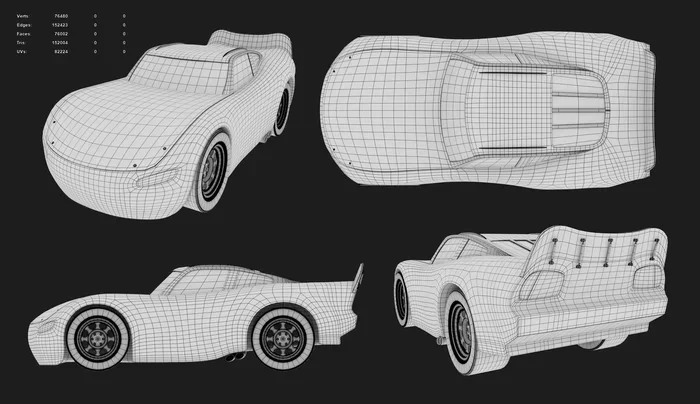
Car Blueprints for 3D Modeling Your Ultimate Guide
Car blueprints for 3D modeling are essential reference files that help artists and designers create realistic digital vehicles. These automotive blueprints provide accurate side, front, and top views that serve as the foundation for any 3D car model. Whether you are a beginner or a seasoned 3D artist, using proper car design plans saves time and boosts accuracy. This guide covers everything from finding the right blueprint file to creating your own digital blueprint from scratch.
Car blueprints for 3D modeling have become a cornerstone of modern digital design. Artists, game developers, and automotive enthusiasts rely on these detailed reference files to build stunning 3D car models. Without a solid blueprint, even the most skilled modeler can struggle with proportions and accuracy.
Whether you are building a car for a video game, a film, or a personal project, the right blueprint file makes all the difference. In this guide, we will walk you through everything you need to know about car blueprints for 3D modeling. You will learn what they are, where to find them, and how to use them effectively.
Key Takeaways
- Car blueprints for 3D modeling give artists precise reference images that ensure accurate proportions and details in every 3D car model.
- You can find both free and paid blueprint downloads online, and each type serves different modeling needs and skill levels.
- Popular software like Blender, Maya, and 3ds Max works best with properly scaled automotive blueprints for clean modeling results.
- Creating your own car blueprint template gives you full control over design and lets you customize every curve and angle.
- Avoiding common mistakes like wrong scale, blurry images, and missing reference views will save you hours of rework.
- 3D car visualization quality depends heavily on the accuracy and clarity of the blueprint reference you start with.
📑 Table of Contents
- What Are Car Blueprints for 3D Modeling?
- Types of Car Blueprints for 3D Modeling
- Best Tools and Software for Working with Car Blueprints
- How to Create Your Own Car Blueprints
- Where to Find Car Blueprints for 3D Modeling
- Common Mistakes to Avoid When Using Car Blueprints
- Tips for Improving Your 3D Car Modeling Workflow
- Expert Insights on Car Blueprint Modeling
- Key Takeaways
- Conclusion
What Are Car Blueprints for 3D Modeling?
A car blueprint is a detailed technical drawing that shows the exact shape, dimensions, and features of a vehicle. In the world of 3D modeling, these blueprints serve as the visual guide that artists follow when building a digital car. Think of them as the skeleton or framework that holds the entire model together.
Most automotive blueprints include multiple views. You will typically see a side view, front view, rear view, and top view. Some advanced blueprint templates also include detail shots of the interior, wheels, and engine bay. These views help the 3D artist understand the car from every angle.
Why Do You Need Blueprints for 3D Car Models?
Building a 3D car model without a blueprint is like painting a portrait without looking at the subject. You might get close, but the details will be off. Car design plans give you exact measurements and proportions that keep your model looking real and professional.
Here are the key reasons why blueprint references are so important:
- Accurate proportions: Blueprints ensure that every part of the car is the right size relative to the rest.
- Detail accuracy: You can capture small features like door handles, grilles, and headlights with precision.
- Faster workflow: Working from a reference saves you from guessing and reworking shapes.
- Consistency: A good digital blueprint keeps your model consistent from every viewing angle.
- Professional results: Clients and audiences notice the difference between models built with and without proper references.
Types of Car Blueprints for 3D Modeling
Not all car blueprints for 3D modeling are the same. Different projects require different types of references. Understanding the types available helps you choose the right one for your work.
Side View Blueprints
The side view is the most commonly used blueprint layout in 3D car modeling. It shows the full profile of the vehicle, including the body lines, wheel arches, and overall length. Most artists start with a side view because it gives the clearest picture of the car’s shape.
When selecting a side view blueprint file, look for one that is clean and high resolution. A blurry or distorted side view will cause problems later in the modeling process.
Front and Rear View Blueprints
The front and rear views complete the picture. They show the width of the car and the details of the front fascia and rear end. These views are essential for modeling the grille, headlights, taillights, and bumper details.
Many automotive blueprints package the front and rear views together with the side view. This gives you a complete set of car design plans to work from.
Top Down and Bottom View Blueprints
The top down view, also called the plan view, shows the car from directly above. This view is crucial for understanding the roofline, window shapes, and overall width. Some advanced 3D car blueprint sets also include a bottom view, which helps with undercarriage modeling and wheel placement.
Detail and Close-Up Views
For high-quality 3D car visualization, detail views are a game changer. These include close-ups of the front grille, rear diffuser, wheel spokes, and interior dashboard. Detail views help you add realism and fine-tune small elements that make a model stand out.
Best Tools and Software for Working with Car Blueprints
Once you have your car blueprints for 3D modeling, you need the right software to bring them to life. Different programs offer different strengths, and choosing the right one depends on your goals and skill level.
Blender
Blender is one of the most popular free 3D modeling software options available today. It supports a wide range of blueprint templates and has powerful tools for car modeling. Artists can import blueprint images as reference planes and start building their 3D car model right away.
Blender also has a large community that shares free car blueprint downloads and tutorials. This makes it an excellent choice for beginners and professionals alike.
Maya and 3ds Max
Autodesk Maya and 3ds Max are industry-standard tools used in AAA game studios and film production. Both programs handle automotive blueprints with ease and offer advanced modeling and rendering features. They are ideal for artists who work on professional 3D car visualization projects.
However, these programs come with a steep learning curve and a premium price tag. If you are just starting out, Blender might be a better first step.
Specialized Automotive Design Software
Some artists prefer specialized tools like Alias AliasStudio or ICEM Surf. These programs are built specifically for automotive engineering and car body design. They allow for complex surfacing and curvature modeling that standard 3D modeling software may not handle as smoothly.
These tools are more common in professional automotive design studios. They are less accessible to hobbyists but offer unmatched precision for car blueprint modeling.
How to Create Your Own Car Blueprints
Sometimes the best blueprint reference is one you create yourself. Making your own car blueprint template gives you full control over the design and ensures that every detail matches your vision.
Step 1: Gather Reference Images
Start by collecting high-quality photos of the car you want to model. Look for images that show the car from the side, front, rear, and top. The clearer and more detailed these photos are, the better your final blueprint file will be.
You can find reference photos on car manufacturer websites, automotive magazines, and stock photo sites. Choose images with minimal distortion and good lighting.
Step 2: Trace and Clean Up the Images
Use a photo editing tool like Photoshop or GIMP to clean up your reference images. Remove backgrounds, adjust contrast, and straighten any skewed perspectives. The goal is to create clean, flat images that accurately represent the car’s shape.
Many artists use a grid system to ensure that their car design plans are properly scaled. This step is critical for maintaining accurate proportions in the final 3D car model.
Step 3: Set Up the Blueprint Planes
Import your cleaned images into your 3D modeling software as reference planes. Position each view correctly, making sure the side, front, and top views align properly. Use the car’s known dimensions to set the correct scale.
Take your time with this step. Properly aligned automotive blueprints will save you countless hours of modeling adjustments later on.
Step 4: Start Modeling
With your digital blueprint in place, you can begin building the 3D car model. Start with the basic shape and gradually add details. Work one section at a time, constantly checking your model against the blueprint views.
Remember to save your work frequently and keep backup versions. This protects your progress and gives you the freedom to experiment with different design choices.
Where to Find Car Blueprints for 3D Modeling
If you do not want to create your own blueprint template, there are many places to find ready-made car blueprints for 3D modeling. Here are some of the best sources.
Free Online Resources
Several websites offer free car blueprint downloads for personal and educational use. Sites like DeviantArt, SketchUp Community, and various 3D modeling forums often share high-quality references. These are great for beginners who want to practice without spending money.
Paid Blueprint Libraries
For more professional-grade blueprint files, paid libraries are worth the investment. Platforms like TurboSquid, CGTrader, and ArtStation offer curated collections of automotive blueprints. These often come with multiple views, proper scaling, and clean line work.
Manufacturer and Enthusiast Websites
Car manufacturers sometimes release official technical drawings of their vehicles. These can serve as excellent blueprint references. Enthusiast forums and car clubs are also great places to find detailed photos and measurements of specific models.
Common Mistakes to Avoid When Using Car Blueprints
Even experienced artists make mistakes when working with car blueprints for 3D modeling. Being aware of these pitfalls helps you avoid wasted time and frustrating revisions.
Using Unscaled or Distorted Blueprints
One of the biggest mistakes is using a blueprint file that is not properly scaled. If your reference images are stretched or compressed, your 3D car model will have incorrect proportions. Always verify the scale before you start modeling.
Ignoring the Importance of Clean Line Work
Blurry, low-resolution, or cluttered images make car blueprint modeling much harder. Always choose clean, high-quality references. A messy blueprint template leads to a messy 3D car model.
Skipping the Reference Alignment Step
Failing to properly align your blueprint views in the 3D modeling software is a common error. Misaligned views cause inconsistencies that are hard to fix later. Take the time to line up your side, front, and top views carefully.
Overlooking Small Details
It is easy to focus on the overall shape and forget the small details. Things like door seams, panel lines, and creases add realism to your model. Use close-up reference images to capture these details accurately.
Tips for Improving Your 3D Car Modeling Workflow
Building a great 3D car model takes practice and patience. Here are some tips to help you work more efficiently and achieve better results.
- Start with simple shapes. Block out the basic form before adding details. This keeps your model organized and easy to adjust.
- Use symmetry wisely. Most cars are symmetrical, so model one side and mirror it. This saves time and ensures balance.
- Check your blueprint views constantly. Rotate your model frequently and compare it against the reference images.
- Focus on lighting and materials. A well-modeled car looks even better with proper materials and realistic lighting in your 3D render.
- Join car modeling communities. Online forums and social media groups are great places to learn, share your work, and get feedback.
- Practice regularly. The more you work with car blueprints for 3D modeling, the better your skills will become.
Expert Insights on Car Blueprint Modeling
Professional 3D car modelers agree that the quality of your reference material directly impacts the final result. A well-prepared blueprint set can cut your modeling time in half. Many experts recommend always working from at least three views, with the side view being the most critical.
Industry veterans also stress the importance of understanding automotive design principles. Knowing how cars are structured, where the body lines flow, and how proportions work together gives you an edge when working from car design plans. This knowledge helps you make smart decisions even when the blueprint is not perfect.
Another tip from experienced automotive engineering professionals is to study real cars in person whenever possible. Seeing the actual vehicle helps you understand depth, curvature, and surface transitions in ways that a flat blueprint reference cannot fully convey.
Key Takeaways
- Car blueprints for 3D modeling give artists precise reference images that ensure accurate proportions and details in every 3D car model.
- You can find both free and paid blueprint downloads online, and each type serves different modeling needs and skill levels.
- Popular software like Blender, Maya, and 3ds Max works best with properly scaled automotive blueprints for clean modeling results.
- Creating your own car blueprint template gives you full control over design and lets you customize every curve and angle.
- Avoiding common mistakes like wrong scale, blurry images, and missing reference views will save you hours of rework.
- 3D car visualization quality depends heavily on the accuracy and clarity of the blueprint reference you start with.
Conclusion
Car blueprints for 3D modeling are an essential tool for anyone who wants to create realistic and professional digital vehicles. From choosing the right blueprint file to setting up your 3D modeling software, every step matters. Whether you use a free car blueprint download or create your own digital blueprint, the key is accuracy and attention to detail.
The world of 3D car modeling offers endless creative possibilities. With the right automotive blueprints and the proper tools, you can build stunning 3D car models that look real and capture the beauty of automotive design. Start with the basics, practice regularly, and never stop learning. Your journey into car blueprint modeling begins with a single reference image and a willingness to create.
Now that you have the knowledge and tools, it is time to put them into action. Pick a car you love, find the best blueprint template you can, and start building. The road to creating amazing 3D car models starts right here.
Frequently Asked Questions
What are car blueprints for 3D modeling?
Car blueprints for 3D modeling are detailed technical drawings that show a vehicle’s shape, dimensions, and features from multiple angles. They serve as reference images that 3D artists use to build accurate and realistic digital car models.
Where can I find free car blueprints for 3D modeling?
You can find free car blueprint downloads on sites like DeviantArt, SketchUp Community forums, and various 3D modeling communities. These blueprint files are great for practice and personal projects, though quality can vary.
What software is best for working with car blueprints?
Blender is a popular free choice that works well with automotive blueprints. Maya and 3ds Max are professional options used in the industry. The best software depends on your budget, skill level, and project goals.
Do I need to create my own car blueprints?
No, you can use ready-made blueprint templates available online. However, creating your own car design plans gives you full control over the design and ensures the reference matches your specific modeling needs perfectly.
What is the most important view in a car blueprint?
The side view is the most important blueprint layout because it shows the full profile and overall shape of the car. Most artists begin with the side view and then add front, rear, and top views for complete reference coverage.
Can beginners use car blueprints for 3D modeling?
Absolutely. Car blueprints for 3D modeling are helpful for beginners because they provide clear guidance and reduce guesswork. Start with simple car shapes and free blueprint downloads to build your skills before tackling more complex models.