Car Mod NFS MW How To Find And Install The Best Mods
Car mod NFS MW transforms your Need for Speed Most Wanted experience with custom vehicles, skins, and performance upgrades. This guide shows you exactly where to find safe, high-quality mods and how to install them without breaking your game. Whether you want rare cars, stunning liveries, or better handling, you will find everything you need right here.
Want to make Need for Speed Most Wanted feel brand new? The secret is simple: install car mod NFS MW files. These mods let you add new cars, change paint jobs, tweak handling, and much more. Whether you are a casual player or a hardcore racer, mods can completely refresh your experience.
In this guide, we walk you through everything you need to know. You will learn where to find the best NFS MW mods, how to install them safely, and which mods are worth your time. By the end, you will feel confident enough to mod your game like a pro. Let us dive right in.
Key Takeaways
- Easy Access to Mods: You can find tons of car mod NFS MW files on trusted sites like NFS Mods, GTAGarage, and ModTheSims.
- Simple Installation: Most NFS MW mods install quickly with basic tools like a mod manager or manual file replacement.
- Massive Variety: From performance upgrades to visual liveries, the NFS MW modding community offers thousands of options.
- Safety First: Always scan downloaded files and back up your game before installing any car mod NFS MW package.
- Community Support: The NFS MW modding community is active and helpful, making it easy to learn and grow.
📑 Table of Contents
- What Is Car Mod NFS MW and Why Should You Care?
- Where to Find the Best Car Mod NFS MW Files
- Essential Tools for Installing Car Mods NFS MW
- Step-by-Step Guide to Installing Car Mods NFS MW
- Best Car Mod NFS MW Mods You Should Try Right Now
- Common Mistakes to Avoid When Modding NFS MW
- Expert Tips for Getting the Most Out of Your NFS MW Mods
- Frequently Asked Questions About Car Mod NFS MW
- Conclusion
What Is Car Mod NFS MW and Why Should You Care?
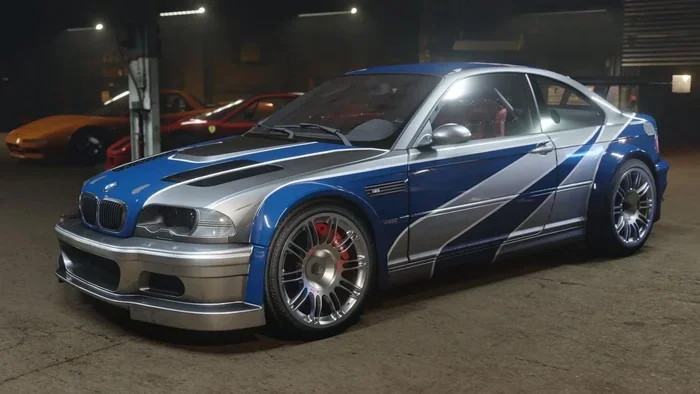
Car mod NFS MW refers to modified files that change or add vehicles in Need for Speed Most Wanted. These mods can replace existing cars with new ones, add custom liveries, or improve performance. The NFS MW modding scene is huge, and it has been active for years.
So why should you bother? First, the base game has a solid car roster, but mods open up thousands of additional options. Second, mods keep the game fresh. You can play NFS MW for years and still discover new content. Third, the modding community is welcoming and generous. People share their creations for free.
Here are some key reasons to explore NFS MW car mods:
- New cars: Add vehicles that were never in the original game.
- Custom skins: Give your rides unique looks with liveries and paint jobs.
- Performance tweaks: Adjust handling, speed, and acceleration for a better feel.
- Visual upgrades: Add aftermarket parts like spoilers, hoods, and rims.
- Free content: Most mods cost nothing and are created by fans.
The bottom line is this: NFS MW mods take a great game and make it even better. You just need to know where to look and how to install them correctly.
Where to Find the Best Car Mod NFS MW Files
Finding quality car mod NFS MW files is easier than you think. Many websites host NFS MW mods for free. However, not all sites are equal. Some are trustworthy, while others might host files with malware. You need to know where to go.
Top Websites for NFS MW Mods
Here are the most reliable places to download NFS Most Wanted car mods:
- GTAGarage.com: One of the largest mod repositories. You will find thousands of NFS MW car mods here. The site is well-organized and easy to navigate.
- NFSMods.com: A dedicated Need for Speed mod site. It focuses specifically on NFS titles, including MW. The mods here are well-tested and safe.
- ModTheSims.net: While broader in scope, this site has a solid NFS section with quality mods.
- NFS-World.org: A community hub for NFS fans. Members share custom mods and offer support.
- Discord Servers: Many NFS MW modders share their work on Discord. These are great for finding rare or niche mods.
Always stick to well-known sites. Avoid sketchy links that promise “free downloads” but look suspicious. A good rule of thumb is to check the site’s reputation before downloading anything.
What to Look for in a Quality Mod
Not every NFS MW mod download is created equal. Here is how to spot a good mod:
- Clear instructions: A quality mod comes with installation steps.
- User reviews: Check ratings and comments from other players.
- Regular updates: Good modders keep their files current.
- No executable files: Mods should be archive files like .zip or .rar, not .exe files.
- File size makes sense: A car mod should not be 500 MB unless it includes multiple vehicles.
Following these tips helps you avoid corrupted or unsafe files. It also ensures your NFS MW modding experience stays smooth and enjoyable.
Essential Tools for Installing Car Mods NFS MW
Before you start installing car mod NFS MW files, you need the right tools. Fortunately, most of these tools are free and easy to use. Having the correct software saves you time and prevents errors.
Mod Managers
A mod manager is the easiest way to install NFS MW mods. It handles file placement and backup for you. Here are the most popular options:
- Modio: A user-friendly mod manager with a built-in library. You can browse and install NFS MW mods directly from the app.
- GameFire: Another reliable tool that supports NFS MW and other EA games.
- Manual Installation: You can also install mods by hand, which gives you more control. We will cover this method below.
Archive Extraction Tools
Most NFS MW car mods come in .zip or .rar format. You need a tool to extract them:
- WinRAR: A classic and reliable extraction tool.
- 7-Zip: Free and open-source. It handles almost any archive format.
- PeaZip: Another solid free option with a clean interface.
Backup Tools
Before installing any mod, always back up your game files. This is non-negotiable. If something goes wrong, a backup lets you restore your game to working condition. You can simply copy your entire NFS MW folder to an external drive or a separate folder on your PC.
Quick Tip: Create a “NFS MW Backup” folder on your desktop. Copy the entire game directory there before you install any mods. This takes a few minutes but can save you hours of frustration later.
Step-by-Step Guide to Installing Car Mods NFS MW
Installing NFS MW mods is straightforward once you know the process. Below is a step-by-step walkthrough that works for most car mods. Follow these steps carefully and you will have your new mod running in minutes.
Step 1: Download the Mod
Go to a trusted site like GTAGarage or NFSMods. Search for the specific car mod NFS MW you want. Click the download link and save the file to your computer. Make sure you remember where you saved it.
Step 2: Extract the Files
Right-click the downloaded archive and select “Extract Here” or use your archive tool. You should see files like .fba, .dds, .xml, or .car. These are the mod files that will replace or add content to your game.
Step 3: Locate Your NFS MW Game Folder
Find where NFS MW is installed on your PC. The default location is usually:
C:\Program Files (x86)\EA Games\Need for Speed Most Wanted
Inside this folder, look for subfolders like “cars” or “db.” The exact folder depends on the mod type. Most mod pages include instructions that tell you exactly where to place the files.
Step 4: Replace or Copy the Files
If the mod replaces an existing car, copy the new file and paste it into the corresponding folder. You will be asked to replace the existing file. Click “Yes to All” if you are sure you want to overwrite.
If the mod adds a new car, you may need to edit a database file. Some mods come with a simple installer that does this for you. Others require you to use a tool like NFS MW’s built-in mod tools.
Step 5: Test the Mod
Launch NFS MW and go to the garage or car selection menu. Your new mod should appear. Test it on a race to make sure everything works correctly. If the game crashes or the mod does not show up, check the mod’s instructions for troubleshooting steps.
Common Mistake: Never install multiple mods that modify the same file at the same time. This causes conflicts and crashes. If you want to use several mods, use a mod manager that handles file priorities for you.
Best Car Mod NFS MW Mods You Should Try Right Now
Not sure which NFS MW mods to start with? Here are some of the most popular and highly rated car mods in the community. These mods are safe, well-made, and add real value to your game.
Performance Mods
Performance mods change how your car handles, accelerates, and tops out. They are perfect for players who want a more realistic or exciting driving feel.
- NFS MW Handling Overhaul: Adjusts the physics engine for more responsive steering and better grip.
- Tire Grip Mod: Improves traction, especially useful on tight corners and drift sections.
- Speed Boost Mod: Increases top speed for cars that feel too slow in the base game.
Visual Mods
Visual mods change how your cars look. They are the most popular type of NFS MW mod because they make the game more visually appealing.
- Custom Liveries Pack: Adds dozens of unique paint designs for your favorite cars.
- Aftermarket Parts Mod: Includes spoilers, bumpers, side skirts, and hoods for a customized look.
- High-Resolution Textures: Replaces low-res textures with crisp, detailed versions of car surfaces.
Car Swap Mods
Car swap mods replace existing NFS MW cars with vehicles from other games or real-world models. These are the most exciting type of NFS MW custom car mods.
- Supercar Expansion: Adds exotic cars like Lamborghinis and Ferraris to the NFS MW roster.
- JDM Car Pack: Brings Japanese classics like the Skyline GT-R and Supra into the game.
- Muscle Car Mod: Replaces standard sedans with powerful American muscle cars.
When you browse these categories, keep an eye on download counts and ratings. Higher numbers usually mean a more reliable and popular mod. But always read the comments to check for any known issues.
Common Mistakes to Avoid When Modding NFS MW
Modding is fun, but mistakes happen. Here are the most common errors players make when installing car mod NFS MW files. Avoid these, and your modding experience will be much smoother.
Skipping the Backup
This is the number one mistake. Without a backup, a bad mod can corrupt your save files or even break the game entirely. Always back up before you install anything new.
Installing Mods Without Reading Instructions
Every mod is different. Some go in the “cars” folder, while others require database edits. Skipping the readme file or installation guide is a recipe for problems. Take five minutes to read the instructions carefully.
Overloading Your Game with Too Many Mods
It is tempting to install every mod you find. But too many mods at once can cause conflicts, crashes, and performance issues. Start with two or three mods, test them thoroughly, and add more gradually.
Downloading from Untrusted Sources
Free mods are great, but downloading from random websites is risky. Some files contain viruses, spyware, or corrupted data. Stick to the trusted sites we listed earlier. If a mod looks suspicious, trust your instincts and skip it.
Ignoring Game Updates
If NFS MW receives an update, your mods may stop working. Always check the mod page for compatibility notes before updating your game. Some modders release updated versions to match game patches.
Expert Tips for Getting the Most Out of Your NFS MW Mods
Ready to level up your NFS MW modding game? These expert tips will help you get the most out of every mod you install.
Start Small and Build Up
Do not install twenty mods on day one. Start with one or two simple mods, like a new livery or a single car swap. Once you are comfortable with the process, you can explore more complex mods like performance tweaks and car packs.
Join the Community
The NFS MW modding community is one of the best resources available. Join forums, Discord servers, and Reddit groups dedicated to NFS modding. You will find tutorials, support, and new mods that you would never discover on your own.
Keep a Mod Log
As you install more mods, it becomes hard to remember which files go where. Keep a simple text file that lists every mod you install, the files it modifies, and where you placed them. This makes troubleshooting much easier if something goes wrong later.
Use a Dedicated Mod Folder
Some players create a separate folder for all their downloaded mods. This keeps your downloads organized and makes it easy to find a specific mod when you need it. Name each folder clearly with the mod name and version number.
Respect the Creators
Modders spend countless hours creating content for free. If a mod page has a donation button or a Patreon link, consider supporting the creator. Even a small contribution goes a long way in keeping the modding community alive and thriving.
Key Takeaway: Modding NFS MW is a journey, not a race. Take your time, learn as you go, and enjoy the process of customizing your game. The NFS MW modding community is there to help you every step of the way.
Frequently Asked Questions About Car Mod NFS MW
Is it safe to download car mod NFS MW files from the internet?
Yes, as long as you download from trusted websites like GTAGarage, NFSMods, or ModTheSims. Always scan downloaded files with your antivirus software before opening them. Avoid any site that looks unprofessional or asks you to complete surveys before downloading.
Do NFS MW mods work on all platforms?
Most NFS MW mods are designed for the PC version of the game. Console versions like PlayStation and Xbox have limited or no mod support. If you want to mod your game, the PC platform is your best and most flexible option.
Can I use multiple car mods at the same time?
You can, but you need to be careful. Installing multiple mods that modify the same game files can cause conflicts and crashes. Use a mod manager to handle file priorities, and always test mods one at a time before combining them.
Will modding NFS MW void my warranty or get me banned?
Since NFS MW is an older game, there is no active online service to get banned from. Modding the single-player experience does not affect any online accounts. However, always back up your original game files as a precaution.
What file types should I look for in a safe NFS MW mod?
Safe NFS MW car mods typically come as .zip, .rar, or .7z archive files. Inside, you will find .fba, .dds, .xml, or .car files. If a download contains .exe files or asks you to run an installer, be cautious and scan it thoroughly before proceeding.
How do I uninstall a mod if I do not like it?
If you backed up your game folder before installing the mod, simply restore the original files from your backup. If you did not back up, you can usually find the original files by reinstalling the game. Using a mod manager also makes uninstallation much easier since it tracks which files were changed.
Conclusion
Car mod NFS MW is one of the best ways to keep Need for Speed Most Wanted exciting and fresh. Whether you want new cars, custom liveries, or performance upgrades, the modding community has you covered. The process is simpler than most people think, and the rewards are well worth the effort.
Start with trusted download sites, use the right tools, and always back up your game. Follow the step-by-step installation guide, avoid common mistakes, and join the community for support and inspiration. With the right approach, your NFS MW experience will feel like a completely new game.
Now that you have all the knowledge you need, it is time to start modding. Pick a mod, follow the steps, and enjoy the ride. NFS MW mods are waiting for you, and the best one is just a download away.