Does the Toyota Camry Have Android Auto Explained
Yes, the Toyota Camry does have Android Auto, but availability depends on the trim level and model year. The Toyota Camry offers this popular smartphone integration feature on most newer trims, allowing seamless car smartphone integration for navigation, music, and messaging. Whether you drive a base LE or a loaded XSE, understanding how Android Auto works on your Camry can make your daily commute smarter and safer.
If you are a Toyota Camry owner or thinking about buying one, you have probably wondered about smartphone integration. The short answer is yes, the Toyota Camry does offer Android Auto. But the full story is a bit more detailed than that. Your trim level, model year, and even the audio system all play a role in whether you can use this handy feature.
Android Auto has become a must-have for many drivers. It lets you access your phone’s apps, navigation, music, and messages right on your car display screen. This means less screen staring on your phone and more eyes on the road. Toyota has recognized this demand and made Android Auto a standard or available feature on most recent Camry models.
In this guide, we will walk you through everything you need to know. We will cover which trims support it, how to set it up, what features you get, and how it compares to Apple CarPlay. By the end, you will know exactly what to expect from Toyota Camry Android Auto in your daily drive.
Key Takeaways
- Android Auto is available: Most 2023 and 2024 Toyota Camry trims come with Android Auto built in.
- Trim matters: Higher trims like XSE and XLE typically include the feature, while base models may need an upgrade.
- Wireless and wired options: Some Camry models support wireless Android Auto, while others use a USB cable.
- Easy setup: Connecting your phone takes just a few simple steps and works with both Android and iPhone users.
- More than just music: Android Auto offers navigation, voice commands, messaging, and app access right from your car display screen.
- Competes with Apple CarPlay: Toyota Camry offers both Android Auto and Apple CarPlay on supported trims.
📑 Table of Contents
- What Is Android Auto and Why Does It Matter?
- Which Toyota Camry Trims Offer Android Auto?
- How to Set Up Android Auto on Your Toyota Camry
- Android Auto vs. Apple CarPlay on the Toyota Camry
- What Features Does Android Auto Offer in the Camry?
- Common Issues and How to Fix Them
- Does Every Toyota Camry Year Support Android Auto?
- Tips to Get the Most Out of Android Auto on Your Camry
- The Future of Smartphone Integration in Toyota Camry
- Final Thoughts
What Is Android Auto and Why Does It Matter?
Android Auto is Google’s car smartphone integration platform. It mirrors key apps from your Android phone onto your car’s infotainment screen. Think of it as a safer, simpler version of your phone built right into your dashboard.
The system is designed to reduce distractions. When you connect your phone, you see a clean, driver-friendly interface. Big buttons, voice commands, and simple menus make it easy to stay focused on the road. You can make calls, send texts, listen to music, and get directions without picking up your phone.
For Toyota Camry owners, this feature adds real value. Whether you use Google Maps for navigation or Spotify for music, Android Auto brings all your favorite apps into one place. It works with the Toyota multimedia system to create a smooth experience every time you get behind the wheel.
How Android Auto Works in the Camry
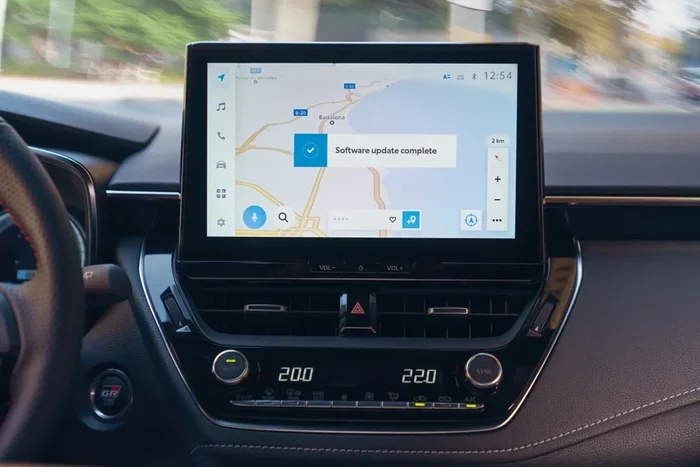
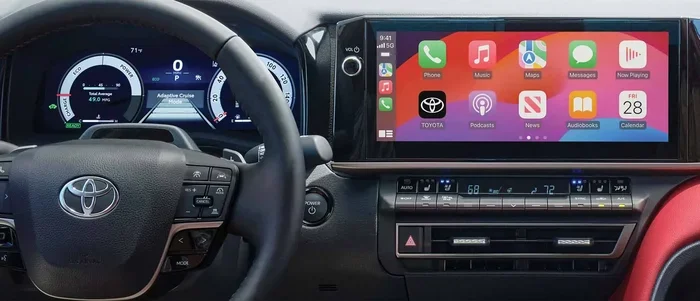
Once you connect your phone, the Camry’s infotainment screen switches to the Android Auto interface. You can access your most-used apps right from the home screen. The system supports popular apps like Google Maps, Spotify, Pandora, WhatsApp, and more.
Voice commands are a big part of the experience. You can say “Hey Google” to send a text, start navigation, or play a song. This hands-free approach makes driving safer and more convenient. The Toyota infotainment screen responds quickly, so you spend less time interacting and more time driving.
Which Toyota Camry Trims Offer Android Auto?
Not every Camry trim includes Android Auto. Toyota has made it available across several trims, but the exact features depend on the model year and package you choose. Here is a breakdown of what you can expect.
LE Trim
The base LE trim on the Toyota Camry comes with an 8-inch touchscreen. On recent model years, this trim includes Android Auto as a standard feature. You also get Apple CarPlay, so both Android and iPhone users are covered. The LE trim is a solid choice if you want basic car smartphone integration without paying extra.
SE Trim
The SE trim adds sportier styling and the same Android Auto support found on the LE. The 8-inch display works the same way, giving you full access to your phone’s apps. If you want a slightly more polished look with the same smart features, the SE is a great pick.
XLE Trim
The XLE trim ups the comfort and convenience features. It includes Android Auto along with a larger or higher-resolution display depending on the model year. The XLE also offers wireless charging on some packages, which pairs well with wireless Android Auto if your model supports it.
XSE Trim
The XSE is the sportiest Camry trim, and it comes with full Android Auto support. The bigger 9-inch display on some 2024 models makes the experience even better. If you want the full package of tech and style, the XSE delivers on both fronts.
TRD Trim
The TRD trim is the performance-oriented option. It includes Android Auto along with unique styling and handling upgrades. Even if you prioritize performance, you do not have to sacrifice smart features.
How to Set Up Android Auto on Your Toyota Camry
Setting up Android Auto on your Camry is straightforward. Follow these steps to get started quickly.
Step 1: Check Your Connection. Make sure your phone is compatible with Android Auto. You need an Android phone running version 6.0 or higher. Update your phone and your car’s infotainment system to the latest software for the best experience.
Step 2: Connect via USB or Wirelessly. If your Camry supports wireless Android Auto, you can connect without cables. Simply follow the prompts on your car display screen. For wired connections, plug your phone into the USB port. The system will detect your phone and launch Android Auto automatically.
Step 3: Accept Permissions. The first time you connect, you will need to grant permissions. Allow access to your contacts, messages, and apps. This lets Android Auto work properly for calls, texts, and navigation.
Step 4: Customize Your Home Screen. Once connected, you can choose which apps appear on the home screen. Pin your most-used apps like Google Maps or Spotify for quick access. This personal setup makes your daily drive more efficient.
Step 5: Use Voice Commands. Say “Hey Google” to activate voice control. You can ask for directions, send texts, or change music without touching your phone. This feature is one of the biggest benefits of Android Auto in the Camry.
Quick Tip: If your Camry does not recognize your phone, try a different USB cable or port. Some cables are charge-only and do not support data transfer. A high-quality cable solves most connection issues.
Android Auto vs. Apple CarPlay on the Toyota Camry
Toyota offers both Android Auto and Apple CarPlay on supported Camry trims. Here is how they compare.
| Feature | Android Auto | Apple CarPlay |
|---|---|---|
| Platform | Android phones | iPhone |
| Voice Assistant | Google Assistant | Siri |
| Navigation | Google Maps | Apple Maps |
| Default Apps | Google apps | Apple apps |
| Wireless Support | Available on select trims | Available on select trims |
| App Store | Google Play Store | App Store |
Both systems offer a similar experience. They provide a clean interface, voice control, and access to your favorite apps. The main difference is which phone ecosystem you use. If you have an Android phone, Android Auto is the natural choice. iPhone users will prefer Apple CarPlay. Toyota Camry owners who switch between platforms will appreciate having both options available.
Some drivers wonder about the 9-inch Android car stereo option and whether it enhances the Android Auto experience. While the factory system works great, aftermarket upgrades can add extra features. However, for most Camry owners, the stock system handles Android Auto perfectly well.
What Features Does Android Auto Offer in the Camry?
Android Auto brings a lot more than just phone calls to your Toyota Camry. Here are the key features you can expect.
Navigation
Google Maps is the star of the navigation experience. It provides real-time traffic updates, route suggestions, and estimated arrival times. You can search for restaurants, gas stations, or any destination right from your car display screen. The navigation works smoothly with the Camry’s audio system, giving you clear turn-by-turn directions.
Music and Podcasts
Stream your favorite music and podcasts through apps like Spotify, Pandora, YouTube Music, and Apple Music (yes, it works on Android too). The audio quality through the Camry’s speakers is excellent. You can control playback, skip tracks, and adjust volume using the car’s interface or voice commands.
Messaging
Android Auto reads your text messages aloud and lets you respond using voice. This keeps your eyes on the road and your hands on the wheel. You can also use WhatsApp and other messaging apps, depending on compatibility.
Voice Commands
The Google Assistant integration is powerful. You can ask it to set reminders, check the weather, find nearby places, or control smart home devices. The voice commands car feature works reliably in the Camry, making it one of the best aspects of the Android Auto experience.
App Compatibility
Beyond the basics, Android Auto supports many third-party apps. Popular apps like Waze, Spotify, and WhatsApp work seamlessly. The system also supports podcast apps, audiobook platforms, and even some games for passengers. The Toyota multimedia system handles all of these without lag or issues.
Wireless Charging
Some Camry trims offer wireless charging pads. This works hand-in-hand with wireless Android Auto to create a cable-free experience. You place your phone on the pad, and it connects automatically. No fumbling with cables or USB ports. Just a clean, simple connection every time you get in the car.
Expert Insight: If you want the smoothest Android Auto experience, keep your phone’s apps updated. Google regularly improves Android Auto with new features and bug fixes. Also, clearing the app cache occasionally prevents slow loading times and connection issues.
Common Issues and How to Fix Them
While Android Auto on the Toyota Camry works well most of the time, you might run into occasional issues. Here are the most common problems and their solutions.
Phone Not Connecting
If your phone does not connect, try a different USB cable first. Charge-only cables will not work for data transfer. Also, restart both your phone and the car’s infotainment system. This simple step fixes most connection problems.
Apps Not Loading
Sometimes apps on Android Auto will not load properly. This is often caused by an outdated app or a full cache. Update your Android Auto app through the Google Play Store. Clear the cache in your phone’s settings under Apps, then select Android Auto and choose Clear Cache.
Voice Commands Not Working
If voice commands stop responding, check your microphone settings. Make sure nothing is blocking the microphone on your phone or near the car’s steering wheel. Also, check that the Google Assistant is enabled in your phone’s settings. Sometimes a simple phone restart fixes this issue.
Screen Freezing
If the infotainment screen freezes while using Android Auto, perform a soft reset. Turn off the car, wait 30 seconds, and restart. This clears temporary glitches without affecting your settings. If the problem persists, check for infotainment system updates at your dealer.
Does Every Toyota Camry Year Support Android Auto?
Android Auto availability on the Toyota Camry depends on the model year. Here is a quick look at how support has evolved.
Starting with the 2019 model year, Toyota began offering Android Auto on the Camry as part of the standard or available infotainment package. By the 2021 model year, it became more widely available across trims. The 2023 and 2024 Camry models offer Android Auto on nearly every trim, with some models supporting wireless connectivity.
If you own an older Camry, you might not have Android Auto built in. In that case, you can consider aftermarket solutions. A quality aftermarket head unit can add Android Auto support to older models. Just make sure to choose a unit that fits your Camry’s dashboard and wiring system.
Before buying a used Camry, always confirm the model year and trim level to ensure Android Auto is included. You can check the window sticker or ask the seller for the infotainment specifications. This saves you from surprises after the purchase.
Common Mistake: Many buyers assume all Camry trims include Android Auto. Always verify the specific trim and package before purchasing. The base L trim on some years may not include the feature, even though higher trims do.
Tips to Get the Most Out of Android Auto on Your Camry
Want to maximize your Android Auto experience? Here are some practical tips.
- Use a high-quality USB cable. A good cable ensures a stable connection and faster data transfer. Look for cables rated for data and charging.
- Keep your phone plugged in. Using Android Auto drains your phone battery. Plugging in while driving keeps your phone charged and the system running smoothly.
- Organize your home screen apps. Pin only the apps you use most. This keeps the car display screen clean and easy to navigate.
- Use wireless mode when available. If your Camry supports wireless Android Auto, use it for a clutter-free experience. No cables to manage or forget.
- Explore the settings menu. The Android Auto settings let you customize notifications, app layout, and display themes. Spend a few minutes exploring these options.
- Keep your car’s software updated. Toyota releases infotainment updates that improve Android Auto performance. Visit your dealer for free software updates.
Following these tips will make your daily drive more connected and convenient. Android Auto on the Toyota Camry is a powerful tool when used correctly.
The Future of Smartphone Integration in Toyota Camry
Toyota continues to invest in car smartphone integration technology. Future Camry models are expected to offer even deeper Android Auto integration. Wireless connectivity is becoming standard across more trims. The 9-inch display on newer models provides a better visual experience for Android Auto apps.
Toyota is also working on improving the overall infotainment experience. Faster processors, better voice recognition, and more app support are all on the roadmap. As Android Auto continues to evolve, Camry owners can look forward to an even more seamless and intuitive experience.
The push toward connected cars means features like Android Auto will only get better. Toyota’s commitment to integrating the latest technology ensures that the Camry remains competitive in the midsize sedan market. Whether you are a tech enthusiast or just want a simple way to stay connected, Android Auto delivers real value.
If you are curious about how other car tech features work, you might want to learn more about how to activate the Connect App for additional connectivity options. Understanding all the tech features available helps you make the most of your vehicle.
Another helpful resource is learning how to adjust your car display screen settings for optimal visibility. These small adjustments can make a big difference in your daily driving experience.
Final Thoughts
The Toyota Camry is a fantastic car, and the inclusion of Android Auto adds another layer of convenience and safety. Whether you are commuting to work or taking a road trip, having your favorite apps at your fingertips makes the journey better. The Toyota Camry Android Auto integration is smooth, reliable, and easy to use.
With support across most trims and model years, the Camry remains one of the best choices for drivers who want car smartphone integration. From navigation to music to messaging, Android Auto covers all your needs. Just remember to check your specific trim and model year to confirm availability.
Take a few minutes to set up Android Auto on your Camry today. Once you experience the convenience, you will wonder how you ever drove without it. The Toyota Camry and Android Auto are a winning combination that makes every drive smarter and safer.
Frequently Asked Questions
Does the Toyota Camry Have Android Auto on All Trims?
Most 2023 and 2024 Toyota Camry trims include Android Auto, but the base L trim on some model years may not have it. Always check the specific trim and model year before purchasing. Higher trims like XSE and XLE definitely include the feature.
Can I Use Android Auto Wirelessly on the Toyota Camry?
Yes, some Camry trims support wireless Android Auto, but it depends on the model year and package. Wireless connectivity eliminates the need for a USB cable and provides a cleaner setup. Check your owner’s manual or ask your dealer to confirm wireless support for your specific model.
Is Android Auto Free to Use on the Toyota Camry?
Android Auto itself is free to use. You just need a compatible Android phone and a supported Camry trim. Some apps within Android Auto, like Spotify or Google Maps, may require subscriptions, but the integration feature costs nothing extra.
Can I Use Android Auto and Apple CarPlay at the Same Time on My Camry?
No, you cannot use both at the same time. The Camry’s infotainment system switches between Android Auto and Apple CarPlay depending on which phone is connected. If you switch phones, you simply disconnect one and connect the other to access the respective platform.
What Should I Do If Android Auto Keeps Disconnecting on My Camry?
Try using a different USB cable or port first, as charge-only cables often cause disconnections. Restart both your phone and the car’s infotainment system. If the problem continues, clear the Android Auto app cache on your phone or check for software updates for both your phone and the car system.
Does the Toyota Camry Support Third-Party Apps Through Android Auto?
Yes, Android Auto supports many third-party apps on the Toyota Camry. Popular apps like Spotify, Waze, WhatsApp, and podcast apps work through the system. You can access these apps directly from the car display screen, making your drive more entertaining and productive.
=== CONCLUSION ===
The Toyota Camry offers Android Auto on most trims and model years, making it a great choice for drivers who want seamless car smartphone integration. From navigation to music to hands-free messaging, this feature adds real everyday value. Whether you drive the base LE or the sporty XSE, you can stay connected and safe on the road.
Setting up Android Auto is quick and easy, and the system works reliably with the Camry’s infotainment setup. With both wired and wireless options available, you can choose the connection method that suits your lifestyle. The combination of Toyota’s trusted build quality and modern Android Auto technology makes the Camry a smart pick for anyone who wants a connected driving experience.
Take the time to explore all the features, customize your home screen, and use voice commands to stay safe. Your Toyota Camry and Android Auto are designed to work together beautifully. Enjoy the ride and stay connected every mile of the way.