How to Dismiss Messages on a Buick Encore Right Now
Knowing how to dismiss messages on a Buick Encore is simple once you understand the system. This guide walks you through clearing notifications, warning alerts, and infotainment pop-ups on your dashboard. You will learn quick steps to keep your screen clean and your drive focused.
Driving a Buick Encore should feel smooth and stress-free. But nothing throws off that calm faster than a stack of messages glowing on your dashboard. Whether it is a low fuel warning, a maintenance reminder, or a random pop-up you do not understand, these alerts can pile up fast. The good news is that how to dismiss messages on a Buick Encore is much simpler than most people think. You do not need to be a tech expert. A few taps or button presses can clear your screen in seconds.
This guide breaks down every method you need. We cover everything from basic dismissals to handling stubborn warning lights. You will also learn tips to stop messages from cluttering your display in the first place. By the end, you will feel confident managing every notification on your Buick Encore infotainment system. Let us get started.
Key Takeaways
- Easy Access: Most messages on the Buick Encore can be dismissed with a single button press or touchscreen tap.
- Warning Alerts Matter: Some notifications signal real issues that need attention before you can clear them.
- Infotainment Reset Works: A simple system restart often clears stuck messages on the Buick Encore touchscreen.
- Prevent Message Buildup: Regularly checking your display settings stops unnecessary alerts from piling up.
- Owner Manual Is Key: Your Buick Encore owner guide has model-specific instructions for every alert type.
- Professional Help Exists: Persistent messages may need a dealer or mechanic to resolve properly.
📑 Table of Contents
- Understanding the Buick Encore Message System
- How to Dismiss Messages on a Buick Encore
- Dealing with Warning and Alert Notifications
- Resetting the Infotainment Display
- Tips to Prevent Message Overload on Your Buick Encore
- When to Seek Professional Help for Persistent Messages
- Common Mistakes People Make When Dismissing Messages
- Expert Insights on Managing Buick Encore Alerts
- Key Takeaways
Understanding the Buick Encore Message System
The Buick Encore message system is designed to keep you informed. It shows alerts about fuel levels, tire pressure, oil life, and more. These messages appear on the dashboard display or the center touchscreen. Each alert serves a purpose. Some are simple reminders. Others are urgent warnings you should not ignore.
Understanding what each message means helps you decide how to respond. A yellow triangle usually means a warning. A red light often signals something serious. Green or blue icons typically indicate routine info. Once you know the color codes, dismissing messages on a Buick Encore becomes much easier because you will know which ones need action first.
Types of Messages You Will See
Not all messages are the same. Here are the common types you will encounter on your Buick Encore touchscreen:
- Informational Messages: These tell you about features or settings. They are harmless and easy to dismiss.
- Warning Alerts: These flag potential problems like low tire pressure or low fuel.
- Critical Alerts: These demand immediate attention. Think engine lights or brake warnings.
- Maintenance Reminders: These nudge you to service your vehicle at certain intervals.
- Connectivity Notifications: These relate to phone pairing, Bluetooth, or Wi-Fi status.
Each type requires a different approach for dismissal. Knowing the difference saves you time and frustration. It also keeps you safe on the road.
How to Dismiss Messages on a Buick Encore
The core of this guide is the step-by-step process for how to dismiss messages on a Buick Encore. The method depends on the type of message and the model year. Most Buick Encore models from 2018 onward share similar steps. Older models may have slight differences, but the basics remain the same.
Method 1: Using the Steering Wheel Controls
The fastest way to clear a message is through the steering wheel. Almost every Buick Encore has buttons on the left side of the steering column. Look for the OK or Enter button. When a message pops up on the dashboard, press this button once. The notification should disappear immediately.
Here is how to do it:
- Wait for the message to appear on the display.
- Locate the OK button on the steering wheel.
- Press the button firmly once.
- The message should clear from the screen.
If the message does not go away, do not panic. Some alerts require a second step. You may need to scroll to a Dismiss or Clear option using the arrow buttons on the steering wheel. Press the down arrow to highlight the option, then press OK again.
For owners wondering about other dashboard features, you might also want to check whether car seats are easy to take out if you frequently adjust your cabin layout and notice messages related to seat sensors.
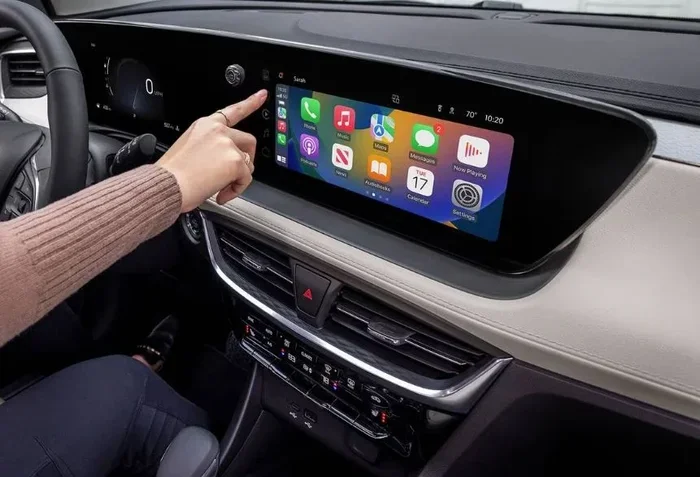
Method 2: Using the Center Touchscreen
The Buick Encenter touchscreen gives you another way to manage messages. This method works well when you are parked or at a stoplight. Follow these steps:
- Wake up the infotainment screen by tapping it lightly.
- Look for the notification banner at the top of the display.
- Swipe down from the top of the screen to view all alerts.
- Tap the message you want to dismiss.
- Select Dismiss or Clear from the options shown.
Some Buick Encore models let you swipe left on a message to reveal a Delete button. This is especially helpful when you have multiple notifications stacked up. The Buick Encore infotainment system is designed to be intuitive, so you should not need a manual for basic dismissals.
Method 3: Using the Information Display Controls
Behind the steering wheel, there is usually a small knob or set of buttons that controls the instrument cluster display. This is the cluster screen right behind the steering wheel. Use it to navigate to the message you want to clear:
- Turn the knob to scroll through menu options.
- Highlight the message or alert you want to dismiss.
- Press the knob to select Dismiss or OK.
This method works for most dashboard-level alerts. It is especially useful for warning notifications that do not go away with a simple button press. The knob control gives you more precision than the steering wheel buttons alone.
Dealing with Warning and Alert Notifications
Not every message can be dismissed with a single tap. Warning and alert notifications sometimes stick around because they signal a real issue. Understanding this difference is key to managing your Buick Encore dashboard messages effectively.
Why Some Alerts Will Not Dismiss
Your car is smart. It will not let you ignore something important. If a warning message keeps appearing, it usually means one of these things:
- The underlying issue has not been fixed yet.
- A sensor is detecting a problem that needs attention.
- The system needs you to acknowledge the alert before it clears.
For example, if your tire pressure is low, the message will keep showing until you check and inflate the tires. Once the problem is resolved, the message usually clears on its own. If it does not, you can try the dismissal methods above.
Safety Alerts and the Buick Encore
Safety alerts deserve special attention. These include forward collision warnings, lane departure warnings, and blind spot notifications. They are designed to protect you. When a safety alert appears, do not just dismiss it and forget about it. Take a moment to understand what triggered it.
Some safety messages relate to external factors. For instance, if you frequently drive in areas with wildlife, you might encounter situations where hitting a deer can total your car, and your vehicle’s safety sensors may trigger related alerts. Always address safety notifications seriously before clearing them.
Maintenance and Service Alerts
Maintenance reminders are another common type of persistent message. Your Buick Encore tracks oil life, tire rotation intervals, and service schedules. When a maintenance alert appears, it means it is time to book a service appointment. You can dismiss the message after scheduling the service. The alert will return if you skip the maintenance.
To dismiss a maintenance reminder:
- Press and hold the OK button on the steering wheel.
- Hold for about three seconds until a menu appears.
- Select Reset Maintenance or Dismiss.
- Confirm your choice when prompted.
This process resets the service interval timer. It does not replace the actual maintenance. Always follow through with the recommended service to keep your vehicle running well.
Resetting the Infotainment Display
Sometimes messages get stuck. The screen freezes, or a notification refuses to go away no matter what you try. In these cases, resetting the infotainment system is the best fix. A reset clears temporary glitches and refreshes the Buick Encore touchscreen.
Soft Reset
A soft reset is the gentlest approach. It does not delete any of your settings or saved data:
- Turn off the ignition but do not lock the car.
- Wait for about 30 seconds.
- Turn the ignition back on.
- The infotainment system will reboot.
- Check if the stuck message is gone.
A soft reset works for most minor display issues. It is the first thing you should try when a message will not clear. Think of it like restarting a phone when an app freezes.
Hard Reset
A hard reset is more thorough. It resets the entire infotainment system to factory defaults. Use this only if a soft reset does not work:
- Turn off the ignition and remove the key.
- Disconnect the negative battery terminal for about five minutes.
- Reconnect the terminal and start the car.
- The system will reload all settings.
Be aware that a hard reset may erase your Bluetooth pairings, radio presets, and navigation favorites. You will need to set these up again. Use this method as a last resort when dismissing messages on a Buick Encore through normal means fails.
For drivers also curious about fuel efficiency, you may want to learn how far 1 litre of petrol can take you in a car, as fuel-related messages are among the most common alerts on any vehicle display.
When a Reset Does Not Fix the Problem
If resetting the system does not clear the messages, there may be a deeper issue. Faulty sensors, software bugs, or wiring problems can cause persistent alerts. In these situations, it is best to visit a Buick dealer or a trusted mechanic. They have diagnostic tools that can read error codes and pinpoint the exact cause.
Tips to Prevent Message Overload on Your Buick Encore
Prevention is always better than cure. You can reduce the number of messages you see by adjusting a few settings on your Buick Encore. Here are practical tips to keep your display clean and your mind focused on the road.
Adjust Notification Preferences
Your Buick Encore lets you customize which alerts you see. You do not have to accept every notification by default. Here is how to adjust your preferences:
- Go to Settings on the infotainment screen.
- Select Notifications or Alerts.
- Toggle off alerts you do not need.
- Save your changes.
For example, you might turn off connectivity notifications if you do not use Bluetooth often. Or you might reduce maintenance reminders if you keep your own service log. Customizing your alerts cuts down on clutter significantly.
Keep Your Software Updated
Buick regularly releases software updates for the Encore infotainment system. These updates often fix bugs that cause false or repeated alerts. Check for updates at your local dealer or through the myBuick app. Staying current means fewer phantom messages and smoother performance.
Address Issues Promptly
The fastest way to stop a flood of messages is to fix the root cause. If your tire pressure is low, fill the tires. If your oil is due for a change, schedule the service. When you address problems quickly, the messages stop appearing. This also keeps your vehicle in better shape overall.
Use Do Not Disturb Mode While Driving
Some Buick Encore models offer a Do Not Disturb mode for the infotainment display. This mode silences non-critical notifications while you drive. It is a great way to reduce visual clutter without missing important safety alerts. You can usually find this option in the display settings menu.
For drivers who also want to understand their vehicle better, learning at what speed a hybrid switches from electric to gas can help you understand how different alert systems work across vehicle types and powertrains.
When to Seek Professional Help for Persistent Messages
Most messages on a Buick Encore are easy to manage on your own. But some situations call for professional help. You should not ignore a message that keeps coming back no matter what you try.
Signs You Need a Dealer Visit
Watch for these warning signs that something deeper is going on:
- The same message returns immediately after you dismiss it.
- Multiple warning lights appear at the same time.
- The infotainment screen freezes or becomes unresponsive.
- You notice a burning smell or unusual sounds alongside the alert.
- Your vehicle performance changes, such as rough idling or stalling.
These symptoms suggest a hardware or software problem that goes beyond a simple dismissal. A certified Buick technician can run diagnostics and fix the issue properly.
What to Expect at the Dealer
When you visit the dealer, they will connect a diagnostic computer to your vehicle. This tool reads error codes from the car’s computer system. Based on the codes, the technician can identify the exact problem. They will then fix it and clear any stored error messages.
Most dealer visits for message-related issues take less than an hour. It is a quick and effective way to resolve persistent alerts. Keep your maintenance records handy, as they help the technician understand your vehicle’s history.
Remember that ignoring persistent messages can lead to bigger problems down the road. A small sensor issue today can become an expensive repair tomorrow. Always take recurring alerts seriously.
Common Mistakes People Make When Dismissing Messages
Even the simplest tasks can go wrong when we rush. Here are common mistakes drivers make when trying to dismiss messages on a Buick Encore and how to avoid them.
Mistake 1: Tapping Too Quickly
Many people tap the screen or buttons too fast. The system needs a moment to register your input. Wait for the highlight to appear on the option before pressing. A slow, deliberate tap works better than a rapid jab.
Mistake 2: Ignoring the Root Cause
Dismissing a warning without addressing the cause just delays the problem. If your car tells you the oil is low, add oil before dismissing the message. Otherwise, the alert will come right back.
Mistake 3: Not Reading the Full Message
Some drivers swipe away messages without reading them. This can cause you to miss important information. Take two seconds to read the full text. You might learn something important about your vehicle’s condition.
Mistake 4: Skipping Software Updates
Outdated software causes many persistent message issues. Skipping updates means you miss bug fixes that could prevent alert problems. Always keep your infotainment system current.
Mistake 5: Performing a Hard Reset Too Soon
A hard reset erases your settings and should be a last resort. Many people jump to this step before trying simpler fixes. Always start with a soft reset or a simple button press before going to a full system reset.
Expert Insights on Managing Buick Encore Alerts
Experienced Buick owners and automotive technicians share a common piece of advice: stay proactive. The more attention you give to your vehicle’s alerts, the fewer surprises you will face. Here are some expert tips that go beyond basic dismissal.
Keep a log of recurring messages. If the same alert appears frequently, write it down. This helps your mechanic diagnose the issue faster. It also helps you spot patterns, such as a warning that only appears in cold weather or after long drives.
Use the myBuick app. This companion app lets you check your vehicle’s status remotely. You can view alerts, schedule service, and even receive maintenance reminders on your phone. It is a great way to stay on top of your Buick Encore features without staring at the dashboard.
Clean your touchscreen regularly. A dirty screen can cause false taps and unresponsive controls. Use a microfiber cloth and a screen-safe cleaner to keep the display crisp. This simple habit makes all the dismissal methods work more smoothly.
Learn your model-specific quirks. Every Buick Encore model year has slight differences in the alert system. Spend 15 minutes reading the relevant section of your owner manual. You will discover features and shortcuts you did not know existed.
Key Takeaways
- Simple Button Press: Most messages on the Buick Encore clear with a single press of the OK button on the steering wheel.
- Touchscreen Navigation: Swipe down on the center screen and tap Dismiss to clear notifications quickly.
- Warning Alerts Need Action: Some messages will not clear until you fix the underlying issue they are flagging.
- Reset When Needed: A soft reset fixes most stuck messages. A hard reset should be your last resort.
- Prevent Buildup: Adjust notification settings and keep software updated to reduce alert clutter.
- See a Professional: Persistent or recurring messages may need a dealer diagnostic to resolve properly.
- Stay Proactive: Address alerts promptly and keep a log of recurring issues for better vehicle health.
Frequently Asked Questions
Can I dismiss all messages at once on a Buick Encore?
Yes, on most Buick Encore models, you can swipe down from the top of the infotainment screen to view all notifications at once. Some models let you tap a “Clear All” option to dismiss everything in one go. Check your specific model’s user guide for the exact steps.
Why do some messages on my Buick Encore keep coming back?
Messages keep returning when the underlying issue has not been resolved. For example, a low tire pressure warning will reappear until you inflate the tires. Once you fix the root cause, the message usually stops appearing on its own.
Is it safe to dismiss a warning message while driving?
It is generally safe to dismiss informational messages while driving. However, you should not dismiss critical safety alerts without understanding them first. Pull over safely if a warning message is unclear or if multiple alerts appear at once.
Will resetting the infotainment system delete my saved settings?
A soft reset will not delete any settings. A hard reset, which involves disconnecting the battery, may erase Bluetooth pairings, radio presets, and navigation favorites. Always try a soft reset first before considering a hard reset.
How often should I check my Buick Encore’s message display?
It is a good habit to glance at your message display every time you start the car. This takes just a few seconds and helps you catch important alerts early. Regular checks also prevent messages from piling up and becoming overwhelming.
Can I customize which messages appear on my Buick Encore dashboard?
Yes, you can adjust notification preferences in the infotainment settings. You can toggle off non-essential alerts and keep only the ones that matter to you. This customization helps reduce distractions and keeps your display focused on what is important.
=== CONCLUSION ===
Learning how to dismiss messages on a Buick Encore is a small skill that makes a big difference in your daily driving experience. A clean dashboard means less distraction and more focus on the road ahead. Whether you use the steering wheel buttons, the touchscreen, or the display controls, the process is quick and straightforward once you know the steps.
Remember to address warning messages seriously. They are there to protect you and your vehicle. Use the tips in this guide to prevent message overload and keep your infotainment system running smoothly. And when in doubt, do not hesitate to consult your owner manual or visit a professional.
Your Buick Encore is a great vehicle. With the right knowledge, you can keep its message system working for you instead of against you. Take control of your alerts today and enjoy a cleaner, calmer drive every time you hit the road.