Can You Use the Toyota App Instead of the Key for Toyota
Yes, you can use the Toyota App instead of the key for many Toyota models that support digital key functionality. The Toyota App lets you lock, unlock, and start your car using your smartphone. However, compatibility depends on your vehicle model, year, and whether your phone supports the required technology.
This is a comprehensive guide about Can You Use the Toyota App Instead of the Key.
Key Takeaways
- Toyota App as Digital Key: The Toyota App can replace your physical key for locking, unlocking, and starting your vehicle on supported models.
- Smartphone Requirements: You need a compatible Android or iPhone with NFC or UWB support to use the digital key feature.
- Not All Models Are Compatible: Only certain Toyota vehicles from recent years support the full digital key experience through the app.
- You Still Need a Backup: Toyota recommends keeping a physical key or key fob as a backup in case your phone dies or gets lost.
- Multiple Users Can Be Added: The app lets you share digital key access with family members or trusted friends.
- Remote Features Go Beyond the Key: The Toyota App also offers remote start, vehicle tracking, and maintenance alerts.
[FEATURED_IMAGE_PLACEHOLDER]
Can You Use the Toyota App Instead of the Key?
The short answer is yes. If you own a compatible Toyota vehicle, the Toyota App can act as a digital replacement for your physical key. You can lock your doors, unlock them, and even start the engine straight from your phone. It is a game changer for people who want a keyless driving experience without carrying around a bulky fob.
But the full picture is a bit more nuanced. Not every Toyota model supports this feature. Your phone also needs to meet certain requirements. And there are situations where you will still want a traditional Toyota Smart Key or physical key on hand. Let us walk through everything you need to know about using the Toyota App as your primary way to access and drive your car.
The Toyota App has grown into a powerful tool for Toyota owners. What started as a simple remote start and navigation tool now includes full digital key capabilities on newer models. This means your smartphone can do everything your old key fob used to do and more.
How the Toyota App Digital Key Works
The digital key feature in the Toyota App uses a combination of Bluetooth Low Energy, NFC, and in some cases Ultra-Wideband technology to communicate with your vehicle. When you approach your car, your phone acts like a key. You can unlock the doors just by touching the door handle, and you can start the engine by placing your phone on the designated reader inside the car.
Setting Up the Digital Key
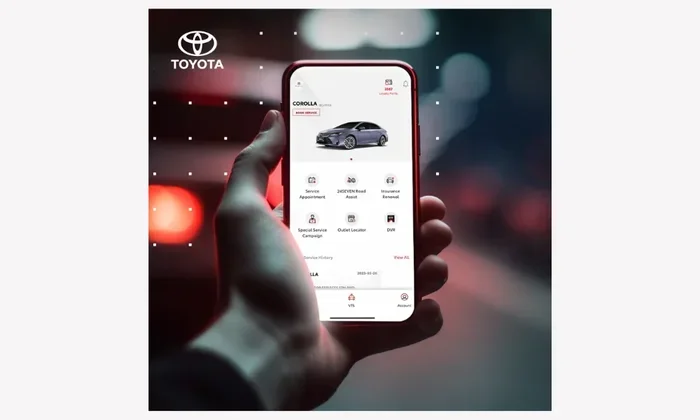
Setting up the digital key through the Toyota App is straightforward, but it does take a few minutes. First, you need to download the Toyota App and create an account linked to your vehicle. Then, follow the on-screen prompts to pair your phone with your car. The app walks you through each step, so even if you are not very tech savvy, you should be able to get it done.
Here is what the setup process typically looks like:
- Download the Toyota App from the App Store or Google Play Store.
- Log in with your Toyota account or create a new one.
- Select your vehicle from your registered Toyota profile.
- Navigate to the digital key or vehicle access section.
- Follow the prompts to pair your phone with your car.
- Test the digital key by locking, unlocking, and starting your vehicle.
Once the setup is complete, your phone becomes your primary car key replacement. You can leave your physical key at home. The app will handle everything from keyless entry to engine ignition.
What Phones Are Compatible?
Not all smartphones can use the Toyota digital key. You need a phone that supports the right wireless technology. Most newer Android phones with NFC and UWB capability work well. iPhones with Face ID and NFC also support the feature on compatible Toyota models. Check the Toyota App requirements page or your owner manual to confirm your phone qualifies.
Features You Get When Using the Toyota App Instead of the Key
Using the Toyota App as your key opens up a lot more than just locking and unlocking. The app is packed with features that make owning a Toyota easier and more convenient. Here are some of the standout features you get when you go digital.
Remote Lock and Unlock
You can lock and unlock your Toyota from anywhere using the app. Forgot to lock your car? No problem. Just open the Toyota App and tap the lock button. This is especially helpful when you are rushing out the door or when you need to let someone into your car without being there in person.
Remote Start
The Toyota App lets you remotely start your engine before you even get in. On cold winter mornings or hot summer days, this feature is a lifesaver. Your car warms up or cools down while you finish your coffee. It is one of the most popular reasons people download the Toyota App in the first place.
Vehicle Status and Alerts
The app sends you real-time alerts about your vehicle. You can check fuel levels, tire pressure, oil life, and more right from your phone. If something needs attention, the app notifies you immediately. This helps you stay on top of Toyota maintenance and avoid unexpected breakdowns.
Location Tracking
Ever forget where you parked? The Toyota App shows you the last known location of your vehicle on a map. This feature is a real lifesaver in large parking lots or unfamiliar areas. You can also track your car if you are worried about theft.
Multiple Digital Keys
One of the best parts about the Toyota App digital key is that you can share access with others. You can create multiple digital keys and send them to family members or trusted friends. Each key can have different permission levels, so you control exactly who can access your vehicle and when.
Which Toyota Models Support the App Digital Key?
Toyota has been rolling out digital key support across its lineup, but not every model qualifies. The feature is most commonly available on newer models from the last few years. Here is a general breakdown of what to expect.
Models like the Toyota Camry, Toyota RAV4, Toyota Highlander, and Toyota Tacoma are among the most likely to support the full digital key feature through the app. However, support depends on the specific trim level and model year. Higher trims and newer model years are more likely to include digital key compatibility.
If you are unsure whether your Toyota supports the app digital key, you have a few options. You can check your owner manual, visit the Toyota website, or contact your local Toyota dealer. They can confirm whether your specific vehicle is compatible with the Toyota App digital key feature.
Also keep in mind that Toyota regularly updates the app and adds support for more models. Even if your current vehicle does not support the digital key today, a future software update might add it. Staying up to date with your Toyota App ensures you do not miss out on new features.
Do You Still Need a Physical Key or Fob?
This is one of the most common questions people ask when they switch to the Toyota App digital key. The answer is yes, you should keep a backup. Here is why.
Your phone battery can die. It happens to everyone. If your phone is dead and you do not have a physical Toyota key fob or spare key, you will be stranded. Toyota designed the digital key system with this in mind, which is why they still recommend carrying a backup key at all times.
There are other situations where a physical key comes in handy too. Maybe you are going to a place where phones are not allowed. Or perhaps you are lending your car to someone who does not have the Toyota App. A physical key or fob covers all these scenarios.
Some Toyota owners also worry about phone damage. If your phone gets dropped, cracked, or submerged in water, you lose access to your digital key. Having a spare car key replacement option in your glove box gives you peace of mind. It is a simple step that saves a lot of headaches.
The good news is that the Toyota App digital key and your physical key can work side by side. You do not have to choose one over the other. Use the app for your daily driving and keep the physical key as your emergency backup.
Common Issues and How to Fix Them
The Toyota App digital key is generally reliable, but like any technology, it can have hiccups. Here are some common problems and how to solve them.
Phone Does Not Connect to the Car
If your phone will not connect to your Toyota, the first thing to check is your Bluetooth and NFC settings. Make sure both are turned on. Restart the Toyota App and try again. If that does not work, unpair your phone from the car and go through the pairing process again. Sometimes a fresh connection fixes the issue.
Digital Key Stops Working After an Update
Phone software updates can sometimes interfere with the digital key. If your Toyota App digital key stops working after updating your phone, check for app updates too. Toyota releases updates to the app that keep it compatible with the latest phone software. Updating the app usually resolves the problem.
Car Does Not Recognize the Phone
If your car does not recognize your phone at the door handle or the start button, make sure your phone is close enough. The digital key relies on proximity sensors. Keep your phone in your pocket or purse near the door. Also check that your phone battery is not critically low, as this can weaken the signal.
Tips for Getting the Most Out of the Toyota App
Want to make the most of your Toyota App experience? Here are some practical tips that will help you get the most out of the digital key and all the app features.
- Keep your app updated. Toyota releases regular updates that improve performance and add new features. Check for updates in your app store at least once a month.
- Charge your phone. Since your phone is your key, keeping it charged is essential. Make it a habit to charge your phone overnight so it is always ready to go.
- Enable notifications. Turn on app notifications so you get alerts about your vehicle status, maintenance reminders, and security warnings.
- Add a trusted contact. Share a digital key with a family member or close friend so they can access your car in an emergency.
- Learn the shortcut gestures. The Toyota App has quick-access buttons for lock, unlock, and remote start. Familiarize yourself with them for faster use.
- Use Wi-Fi for large updates. If the app needs a major update, connect to Wi-Fi to avoid using up your mobile data.
These small habits make a big difference over time. They keep your digital key working smoothly and ensure you always have a reliable way to access your Toyota.
How the Toyota App Compares to a Traditional Key Fob
The Toyota App digital key and a traditional key fob both give you access to your vehicle. But they work in different ways and offer different levels of convenience. Here is a quick comparison.
- Convenience: The Toyota App wins here. You always have your phone with you, so you never need to dig for a key fob.
- Battery Life: A key fob battery lasts for months or even years. Your phone battery needs daily charging. This is the biggest advantage of a traditional fob.
- Security: Both offer strong security. The digital key uses encrypted communication, while a key fob uses rolling codes. Neither is clearly better than the other.
- Sharing Access: The Toyota App makes sharing key access easy. A traditional fob requires a physical copy to be made.
- Backup Options: A key fob works independently. The app needs your phone to be functional, which adds a layer of dependency.
Most Toyota owners find that the app offers more overall value, especially when combined with the remote features like remote start and vehicle tracking. But keeping a fob as a backup is still the smartest approach.
Final Thoughts
Using the Toyota App instead of the key is a great option for Toyota owners with compatible vehicles. The digital key feature gives you hands-free access, remote start, and a range of smart features that make driving more convenient. It is modern, practical, and increasingly popular among Toyota owners.
That said, it is not a complete replacement for a physical key yet. You should always keep a backup Toyota key fob or spare key available. Technology can be unpredictable, and having a fallback plan never hurts. As Toyota continues to update the app and expand compatibility, the digital key experience will only get better.
If you are new to the Toyota App, now is a great time to explore its features. Download the app, set up your digital key, and enjoy the convenience of leaving your physical keys at home. Just remember to charge your phone, and you will be all set.
The future of car key alternatives is here, and Toyota is leading the way. The Toyota App makes it easy to embrace a keyless lifestyle without sacrificing security or convenience. Give it a try and see how much simpler your daily routine can become.
Is the Toyota App Digital Key Safe?
Yes, the Toyota App digital key uses encrypted communication and secure authentication to protect your vehicle. Only paired phones can unlock and start your car. Toyota also includes remote lock and alarm features that add an extra layer of security.
Can I Use the Toyota App on More Than One Phone?
Yes, you can set up the digital key on multiple phones. You can also share digital keys with other people through the app. Each user gets their own access, and you can control permission levels for each key.
What Happens If My Phone Battery Dies?
If your phone battery dies, you will not be able to use the digital key. This is why Toyota recommends keeping a physical key or key fob as a backup. You can still use your backup to unlock and start your car.
Does the Toyota App Work Offline?
Some features like digital key access work offline using Bluetooth and NFC. However, remote features like starting the engine from a distance require an internet connection. Make sure you have cellular service for full remote functionality.
Can I Still Use My Physical Key After Setting Up the App?
Absolutely. The Toyota App digital key works alongside your physical key. You can use either one to access and start your vehicle. Many owners prefer to use the app daily and keep the physical key in their glove box as a backup.
Will Toyota Add More Models to the Digital Key Feature?
Toyota is actively expanding digital key support to more models. Keep your Toyota App updated to receive the latest features and model compatibility additions. Check the Toyota website or contact your dealer for the most current list of supported vehicles.
Frequently Asked Questions
What is Can You Use the Toyota App Instead of the Key?
Can You Use the Toyota App Instead of the Key is an important topic with many practical applications.