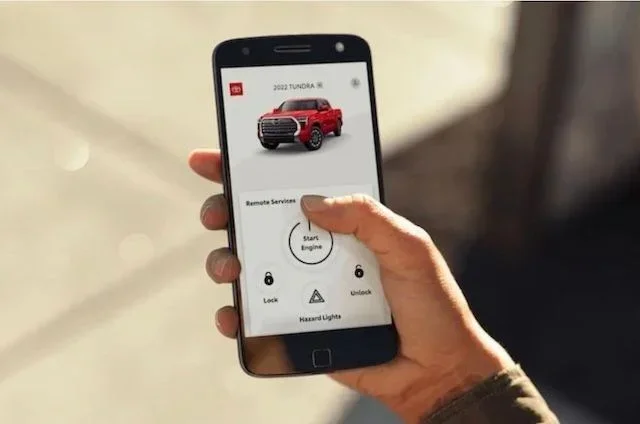
Do All Toyotas Have a Remote Start App Available Today
Not all Toyotas come with a factory-installed remote start app out of the box. Many newer models from 2017 onward offer the Toyota Remote Connect service, but older vehicles and certain trims may lack this feature entirely. If your Toyota doesn’t support it, you can still add a compatible aftermarket remote start system through a dealer or trusted installer.
Do All Toyotas Have a Remote Start App Available Today?
Not every Toyota rolls off the lot with a remote start app ready to go. If you have been wondering whether your Toyota has this feature, the answer depends on the model, the trim level, and the year you bought it. Some Toyotas come loaded with Toyota Connect technology right out of the box, while others need a simple upgrade or add-on. This guide breaks it all down so you know exactly what to expect.
A Toyota remote start app lets you start your engine from your phone. You can warm up the car on a cold morning or cool it down in summer before you even step outside. It is one of those features that feels like a luxury once you get used to it. But the big question remains: does your Toyota have it?
In this article, we will walk through every Toyota model that supports remote start, explain how the Toyota Connect app works, and show you how to set it up step by step. We will also cover the benefits, limitations, and a few surprises you might not expect. Whether you own a new 2024 Camry or a used RAV4 from a few years ago, this guide has you covered.
Key Takeaways
- Not all Toyotas: factory remote start apps come installed from the dealership.
- Newer models like the RAV4: offer built-in remote start through the Toyota app.
- Older Toyotas may need: a dealer-installed or aftermarket module for app compatibility.
- Toyota Remote Connect works only: with specific equipped trim levels and packages.
- Check your infotainment system: to see if remote start features are already available.
- Aftermarket kits can add: smartphone remote start control to non-equipped Toyota vehicles.
- Always verify compatibility first: with your exact Toyota model year before buying.
📑 Table of Contents
What Is the Toyota Remote Start App?
The Toyota remote start app is a smartphone application that lets you start, stop, and control certain features of your Toyota from a distance. You do not need a physical key fob. Instead, you use your phone to send a signal to your vehicle. It works through Toyota Connect, Toyota’s built-in connectivity platform that uses cellular technology to communicate with your car.
Most people associate the remote start app with just turning on the engine. But it does much more than that. You can lock and unlock doors, honk the horn, locate your parked car, and even send directions to the infotainment system. Some models let you check fuel levels and tire pressure right from your phone screen.
How Does the App Connect to Your Vehicle?
The Toyota Connect system uses a built-in modem inside your car. This modem connects to the cellular network, just like a smartphone. When you open the app on your phone, it sends a secure signal through the cloud to your vehicle. The car receives the command and performs the action. This whole process takes just a few seconds.
To make this work, your Toyota needs a few things. First, it must have the Toyota Connect hardware installed. Second, you need an active Toyota Connect subscription. Third, your phone must have the app downloaded and paired with your account. Without any one of these pieces, the remote start app will not function.
Which Toyota Models Support Remote Start?
Not every Toyota model comes with remote start capability. The availability depends on the model year, trim level, and whether the vehicle was built with the Toyota Connect system. Let us look at which Toyotas support this feature and which ones fall short.
Models That Come With Remote Start
Several popular Toyota models include the remote start app as either standard equipment or an available option. Here are the most common ones:
- Toyota Camry – Available on higher trims with the Toyota Connect package
- Toyota RAV4 – Supported on select trims, especially the XLE and above
- Toyota Highlander – Includes remote start on most equipped models
- Toyota 4Runner – Available on TRD and Limited trims
- Toyota Tacoma – Supported on certain trim levels with the tech package
- Toyota Tundra – Includes remote start on higher trims
- Toyota Sienna – Available on XLE and Limited trims
Models That May Not Have Remote Start
Some Toyota models, especially lower trims or older model years, do not include the Toyota Connect system. This means no remote start app support. Base trims of the Corolla, Yaris, and certain C-HR configurations often lack this feature. If you are unsure about your specific vehicle, check your owner’s manual or ask your Toyota dealer.
Toyota Remote Start Compatibility by Model
| Toyota Model | Remote Start Available | System Required |
|---|---|---|
| Camry | Yes (select trims) | Toyota Connect |
| RAV4 | Yes (select trims) | Toyota Connect |
| Highlander | Yes | Toyota Connect |
| 4Runner | Yes (TRD/Limited) | Toyota Connect |
| Tacoma | Yes (select trims) | Toyota Connect |
| Tundra | Yes (select trims) | Toyota Connect |
| Corolla | Limited/No on base trims | Varies |
| C-HR | Limited | Varies |
| Yaris | No | N/A |
How the Toyota Connect App Works
The Toyota Connect app is the main interface for accessing remote start features on your phone. It is available for both iOS and Android devices. Once you download it and link it to your Toyota, you can control a range of functions from anywhere with cell service.
Setting up the app is straightforward. You create a Toyota account, enter your vehicle identification number, and follow the pairing instructions. The app walks you through each step with clear prompts. After setup, you can start your engine with a single tap on your phone screen.
Key Features of the Toyota Connect App
The Toyota Connect app offers more than just remote start. Here are the features you can expect:
- Remote Engine Start – Start your Toyota from up to 30 feet away
- Remote Lock and Unlock – Secure your vehicle or let someone in without a key
- Climate Control – Turn on the heater or air conditioning before you get in
- Vehicle Location – Find your parked Toyota in a crowded lot
- Fuel Level Check – See how much gas you have left
- Maintenance Alerts – Get notified about service needs
- Trip Data – Track mileage and driving habits
One thing many people appreciate is the climate control feature. On a freezing morning, you can start your Toyota and turn on the heater from bed. By the time you walk outside, the car is warm and comfortable. This alone makes the remote start app worth it for many owners.
How to Sync Your Phone With Your Toyota
If you have not yet synced your phone, the process is simple. Download the Toyota Connect app from the App Store or Google Play Store. Create your account and enter your Toyota vehicle identification number. The app will guide you through the Bluetooth pairing process. Once connected, you can access all the remote features right from your home screen.
For a detailed walkthrough on syncing your phone with your car, check out our guide on how to sync your phone to your car system. It covers the basics and some troubleshooting tips that can save you time.
Setting Up Remote Start on Your Toyota
Getting the Toyota remote start app up and running takes just a few minutes. But there are a few things you need to have in place before you begin. Let us walk through the setup process step by step.
Step-by-Step Setup Guide
- Verify Compatibility – Check your owner’s manual or confirm with your Toyota dealer that your vehicle supports Toyota Connect.
- Download the App – Get the Toyota Connect app from your phone’s app store.
- Create Your Account – Register with your email and set up a secure password.
- Enter Your VIN – Input your 17-digit vehicle identification number to pair the app with your car.
- Activate Your Subscription – Toyota Connect requires an active subscription. Some new vehicles include a free trial period.
- Test the Connection – Try locking or unlocking your doors through the app to confirm everything works.
- Start Your Engine – Use the remote start button in the app to fire up your Toyota from your phone.
Quick Tips for a Smooth Setup
- Make sure your phone has a stable internet connection during setup
- Keep your VIN handy. You can find it on your dashboard or driver’s side door jamb
- If the app does not pair, try restarting both your phone and your vehicle’s infotainment system
- For help with the initial activation process, you can read our guide on how to activate the Connect app
One common issue people run into is forgetting that the Toyota Connect subscription needs to be active. If your subscription has expired, the remote start app will not work. Most subscriptions cost around $10 to $20 per year, depending on the plan you choose. It is a small price for the convenience of starting your car from the couch.
Benefits of Using the Toyota Remote Start App
The Toyota remote start app offers real-world benefits that go beyond just convenience. Once you start using it, you will wonder how you ever lived without it. Here are the top advantages that Toyota owners love.
Comfort and Convenience
The biggest benefit is comfort. On a cold winter morning, you can start your Toyota and let the heater warm up the cabin. In summer, you can cool down the interior before you get in. This is especially helpful if you park outside or in a garage where the temperature can drop quickly.
Enhanced Vehicle Security
Using the Toyota Connect app adds a layer of security. You can lock your doors remotely if you realize you left them unlocked. You can also sound the horn or flash the lights to find your car in a large parking lot. Some owners feel safer knowing they can check on their vehicle from anywhere.
Better Engine Health
Starting your engine remotely allows the oil to circulate before you drive. This is especially beneficial in cold weather when oil tends to be thicker. Letting the engine warm up for a few minutes can reduce wear and tear on internal components over time.
Time Savings
Think about how much time you spend waiting for your car to warm up or cool down. With the remote start app, you can handle that while you finish your coffee, check your emails, or walk your dog. Those few minutes add up over weeks and months.
Limitations and Things to Know
While the Toyota remote start app is a great feature, it is not without limitations. Understanding these upfront helps you set realistic expectations and avoid frustration.
Subscription Requirements
The Toyota Connect system requires a paid subscription for full functionality. Some new Toyota vehicles come with a complimentary trial, usually lasting one to three years. After that, you must renew the subscription to keep using the remote start app. Without an active subscription, many features become unavailable.
Distance Limitations
You can only start your Toyota remotely from a short distance. The app works best when you are within a few hundred feet of the vehicle. This is a safety feature designed to prevent unauthorized use. If you are at the office and want to start your car, you need to be close enough to the parking lot.
Model and Trim Restrictions
As we covered earlier, not every Toyota has this feature. Base trims and older model years may not support the Toyota Connect system. Before purchasing a used Toyota specifically for remote start, confirm the vehicle has the necessary hardware and software.
Cold Weather Performance
In extremely cold climates, the remote start app works well but has limits. Most Toyotas allow the engine to run for 10 to 15 minutes before automatically shutting off. You can restart it remotely if needed, but you cannot keep it running indefinitely. This is a safety and fuel conservation measure.
Can You Program a Keyless Key Fob Yourself?
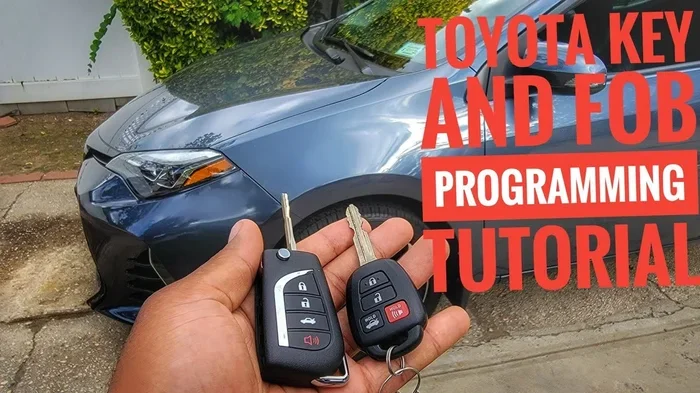
If you are exploring remote features on your Toyota, you might also wonder about programming your key fob independently. Many Toyota owners ask whether you can program a keyless key fob yourself. The answer depends on your model, but many Toyotas allow basic fob programming without a dealer visit. This is a helpful skill to have, especially if you lose your fob or buy a replacement.
Final Thoughts
The Toyota remote start app is a fantastic feature that adds real value to your daily driving experience. Not every Toyota has it, but a wide range of popular models do. If your vehicle supports Toyota Connect, setting up the app is simple and the benefits are immediate. You get comfort, security, and convenience all from your phone.
Before you assume your Toyota has this feature, double-check your model, trim, and model year. If it does not, you might be able to add the Toyota Connect system through your dealer. The cost varies, but for many owners, the convenience of a remote start app makes it well worth the investment.
Take a few minutes today to check whether your Toyota supports remote start. Download the app, verify your subscription, and enjoy the ease of starting your car from anywhere. Once you try it, you will not want to go back to waiting outside in the cold or heat. The Toyota remote start app is one of those small upgrades that makes a big difference in your everyday life.
Frequently Asked Questions
Do All Toyotas Have a Remote Start App Available Today?
No, not every Toyota comes with a remote start app. The feature depends on your specific model, trim level, and the technology package installed. Newer Toyota models with the Toyota Connected service or the Smart Key System are more likely to include app-based remote start functionality.
Which Toyota Models Support the Remote Start App?
Popular models like the Toyota Camry, Toyota RAV4, Toyota Highlander, and Toyota Tacoma offer remote start through the Toyota app. However, you typically need the Enhanced Connected or Premium Connected package to unlock this feature. Always check the specific trim and year of the vehicle before assuming it has app-based remote start.
Can I Add a Remote Start App to Older Toyota Models?
Older Toyota models that lack factory connectivity generally cannot support the official Toyota remote start app. Aftermarket solutions exist, but they do not integrate with the Toyota Connected platform. If you want the full factory experience, you will likely need a newer Toyota with the right technology package.
Do I Need a Subscription to Use the Toyota Remote Start App?
Yes, most Toyota models require a connected service subscription to use the remote start app. Toyota offers different tiers, and the remote start feature is usually included in the Premium Connected plan. Without an active subscription, the app will not grant you remote access to start your vehicle.
How Do I Know if My Toyota Has Remote Start Capability?
Check your owner’s manual or visit the Toyota website and enter your vehicle’s VIN to see what features are included. You can also look for the Smart Key System and Toyota Connected badges in your vehicle’s tech specs. If your Toyota supports the app, you will see remote start listed as a feature in the Toyota app itself.
Is the Toyota Remote Start App Available on Both iOS and Android?
Yes, the Toyota app is available for both iOS and Android devices. You can download it from the Apple App Store or Google Play Store and link it to your compatible Toyota vehicle. Make sure your phone meets the app’s minimum requirements and that your Toyota model supports remote start through the app.