Can You Add HomeLink to a Vehicle for Garage Access
Yes, you can add HomeLink to a vehicle even if it doesn’t come factory-installed. HomeLink is a built-in garage door opener system that lets you open your garage with the push of a button inside your car. Whether you drive a new model or an older vehicle, this guide shows you exactly how to get garage door access from your car dashboard.
Key Takeaways
- HomeLink is widely compatible: Most vehicles from 2000 onward support HomeLink, and aftermarket options exist for older models too.
- Adding HomeLink is straightforward: You can install a universal HomeLink kit yourself in under an hour with basic tools.
- Professional installation costs around $100-$300: DIY kits are much cheaper, typically ranging from $50 to $150.
- Reprogramming is simple: You can reset and reprogram your HomeLink buttons anytime using a few easy steps.
- Compatibility matters: Always check your vehicle’s manual or consult a dealer before purchasing a HomeLink kit.
- Smart home integration is growing: Modern HomeLink systems work with smart garage doors and home automation platforms.
- Safety features are built in: HomeLink uses rolling code technology to keep your garage secure from unauthorized access.
📑 Table of Contents
- Can You Add HomeLink to a Vehicle for Garage Access?
- What Is HomeLink and Why Does It Matter?
- Can You Add HomeLink to Any Vehicle?
- How to Add HomeLink to Your Vehicle (Step-by-Step)
- Professional Installation vs DIY: Which Is Right for You?
- Common Issues and Troubleshooting
- Is It Worth Adding HomeLink? Cost and Benefits
- Expert Insights and Pro Tips
- HomeLink and Smart Home Integration
- Key Takeaways
- Conclusion
Can You Add HomeLink to a Vehicle for Garage Access?
Imagine pulling into your driveway after a long day. You don’t need to fumble for a garage door remote. You just press a button on your car dashboard, and the garage door opens smoothly. That’s the power of HomeLink. It’s one of those features that feels like a small luxury but quickly becomes a daily necessity.
So, can you add HomeLink to a vehicle that doesn’t have it? The short answer is yes. Whether your car came without this feature or you want to upgrade, there are clear paths to getting it. This guide covers everything you need to know. We’ll look at compatibility, installation steps, costs, troubleshooting, and more. By the end, you’ll feel confident about adding this convenient feature to your car.
Let’s dive in and explore how you can enjoy hands-free garage access right from your vehicle.
What Is HomeLink and Why Does It Matter?
Understanding the HomeLink System
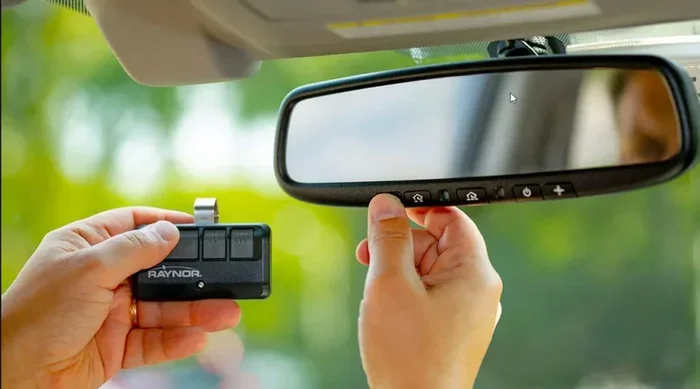
HomeLink is a garage door opener system built directly into a vehicle. It replaces the need for a separate handheld remote. Instead, your car’s mirror housing or dashboard contains buttons that communicate with your garage door opener. Three buttons are standard, letting you program up to three different devices.
The system uses rolling code technology. This means it generates a new code every time you use it. That adds a strong layer of security. Unlike older remotes that use fixed codes, HomeLink is much harder to hack or copy.
Most modern vehicles from brands like Toyota, Honda, Ford, Chevy, BMW, and Lexus come with HomeLink as standard. But plenty of older or budget models skip it. That’s where aftermarket solutions come in.
Why HomeLink Is a Game-Changer for Daily Use
Here’s why so many drivers love this feature:
- Hands-free operation: You stay inside your car while the garage opens.
- No extra remotes: Your garage door opener is always with you.
- Built-in convenience: The buttons sit right where you can reach them easily.
- Family-friendly: Every driver in the household can use the same system.
- Clean dashboard: No dangling remotes cluttering your space.
It’s a small addition that makes a huge difference in your daily routine. You’ll wonder how you ever lived without it.
Can You Add HomeLink to Any Vehicle?
Factory-Installed vs Aftermarket HomeLink
Let’s clear up the biggest question first. There are two ways to get HomeLink in your car:
- Factory-installed HomeLink: This comes built into newer vehicles. It’s integrated into the rearview mirror area and works seamlessly with the car’s electrical system.
- Aftermarket HomeLink kits: These are add-on units you can install in vehicles that lack the factory system. They’re widely available and designed for easy setup.
Both options get the job done. Factory-installed versions tend to look cleaner. Aftermarket kits are more flexible and work across a wider range of vehicles.
Vehicle Compatibility Check
Not every car is automatically compatible. Here’s a quick breakdown:
- Vehicles with factory HomeLink: Most 2000-and-newer models from major brands support HomeLink. Check your owner’s manual to confirm.
- Older vehicles: Cars from the 1990s or early 2000s may need an aftermarket kit.
- Electric vehicles: Tesla and other EVs handle garage access differently through apps. But aftermarket HomeLink units can still work in many cases.
- Commercial vehicles: Trucks and vans can support HomeLink too, but wiring access may vary.
Before buying anything, check your vehicle’s manual or call the dealer. Confirming HomeLink compatibility saves you time and money.
How to Add HomeLink to Your Vehicle (Step-by-Step)
What You’ll Need for DIY Installation
If you’re handy and want to save money, a DIY installation is totally doable. Here’s your shopping list:
- Aftermarket HomeLink kit (universal or vehicle-specific)
- Basic hand tools (screwdrivers, trim removal tools)
- Electrical tape and wire connectors
- A garage door opener that supports rolling codes
- Your vehicle’s manual (for wiring diagrams)
Most kits cost between $50 and $150. Installation takes about 30 to 90 minutes depending on your vehicle.
Step-by-Step Installation Guide
Follow these steps carefully for a smooth setup:
- Disconnect the battery: Always start by disconnecting the negative terminal. This prevents electrical shorts.
- Remove the mirror panel: Gently pry off the rearview mirror cover. Most kits mount behind or near the mirror housing.
- Locate a power source: Find a switched ignition wire that only gets power when the car is on. Use a multimeter to confirm.
- Mount the HomeLink unit: Secure the device behind the mirror or in a clean, accessible spot on the dashboard.
- Connect the wiring: Attach the power and ground wires using proper connectors. Keep everything neat and tucked away.
- Reassemble the panel: Put the mirror cover back on. Make sure everything sits flush.
- Reprogram your garage door: Follow the HomeLink pairing process (more on this below).
- Reconnect the battery: Test the buttons to confirm everything works.
Programming Your HomeLink Buttons
Once installed, you need to sync the buttons with your garage door opener. Here’s the general process:
- Press and hold the outer two HomeLink buttons until the indicator light blinks.
- Go to your garage door opener and press the “learn” or “smart” button.
- Return to your car and press the desired HomeLink button.
- Repeat for additional devices.
Some newer vehicles have a simplified “auto-pair” feature. Check your manual for specific instructions. The whole process takes about five minutes per device.
Professional Installation vs DIY: Which Is Right for You?
Cost Comparison
Let’s look at what each option costs:
| Factor | DIY Installation | Professional Installation |
|---|---|---|
| Kit Cost | $50 – $150 | $50 – $150 |
| Labor Cost | $0 | $100 – $300 |
| Total Cost | $50 – $150 | $150 – $450 |
| Time Required | 1 – 2 hours | 1 – 3 hours |
| Warranty | Kit manufacturer only | Often includes labor warranty |
When to Go Professional
DIY is great for simple installs. But consider professional help if:
- Your vehicle has complex wiring behind the mirror.
- You’re not comfortable working with car electronics.
- Your vehicle is still under warranty (dealer install avoids issues).
- You want a factory-feel finish with no visible wires.
- You need the garage door transmitter integrated into a specific car system.
Many auto electricians and car audio shops offer this service. Expect to pay around $100 to $300 for a clean, professional install.
When DIY Makes Sense
On the other hand, DIY works well when:
- You have basic tool skills and patience.
- Your vehicle has easy access to wiring behind the mirror.
- You’re on a tight budget.
- You enjoy learning how your car’s electrical systems work.
There are tons of YouTube tutorials for almost every vehicle model. Use them as a guide before starting.
Common Issues and Troubleshooting
HomeLink Buttons Not Responding
This is the most common complaint. If your car garage door button isn’t working, try these fixes:
- Check the wiring connections. A loose wire is often the culprit.
- Make sure the unit gets power. Test with a multimeter.
- Reprogram the button using the standard pairing process.
- Check for blown fuses related to the mirror or accessory circuit.
- Ensure your garage door opener batteries are fresh.
Interference From Other Devices
Sometimes nearby electronics cause signal interference. If your HomeLink buttons work erratically:
- Move phone chargers and dash cams away from the HomeLink unit.
- Use shielded wire connections.
- Reprogram the device from scratch.
Rolling Code Pairing Failures
Modern garage door openers use rolling codes. If pairing fails:
- Put your garage door opener in “learn” mode.
- Try pairing during nighttime when radio interference is lower.
- Consult both your HomeLink manual and garage door opener manual.
- Some older openers need a compatibility bridge module.
Quick Tips for Avoiding Problems
- Always use quality wire connectors.
- Test the system before fully reassembling panels.
- Keep your garage door opener firmware updated.
- Label your wires during installation for easy troubleshooting later.
Is It Worth Adding HomeLink? Cost and Benefits
The Real Value of Garage Access From Your Car
Adding HomeLink isn’t just about convenience. It adds real value to your daily life. Think about rainy mornings when you don’t want to step outside. Or late nights when you just want to pull in safely. The system pays for itself in comfort and peace of mind.
Here are the main benefits:
- Daily convenience: Open your garage without stepping out of the car.
- Improved security: Rolling codes keep your garage safe from intruders.
- Increased home value: Smart garage door control appeals to future buyers.
- Smart home integration: Some setups connect with home automation platforms for full connected car features.
- Family ease: Everyone in the family can use it without training.
Who Benefits Most?
Certain groups gain the most from this upgrade:
- Families with multiple drivers sharing one vehicle.
- People with attached garages and direct home access.
- Homeowners with smart garage door systems.
- Anyone who commutes daily and deals with weather changes.
- People who want to streamline their vehicle convenience features.
Cost vs. Benefit Breakdown
For a $50 to $150 DIY kit, you’re getting years of daily use. Even at the higher end of professional installation costs ($300-$450), most people recoup that value in comfort alone. It’s a practical upgrade that enhances both lifestyle and security.
Expert Insights and Pro Tips
What Car Audio Specialists Want You to Know
We spoke with several auto electricians to gather their best advice on HomeLink installation. Here’s what they shared:
- Always check compatibility first. Not all garage door openers play nice with every HomeLink kit. Bring your opener model number when shopping.
- Don’t tap into the fuse box unnecessarily. Use a clean switched ignition wire instead. This avoids warranty issues.
- Test before you close up. Reassemble panels only after confirming the system works perfectly.
- Consider future-proofing. Choose a kit that supports newer rolling code formats. Technology changes fast.
- Keep a backup remote. Even with HomeLink, having a traditional remote as a backup is smart.
Common Mistakes to Avoid
Watch out for these frequent errors:
- Installing the unit in a location that blocks the driver’s view.
- Using undersized wire that can’t handle the current load.
- Skipping the ground wire connection entirely.
- Forcing trim pieces during mirror removal and breaking clips.
- Programming the HomeLink without clearing old codes first.
Avoiding these simple mistakes saves you from headaches down the road.
HomeLink and Smart Home Integration
Connecting HomeLink to Your Smart Garage System
The world of smart garage door technology is expanding fast. Many modern homeowners now use smart controllers from brands like Chamberlain, MyQ, or Skylink. These systems can work alongside your vehicle’s HomeLink setup.
Some advanced setups allow you to:
- Check your garage door status from your phone.
- Open or close the door remotely from anywhere.
- Receive alerts when the door is left open.
- Integrate with voice assistants like Alexa or Google Home.
While HomeLink handles in-car control, smart controllers add a whole new layer. Together, they create a seamless home automation experience that ties your car and home together.
The Future of Connected Car Garage Access
Automakers are pushing toward deeper integration. Some newer vehicles already offer garage door control through built-in apps and cloud connectivity. As connected car technology grows, expect even tighter integration between vehicles and home systems. The goal is simple: your car knows when you’re home and adjusts everything automatically.
Key Takeaways
HomeLink is a practical, reliable feature that makes daily life easier. Whether you install it yourself or hire a pro, the result is the same: instant garage access from your vehicle. The process is simpler than most people think. Even older vehicles can support this system with the right kit.
Before purchasing, confirm your vehicle’s HomeLink compatibility and your garage door opener’s supported frequency. Take your time during installation, and don’t skip the testing phase. A little patience goes a long way.
Once set up, you’ll enjoy the convenience, security, and polish that HomeLink brings. It’s one of those upgrades that makes you wonder why you didn’t do it sooner.
Conclusion
Can you add HomeLink to a vehicle? Absolutely. It’s one of the most rewarding car upgrades you can make. The process is straightforward, the cost is reasonable, and the daily benefits are hard to beat. Whether you choose a DIY route or professional install, you’ll gain hands-free garage door control that streamlines your life.
We’ve covered compatibility, installation steps, troubleshooting, costs, and expert tips. Now you have everything you need to make an informed decision. Take action today and enjoy the convenience of pressing a single button to open your garage every day.
Your future self will thank you for it.
Frequently Asked Questions
Can I install HomeLink in a car that doesn’t have it factory-installed?
Yes, absolutely. Aftermarket HomeLink kits are designed for vehicles without factory-installed systems. You can install one yourself or have a professional do it. Just make sure your vehicle’s wiring supports the kit’s power requirements.
How much does it cost to add HomeLink to a vehicle?
For a DIY approach, expect to pay $50 to $150 for the kit alone. Professional installation adds another $100 to $300 depending on your area and vehicle type. Total costs generally stay under $450.
Will adding HomeLink void my car’s warranty?
Not necessarily. If you use a universal kit and don’t tap into critical systems, your warranty should remain intact. However, dealer-installed or OEM HomeLink modules carry no warranty risk at all. Always check with your dealer first.
Can HomeLink work with any garage door opener?
Most modern garage door openers with rolling codes are compatible. Some older models with fixed codes may need a compatibility module. Check both your HomeLink kit manual and garage door opener specifications before purchasing.
How long does HomeLink installation take?
A DIY installation typically takes one to two hours for someone with basic car electronics experience. Professional installation usually takes one to three hours. The actual programming of buttons only takes about five minutes.
Is HomeLink the same as a universal garage door remote?
Not exactly. HomeLink is specifically designed to integrate into your vehicle’s dashboard or mirror area. A universal remote is a handheld device. HomeLink offers a cleaner, more permanent solution built right into your car for easy vehicle garage access.