Are Toyota Highlanders Equipped with a Heads-Up Display
The Toyota Highlander offers a heads-up display on select trims and higher-end configurations. This feature projects key driving information like speed and navigation directly onto your windshield, helping you keep your eyes on the road. Not every trim includes it, so knowing which model year and trim level matters is essential when shopping for a Highlander.
When you are shopping for a Toyota Highlander, one question that keeps coming up is whether this popular SUV comes with a heads-up display. The Toyota Highlander heads-up display is a feature that many drivers love because it keeps important information right in your line of sight. Instead of glancing down at the dashboard, you can see your speed, navigation prompts, and safety alerts projected onto the windshield.
But here is the catch. Not every Toyota Highlander comes with this feature standard. It depends on the trim level, the model year, and the specific package you choose. In this article, we will break down everything you need to know about the Highlander display system, including which trims offer it, what it shows, and how to get the most out of it.
Whether you are a current Highlander owner or you are shopping for a new one, understanding the heads-up display Toyota options can make a big difference. Let us dive in and explore what this feature offers and why it has become such a popular choice among SUV buyers.
Key Takeaways
- Not all Highlanders have a HUD: The heads-up display is available on select trims, primarily higher-end models.
- HUD shows critical driving data: Speed, navigation arrows, and safety alerts appear right on your windshield.
- Trim level determines availability: Higher trims like Limited and Platinum are more likely to include this feature.
- Adjustable brightness settings: You can customize the display to reduce glare, especially at night.
- Improves driving safety: Keeping your eyes on the road reduces distraction and enhances situational awareness.
- Model year matters: Newer Highlander generations offer more advanced and refined HUD technology.
- Complementary display features: The HUD works alongside the infotainment touchscreen for a complete driver experience.
📑 Table of Contents
- What Is a Heads-Up Display and Why Does It Matter?
- Do Toyota Highlanders Come with a Heads-Up Display?
- What Information Shows on the Toyota Highlander Heads-Up Display?
- How to Use and Adjust the Heads-Up Display
- Benefits of Having a Heads-Up Display in Your Highlander
- Toyota Highlander Display System vs. Other SUVs in Its Class
- Common Issues with the Toyota Highlander Display
- Expert Tips for Maximizing Your Highlander HUD Experience
- Is the Heads-Up Display Worth It in a Toyota Highlander?
- Conclusion
What Is a Heads-Up Display and Why Does It Matter?
A heads-up display, commonly called a HUD, is a transparent screen that projects vehicle information onto your windshield. The idea is simple but powerful. You stay focused on the road ahead while still seeing the data you need to drive safely.
Most vehicle heads-up display systems show a few core pieces of information. These typically include your current speed, cruise control settings, and navigation directions. Some advanced systems also show collision warnings, lane departure alerts, and audio controls. The display appears to float on the windshield, usually at the top of the dashboard where your sight line naturally rests.
Why does this matter so much? Because taking your eyes off the road, even for a second, can be dangerous. Studies show that driver distraction is one of the leading causes of accidents. A HUD helps reduce that distraction by bringing essential data to you instead of forcing you to look away from the road.
How a HUD Works in Toyota Vehicles
Toyota uses a projection system that sends light onto a special section of the windshield. The image appears clear and readable during the day and adjusts for nighttime driving. The Toyota digital display technology has improved significantly over the years, becoming brighter, sharper, and more customizable.
In the Highlander, the HUD connects to the vehicle’s main computer. This means it receives real-time data from the speedometer, GPS navigation, and safety systems. When you turn on the Highlander navigation display, for example, turn-by-turn directions can appear directly on the HUD, so you never have to look away from traffic.
Do Toyota Highlanders Come with a Heads-Up Display?
The short answer is yes, but with an important caveat. The Toyota Highlander HUD is available, but it is not standard across all trims and model years. Your specific Highlander may or may not have this feature depending on what you purchased.
Standard vs. Available HUD Features
On base trims like the L and LE, the heads-up display is typically not included. These models come with a traditional instrument cluster behind the steering wheel. You will still get all the essential gauges, but the information stays in the dashboard rather than projecting onto the windshield.
On higher trims, such as the XLE, Limited, and Platinum, the HUD becomes more commonly available. In many cases, it is part of a premium package that also includes leather seating, upgraded audio, and advanced driver-assistance features. If you are looking for a Toyota Highlander with heads-up display, focusing on these upper trims is the best starting point.
Which Toyota Highlander Trims Offer a HUD
Here is a general breakdown of where you are likely to find the heads-up display:
- L and LE trims: HUD is typically not available as standard or an option.
- XLE trim: HUD may be available depending on the package and model year.
- Limited trim: HUD is commonly included or available as part of a technology package.
- Platinum trim: HUD is almost always included as part of the premium features.
- Hybrid trims: HUD availability follows the same pattern as the gas-powered versions, tied to the trim level.
Keep in mind that model year changes can affect availability. For example, a 2020 Highlander Limited might have a different HUD setup than a 2024 Highlander Limited. Always check the specific vehicle specifications before making a purchase decision.
What Information Shows on the Toyota Highlander Heads-Up Display?
The Toyota Highlander display is designed to show the most important driving information without overwhelming you. Here is what you can typically expect to see projected on your windshield.
Navigation and Speed Data
The most common HUD information includes your current speed, cruise control status, and navigation directions. When you are using the Highlander infotainment system for directions, the HUD can display the next turn arrow and the distance to your destination. This is incredibly helpful, especially in unfamiliar areas where you might otherwise need to stare at the screen mounted on the dashboard.
Speed readings on the HUD are large and easy to read. They update in real time, so you always know exactly how fast you are going. Some drivers find this more convenient than glancing at the traditional speedometer on the instrument cluster.
Safety Alerts on the HUD
Toyota equips the Highlander with a range of Toyota safety features display capabilities. When the vehicle detects a potential collision, the HUD can flash a warning icon. Lane departure warnings also appear on the display, giving you a visual cue without a loud alarm that might startle you.
Adaptive cruise control status is another common HUD feature. You can see when the system is engaged, the set speed, and the distance to the vehicle ahead of you. All of this information stays in your natural sight line, which makes highway driving much safer and more comfortable.
How to Use and Adjust the Heads-Up Display
Once you have a Highlander with a HUD, knowing how to use and adjust it properly makes a big difference. The display is designed to be intuitive, but a few tips can help you get the best experience.
Brightness and Position Settings
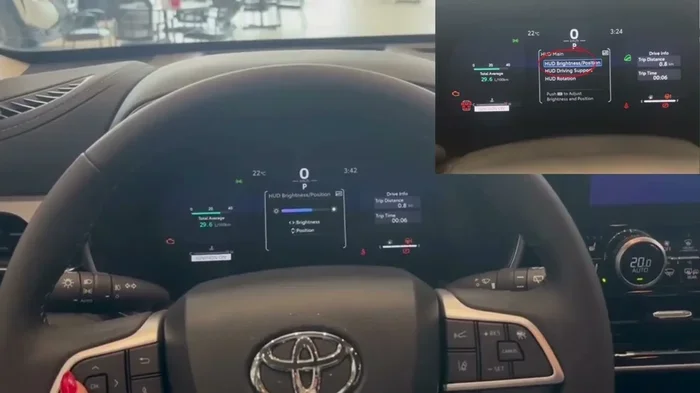
Most Toyota Highlanders allow you to adjust the brightness of the heads-up display. During the day, you might want it at full brightness for maximum visibility. At night, turning it down prevents glare and helps you maintain night vision. You can usually access these settings through the steering wheel controls or the infotainment menu.
The position of the display is also adjustable in some models. You can move it up or down to find the sweet spot where it does not obstruct your view of the road. If the display appears too high or too low, take a moment to adjust it during a parked moment. Proper positioning reduces eye strain and keeps the information clear and readable.
If you ever notice the display acting strangely or showing incorrect data, you may want to refresh your display to reset the system. This simple step can resolve many minor glitches and get your HUD working properly again.
Customizing What Appears on the HUD
Depending on your model year and trim, you may have options for what appears on the heads-up display. Some drivers prefer to see navigation arrows, while others prioritize speed and cruise control data. The Toyota display system allows you to choose which information shows up most prominently.
You can also pair your smartphone to the Highlander’s system, which means notifications and calls can appear on the HUD as well. This is especially useful if you frequently use your phone for navigation or music. Just remember that safety comes first, and the display is designed to minimize distraction, not add to it.
Benefits of Having a Heads-Up Display in Your Highlander
The Toyota Highlander technology features go beyond just looking fancy. The heads-up display offers real, practical benefits that enhance your daily driving experience.
- Improved safety: Keeping your eyes on the road reduces reaction time and lowers the risk of accidents.
- Less eye strain: You do not have to constantly shift your focus between the road and the dashboard.
- Better navigation: Turn-by-turn directions appear right in your line of sight, making it easier to follow complex routes.
- Modern driving feel: A HUD gives your Highlander a premium, tech-forward feel that matches the vehicle’s reputation for quality.
- Reduced distraction: Instead of looking at multiple gauges or the infotainment screen, you get a consolidated view of everything you need.
Many drivers who switch to a Highlander with a HUD say they do not want to go back to a vehicle without one. It becomes such a natural part of the driving experience that its absence feels like a noticeable gap.
Toyota Highlander Display System vs. Other SUVs in Its Class
The Toyota Highlander display system holds its own against competitors in the mid-size SUV segment. Vehicles like the Honda Pilot, Ford Explorer, and Chevrolet Traverse also offer heads-up displays on higher trims. However, Toyota has a reputation for making its systems intuitive and reliable, which gives the Highlander an edge.
One area where the Highlander shines is in the consistency of its display quality across model years. Toyota tends to refine its HUD technology incrementally, ensuring that each new generation builds on the last without introducing confusing changes. This means that whether you are looking at a 2022 or a 2024 model, the experience is familiar and user-friendly.
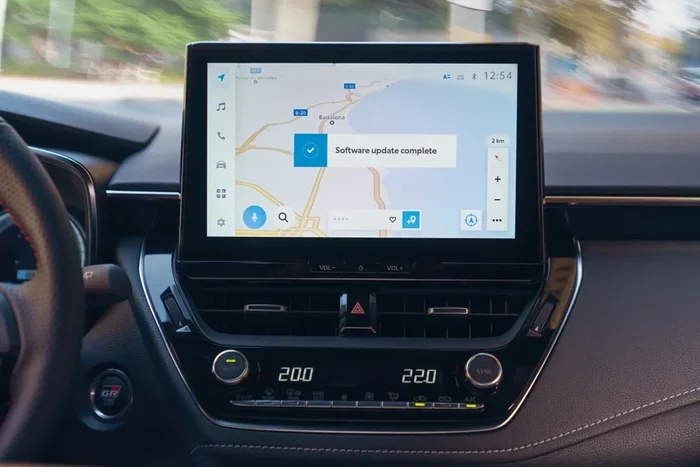
The Highlander multimedia screen works hand-in-hand with the HUD to create a cohesive driving experience. The touchscreen handles detailed inputs like setting a destination or choosing a radio station, while the HUD handles the quick-glance information you need while driving. This division of labor keeps the cockpit clean and uncluttered.
Common Issues with the Toyota Highlander Display
While the Toyota Highlander display system is generally reliable, some owners do encounter issues from time to time. Being aware of these potential problems helps you address them quickly and keep your HUD functioning at its best.
Display Flickering or Dimness
Some Highlander owners report that the heads-up display becomes dim or flickers over time. This is often caused by a loose connection or a software glitch. In many cases, a simple reset or display refresh resolves the issue. If the problem persists, it is worth having a technician check the wiring and projection unit.
Another common cause of dimness is a dirty windshield. The HUD projects onto a specific area of the glass, and if that area is dirty or has a film from window treatments, the image can appear faded. A thorough cleaning of the windshield in the projection zone can make a surprising difference.
Syncing Your Phone and Navigation
If you are having trouble connecting your phone to the Highlander’s system, you are not alone. Many owners benefit from learning how to sync their phone to their car system properly. Once your phone is connected, you can use the HUD to display calls, messages, and navigation directions more seamlessly.
Similarly, if you rely on Google Maps for navigation, setting it up to connect with your Highlander’s display can streamline your driving. You can find guidance on getting Google Maps to connect to your car, which pairs well with the HUD for a complete navigation experience.
Expert Tips for Maximizing Your Highlander HUD Experience
Here are some practical tips from experienced Highlander owners and automotive experts to help you get the most out of your heads-up display.
- Keep your windshield clean: The projection area should be free of dirt, streaks, and tint films for the clearest image.
- Adjust brightness before driving: Make brightness adjustments while parked to avoid distractions on the road.
- Use the HUD for navigation: Rely on the heads-up display for directions rather than the touchscreen whenever possible.
- Update your software: Toyota occasionally releases updates that improve HUD functionality and add new features.
- Pair your devices thoughtfully: Connect only the devices you use most often to keep the display uncluttered.
These small steps add up over time. A well-maintained HUD makes every drive smoother, safer, and more enjoyable. It is one of those features that you barely notice when it works perfectly, but you immediately feel its absence when it is gone.
Is the Heads-Up Display Worth It in a Toyota Highlander?
The Toyota Highlander heads-up display is absolutely worth it for drivers who value safety, convenience, and a premium driving experience. It is one of those features that you get used to quickly and then consider essential. If you are comparing trims, spending a little extra to get a model with the HUD can pay off in both safety and comfort every single time you get behind the wheel.
That said, it is not a dealbreaker for everyone. If you mostly drive short distances on familiar roads, you may not feel the need for a HUD. But if you commute long distances, travel frequently, or simply appreciate modern technology in your vehicle, the heads-up display is a feature that delivers real value every day.
Conclusion
The Toyota Highlander does offer a heads-up display, and it is a feature that elevates the driving experience significantly. From showing your speed and navigation directions to providing safety alerts at a glance, the Toyota Highlander HUD keeps you informed without pulling your attention away from the road. It is available on select trims, so be sure to check the specific configuration of the model you are considering.
Whether you are a current owner looking to make the most of your display or a buyer shopping for your next Highlander, understanding this feature helps you make a smarter decision. The heads-up display is more than a luxury. It is a practical tool that enhances safety, reduces distraction, and adds a touch of modern refinement to one of the most popular SUVs on the road today.
Take the time to explore the Highlander display system in person if you can. Sit in the driver’s seat, adjust the brightness, and see how the information appears on the windshield. Once you experience it, you will understand why so many drivers consider the heads-up display one of the best features in the Toyota Highlander lineup.
Frequently Asked Questions
Do all Toyota Highlanders have a heads-up display?
No, not all Toyota Highlanders come with a heads-up display. The feature is typically available on higher trims like the Limited and Platinum, and sometimes on the XLE depending on the model year and package. Base trims like the L and LE usually do not include a HUD as standard or an option.
Can I add a heads-up display to my Highlander if it does not have one?
Adding an aftermarket heads-up display to a Highlander is possible, but it requires professional installation. Aftermarket HUDs vary in quality and compatibility, so it is important to choose a reputable brand and have the installation done by a qualified technician to ensure it works properly with your vehicle’s systems.
What information does the Toyota Highlander heads-up display show?
The HUD in the Toyota Highlander typically shows your current speed, cruise control status, navigation directions, and safety alerts such as collision warnings and lane departure notifications. The exact information displayed depends on your model year and the trim level of your vehicle.
Is the heads-up display hard to read in bright sunlight?
Toyota designed the Highlander HUD to be readable in various lighting conditions. The brightness is adjustable, and the display uses high-contrast colors to remain visible even in direct sunlight. If you find it difficult to read, adjusting the brightness setting or the position of the display can usually resolve the issue.
Does the Toyota Highlander HUD work with Apple CarPlay and Android Auto?
Yes, on models that support Apple CarPlay and Android Auto, the heads-up display can show navigation and call information from your connected smartphone. This integration makes the HUD even more useful for daily driving and long road trips alike.
How do I adjust the heads-up display brightness in my Toyota Highlander?
You can usually adjust the HUD brightness through the steering wheel controls or the infotainment settings menu. Look for a display or brightness option, and use the up and down buttons to increase or decrease the intensity. It is best to make these adjustments while parked for safety.