Does Tesla Lock When You Walk Away And How It Works
Does Tesla lock when you walk away? Yes, most Tesla vehicles come equipped with a walk-away auto lock feature that detects when you leave the car and locks the doors automatically. This convenient security system uses Bluetooth proximity sensing and passive entry technology to keep your Tesla safe without any manual effort. Whether you drive a Model 3, Model Y, Model S, or Model X, understanding how this feature works can save you time and give you peace of mind.
Key Takeaways
- Walk-Away Locking Is Standard: Most Tesla models include automatic walk-away locking as a built-in feature.
- Uses Bluetooth Proximity Detection: The system tracks your phone key or key fob and locks the car when you move out of range.
- Customizable Settings: You can enable or disable walk-away lock through the Tesla touchscreen settings.
- Works With Phone Key and Key Fob: Both methods trigger the auto-lock function seamlessly.
- Not All Situations Trigger It: Certain conditions like open doors or garage environments may prevent auto-locking.
- Enhances Vehicle Security: The feature adds a layer of protection alongside Sentry Mode and other Tesla security tools.
📑 Table of Contents
- Does Tesla Lock When You Walk Away? Here Is Everything You Need to Know
- How Does the Walk-Away Lock Feature Work?
- Which Tesla Models Support Walk-Away Auto Lock?
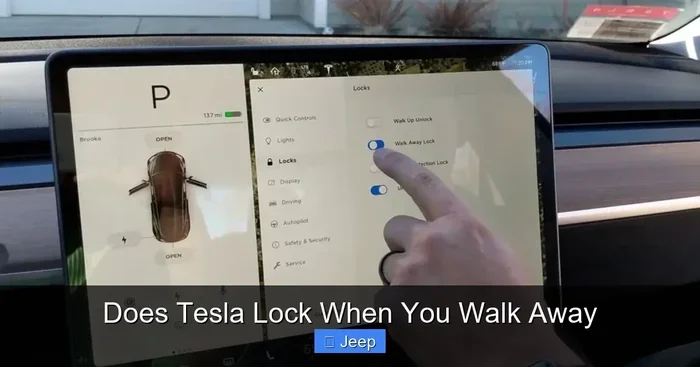
- How to Enable or Disable Walk-Away Lock
- Common Issues with Tesla Walk-Away Locking
- How Tesla Walk-Away Lock Compares to Other Vehicle Systems
- Expert Tips for Getting the Most Out of Walk-Away Lock
- Common Mistakes Tesla Owners Make with Walk-Away Lock
- Final Thoughts on Tesla Walk-Away Locking
Does Tesla Lock When You Walk Away? Here Is Everything You Need to Know
If you have ever walked away from your Tesla and wondered, “Did it lock?” — you are not alone. The does Tesla lock when you walk away question is one of the most common queries among new and experienced Tesla owners alike. The short answer is yes. Tesla vehicles are designed with a smart walk-away auto lock feature that locks your doors automatically when you step away from the car.
This feature is part of Tesla’s broader approach to keyless entry and passive vehicle security. Instead of requiring you to press a button on your key fob or phone, Tesla uses Bluetooth Low Energy (BLE) technology to detect when you have moved a certain distance away from the vehicle. Once the system determines you are no longer near the car, it triggers the locking mechanism. It is smooth, seamless, and incredibly convenient.
But like any smart feature, there are nuances to understand. Settings can be adjusted. Certain conditions may prevent the lock from activating. And not every Tesla model handles it the same way. Let us break down exactly how this works, which models support it, and how you can get the most out of it.
How Does the Walk-Away Lock Feature Work?
Understanding the Tesla locking mechanism is simpler than you might think. Tesla vehicles rely on a combination of sensors, Bluetooth connectivity, and software logic to determine when to lock the doors. Here is a closer look at the process.
Bluetooth Proximity Detection
When you walk away from your Tesla, the car continuously monitors the Bluetooth signal from your Tesla phone key or Tesla key fob. The system measures the signal strength to estimate your distance from the vehicle. Once you move beyond a certain range — typically around 25 to 30 feet — the car interprets this as you leaving and initiates the lock sequence.
This is similar to how Tesla passive entry works when you approach the car. As you get closer, the doors may unlock automatically. As you walk away, they lock automatically. It is a two-way system designed for maximum convenience.
The Role of the Tesla App
The Tesla mobile app plays a supporting role in the walk-away lock process. Your phone acts as a digital key, and the app maintains a constant connection with the vehicle. If your phone battery dies or Bluetooth is turned off, the system may not detect your departure, which can prevent auto-locking. This is why keeping your phone charged and Bluetooth enabled is important for the feature to work reliably.
What Happens After You Walk Away
Once the system detects you have left the vicinity, here is what typically happens:
- The taillights flash once to confirm the lock.
- The doors lock automatically.
- The touchscreen display turns off.
- The vehicle enters its standby security mode.
You may also notice the Tesla Sentry Mode activating if you have it enabled. Sentry Mode uses the car’s cameras to monitor the surrounding area after you leave, adding another layer of protection to your parked vehicle.
Which Tesla Models Support Walk-Away Auto Lock?
Tesla has equipped most of its current lineup with the walk-away auto lock feature. Here is a breakdown by model.
Tesla Model 3
The Tesla Model 3 is one of the most popular electric vehicles on the road, and it fully supports walk-away locking. Whether you have the standard range or long-range version, the feature works the same way. The Model 3 uses the phone key and key fob seamlessly to detect when you have walked away from the vehicle.
Tesla Model Y
The Tesla Model Y also includes walk-away auto lock as a standard feature. As a compact SUV, the Model Y is popular among families, and the auto-lock feature adds a layer of convenience for busy parents who are juggling groceries, kids, and a lot of other tasks. You simply walk away, and the car handles the rest.
Tesla Model S
The Tesla Model S has featured walk-away locking for several years now. As Tesla’s flagship sedan, the Model S comes packed with advanced security and convenience features. The walk-away lock is just one of many smart systems that make the Model S feel futuristic and effortless to use.
Tesla Model X
The Tesla Model X SUV also supports walk-away auto lock. With its falcon-wing doors and spacious interior, the Model X is a premium vehicle that benefits greatly from hands-free locking. You can walk away with your arms full and know the car is secure.
How to Enable or Disable Walk-Away Lock
Not everyone wants their Tesla to lock automatically. Some owners prefer to control the locking process manually. The good news is that Tesla gives you full control over this feature. Here is how to adjust the settings.
Enabling Walk-Away Lock
To turn on walk-away auto lock, follow these steps:
- Tap the Tesla icon on your touchscreen.
- Go to Controls.
- Select Locks.
- Toggle on Walk-Away Auto Lock.
Once enabled, your Tesla will lock automatically every time you walk away from the vehicle. The system is smart enough to distinguish between a brief pause and actually leaving the car.
Disabling Walk-Away Lock
If you prefer to lock the car manually, you can disable the feature by following the same steps and toggling Walk-Away Auto Lock off. Some owners choose to do this in areas where they are concerned about the system locking unexpectedly, such as in tight parking garages or when loading heavy items into the trunk.
Quick Tips for Lock Settings
- Always double-check that your phone key is active and Bluetooth is on.
- If you are carrying another Bluetooth device close to the car, the system may not detect your departure.
- Keep your Tesla app updated to ensure the latest lock features are available.
Common Issues with Tesla Walk-Away Locking
While the walk-away lock feature is generally reliable, there are situations where it may not work as expected. Understanding these common issues can help you troubleshoot and avoid frustration.
Your Phone Key Is Not Detected
The most common reason walk-away lock fails is that the car does not detect your phone key. This can happen if:
- Your phone battery is low.
- Bluetooth is turned off on your phone.
- Your phone is in airplane mode.
- The Tesla app is not running in the background.
If the system cannot detect your phone, it will not trigger the auto-lock. Always make sure your phone key is active before walking away from the vehicle.
Open Doors or Trunk
Tesla is designed with safety in mind. If any door or the trunk is open, the walk-away lock will not activate. The car waits until all entry points are closed before initiating the lock sequence. This prevents the car from locking you out or trapping items outside.
Garage or Enclosed Spaces
In enclosed spaces like garages, Bluetooth signals can behave differently. Walls and metal structures may interfere with the signal, causing the system to misjudge your distance from the car. In these situations, walk-away lock may not trigger, or it may lock earlier than expected.
Key Fob Battery Issues
If you rely on a Tesla key fob instead of your phone, a low battery can prevent the walk-away lock from working. Tesla key fobs use a small CR2032 battery that should be replaced periodically. Most fobs will show a low battery warning on the touchscreen before the battery dies completely.
How Tesla Walk-Away Lock Compares to Other Vehicle Systems
Walk-away locking is not unique to Tesla, but the way Tesla implements it is notably smooth. Many hybrid and electric vehicles now offer some form of auto-lock, but the integration with a phone key sets Tesla apart.
For comparison, some hybrid models like the Ford Escape Hybrid use their own proximity-based systems. You can learn more about how different vehicles handle the transition between electric and gas power at this detailed guide. Similarly, understanding how various hybrid models switch between power sources at different speeds can help you appreciate how Tesla’s seamless electric-only experience compares. Another useful comparison can be found in this article about how hybrid vehicles transition from electric to gas, which highlights the differences in how various automakers handle automated systems.
Tesla’s approach is simpler and more integrated. There is no need to manage separate systems for locking, starting, or monitoring the vehicle. Everything is handled through the Tesla app, the phone key, and the car’s onboard sensors.
Expert Tips for Getting the Most Out of Walk-Away Lock
To make sure your Tesla walk-away lock works flawlessly every time, consider these expert recommendations.
Keep Your Phone Key Updated
Tesla regularly releases software updates that improve the phone key experience. Make sure your Tesla app and vehicle firmware are up to date. Updates often include improvements to Bluetooth connectivity and lock reliability.
Use the Phone Key as Your Primary Method
While the key fob works well, the phone key offers a more reliable connection for walk-away locking. Your phone is always with you, and the Bluetooth signal is generally stronger and more consistent than the key fob’s signal.
Enable Sentry Mode for Extra Security
Pairing walk-away lock with Tesla Sentry Mode creates a powerful security combination. When walk-away lock engages, Sentry Mode can activate simultaneously, monitoring your vehicle with the cameras. If someone approaches the car, Sentry Mode will record the event and send an alert to your phone.
Be Mindful of Signal Interference
In crowded areas like shopping malls or airports, multiple Bluetooth signals can interfere with the walk-away lock system. If you notice the car not locking after you walk away, check that your phone is not connected to a strong nearby Bluetooth device that the car might be detecting instead.
Test the Feature Regularly
It is a good habit to test the walk-away lock feature occasionally. Walk a few steps away from your Tesla and watch for the taillight flash. This confirms the system is working correctly and gives you confidence that your vehicle is secure.
Common Mistakes Tesla Owners Make with Walk-Away Lock
Even though the walk-away lock feature is designed to be foolproof, some common mistakes can cause confusion or prevent it from working properly.
- Assuming the car locks instantly: There is a short delay between when you walk away and when the car locks. Give it a few seconds.
- Ignoring low battery warnings: A low phone or fob battery will disrupt the auto-lock feature. Replace batteries promptly.
- Leaving Bluetooth off: If Bluetooth is disabled on your phone, the car cannot detect your departure.
- Not checking if doors are fully closed: Open doors prevent the lock sequence from starting.
- Relying solely on walk-away lock: Always visually confirm your Tesla is locked, especially in unfamiliar or high-risk areas.
Avoiding these simple mistakes ensures your walk-away lock works reliably every single time you leave your Tesla.
Final Thoughts on Tesla Walk-Away Locking
The does Tesla lock when you walk away feature is one of those smart innovations that makes electric vehicle ownership feel effortless. Once you get used to walking away and hearing that single taillight flash, you will never want to go back to manually locking your car.
Tesla has designed this feature with the everyday driver in mind. It works across all current models, it is easy to enable or disable, and it integrates smoothly with other Tesla security features like Sentry Mode and the mobile app. Whether you are in a Model 3, Model Y, Model S, or Model X, walk-away auto lock adds a layer of convenience and peace of mind that is hard to beat.
Just remember to keep your phone key active, your Bluetooth enabled, and your Tesla software updated. With those simple habits in place, your Tesla will lock itself every time you walk away — giving you one less thing to think about in your busy day.
Frequently Asked Questions
Does Tesla lock automatically when you walk away from the car?
Yes, if walk-away auto lock is enabled in your settings, Tesla will lock the doors automatically when it detects you have moved out of Bluetooth range. The taillights will flash once to confirm the lock.
Can I disable the walk-away lock feature on my Tesla?
Absolutely. You can turn off walk-away auto lock by going to the Tesla touchscreen, tapping Controls, selecting Locks, and toggling Walk-Away Auto Lock off. This gives you full control over when your car locks.
Which Tesla models support walk-away auto lock?
All current Tesla models — Model 3, Model Y, Model S, and Model X — support the walk-away auto lock feature as a standard capability. It works with both the phone key and the key fob.
What should I do if my Tesla does not lock when I walk away?
Check that your phone’s Bluetooth is on and the Tesla app is running. Also make sure all doors and the trunk are fully closed. If the issue persists, try restarting the touchscreen or updating your Tesla software.
Does walk-away lock work with the Tesla key fob?
Yes, the walk-away lock feature works with both the Tesla phone key and the Tesla key fob. However, the phone key tends to provide a more reliable and consistent Bluetooth connection for auto-locking.
Is walk-away lock available on older Tesla models?
Walk-away auto lock has been available on most Tesla models for several years. However, older models may require a software update to access the feature. Check with Tesla or your vehicle settings to confirm availability.
=== CONCLUSION ===
So, does Tesla lock when you walk away? The answer is a clear yes. The Tesla walk-away auto lock feature is a smart, reliable, and convenient system that keeps your vehicle secure without any extra effort from you. From Bluetooth proximity detection to seamless integration with the Tesla app, everything works together to make locking your car as simple as walking away.
Whether you are a new Tesla owner or have been driving one for years, understanding how this feature works — and how to troubleshoot it when needed — helps you get the most out of your vehicle. Keep your settings optimized, your phone key active, and your software updated, and your Tesla will handle the rest.
Walk away with confidence. Your Tesla has got you locked down.