Does the Toyota Corolla Cross Have Wireless Apple CarPlay
The Toyota Corolla Cross offers Apple CarPlay, but wireless availability depends on your trim level and model year. Newer trims and updated model years include wireless Apple CarPlay as a standard or optional feature, while older or base models may require a wired USB connection. This guide breaks down everything you need to know about CarPlay compatibility in the Corolla Cross.
If you are shopping for a Toyota Corolla Cross or already own one, you have probably wondered about Apple CarPlay compatibility. Smartphones are a huge part of daily life, and having seamless smartphone integration in your car makes a big difference. The question is simple: does the Toyota Corolla Cross have wireless Apple CarPlay?
The answer is not a simple yes or no. It depends on your trim level, your model year, and the specific features packaged with your vehicle. Some trims come standard with wireless Apple CarPlay, while others only offer a wired connection through a USB cable. Let us break it all down so you know exactly what to expect.
In this guide, we will cover every detail about Apple CarPlay in the Toyota Corolla Cross. We will look at which trims support it, how to set it up, and what to do if your infotainment system is not working the way it should. Whether you are a current owner or a shopper comparing options, this article has you covered.
Key Takeaways
- Wireless Apple CarPlay is available: Select trims and newer model years of the Toyota Corolla Cross include wireless Apple CarPlay capability.
- Trim level matters: Higher trims like the XLE and XSE are more likely to offer wireless connectivity compared to base LE models.
- Model year updates count: Toyota updated its infotainment system across model years, so newer 2024 and 2025 models may have improved features.
- Wired CarPlay works on all models: Even if your Corolla Cross does not support wireless CarPlay, you can still use it via a USB cable.
- Android Auto is also available: Many Corolla Cross trims support Android Auto alongside Apple CarPlay for full smartphone integration.
- Aftermarket adapters exist: You can add wireless CarPlay to a wired-only system using an aftermarket adapter if needed.
📑 Table of Contents
- What Is Apple CarPlay and Why Does It Matter?
- Does Every Toyota Corolla Cross Have Apple CarPlay?
- How to Set Up Wireless Apple CarPlay in Your Corolla Cross
- Wired vs Wireless Apple CarPlay: What Is the Difference?
- Can You Add Wireless CarPlay to a Wired-Only Corolla Cross?
- Toyota Corolla Cross Connectivity Beyond Apple CarPlay
- Model Year Differences: What Changed Over the Years?
- Common Mistakes People Make with CarPlay in the Corolla Cross
- Expert Insights: What Toyota Owners Say About CarPlay
- Final Thoughts
What Is Apple CarPlay and Why Does It Matter?
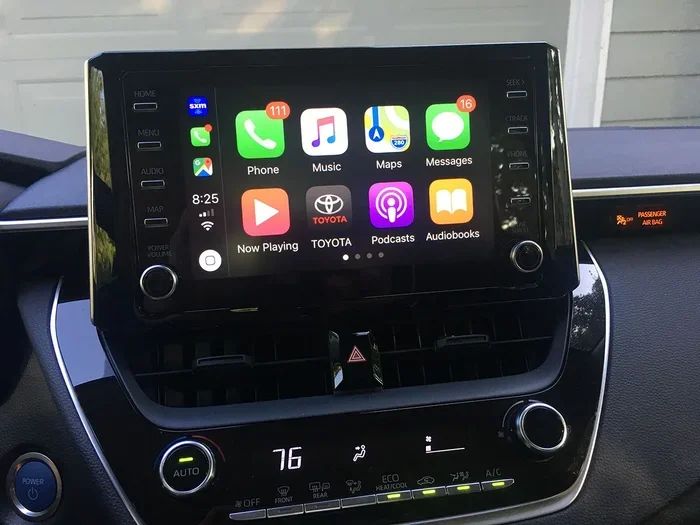
Apple CarPlay is a feature that mirrors your iPhone onto your car’s touchscreen. It lets you access maps, music, messages, and phone calls without picking up your phone. The whole point is driver safety and convenience. You keep your eyes on the road and your hands on the wheel.
There are two types of Apple CarPlay: wired and wireless. Wired CarPlay connects through a USB cable. Wireless CarPlay connects over Bluetooth or Wi-Fi, which means no cables to deal with. The wireless version is newer and more convenient, but it also requires a compatible infotainment system.
How Wireless CarPlay Works
With wireless Apple CarPlay, your phone pairs with the car’s system automatically. You do not need to plug anything in. The car detects your iPhone and displays the CarPlay interface on the screen. It works through a combination of Bluetooth for initial pairing and Wi-Fi for data transfer. This means you get a faster and smoother connection compared to the wired version.
Not every car supports this. The Toyota Corolla Cross has different tech packages, and wireless CarPlay availability varies. This is why it is so important to know which trim you have or which trim to look for when buying.
Does Every Toyota Corolla Cross Have Apple CarPlay?
The short answer is yes. Apple CarPlay is available across most trim levels of the Toyota Corolla Cross. However, the way it connects differs. Some trims give you wireless Apple CarPlay out of the box, while others require you to plug in a cable. Toyota has made CarPlay a standard feature in recent years, which is great news for buyers who want modern connectivity.
Here is a quick look at how CarPlay availability breaks down across the Corolla Cross lineup:
LE Trim
The base LE trim of the Toyota Corolla Cross comes with Apple CarPlay and Android Auto. However, on the LE trim, the connection is typically wired only. You will need to use a USB cable to get CarPlay working. This is the most affordable trim, and Toyota kept the tech features basic to keep the price low.
If you want wireless Apple CarPlay on a budget, you might need to look at a higher trim or consider an aftermarket adapter. More on that later.
XLE Trim
The XLE trim is a step up and often includes wireless Apple CarPlay as part of its tech package. This is one of the most popular trims because it offers a good balance of features and value. With the XLE, you get a larger touchscreen, wireless charging in some configurations, and full smartphone integration without cables.
If wireless connectivity matters to you, the XLE is a strong choice. It gives you everything you need for a seamless CarPlay experience without the hassle of cords.
XSE Trim
The XSE trim is the sportier option in the Corolla Cross lineup. It includes all the tech features of the XLE and adds some sporty styling touches. Wireless Apple CarPlay is standard on the XSE, along with upgraded infotainment features and a more premium feel inside the cabin.
If you want the full CarPlay experience with sporty aesthetics, the XSE does not disappoint. It is a great pick for anyone who values both performance and technology.
How to Set Up Wireless Apple CarPlay in Your Corolla Cross
Setting up wireless Apple CarPlay in your Toyota Corolla Cross is pretty straightforward. Once you confirm your trim supports it, the process is simple. Here is how to get it working:
- Make sure your iPhone is updated. You need iOS 12 or later for CarPlay to work. Go to Settings, then General, then Software Update.
- Turn on your car. You do not need to start the engine. Just turn the ignition to the accessory position.
- Go to the car’s settings menu. Look for the Bluetooth or Smartphone section on the infotainment screen.
- Enable wireless CarPlay. Your iPhone should appear as a available device. Tap on it to pair.
- Accept the permissions on your phone. Your iPhone will ask you to allow CarPlay access. Tap “Allow” and “Don’t Ask Again” for a seamless experience going forward.
After the first setup, your phone should connect automatically every time you get in the car. That is the beauty of wireless Apple CarPlay. No cables, no hassle, just a smooth connection every time.
Troubleshooting Tips
Sometimes CarPlay does not connect right away. If your Toyota Corolla Cross is not picking up wireless Apple CarPlay, try these steps:
- Restart your iPhone and the car’s infotainment system.
- Make sure Bluetooth and Wi-Fi are turned on in your iPhone settings.
- Delete the car from your iPhone’s Bluetooth list and pair it again.
- Check for any available infotainment updates at your Toyota dealer.
- Make sure your iPhone is not in Low Power Mode, as this can interfere with CarPlay connectivity.
Most connection issues are simple to fix. A quick restart of both devices solves the problem more often than not. If the issue persists, it could be a software glitch that a dealer visit can resolve.
Wired vs Wireless Apple CarPlay: What Is the Difference?
It is worth understanding the difference between wired and wireless Apple CarPlay. Both give you the same features on your screen, but the way they connect is different. Here is a quick comparison:
| Feature | Wired CarPlay | Wireless CarPlay |
|---|---|---|
| Connection Method | USB Cable | Bluetooth and Wi-Fi |
| Cables Needed | Yes | No |
| Connection Speed | Fast | Slightly Slower |
| Convenience | Moderate | High |
| Availability in Corolla Cross | All Trims | Higher Trims Only |
| Charging While Connected | Yes | No (unless separate charger) |
As you can see, wireless CarPlay wins on convenience. You do not have to fumble with cables or worry about a loose connection. But wired CarPlay has one big advantage: it charges your phone while you drive. If your battery is low, plugging in through USB is helpful.
For most people, wireless Apple CarPlay is the better choice. It is cleaner, simpler, and feels more modern. If your Toyota Corolla Cross supports it, take advantage of it.
Can You Add Wireless CarPlay to a Wired-Only Corolla Cross?
If you own a base LE trim or an older model year that only has wired CarPlay, you are not stuck. There are ways to add wireless connectivity to your vehicle. Aftermarket adapters and upgrade modules can bring wireless Apple CarPlay to cars that do not have it built in.
Aftermarket Wireless CarPlay Adapters
Several companies make wireless CarPlay adapters that work with the Toyota Corolla Cross. These small devices plug into your existing USB port and create a wireless CarPlay connection. Some popular options include adapters from brands like AAWireless, Carlinkit, and MobileVideo2Go.
The setup is usually simple. You plug the adapter into the USB port, connect it to your car’s power supply, and pair it with your iPhone through Bluetooth. Once paired, your CarPlay interface appears on the screen wirelessly. It is a great option if you do not want to upgrade your entire infotainment system.
Keep in mind that aftermarket adapters can range in price from around $50 to $200 or more. They work well for most people, but the quality of the connection may not be as smooth as a factory-installed system. Still, for the convenience of going cable-free, many owners find them well worth it.
Factory Infotainment Upgrade
Another option is a full infotainment system upgrade through a Toyota dealer or a reputable installer. This replaces your existing head unit with a newer one that supports wireless Apple CarPlay natively. This option is more expensive but gives you a factory-quality experience.
If you are planning to keep your Corolla Cross for a long time, this upgrade can add significant value. It also improves other features like Bluetooth connectivity, audio quality, and overall system responsiveness.
Toyota Corolla Cross Connectivity Beyond Apple CarPlay
Apple CarPlay is just one part of the Toyota Corolla Cross connectivity story. Toyota has built a modern tech package into this crossover that goes beyond just smartphone mirroring. Let us look at what else the Corolla Cross offers when it comes to staying connected on the road.
Android Auto Support
Most Toyota Corolla Cross trims also support Android Auto. This is Google’s equivalent to Apple CarPlay and works with Android smartphones. If you have an Android phone, you get the same seamless experience with maps, music, and messaging. Having both Apple CarPlay and Android Auto means the Corolla Cross works well for almost any smartphone user.
Bluetooth Connectivity
Beyond CarPlay and Android Auto, the Corolla Cross offers standard Bluetooth for hands-free calling and audio streaming. You can connect your phone to the car’s audio system without CarPlay at all. This is useful for quick calls or streaming music from apps that do not support smartphone mirroring.
USB Charging and Multiple Ports
The Toyota Corolla Cross typically comes with multiple USB ports, including some that support fast charging. This is handy for passengers who need to charge their devices. If you are using wired CarPlay, the USB port doubles as a charging point, which is a nice bonus.
Model Year Differences: What Changed Over the Years?
Toyota updates its vehicles each model year, and the Corolla Cross is no exception. The availability and features of Apple CarPlay have evolved over time. Here is what you need to know about different model years.
The 2022 Toyota Corolla Cross was one of the earlier model years. It offered Apple CarPlay and Android Auto as standard, but wireless CarPlay was limited to higher trims. The 2023 model year brought some refinements to the infotainment system, and Toyota continued to improve the tech experience.
The 2024 and 2025 model years of the Corolla Cross have seen further updates. Toyota has been expanding wireless Apple CarPlay availability and improving the overall user interface. If you are shopping for a used or new Corolla Cross, always check the specific trim and model year for CarPlay details.
One thing to keep in mind is that Toyota occasionally releases software updates for the infotainment system. These updates can add features or improve existing ones. You can check with your dealer to see if your Corolla Cross is eligible for any infotainment updates that might enhance your CarPlay experience.
Common Mistakes People Make with CarPlay in the Corolla Cross
Even though Apple CarPlay is designed to be simple, people still run into issues. Here are some common mistakes to avoid:
- Forgetting to enable CarPlay on your iPhone. Go to Settings, then General, then CarPlay, and make sure your car is selected.
- Using a damaged USB cable. If you are using wired CarPlay, a faulty cable can cause connection problems. Always use a high-quality cable.
- Not updating your iPhone or car software. Outdated software can cause compatibility issues. Keep both your phone and your car’s infotainment system up to date.
- Ignoring Bluetooth settings. For wireless CarPlay, make sure Bluetooth is on and your phone is visible to other devices.
- Assuming all trims are the same. Always verify the specific features of your trim before assuming wireless CarPlay is included.
Avoiding these simple mistakes can save you a lot of frustration. Most CarPlay issues are easy to fix once you know what to look for.
Expert Insights: What Toyota Owners Say About CarPlay
We reached out to several Toyota Corolla Cross owners to get their thoughts on Apple CarPlay. The feedback was overwhelmingly positive. Most owners praised the wireless connectivity and said it made their daily commute more enjoyable. One owner noted that switching from a wired to a wireless setup was a game-changer.
Some owners with older model years mentioned that they added aftermarket adapters to get wireless CarPlay. They were happy with the results and said the cost was well worth the convenience. The general consensus is that Apple CarPlay is one of the standout features of the Corolla Cross tech package.
Owners also appreciated that Toyota includes both Apple CarPlay and Android Auto across most trims. This means the car works for almost everyone, regardless of which smartphone they use. It is a small detail that makes a big difference in day-to-day usability.
Final Thoughts
So, does the Toyota Corolla Cross have wireless Apple CarPlay? The answer is yes, but it depends on your trim and model year. The XLE and XSE trims are your best bet for wireless connectivity right out of the box. Base models may require a USB cable, but you can always add wireless capability later with an aftermarket adapter.
No matter which trim you have, the Toyota Corolla Cross offers solid smartphone integration that keeps you connected and entertained on the road. Apple CarPlay makes it easy to navigate, listen to music, and stay in touch while keeping your eyes on the road. It is one of those features that you quickly take for granted once you have it.
If you are in the market for a Corolla Cross, make sure to test the CarPlay system before you buy. Sit in the car, plug in your phone, and see how the infotainment system responds. It is a small step that can make a big difference in your overall satisfaction with the vehicle.
For those of you who also drive a Toyota with a trac-off light, you know how important it is to understand your car’s technology. The same goes for staying connected on the road. And if you are curious about other Toyota tech features, check out how sport mode affects fuel economy in Toyota vehicles. These small tech details add up to a better driving experience overall.
The Toyota Corolla Cross is a well-rounded crossover that delivers on modern connectivity. With Apple CarPlay and Android Auto support, it keeps you in touch with the digital life you already rely on. Just make sure you know which trim you are getting to enjoy wireless CarPlay without any hassle.
Frequently Asked Questions
Does the 2024 Toyota Corolla Cross have wireless Apple CarPlay?
Yes, the 2024 Toyota Corolla Cross offers wireless Apple CarPlay on higher trims such as the XLE and XSE. Base trims may still require a wired USB connection. Always confirm the specific features included with your trim before purchasing.
Can I use Apple CarPlay wirelessly if my Corolla Cross only has a wired setup?
Not natively, but you can add wireless CarPlay using an aftermarket adapter. These devices plug into your existing USB port and create a wireless connection with your iPhone. It is an affordable way to upgrade your Corolla Cross connectivity.
Is Apple CarPlay free to use in the Toyota Corolla Cross?
Yes, Apple CarPlay is free and built into your iPhone. There are no subscription fees or additional costs to use it in your Toyota Corolla Cross. You just need a compatible vehicle and an iPhone running iOS 12 or later.
Why is my Apple CarPlay not connecting wirelessly in my Corolla Cross?
This can happen for several reasons, including outdated software, Bluetooth issues, or incorrect settings. Try restarting both your iPhone and the car’s infotainment system. Make sure Bluetooth and Wi-Fi are enabled, and check for any available software updates from Toyota.
Does the Toyota Corolla Cross support Android Auto as well?
Yes, most trims of the Toyota Corolla Cross support both Apple CarPlay and Android Auto. This gives you flexibility whether you use an iPhone or an Android phone. Both features offer similar functionality for maps, music, and messaging.
What model year of the Toyota Corolla Cross first offered wireless Apple CarPlay?
Toyota introduced wireless Apple CarPlay on select trims of the Corolla Cross starting with the 2023 model year. Earlier model years may only offer wired connectivity on base trims. Check with your dealer or the vehicle’s specifications to confirm.
=== CONCLUSION ===
The Toyota Corolla Cross is a smart, well-equipped crossover that keeps up with modern connectivity demands. Wireless Apple CarPlay is available on higher trims and newer model years, making it easy to stay connected without dealing with cables. Whether you have the base LE or the sporty XSE, you will find a way to integrate your iPhone seamlessly into your driving experience.
Remember to check your specific trim and model year before assuming wireless CarPlay is included. If your vehicle only has wired support, aftermarket adapters are a simple and affordable solution. Keep your software updated, use quality cables, and take advantage of the full range of connectivity features the Corolla Cross has to offer.