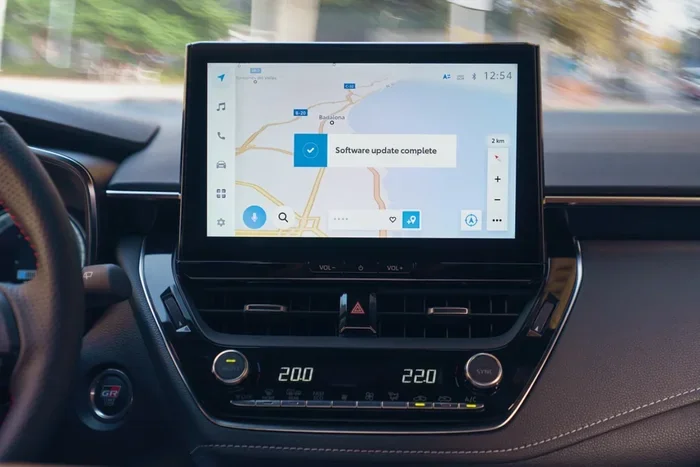
Does Toyota Come With a Navigation System Included
Does Toyota come with a navigation system? The answer depends on your Toyota model and trim level. Many newer Toyotas include a factory-installed GPS navigation system as standard or optional, while older and base models may rely on smartphone integration instead. This guide breaks down exactly what to expect across the Toyota lineup.
Key Takeaways
- Not all Toyotas come with navigation: It depends on the model, year, and trim level you choose.
- Newer Toyotas often include Toyota Entune or a built-in touchscreen: These systems offer GPS, maps, and live features.
- Apple CarPlay and Android Auto are common alternatives: Many Toyotas offer phone mirroring that replaces the need for factory navigation.
- You can add navigation aftermarket: If your Toyota doesn’t have it, you can install a third-party system easily.
- Trim level matters a lot: Higher trims like XLE, XSE, and Limited are more likely to include navigation as standard or optional.
- Map updates are important: Factory navigation systems need periodic updates to stay accurate.
- Toyota’s tech has improved dramatically: Newer models offer large touchscreens and intuitive interfaces.
📑 Table of Contents
- Does Toyota Come With a Navigation System?
- What Toyota Models Include Navigation?
- How Toyota’s Infotainment and Navigation Systems Work
- Trims and Packages: Where Navigation Comes Standard
- Apple CarPlay and Android Auto as Navigation Alternatives
- Can You Add Navigation to a Toyota That Doesn’t Have It?
- Toyota Navigation System Maintenance and Updates
- Toyota Navigation vs. Aftermarket: Which Is Better?
- Expert Tips for Getting the Most Out of Toyota Navigation
- Common Mistakes People Make With Toyota Navigation
- Final Thoughts: Does Toyota Come With Navigation?
Does Toyota Come With a Navigation System?
When you buy a new Toyota, one of the first things you want to know is whether it has a built-in navigation system. The short answer is: it depends. Some Toyota models and trims come with factory GPS navigation right out of the dealership. Others leave you relying on your phone for directions.
This is a common question among car buyers. Toyota makes everything from budget-friendly Corollas to luxury Lexus models. Each vehicle has different infotainment and technology packages. Understanding what’s included can save you time, money, and frustration down the road.
In this article, we will walk you through everything you need to know about Toyota navigation systems. We will cover which models include them, how the technology works, and what your options are if your Toyota doesn’t have one built in.
Whether you are shopping for a new Camry or looking at a used RAV4, this guide will help you make an informed decision. Let us dive into the details of Toyota’s navigation offerings.
What Toyota Models Include Navigation?
Toyota offers navigation systems across many of its models. However, the availability changes based on the model year, trim level, and package you select. Here is a breakdown of what you can expect.
Toyota Camry
The Camry is one of Toyota’s most popular sedans. On lower trims like the L and LE, you may get a basic audio system without GPS. Higher trims like the XLE and XSE often include a touchscreen infotainment system with navigation as an option or standard feature.
Toyota RAV4
The RAV4 is a best-selling SUV, and many buyers want GPS navigation for road trips and daily commutes. The RAV4 offers Toyota’s Entune infotainment system on most trims. Navigation is often available as part of a technology package on mid-level and higher trims.
Toyota Highlander
The Highlander is a three-row SUV that benefits greatly from built-in navigation. Most Higher trims come with a large touchscreen and GPS guidance. The Limited and Platinum trims often include navigation as standard equipment.
Toyota Tacoma
The Tacoma is a rugged pickup truck. Navigation is not always standard on this model. However, higher trims like the TRD Off-Road and Limited may offer a touchscreen with GPS as part of a technology upgrade.
Toyota Corolla
The Corolla is Toyota’s entry-level sedan. Base models typically do not include factory navigation. However, the SE and higher trims may offer a touchscreen display with optional GPS. Many Corolla buyers use Apple CarPlay or Android Auto as their primary navigation tool.
How Toyota’s Infotainment and Navigation Systems Work
Toyota has invested heavily in its infotainment technology over the past few years. The navigation systems are designed to be user-friendly and reliable. Here is how they work.
Toyota Entune System
Toyota Entune is the brand’s infotainment platform. It is available on most Toyota models. The system connects to your smartphone and offers a range of features including GPS navigation, weather updates, fuel pricing, and music streaming. Some versions include a built-in Wi-Fi hotspot for staying connected on the road.
The Entune system uses a touchscreen interface that is intuitive and easy to navigate. You can enter destinations by address, city, or point of interest. The system provides turn-by-turn directions with voice guidance and visual prompts on the screen.
Toyota Multimedia System
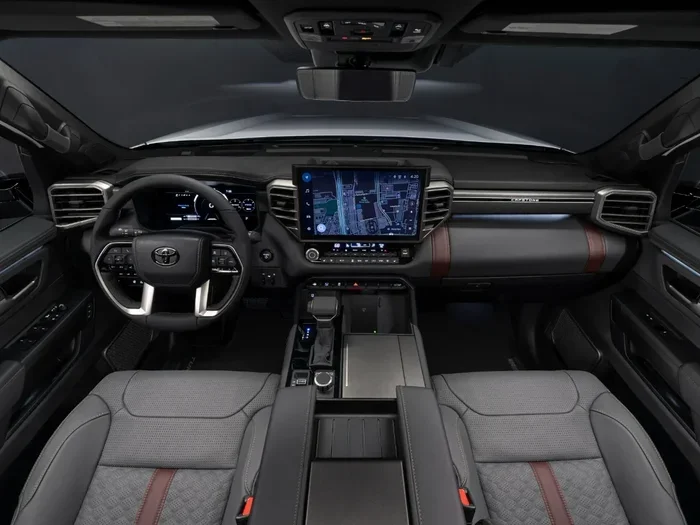
On newer Toyota models, the company has introduced an updated multimedia system. This system features larger screens, faster processing, and improved graphics. Some models now offer 12.3-inch touchscreen displays that rival luxury brands.
The newer system supports wireless Apple CarPlay and Android Auto. This means you can mirror your phone’s navigation apps directly to the car’s screen. For many drivers, this replaces the need for a dedicated factory GPS unit.
Navigation Features You Can Expect
When your Toyota includes a navigation system, you can typically expect the following features:
- Turn-by-turn GPS directions with voice prompts
- Points of interest search for restaurants, gas stations, and attractions
- Traffic updates and route rerouting
- 3D map views on higher-end systems
- Offline map storage so you do not need a data connection
- Integration with your phone for music, calls, and messaging
- Destination setting using voice commands
These features make Toyota navigation systems quite capable for most driving situations. Whether you are navigating city streets or taking a long highway trip, the system provides reliable guidance.
Trims and Packages: Where Navigation Comes Standard
Understanding Toyota’s trim levels is key to knowing if navigation is included. Toyota uses a base-trim-upgrade structure. The higher you go, the more features you get.
Base Trims
Base trims like the Toyota Corolla L or Camry L typically come with a basic audio system. These models usually do not include GPS navigation. Instead, you get a smaller display with AM/FM radio and Bluetooth connectivity.
Mid-Level Trims
Mid-level trims often offer navigation as an optional add-on or include it as part of a technology package. For example, the Toyota RAV4 XLE may offer a navigation upgrade package that includes GPS, a larger screen, and upgraded audio.
Top-Level Trims
Higher trims like the Toyota Camry XSE or RAV4 Limited often include navigation as a standard feature. These trims come with premium audio, larger touchscreens, and the full suite of Toyota’s tech features. If you want a Toyota with navigation included, looking at the top trims is your best bet.
Apple CarPlay and Android Auto as Navigation Alternatives
Many modern Toyotas offer Apple CarPlay and Android Auto compatibility. These smartphone integration systems are powerful alternatives to factory-installed navigation. They allow you to use Google Maps, Waze, Apple Maps, and other apps directly on your car’s touchscreen.
One major advantage of using phone-based navigation is that the maps update automatically. You do not need to visit a dealer for map updates. The apps always have the latest roads, traffic data, and points of interest.
If your Toyota does not have a built-in navigation system, CarPlay and Android Auto can fill that gap completely. You get real-time traffic, voice control, and familiar interfaces. For many drivers, this is actually a better option than a factory GPS system.
Just keep in mind that you will need to mount your phone somewhere visible while driving. A good phone mount keeps your device secure and the screen readable. This is a simple and affordable solution that works well with any Toyota model.
Can You Add Navigation to a Toyota That Doesn’t Have It?
Yes, you absolutely can. If your Toyota does not come with factory navigation, there are several ways to add it. Here are the most common options.
Aftermarket Navigation Units
You can install an aftermarket GPS unit from brands like Garmin or TomTom. These are portable devices that mount on your dashboard or windshield. They work independently of your car’s stock audio system.
Aftermarket units are affordable and easy to install. They do not require any wiring or permanent modifications to your vehicle. The downside is that they are not integrated into your car’s dashboard and may look out of place.
Upgrade Your Head Unit
Another option is to replace your Toyota’s stock head unit with an aftermarket touchscreen that includes built-in GPS. Many aftermarket units also support Apple CarPlay and Android Auto, giving you the best of both worlds.
This option requires professional installation. A car audio shop can swap out your old unit and wire in the new one. The cost typically ranges from $200 to $800 depending on the brand and features.
Use Your Phone with a Mount
The simplest and cheapest option is to use your smartphone with a dashboard mount. Apps like Google Maps and Waze provide excellent navigation for free. This method works with any Toyota, regardless of the model year or trim level.
Many drivers find that phone-based navigation is actually superior to factory systems. The apps are constantly updated, and you get real-time traffic data. Plus, you can use the same app at home and in the car.
Toyota Navigation System Maintenance and Updates
If your Toyota came with a factory navigation system, you need to keep it updated. Outdated maps can lead to wrong directions and missed turns. Here is how to maintain your system.
Map Updates
Toyota provides map updates for its navigation systems. These updates add new roads, changed traffic patterns, and updated points of interest. You can usually get updates at your local Toyota dealer. Some models also support over-the-air updates if equipped with Toyota’s connected services.
System Resets and Troubleshooting
Sometimes the navigation screen may freeze or glitch. A simple system reset often fixes the issue. You can usually reset the infotainment system by holding the power button for 10 to 15 seconds. If the problem persists, a visit to the dealer may be necessary.
Screen and Sensor Care
Keep your touchscreen clean with a soft microfiber cloth. Avoid harsh chemicals that can damage the screen. Also, make sure the GPS antenna on your roof (if equipped) stays clear of debris and obstructions for the best signal strength.
Toyota Navigation vs. Aftermarket: Which Is Better?
This is a question many Toyota owners ask. Let us compare the two options side by side.
| Feature | Factory Navigation | Aftermarket Navigation |
|---|---|---|
| Integration with car systems | Seamless and built-in | Varies by unit |
| Map updates | Through dealer or OTA | Built-in or app-based |
| Cost | Included in vehicle price | $100 to $800+ |
| Screen size | Matches car design | Varies widely |
| Apple CarPlay / Android Auto | Available on newer models | Available on most units |
| Ease of use | Familiar and intuitive | Depends on brand |
| Resale value impact | Positive | Minimal |
Both options have their merits. Factory navigation integrates perfectly with your Toyota’s systems and looks clean in the dashboard. Aftermarket systems offer more flexibility and often include the latest technology at a lower cost.
For most drivers, the best choice depends on budget and preference. If you want a seamless, integrated experience, factory navigation is hard to beat. If you want flexibility and the latest features, an aftermarket unit or phone-based navigation may be the better option.
Expert Tips for Getting the Most Out of Toyota Navigation
Want to make the most of your Toyota’s GPS system? Here are some expert tips that will help.
- Update your maps regularly. New roads and changes happen all the time. Keeping your maps current ensures accurate directions.
- Use voice commands. Most Toyota navigation systems support voice input. This keeps your eyes on the road and hands on the wheel.
- Save frequent destinations. Your home, work, and favorite spots can be saved for quick access. This saves time when you are in a hurry.
- Pair with your phone. Connect your phone via Bluetooth for hands-free calling and music streaming while using navigation.
- Check for software updates. Toyota occasionally releases infotainment software updates. These can improve performance and add new features.
- Use the reroute feature. If you miss a turn, the system will automatically recalculate your route. Trust it and follow the new directions.
These simple tips will help you navigate with confidence whether you are in a new city or driving a familiar route. The more you use your Toyota navigation system, the more you will appreciate its capabilities.
Common Mistakes People Make With Toyota Navigation
Avoid these common mistakes to get the best experience from your Toyota’s GPS system.
- Ignoring map updates. Outdated maps lead to wrong directions. Always keep your system current.
- Relying solely on the factory GPS. Phone apps like Google Maps often have more real-time traffic data. Use both for the best results.
- Not setting destinations before driving. Enter your destination while parked. This keeps you focused on the road.
- Overlooking the power button. A frozen screen can often be fixed with a simple reset. Do not assume the system is broken.
- Choosing the wrong route. Always review the suggested route before you start driving. Sometimes the GPS picks a less efficient path.
By avoiding these mistakes, you will have a smoother and more reliable navigation experience in your Toyota.
Final Thoughts: Does Toyota Come With Navigation?
So, does Toyota come with a navigation system included? The answer is: it depends on your model, trim, and year. Many newer Toyotas offer factory GPS navigation as standard or optional equipment. Base models may not include it, but higher trims almost always do.
Even if your Toyota does not have a built-in system, you have excellent alternatives. Apple CarPlay, Android Auto, and phone-based navigation apps provide reliable and up-to-date guidance at no extra cost. And if you prefer a dedicated screen, aftermarket options are plentiful and affordable.
When shopping for a Toyota, always check the infotainment specifications for the specific trim you are considering. Do not be afraid to ask the dealer about navigation features and what is included. Being informed before you buy will save you from disappointment later.
Toyota has made great strides in its infotainment and technology offerings. Whether you choose factory navigation or a smartphone-based solution, you will have the tools you need to find your way. Drive confidently and enjoy the journey.
Frequently Asked Questions
Do all Toyota models come with a navigation system?
No, not all Toyota models include navigation. Base trims on models like the Corolla and Camry may not have it. Navigation is more commonly found on mid-level and higher trims. Always check the specific trim before purchasing.
Can I add navigation to my Toyota after purchase?
Yes, you can add navigation after buying your Toyota. Options include aftermarket GPS units, head unit upgrades, and phone-based navigation apps. Each option has different costs and levels of integration with your car.
How often do Toyota navigation maps need updating?
Toyota recommends updating your maps at least once a year. New roads and traffic changes happen frequently. You can get updates at a Toyota dealer or through over-the-air updates if your model supports connected services.
Is Apple CarPlay better than Toyota’s factory navigation?
Many drivers prefer Apple CarPlay because it uses familiar apps and updates automatically. However, factory navigation integrates more seamlessly with the car’s systems. The best choice depends on your personal preferences and driving habits.
Does Toyota’s navigation work without an internet connection?
Yes, Toyota’s factory navigation systems store maps locally on the device. This means you can use GPS and get directions even without a data connection. However, real-time traffic features may require a connection.
Which Toyota SUV has the best navigation system?
The Toyota Highlander and Toyota 4Runner are often praised for their navigation systems. Higher trims come with large touchscreens, 3D maps, and responsive guidance. The Toyota RAV4 also offers excellent navigation on its mid-level and upper trims.
=== CONCLUSION ===
To answer the question does Toyota come with a navigation system, the truth is it varies across the lineup. Many Toyota models offer factory-installed GPS navigation especially on higher trims and newer model years. If your specific Toyota does not include it, you have plenty of alternatives including smartphone integration, aftermarket units, and phone mounts. The key is to know what your specific model and trim includes before you buy. With the right navigation setup, every Toyota can take you exactly where you need to go with confidence and ease.
Take the time to explore your options and choose the navigation solution that fits your lifestyle and budget. Whether you prefer a built-in system or rely on your phone, staying informed is the best way to enjoy your Toyota to the fullest.