Does Toyota Have Built-In Wi-Fi for Your Ride
Yes, Toyota offers built-in Wi-Fi on many of its newer models through the Toyota Connected Services platform. You can get a Wi-Fi hotspot in your Toyota using the Entune system or the newer Toyota app, keeping everyone connected on the road. However, not all Toyota models include Wi-Fi, and you will need a data plan to keep it running.
Toyota vehicles have come a long way in recent years. The days of driving in silence with no connection are fading fast. Today, many Toyota owners want to know one thing: does Toyota have built-in Wi-Fi? The short answer is yes, but there is more to the story than a simple yes or no.
If you are shopping for a new Toyota or already own one, understanding the Wi-Fi options can make a big difference. Whether you need internet for the kids in the back seat or want to stream music on a long road trip, built-in Wi-Fi is a game changer. Let us break down everything you need to know about Toyota Wi-Fi and connected car features.
Toyota has invested heavily in connected car technology. The company wants its vehicles to feel more like smart devices on wheels. From the Toyota Entune infotainment system to the newer Toyota app, there are multiple ways to get online. But the details matter. Not every Toyota model, trim, or year includes Wi-Fi. And even when it does, the experience can vary based on your plan, location, and usage.
In this guide, we will cover exactly which Toyota models offer Wi-Fi, how the system works, what plans are available, and what alternatives you have if your Toyota does not come with built-in connectivity. By the end, you will have a clear picture of what to expect.
Key Takeaways
- Toyota Wi-Fi is available: Many newer Toyota models come with a built-in Wi-Fi hotspot through the Entune system or Toyota Connected Services.
- Not every model has it: Wi-Fi availability depends on the trim level, model year, and specific Toyota model you choose.
- You need a data plan: Toyota offers both free and paid Wi-Fi plans, and you can also use third-party hotspot devices.
- Hybrid models benefit too: Even if you use regular gas in a hybrid, you can still enjoy connected features.
- Speed and coverage vary: Wi-Fi speeds in Toyota depend on your cellular connection and location, similar to any mobile hotspot.
📑 Table of Contents
- What Is Toyota Built-In Wi-Fi?
- Toyota Entune vs. Toyota Connected Services
- Wi-Fi Plans and Pricing
- Wi-Fi Speed and Performance
- Benefits of Toyota Built-In Wi-Fi
- Common Issues and How to Fix Them
- Toyota Wi-Fi vs. Aftermarket Hotspots
- Does Toyota Wi-Fi Affect Fuel Economy?
- How to Set Up Toyota Wi-Fi
- Future of Toyota Wi-Fi and Connected Car Technology
- Final Thoughts
What Is Toyota Built-In Wi-Fi?
How Toyota Wi-Fi Works
Toyota built-in Wi-Fi works like a mobile hotspot inside your vehicle. A small device built into the car connects to cellular networks and broadcasts a Wi-Fi signal. Your phones, tablets, and laptops can then connect to this signal just like they would connect to a home router.
The system relies on a built-in modem and a SIM card inside the vehicle. This modem connects to cellular towers just like your phone does. The Wi-Fi hotspot then shares that connection with everyone inside the car. The signal strength depends on your location, the carrier network in your area, and the hardware in your Toyota.
Toyota uses two main systems for connectivity. The older system is called Toyota Entune. The newer system is the Toyota Connected Services platform. Both systems offer Wi-Fi, but the newer platform has better features and more reliable performance. If you are buying a used Toyota, check which system it has.
Which Toyota Models Offer Built-In Wi-Fi?
Not every Toyota model comes with Wi-Fi out of the box. The availability depends on the model, the trim level, and the model year. Here is a general breakdown of Toyota models that commonly include built-in Wi-Fi:
- Toyota Camry: Available on higher trims, especially XSE and XLE versions from 2019 onward.
- Toyota RAV4: Most trims from 2020 and newer include Wi-Fi connectivity.
- Toyota Highlander: Wi-Fi is standard on many trims, making it great for families.
- Toyota Tacoma: Available on select trims, especially the higher-end TRD and Limited editions.
- Toyota Sienna: This minivan often includes Wi-Fi as a standard feature on most trims.
- Toyota 4Runner: Available on newer models with the upgraded infotainment system.
- Toyota Corolla: Some newer trims include Wi-Fi, but it is not always standard.
- Toyota Avalon: Higher trims typically include the Wi-Fi hotspot feature.
Always check with the dealer or the vehicle specification sheet before buying. Wi-Fi availability can change between model years, and a trim that had it last year might not have it this year.
Toyota Entune vs. Toyota Connected Services
Toyota Entune System
The Toyota Entune system was Toyota’s first major push into connected car technology. It launched in the early 2010s and offered basic connectivity features. Entune allowed drivers to access apps, get news updates, and stream music through their phone connection. The early versions did not always include a built-in Wi-Fi hotspot, and many relied on a phone tethering connection instead.
Later versions of Entune added a built-in Wi-Fi feature. However, the system was limited in speed and functionality compared to newer platforms. If you have an older Toyota with Entune, check whether your specific package includes a Wi-Fi hotspot. Some Entune packages only offer app-based connectivity through your phone.
Toyota Connected Services Platform
The Toyota Connected Services platform is the newer and more advanced system. It replaced Entune in many models starting around 2019 and 2020. This platform offers a true built-in Wi-Fi hotspot with better speeds and more reliable connectivity.
Toyota Connected Services includes features like remote start, vehicle diagnostics, and real-time navigation. The Wi-Fi hotspot is a core part of this package. You can connect multiple devices at once, and the system supports streaming, browsing, and video calls. The platform also integrates with the Toyota app, giving you control over your car’s connectivity from your phone.
If you are comparing older Toyotas with newer ones, the Connected Services platform is a significant upgrade. It makes the connected car experience much smoother and more practical for everyday use.
Wi-Fi Plans and Pricing
Free Wi-Fi Plans from Toyota
Toyota offers some free Wi-Fi options, but they are limited. Many new Toyota vehicles come with a complimentary Wi-Fi trial period. This trial usually lasts for one year from the date of purchase or activation. During this period, you can use the built-in hotspot without paying anything extra.
After the trial ends, you will need to purchase a data plan to keep the Wi-Fi running. Toyota has partnered with major carriers like AT&T to provide these plans. The free trial is a nice perk, but it is not a permanent solution. You should plan ahead for the cost of keeping your Toyota Wi-Fi active.
Paid Wi-Fi Plans
Toyota offers several paid data plans for its built-in Wi-Fi. These plans work similarly to a phone data plan. You pay a monthly or annual fee, and Toyota provides a set amount of data each month. Here are the typical plan options:
- Basic Plan: A smaller data package for light browsing and messaging. Usually the most affordable option.
- Standard Plan: A mid-range data package suitable for streaming music and browsing for multiple users.
- Premium Plan: A larger data package for heavy users, families, and long road trips with lots of streaming.
Pricing varies by region and carrier. Toyota typically charges between $10 and $50 per month depending on the plan you choose. Some plans also offer annual payment options at a discounted rate. You can manage your plan through the Toyota app or by contacting Toyota Connected Services.
Third-Party Hotspot Options
If you do not want to pay for Toyota’s built-in Wi-Fi plans, you have alternatives. You can use a third-party mobile hotspot device, like a dedicated MiFi unit. These devices create their own Wi-Fi network using a separate SIM card and data plan.
Third-party hotspots work well in Toyota vehicles because they are portable. You can use them in your car, take them out when you park, and share them with other devices. The downside is that you need to manage a separate device, charge it, and keep track of another data plan.
Some Toyota owners also use their phone’s built-in hotspot feature. This works but drains your phone battery and uses your phone data plan. It is a budget-friendly option for short trips, but not ideal for long road trips or families with multiple devices.
Wi-Fi Speed and Performance
What Speed Can You Expect?
The Wi-Fi speed in your Toyota depends on several factors. First, it depends on the cellular network in your area. If you have strong 4G LTE coverage, you can expect decent speeds for browsing and streaming. In areas with 5G coverage, speeds can be even better.
Typical Toyota Wi-Fi speeds range from 5 to 50 Mbps. This is enough for most activities like browsing the web, checking email, streaming music, and even video calls. However, if multiple devices are connected at the same time, speeds will drop. A family of five streaming different shows will notice slower performance.
Toyota Wi-Fi is not designed for heavy gaming or large file downloads. It is meant for everyday connectivity on the go. Think of it as a convenience feature, not a replacement for your home internet.
Factors That Affect Wi-Fi Performance
Several things can impact your Toyota Wi-Fi performance:
- Cellular coverage: Weak cell signals mean weak Wi-Fi. Rural areas and tunnels are common problem spots.
- Number of connected devices: More devices mean slower speeds for each device.
- Data plan limits: Some plans throttle speeds after you hit a data cap.
- Weather conditions: Heavy rain or storms can affect cellular signals.
- Vehicle location: Being in a parking garage or between tall buildings can weaken your signal.
Understanding these factors helps set realistic expectations. Toyota Wi-Fi works best in areas with good cellular coverage and when you keep the number of connected devices reasonable.
Benefits of Toyota Built-In Wi-Fi
Staying Connected on the Road
The biggest benefit of Toyota built-in Wi-Fi is staying connected. Long road trips can be boring, especially for kids in the back seat. With Wi-Fi, everyone can browse, play games, watch videos, and stay entertained. This alone makes the feature worth it for many families.
Beyond entertainment, Wi-Fi keeps you connected for practical reasons. You can check traffic updates in real time, get weather alerts, and use navigation apps without relying on your phone. This is especially helpful when driving in unfamiliar areas.
Safety and Emergency Features
Toyota Connected Services include safety features that rely on Wi-Fi connectivity. The system can send emergency alerts, provide roadside assistance, and share your location in case of an accident. These features work best when the Wi-Fi hotspot is active and connected.
Some Toyota models also support over-the-air software updates through the Wi-Fi connection. This means your car’s software stays up to date without needing a visit to the dealer. It is a small but valuable convenience that keeps your vehicle running smoothly.
Productivity on the Go
If you work remotely or travel frequently, Toyota Wi-Fi can boost your productivity. You can answer emails, join video calls, and access cloud-based tools from your vehicle. This is especially useful if you spend a lot of time commuting or waiting in parking lots.
Just remember that Wi-Fi in a moving vehicle is not a substitute for a stable home or office connection. Use it for light tasks and quick check-ins, not for intensive work projects.
Common Issues and How to Fix Them
Wi-Fi Not Turning On
If your Toyota Wi-Fi does not turn on, the first thing to check is your data plan. Make sure your plan is active and not expired. You can check this through the Toyota app or by contacting Toyota Connected Services.
Next, try restarting the infotainment system. Turn it off, wait 30 seconds, and turn it back on. This often fixes minor software glitches that prevent the Wi-Fi from starting. If the problem persists, check for software updates in the system settings.
Slow Wi-Fi Speeds
Slow speeds are a common complaint. The most common cause is a weak cellular signal. Try moving to a different location or pulling over to a spot with better coverage. Reducing the number of connected devices can also help improve speed.
If your data plan has a speed cap, you may be throttled after using a certain amount of data. Check your plan details and consider upgrading to a higher tier if you regularly experience slow speeds.
Devices Not Connecting
If your devices cannot connect to the Toyota Wi-Fi, check the network name and password. The password is usually printed in the owner’s manual or displayed on the infotainment screen. Make sure you are entering it correctly.
Also, check the maximum number of devices allowed on the network. Most Toyota Wi-Fi hotspots support between 5 and 7 devices at a time. If you have exceeded this limit, disconnect an unused device and try again.
Toyota Wi-Fi vs. Aftermarket Hotspots
When comparing Toyota Wi-Fi to aftermarket hotspot solutions, there are pros and cons to both. Toyota’s built-in system is convenient and integrated into the vehicle’s infotainment. It looks clean, works seamlessly, and does not require extra hardware.
Aftermarket hotspots, on the other hand, offer more flexibility. You are not tied to Toyota’s data plans, and you can use the device outside the car. Brands like Verizon, T-Mobile, and AT&T offer portable hotspot devices that work well in vehicles.
The trade-off is convenience versus flexibility. Toyota’s system is easier to use but locks you into their plans. Aftermarket hotspots give you more choices but require extra setup and management. Choose the option that fits your needs and budget best.
Does Toyota Wi-Fi Affect Fuel Economy?
Some drivers wonder if running a Wi-Fi hotspot in their car affects fuel economy. The answer is yes, but only slightly. The Wi-Fi modem in your Toyota uses a small amount of electricity. This power comes from the vehicle’s electrical system, which is powered by the engine.
The impact on fuel economy is minimal. Most drivers will not notice any difference in miles per gallon. However, if you run the Wi-Fi hotspot for hours every day, the small extra electrical load can add up over time. It is not something to worry about in normal use.
If you are concerned about fuel economy, you can always turn off the Wi-Fi hotspot when you are not using it. This simple step can save a tiny bit of fuel and extend the life of your vehicle’s battery.
For Toyota hybrid owners, the story is similar. Even if you can put regular gas in a hybrid and still enjoy good fuel economy, the Wi-Fi hotspot draws a small amount of power from the hybrid battery system. The impact is negligible in most cases.
Toyota has designed its Wi-Fi system to be energy efficient. The modem uses low power when idle and ramps up only when devices are connected. This thoughtful design minimizes the effect on your vehicle’s overall performance and fuel efficiency.
How to Set Up Toyota Wi-Fi
Setting up Wi-Fi in your Toyota is straightforward. Here is a step-by-step guide:
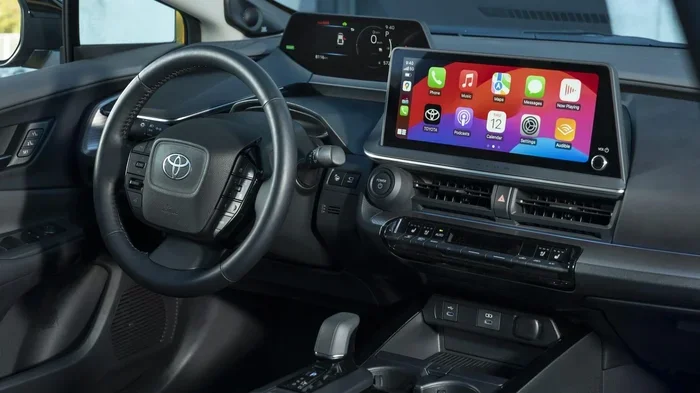
- Turn on the infotainment system: Start your Toyota and press the power button on the touchscreen.
- Navigate to Settings: Look for the Settings icon on the home screen and tap it.
- Select Wi-Fi or Network: Find the Wi-Fi or Network settings menu in the system.
- Enable the Hotspot: Toggle the Wi-Fi hotspot feature to On.
- Set a password: Create a password for your network if one is not already set.
- Connect your devices: On your phone or tablet, search for the Toyota Wi-Fi network and enter the password.
- Confirm connection: Once connected, you should see a Wi-Fi icon on your device and a confirmation on the Toyota screen.
That is it. Your Toyota Wi-Fi is now active and ready to use. If you run into any issues, refer to your owner’s manual or contact Toyota customer support for help.
Future of Toyota Wi-Fi and Connected Car Technology
Toyota continues to invest in connected car technology. The company is working on faster Wi-Fi speeds, better coverage, and more seamless integration with smartphones. Future Toyota models may offer 5G connectivity, giving drivers even faster and more reliable internet on the road.
Toyota is also exploring over-the-air updates that can add new features to your car without a dealer visit. This means your Toyota’s Wi-Fi capabilities could improve over time, even in older models. The connected car experience is only going to get better from here.
As more cars become connected, the demand for reliable in-vehicle Wi-Fi will only grow. Toyota is positioned well to lead this space with its existing infrastructure and partnerships with major carriers. If you value connectivity in your vehicle, Toyota is a solid choice for the future.
Final Thoughts
So, does Toyota have built-in Wi-Fi? Yes, it does on many models, and it is a fantastic feature for staying connected on the road. Whether you are commuting to work or driving across the country, Toyota Wi-Fi keeps you and your passengers online and entertained.
The key is to understand what you are getting. Check which models and trims include Wi-Fi, review the available plans, and set realistic expectations for speed and coverage. With the right setup, Toyota built-in Wi-Fi can make every drive more enjoyable and productive.
Take advantage of the free trial period, explore your plan options, and enjoy the benefits of a connected Toyota. The road ahead is brighter when you stay connected.
Frequently Asked Questions
Does every Toyota model have built-in Wi-Fi?
No, not every Toyota model includes built-in Wi-Fi. The feature is typically available on higher trims and newer model years. Models like the RAV4, Highlander, and Sienna are more likely to include Wi-Fi, but you should always check the specific trim and year before buying.
How much does Toyota Wi-Fi cost per month?
Toyota Wi-Fi plans typically range from $10 to $50 per month depending on the data package you choose. New Toyota vehicles often come with a free one-year trial, after which you will need to purchase a plan to keep the service active.
Can I use my phone as a hotspot instead of Toyota’s built-in Wi-Fi?
Yes, you can use your phone’s hotspot feature as an alternative. It is free if you have enough data on your phone plan, but it drains your phone battery and may not be as convenient as the built-in system for long trips.
How many devices can connect to Toyota Wi-Fi at once?
Most Toyota Wi-Fi hotspots support between 5 and 7 devices at the same time. This is usually enough for a family, but connecting too many devices can slow down the overall speed.
Does Toyota Wi-Fi work in all areas?
Toyota Wi-Fi depends on cellular network coverage. It works well in areas with strong 4G LTE or 5G signals but may be slow or unavailable in rural areas, tunnels, or parking garages with poor coverage.
Can I use Toyota Wi-Fi for streaming video?
Yes, you can stream video on Toyota Wi-Fi, but the experience depends on your data plan and signal strength. For the best results, use the Wi-Fi on Wi-Fi and connected car and limit the number of connected devices while streaming.