Can I Start My Highlander With My Phone And Save Time
Yes, you can start your Toyota Highlander with your phone. Using the Toyota app and keyless entry technology, your smartphone becomes a powerful tool for starting your Highlander remotely. This guide covers everything you need to know about phone-based car starting and how it can save you precious time every single day.
The idea of starting your Highlander with your phone might sound like something from a futuristic movie. But it is very real, very practical, and available right now on most Toyota Highlander models. Toyota has built smartphone integration into the Highlander so that your mobile device can act as a digital car key. This means you can turn on your engine, set the temperature, and even check your fuel level without ever touching a physical key.
The system relies on Toyota remote connect services and a stable connection between your phone and your vehicle. When you send a start command from your Toyota mobile app, the signal travels securely to your Highlander’s vehicle starting system. The car then fires up and is ready for you when you walk out the door. It is one of those small conveniences that completely changes your daily routine once you get used to it.
This is different from using a traditional car key fob. With a wireless key fob, you need to be within a certain range of the vehicle. But with phone-based ignition, you can start your car from much farther away. Think about those cold winter mornings when you want your car warmed up before you step outside. Or picture a hot summer day when you want the air conditioning running before you get in. That is the kind of convenience we are talking about here.
Many people also wonder about car starting without key methods. Starting your Highlander with your phone is one of the most seamless ways to do this. It combines the security of a Toyota Smart Key system with the convenience of your everyday smartphone. You do not need to fumble with buttons or worry about leaving your key fob behind. Everything you need is already in your pocket.
Key Takeaways
- You Can Start Your Highlander With Your Phone: The Toyota app and keyless entry technology allow you to start your vehicle remotely using your smartphone.
- Setup Is Simple: Pairing your phone with your Highlander takes just a few minutes through the Toyota mobile app and Bluetooth connection.
- Remote Start Saves Time: Warming up or cooling down your car before you get in is one of the biggest daily benefits of phone-based car starting.
- Security Is Built In: Phone-based starting uses encrypted signals and multi-layer authentication to keep your vehicle safe at all times.
- It Works With Other Smart Features: Starting your car with your phone connects to a broader ecosystem of smartphone integration tools in the Highlander.
- Backup Options Exist: You can always use your physical car key fob if your phone dies or you lose it.
📑 Table of Contents
- How Phone-Based Starting Works on the Toyota Highlander
- Setting Up Your Phone to Start Your Highlander
- Benefits of Starting Your Highlander With Your Phone
- Troubleshooting Common Issues
- Is Starting Your Highlander With Your Phone Safe and Secure
- Tips to Get the Most Out of Phone-Based Starting
- Conclusion
How Phone-Based Starting Works on the Toyota Highlander
The technology behind starting your Highlander with your phone is more straightforward than you might think. Toyota uses a combination of smartphone car starter technology and Highlander technology features to make this work seamlessly. The Toyota app communicates with your car through a secure cloud connection. This is called Toyota connected services. Your phone sends a command, the cloud relays it to your car, and your Highlander responds within seconds.
The process uses encrypted authentication. This means your mobile device car control is protected from unauthorized access. Toyota has built multiple layers of security into the system. So you can feel confident that your car is safe every time you use your phone to start it. The encryption used is similar to what banks use for online transactions. That should give you peace of mind.
What Happens When You Press Start in the App
When you tap the start button in the Toyota app, here is what happens behind the scenes. First, the app sends an encrypted request to Toyota’s cloud servers. The servers verify your identity and check that your vehicle is in a safe state to start. Then the command is relayed to your Highlander’s onboard system. The engine turns over, the climate control activates, and your vehicle is ready. All of this happens in under 30 seconds.
The system also checks that the car is in park and that all doors are locked before allowing a remote start. These safety measures are built in by design. They prevent accidents and unauthorized use. If any condition is not met, the app will notify you with a clear message explaining what needs to be fixed.
If you are curious about how this compares to traditional key-based methods, you might want to read about Can You Start A Keyless Car With A Key to understand the broader landscape of keyless vehicle access and how phone-based systems fit in.
Setting Up Your Phone to Start Your Highlander
Getting your phone ready to start your Highlander is straightforward. You do not need to be a tech expert. Toyota designed the setup process to be simple and user-friendly. Here is what you need to do step by step.
First, make sure your Highlander supports Toyota remote connect. Most newer Highlander models come with this feature built in. You can confirm by checking your owner’s manual or visiting the Toyota website for your specific model year. If your vehicle was manufactured after 2017, there is a very good chance it has this capability.
Next, download the Toyota app on your smartphone. The app is available for both iPhone and Android devices. Once installed, create your account and follow the on-screen prompts to link your vehicle. You will need your Vehicle Identification Number and some basic information about your Highlander. The entire process usually takes less than ten minutes.
Connecting Your Phone to the Car
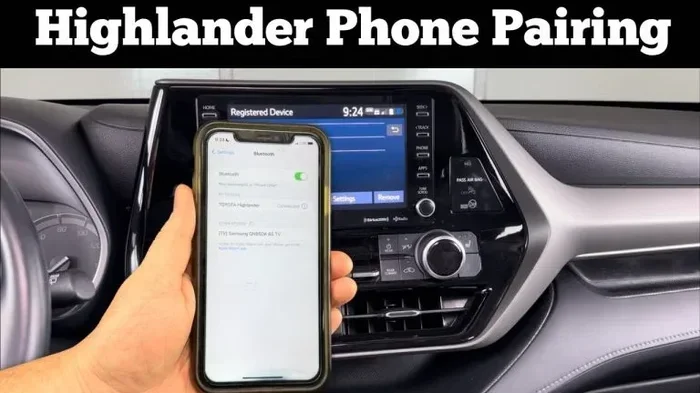
After you have the app set up, you need to pair your phone with your Highlander. This involves a Bluetooth connection and a one-time authentication process. The app will walk you through each step clearly. It is similar to how you would sync your phone to your car system for other features like music and navigation. The pairing process is the same whether you are using an iPhone or an Android device.
Once paired, you can test the remote start feature right away. Open the app, select your vehicle, and choose the start option. Your Highlander should respond within a few seconds. If it does not, check your internet connection and try again. A stable connection is essential for the feature to work properly.
Quick Tips for a Smooth Setup
- Make sure your phone has a stable internet connection during setup.
- Keep your vehicle in park when using the remote start feature.
- Update the Toyota app regularly to get the latest security patches.
- Set up a strong password for your Toyota account to protect your vehicle.
- Enable two-factor authentication if available for extra security.
- Make sure your phone’s location services are turned on for the app to work correctly.
- Restart your phone and your car’s infotainment system if you experience connection issues.
Many owners also enjoy other smart features that come with the Highlander. For instance, if you are interested in how your phone connects to other car systems, check out our guide on How Do I Get My Garage Door Opener To Work In My Car for tips on integrating even more smart features into your daily drive.
Benefits of Starting Your Highlander With Your Phone
There are many real-world benefits to using your phone as a smartphone car starter. Let us break them down so you can see exactly why this feature is worth using every single day.
Save Time Every Morning
Imagine waking up on a freezing winter morning. Instead of standing outside waiting for your car to warm up, you start it from bed. By the time you walk to the garage, your Highlander is already heated. This alone can save you five to ten minutes every single day. Over a year, that adds up to hours of your time back. It is a small convenience that compounds into a significant quality-of-life improvement.
In the summer, the same concept works in reverse. You can start your car and turn on the air conditioning before you even leave the house. You walk into a cool, comfortable vehicle instead of sitting in a hot car for ten minutes while the AC struggles to cool down the interior. During heat waves, this feature is an absolute lifesaver.
Improved Vehicle Health
Starting your Highlander remotely allows the engine to warm up properly before you drive. This is especially important in cold weather. A properly warmed-up engine runs more efficiently and experiences less wear over time. Your vehicle starting system benefits from this gentle warm-up routine. The oil circulates better, the transmission fluid warms up, and all components operate more smoothly from the moment you start driving.
Enhanced Security
When you use your phone to start your car, the system keeps your Highlander locked until you physically enter the vehicle. This means you can warm up your car in the driveway without worrying about someone hopping in. The phone as key system adds an extra layer of protection compared to leaving your car running with the keys inside. Your vehicle stays secure while still giving you the comfort of a pre-conditioned interior.
Comparison: Traditional Key Fob vs Phone-Based Starting
| Feature | Traditional Key Fob | Phone-Based Starting |
|---|---|---|
| Range | Limited (near the vehicle) | Extended (from anywhere with internet) |
| Warm-Up Control | Must be near the car | Start from anywhere |
| Security | Standard encryption | Multi-layer encrypted authentication |
| Convenience | Good | Excellent |
| Setup Required | Minimal | App download and pairing |
| Works Without Key Fob | No | Yes |
| Climate Control | Manual only after entry | Pre-set before you arrive |
| Battery Dependency | Key fob battery | Phone battery and car battery |
As you can see, phone-based ignition offers clear advantages in almost every category. The only small trade-off is the initial setup time, which is a one-time effort. After that, the convenience is hard to beat.
Troubleshooting Common Issues
Like any technology, starting your Highlander with your phone can sometimes hit a snag. Most issues are easy to fix. Here are the most common problems and how to solve them quickly.
Phone Not Connecting to the Car
If your phone cannot connect to your Highlander, the first thing to check is your internet connection. Both your phone and your car need a stable data or Wi-Fi connection. Try toggling your phone’s Wi-Fi or mobile data off and back on. Sometimes a simple refresh is all it takes to re-establish the connection.
If that does not work, try refreshing your car’s display. You can learn how to refresh your display to clear any temporary glitches in the system. A quick display refresh often resolves connectivity issues without any further troubleshooting needed.
Remote Start Not Responding
If you send a start command but nothing happens, check a few things first. Make sure your Highlander is in park. Verify that your phone is linked to the correct vehicle in the app. And confirm that your Toyota account is active and in good standing.
Sometimes the issue is with the car’s battery. If your Highlander battery is low, the remote start feature may not engage. In that case, you may need to jump-start the vehicle first or replace the battery. Keeping your car battery healthy is essential for all remote features to work correctly.
Common Mistakes to Avoid
- Forgetting to keep your phone’s app updated to the latest version.
- Leaving your car in gear instead of park when attempting a remote start.
- Ignoring low battery warnings on your phone, which can disconnect you from your vehicle.
- Not setting up a backup method (like your physical key fob) in case your phone dies.
- Assuming the feature works without an active internet connection on either end.
- Trying to start the car while it is still in drive or reverse.
- Forgetting that the remote start timer will shut off the engine after a set period if you do not get in.
One thing many people do not realize is that your phone needs to be authenticated each time you use the remote start feature. If you have not used the app in a while, you may need to log back in. This is a security feature, not a bug. It is there to protect your vehicle from unauthorized access.
Is Starting Your Highlander With Your Phone Safe and Secure
Security is one of the top concerns for any car owner using mobile device car control. The good news is Toyota has taken extensive measures to protect your vehicle. You should feel confident using this feature every day.
Every command sent through the Toyota app is encrypted. This means hackers cannot intercept your start signal and gain access to your car. Toyota uses the same level of encryption that banks use for online transactions. So you can trust that your Highlander smart key system is well-protected around the clock.
What Happens If You Lose Your Phone
If you lose your phone or it gets stolen, you have options. You can log into your Toyota account from another device and remotely disable the phone’s access to your vehicle. You can also use your physical car key fob or wireless key fob to start the car as a backup. This is why it is always smart to keep your key fob accessible even if you rely heavily on phone-based starting.
Expert Insight
According to Toyota’s engineering team, the phone-as-a-key system is designed with multiple fail-safes. The car will not start if the authentication fails. And the vehicle stays locked until the authorized user physically enters. This layered approach means you get convenience without sacrificing safety. Toyota has tested these systems extensively to ensure they meet the highest safety standards.
Some owners worry about whether starting their car without a key is legal or safe. Rest assured, Toyota designed this feature specifically for their vehicles. It is fully supported by the manufacturer and covered under your warranty. There is no risk of damaging your vehicle starting system by using the app instead of the key fob. It is a factory-approved feature that works exactly as intended.
Tips to Get the Most Out of Phone-Based Starting
Once you have your Highlander set up for phone-based starting, there are a few habits that will make the experience even better. These tips will help you maximize the value of this feature.
Use Scheduled Start Features
The Toyota app allows you to set a schedule for your remote start. You can program your Highlander to start every weekday at 7:00 AM. This is perfect for people with consistent morning routines. You wake up to a warm car in winter and a cool car in summer without ever touching your phone. It is the ultimate hands-free convenience.
Pair With Other Smart Features
Phone-based starting works best when combined with other smartphone integration features. For example, you can use the app to check your fuel level, lock your doors, and honk the horn to find your car in a parking lot. All of these features work together to give you full mobile device car control from your pocket. The more you use the app, the more you will appreciate how connected your Highlander really is.
Keep Your App and Car Software Updated
Toyota regularly releases updates that improve the app’s performance and security. Make it a habit to check for updates once a month. An up-to-date app ensures your digital car key works reliably every time you need it. Updates also add new features over time, so staying current means you always have access to the latest improvements.
Know Your Range and Limitations
While phone-based starting offers extended range, it does have limits. You need an active internet connection on both your phone and your car. If you are in an area with poor cellular coverage, the feature may not work. Always keep your physical key fob handy as a backup. Understanding these limitations helps you use the feature more effectively and avoid frustration.
Starting your Highlander with your phone is a game-changer for daily convenience. Once you get used to it, you will wonder how you ever managed without it. It is one of those features that makes you appreciate how far Highlander technology has come. Toyota continues to innovate, and phone-based starting is just the beginning of what smart connectivity can offer.
Conclusion
Starting your Toyota Highlander with your phone is not just a cool tech feature. It is a practical, time-saving tool that fits seamlessly into your daily routine. From warming up your car on cold mornings to cooling it down in the summer heat, the benefits are real and immediate. You save time, improve your vehicle’s health, and add an extra layer of security every single day.
The setup process is simple, the security is robust, and the convenience is unmatched. Whether you are a tech enthusiast or someone who just wants to save a few minutes every morning, phone-based car starting delivers on every promise. Toyota has made it easy for Highlander owners to embrace the future of car starting without key technology.
Embrace the convenience of modern automotive technology. Your Highlander is ready. Your phone is ready. All you need to do is take the first step and set it up today. Once you experience the difference, you will never go back to the old way of starting your car.
Frequently Asked Questions
Can I Start My Highlander With My Phone If the Battery Is Dead?
No, you cannot start your Highlander remotely if the car battery is completely dead. The remote start feature requires the vehicle’s battery to have enough charge to receive and process the command. If your car battery is frequently dying, it may be time to replace it or check the charging system.
Do I Need a Special App to Start My Highlander With My Phone?
Yes, you need the official Toyota app, which is available for free on both iPhone and Android. The app connects to your Highlander through Toyota connected services and allows you to use features like remote start, lock and unlock, and vehicle status checks.
Is It Safe to Start My Car Remotely With My Phone?
Absolutely. Toyota uses encrypted authentication and multi-layer security protocols to protect your vehicle. The car stays locked until you physically enter it. Your phone as key system is designed with safety as a top priority, so you can start your Highlander with confidence.
Can I Start My Highlander With My Phone From Far Away?
Yes, one of the biggest advantages of phone-based ignition is the extended range. As long as you have an internet connection, you can start your Highlander from miles away. This is perfect for warming up your car before you leave home or the office.
What Happens If I Lose My Phone but Need to Start My Highlander?
You can always use your physical car key fob or wireless key fob as a backup. Toyota designed the system so that phone-based starting is a convenience feature, not the only way to start your vehicle. Keep your key fob accessible at all times.
Does Starting My Highlander With My Phone Work in Cold Weather?
Yes, it works excellently in cold weather. In fact, this is where the feature shines the most. You can start your Highlander from inside your home and let the engine warm up before you step outside. The smartphone car starter is especially valuable during freezing winter months when every minute of warmth counts.