Does Toyota Have Wireless Apple CarPlay And How To Use It
Yes, many Toyota models now come with wireless Apple CarPlay, letting you connect your iPhone without any cables. This guide covers which Toyotas support it, how to set it up step by step, and how to fix common issues. You will learn about compatibility, setup tips, and the difference between wireless and wired CarPlay for your Toyota.
Let us talk about something that has become a must-have for most drivers today. Wireless Apple CarPlay has completely changed the way we interact with our phones while driving. If you own a Toyota or are thinking about buying one, you might be wondering whether your ride supports this convenient feature.
The good news is that many Toyota models now come with wireless Apple CarPlay built right into the factory infotainment system. But the details matter. Not every Toyota trim level includes it, and the setup process can vary depending on your specific model year. In this article, we will walk you through everything you need to know about Toyota wireless Apple CarPlay, from compatibility to setup to troubleshooting common problems.
Whether you drive a Camry, a RAV4, or a sporty GR86, this guide has you covered. We will also share practical tips to help you get the most out of Apple CarPlay Toyota integration. So let us dive in and make sure you stay connected without the hassle of cables cluttering your dashboard.
Key Takeaways
- Wireless Apple CarPlay is available on select Toyota models from recent model years, offering cable-free convenience every time you drive.
- Setting up wireless CarPlay is simple and only takes a few minutes through your Toyota’s touchscreen infotainment system.
- Not every Toyota trim includes wireless CarPlay, so always check your specific model year and package before buying.
- Common issues like disconnections can often be fixed with a quick reset, software update, or re-pairing process.
- Wireless CarPlay works best with iPhone 12 and newer models that support modern Wi-Fi and Bluetooth protocols.
- Toyota’s infotainment system has improved significantly in recent years, making wireless connectivity smoother than ever before.
📑 Table of Contents
- What Is Wireless Apple CarPlay?
- Does Toyota Offer Wireless Apple CarPlay?
- How To Set Up Wireless Apple CarPlay On Your Toyota
- Troubleshooting Common Wireless Apple CarPlay Issues
- Wireless Apple CarPlay vs Wired Connection: What Is Better?
- Toyota Infotainment System: What You Need To Know
- Tips To Get the Most From Wireless Apple CarPlay in Your Toyota
What Is Wireless Apple CarPlay?
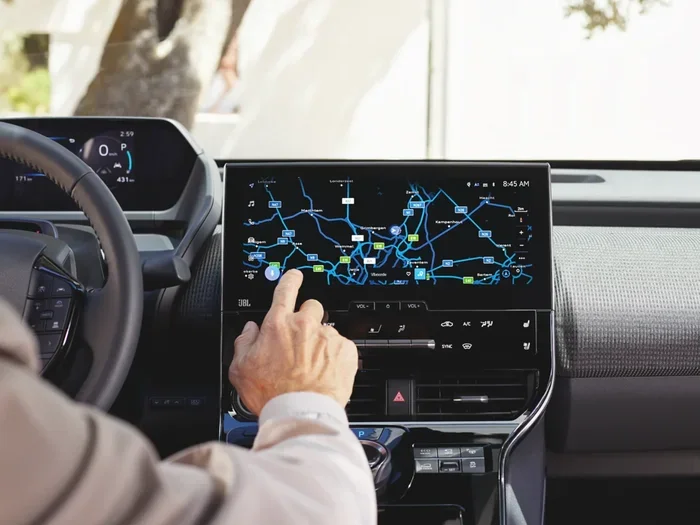
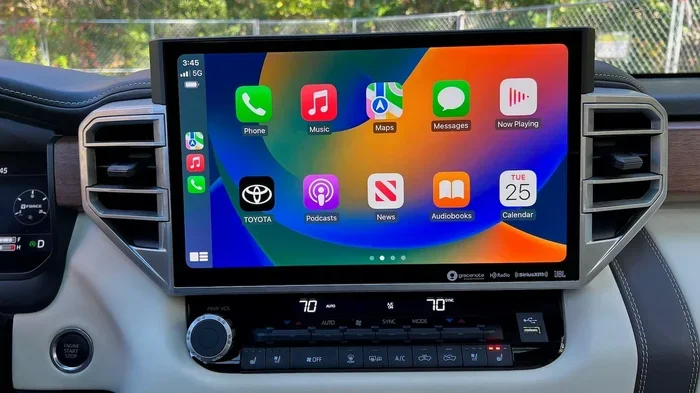
Apple CarPlay is a feature that mirrors your iPhone interface onto your car touchscreen. It lets you access maps, music, messages, and phone calls safely while driving. Wireless Apple CarPlay takes this a step further by removing the need for any USB cable at all.
How Does It Work?
Wireless CarPlay uses Bluetooth and Wi-Fi to connect your iPhone to your car infotainment system. Once paired, your phone and car communicate seamlessly. You can see notifications, use Siri, and navigate with Apple Maps all without plugging in a single wire.
The connection happens automatically when you sit in your car and unlock the door. This means less fumbling with cables and more focus on the road ahead. Toyota wireless Apple CarPlay makes this experience even smoother by integrating directly with the factory Toyota multimedia system.
Why Is Wireless CarPlay So Popular?
Drivers love the convenience of going cable-free. No more dealing with tangled wires or worn-out USB ports. Wireless Apple CarPlay also keeps your dashboard looking clean and modern. Another big benefit is smartphone integration. With wireless CarPlay, you get a familiar iPhone interface every time you get behind the wheel. The experience feels natural and intuitive, which is exactly what Toyota aimed for when they added this feature to their newer models.
Does Toyota Offer Wireless Apple CarPlay?
The short answer is yes, but with some important caveats. Toyota wireless Apple CarPlay availability depends on your specific model, trim level, and model year. Let us break this down so you know exactly what to expect before you buy or upgrade.
Which Toyota Models Have Wireless CarPlay?
Toyota has been gradually rolling out wireless Apple CarPlay across its lineup. Here are some of the models that offer this feature in recent years:
- Toyota Camry – Available on higher trims starting from the 2019 model year and later
- Toyota RAV4 – Wireless CarPlay comes standard on many 2019 and newer trims
- Toyota Highlander – Available on 2020 and newer models with the upgraded infotainment system
- Toyota Corolla – Wireless support on 2020 and newer models with the touchscreen package
- Toyota GR86 – The 2023 and newer GR86 models include wireless Apple CarPlay Toyota integration
If you own or are considering a Toyota GR86, you might also want to check whether it needs premium fuel. You can find that information in our detailed guide on Does the GR86 Need Premium Gas.
Does Every Toyota Trim Include It?
No, not every trim includes wireless Apple CarPlay. In many cases, Toyota reserves this feature for higher-end trims or optional packages. For example, a base-level Camry LE might only offer wired CarPlay, while the XSE or XLE trims include the wireless version.
This is an important distinction when shopping for a used Toyota. Always check the specific trim and model year before assuming you will get wireless connectivity. Some older Toyotas only support wired connections, and there is no simple upgrade path to add wireless capability after purchase without replacing the head unit.
How To Set Up Wireless Apple CarPlay On Your Toyota
Setting up wireless Apple CarPlay on a Toyota is straightforward. Follow these steps to get connected in just a few minutes.
Step-by-Step Setup Guide
- Make sure your iPhone is updated to the latest iOS version. Wireless CarPlay requires iOS 12 or later, but newer versions work best with Toyota systems.
- Enable Bluetooth and Wi-Fi on your iPhone. These are the two wireless connections CarPlay uses to communicate with your Toyota.
- Turn on your car and make sure the infotainment system is active. Press the CarPlay icon on the touchscreen.
- Select your car from your iPhone when it appears in the CarPlay menu. You may need to confirm a pairing request on both devices.
- Follow the on-screen prompts to complete the setup. Choose your preferred apps and display settings.
- Test the connection by playing music or opening a map. The connection should feel instant and seamless every time.
Quick Tips for a Smooth Setup
- Make sure your phone is not in low power mode during setup, as this can interfere with wireless mirroring between devices.
- Restart both your iPhone and your Toyota infotainment system if the connection fails the first time you try.
- Keep your phone within the car during the pairing process for the strongest Bluetooth and Wi-Fi signal.
- Delete and re-pair the connection if you experience persistent issues with Toyota connectivity or CarPlay recognition.
Once set up, your Toyota will remember your iPhone and connect automatically every time you get in the car. This is one of the biggest advantages of wireless Apple CarPlay over the wired version. You just get in and go, no cables needed.
Troubleshooting Common Wireless Apple CarPlay Issues
Even with a great infotainment system, you can run into occasional hiccups with wireless CarPlay. Here are the most common problems Toyota owners face and how to fix them quickly.
CarPlay Disconnects Frequently
If your Toyota wireless Apple CarPlay keeps dropping, the first thing to check is your Wi-Fi connection. Wireless CarPlay relies on a dedicated Wi-Fi network between your phone and car. If other wireless devices are hogging bandwidth, it can cause interruptions and dropouts.
Try turning Bluetooth and Wi-Fi off and back on. Restarting your iPhone can also help resolve temporary CarPlay not working Toyota issues. If the problem persists, reset your car infotainment system by holding down the power button for about 10 seconds.
Some Toyota owners have also found that calibrating adaptive cruise control and other safety systems can occasionally interfere with wireless connections. If you have recently calibrated your adaptive cruise control, try reconnecting CarPlay afterward. You can learn more about this process in our guide on Do You Have To Calibrate Adaptive Cruise Control.
CarPlay Won Connect At All
If your iPhone does not detect the CarPlay option, start by checking for software updates on both devices. Apple releases iOS updates regularly, and Toyota pushes infotainment updates through dealerships or over-the-air where supported.
Make sure CarPlay is enabled in your iPhone settings under Settings, General, CarPlay. If you still cannot connect, try forgetting the car from your iPhone Bluetooth settings and pairing it again from scratch. This simple reset solves the issue for most Toyota owners.
Audio or Video Lag
A slight delay in audio or video is normal with any wireless connection. However, if the lag is severe, it could be caused by interference from other wireless devices in the car. Turn off any Bluetooth devices you are not actively using, such as wireless earbuds or headphones.
Also, check that your Toyota audio system firmware is up to date. Toyota occasionally releases updates that improve wireless performance and reduce latency in the Toyota infotainment system. A quick visit to your local dealer can often resolve these issues at no cost.
Wireless Apple CarPlay vs Wired Connection: What Is Better?
Both wireless and wired Apple CarPlay Toyota setups have their strengths. Let us compare them side by side so you can decide which works better for your driving style.
Comparison: Wireless vs Wired CarPlay
- Connection Method: Wireless uses Bluetooth and Wi-Fi; wired uses a USB cable plugged into the port
- Convenience: Wireless is hands-free and automatic; wired requires plugging in each time you drive
- Charging: Wired CarPlay charges your phone while driving; wireless does not always provide power
- Connection Stability: Wired is generally more stable and consistent; wireless can be affected by interference
- Setup Speed: Wireless connects automatically when you enter the car; wired requires plugging in and waiting
- Compatibility: Wireless requires newer Toyota models with updated infotainment; wired works on most Toyotas with CarPlay support
When Wired CarPlay Makes More Sense
If you frequently take long road trips, a wired Apple CarPlay connection might be more reliable. The cable provides a stable data connection and keeps your phone charged during the drive. This is especially useful if your phone battery tends to drain quickly on long journeys.
Wired connections also tend to have slightly faster data transfer rates. This means maps and music load a bit quicker. For drivers who rely heavily on navigation, this small advantage can make a real difference in your daily commute or weekend road trips.
When Wireless CarPlay Is the Better Choice
For everyday driving, wireless Apple CarPlay is the clear winner. The automatic connection means you never have to think about cables. Just get in your car, and your phone is already connected and ready to go.
Wireless CarPlay also keeps your dashboard looking clean and clutter-free. No cables running across the center console means a nicer aesthetic and more usable space. If you value convenience and a clean modern look, wireless is definitely the way to go.
It is also worth noting that some driving habits can affect which option works best for you. For instance, if you use sport mode frequently, you might want to know whether it impacts fuel economy. Check out our article on Does Sport Mode Save Gas for more insights on how your driving settings affect your Toyota.
Toyota Infotainment System: What You Need To Know
Toyota infotainment system has come a long way over the past several years. The company has invested heavily in making its Toyota multimedia systems more intuitive and responsive. Understanding how the system works helps you get the most from Apple CarPlay Toyota integration every time you drive.
The Toyota Multimedia System
Toyota current infotainment platform features a clean touchscreen interface. The system supports both Apple CarPlay and Android Auto, giving you flexibility regardless of your phone brand. The wireless version uses a dedicated Wi-Fi connection that does not interfere with your phone regular Wi-Fi network for internet browsing.
The system also supports voice commands through Siri, allowing you to keep your hands on the wheel and eyes on the road. You can make calls, send messages, and change music using just your voice. This is one of the safest features of wireless Apple CarPlay in any Toyota vehicle. It truly makes driving safer and more convenient.
Toyota Entune and Beyond
Toyota previously used the Entune system for its connected services. While Entune is being phased out in favor of newer platforms, many older Toyotas still run it. If your Toyota uses Entune, you may need a software update or a new head unit to access wireless Apple CarPlay capabilities.
Newer Toyota models use a more modern infotainment platform that natively supports wireless CarPlay. These systems are faster, more responsive, and offer better smartphone integration than their predecessors. If you are shopping for a used Toyota, look for models from 2019 onward for the best wireless CarPlay experience and overall system performance.
Tips To Get the Most From Wireless Apple CarPlay in Your Toyota
Once you have wireless Apple CarPlay set up and working, there are several ways to enhance your experience. These tips will help you squeeze every bit of value out of the feature and keep everything running smoothly.
Customize Your CarPlay Home Screen
Take a few minutes to arrange your CarPlay apps in a way that makes sense for your daily routine. Put your navigation app front and center on the screen. Move your favorite music app to an easily accessible spot. The more organized your home screen, the less you have to scroll while driving and the safer your experience will be.
Use Siri for Hands-Free Control
Siri is your best friend when it comes to wireless Apple CarPlay in your Toyota. You can ask Siri to call contacts, send messages, play specific playlists, and even read your notifications aloud. This keeps your eyes on the road and your hands firmly on the wheel at all times. It is one of the safest features of the entire CarPlay ecosystem.
Keep Your iPhone and Toyota Updated
Software updates can improve Toyota connectivity and fix bugs that cause CarPlay issues. Check for iOS updates on your iPhone regularly. Also, ask your Toyota dealer about infotainment software updates at your next service visit. Staying current ensures the best performance and compatibility between your devices.
Manage Your Battery Usage
Wireless CarPlay uses both Bluetooth and Wi-Fi, which can drain your phone battery faster than normal usage. If you notice your battery draining quickly during long drives, consider using a wireless charging pad in your Toyota. This keeps your phone powered up without the hassle of cables and ensures you always have navigation and music available.
Explore Third-Party Apps
While Apple CarPlay comes with built-in apps like Maps, Music, and Messages, you can also use compatible third-party apps. Apps like Spotify, Pandora, and Google Maps work well with CarPlay. Just make sure they are installed on your iPhone before you try to access them through your Toyota touchscreen. This gives you even more flexibility and entertainment options on every drive.
In conclusion, Toyota wireless Apple CarPlay is a fantastic feature that adds real value to your driving experience. It keeps you connected, entertained, and navigating with ease. Whether you have a Camry, RAV4, Highlander, or GR86, wireless CarPlay makes every drive more enjoyable and safer for you and your passengers.
Setting it up is simple, troubleshooting is manageable, and the convenience of going cable-free is hard to beat. If your Toyota supports it, there is no reason not to take advantage of wireless Apple CarPlay. Follow the setup tips and troubleshooting advice in this guide, keep your software updated, and you will enjoy a seamless connection every time you get behind the wheel.
Remember, the key to a great CarPlay experience is keeping your devices updated and understanding your specific Toyota capabilities. With the right setup, Apple CarPlay Toyota integration becomes second nature. You will wonder how you ever drove without it. Embrace the wireless lifestyle and enjoy every moment on the road.