Can You See Tire Pressure Readings on the Toyota App
Yes, you can see tire pressure readings on the Toyota App if your vehicle supports Toyota Connected Services. The Toyota App provides real-time TPMS data, alerts for low pressure, and maintenance reminders. This guide covers everything you need to know about accessing tire pressure through the Toyota App, from setup to troubleshooting common issues.
Key Takeaways
- Toyota App Support: Not all Toyota models display tire pressure on the app. Check if your vehicle has Toyota Connected Services enabled.
- Real-Time Monitoring: The app shows current tire pressure for each tire, helping you catch issues early.
- TPMS Alerts: The app sends notifications when tire pressure drops below safe levels.
- Easy Setup: You need a compatible Toyota model, the Toyota App, and a linked Toyota account to access tire data.
- Maintenance Tips: Regularly checking tire pressure through the app can improve fuel economy and tire life.
- Limitations Exist: Some older Toyota models and trims may not support tire pressure readings in the app.
📑 Table of Contents
- Can You See Tire Pressure Readings on the Toyota App?
- What Is the Toyota App and How Does It Work?
- How to Check Tire Pressure Using the Toyota App
- Understanding Tire Pressure Monitoring System (TPMS) in Toyota Vehicles
- Which Toyota Models Support Tire Pressure on the App?
- Common Tire Pressure Issues and What They Mean
- Tips for Maintaining Proper Tire Pressure
- Troubleshooting Toyota App Tire Pressure Issues
- Why Tire Pressure Monitoring Matters for Toyota Owners
- Final Thoughts
Can You See Tire Pressure Readings on the Toyota App?
If you own a Toyota and want to keep tabs on your tire health, you might be wondering whether the Toyota App shows tire pressure. The short answer is yes, but with some important caveats. Not every Toyota model supports tire pressure readings through the app. Your experience depends on the year, trim level, and whether your vehicle has Toyota Connected Services.
Toyota has been integrating smart features into its vehicles for years. The Toyota App acts as a bridge between your phone and your car. It lets you check things like fuel level, lock status, and in some models, tire pressure monitoring system data. But the tire pressure feature is not universal. It works best with newer Toyota models that have the right hardware and software installed.
In this guide, we will walk you through everything you need to know. We will cover which Toyota models support it, how to set it up, what the readings mean, and how to troubleshoot common problems. Whether you drive a Toyota Camry, RAV4, or Highlander, this article has you covered.
Proper tire pressure matters more than most people think. Underinflated tires can reduce fuel economy, cause uneven wear, and even lead to dangerous blowouts. Being able to check your tire pressure readings right from your phone is a huge convenience. Let us dive into the details.
What Is the Toyota App and How Does It Work?
The Toyota App is a mobile application available for both iOS and Android devices. It connects to your Toyota vehicle through a cellular module or Bluetooth, depending on the model. Once paired, the app gives you remote access to many vehicle features.
Toyota Connected Services is the backbone of the app. This subscription-based service provides data from your vehicle to your phone. Some Toyota models come with a complimentary trial period, while others require a paid subscription after the first year.
Key Features of the Toyota App
- Remote Lock and Unlock: Lock or unlock your doors from anywhere.
- Vehicle Location: Find your car on a map if you forget where you parked.
- Fuel Level Check: See how much gas is left without walking to your car.
- Tire Pressure Readings: View current pressure for each tire (on supported models).
- Maintenance Alerts: Get notified when your car needs service.
- Climate Control: Preheat or pre-cool your vehicle before you get in.
The tire pressure feature falls under the vehicle health monitoring category. It is part of Toyota’s broader effort to make car ownership easier and safer. If your Toyota supports this feature, you will find it in the Vehicle Health or Diagnostics section of the app.
How to Check Tire Pressure Using the Toyota App
Checking your tire pressure through the Toyota App is straightforward once everything is set up. Here is a step-by-step guide to help you get started.
Step 1: Download and Install the Toyota App
Go to the Apple App Store or Google Play Store and search for “Toyota.” Download the official Toyota App and create an account or sign in to your existing Toyota account. Make sure you use the same account linked to your vehicle.
Step 2: Connect Your Vehicle
Follow the on-screen prompts to pair your Toyota with the app. You may need to enter your Vehicle Identification Number (VIN) or scan a QR code found in your owner’s manual. Some models require you to activate Toyota Connected Services first through your dealer.
Step 3: Navigate to Tire Pressure
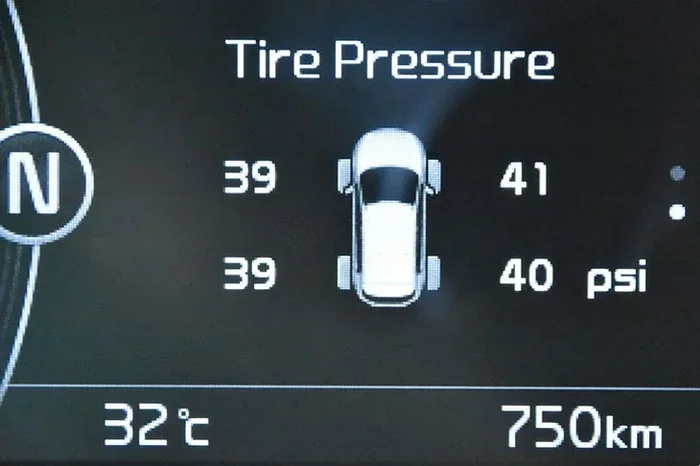
Once connected, open the app and look for the “Vehicle Health” or “Vehicle Status” tab. On supported models, you will see a section for tire pressure. The app displays the current PSI (pounds per square inch) for each individual tire.
Step 4: Interpret the Readings
The app will show you a number for each tire. Compare these numbers to the recommended pressure listed on the sticker inside your driver’s door frame. Most Toyotas recommend between 32 and 35 PSI for standard driving. If any tire shows a significantly lower number, you may have a slow leak or a puncture.
Quick Tip
Check your tire pressure when the tires are cold, meaning the car has been sitting for at least three hours. Hot tires can give falsely high readings. This applies whether you are using the app or a manual tire pressure gauge.
Understanding Tire Pressure Monitoring System (TPMS) in Toyota Vehicles
Every modern Toyota comes equipped with a Tire Pressure Monitoring System, commonly known as TPMS. This system uses sensors inside each tire to measure air pressure and send data to your car’s computer. On newer Toyotas, this data is also transmitted to the Toyota App.
There are two types of TPMS systems. Direct TPMS uses physical sensors inside the tire valve stem. Indirect TPMS uses the car’s wheel speed sensors to detect pressure differences based on tire rotation speed. Most newer Toyota models use direct TPMS, which is more accurate and provides individual tire readings.
What the TPMS Warning Light Means
If your TPMS warning light comes on, it means one or more tires are significantly underinflated. The Toyota App may also send you a push notification about this. Do not ignore this light. Driving on low tires is dangerous and can damage your wheels.
Sometimes the light comes on due to a temperature change. Cold weather can cause tire pressure to drop temporarily. If the light appears in winter, check your pressure and add air if needed. If the light stays on after you inflate your tires, you may need to reset the TPMS system.
TPMS Reset Procedure
Most Toyota models allow you to reset the TPMS light after you have inflated your tires to the proper level. The reset button is usually located below the steering column. Press and hold it until the TPMS light blinks three times. For specific instructions, refer to your Toyota owner’s manual.
Which Toyota Models Support Tire Pressure on the App?
Not all Toyota vehicles can display tire pressure through the app. The feature is available primarily on models equipped with Toyota Connected Services and the necessary hardware. Here is a general breakdown.
| Model | Approximate Years Supported | Tire Pressure on App? |
|---|---|---|
| Toyota Camry | 2019 and newer | Yes (with Connected Services) |
| Toyota RAV4 | 2019 and newer | Yes (with Connected Services) |
| Toyota Highlander | 2020 and newer | Yes (with Connected Services) |
| Toyota Corolla | 2020 and newer | Yes (with Connected Services) |
| Toyota Tacoma | 2023 and newer | Limited support |
| Toyota 4Runner | 2024 and newer | Yes (with Connected Services) |
The table above is a general guide. Always check with your Toyota dealer to confirm whether your specific trim and model year supports tire pressure readings through the app. Some base trims may not include Toyota Connected Services, even on newer models.
Common Tire Pressure Issues and What They Mean
When you check your tire pressure through the Toyota App, you might notice some common issues. Here is what they usually mean and what you should do about them.
Low Pressure on One Tire
If only one tire shows low pressure, you likely have a slow leak. This could be caused by a nail, a faulty valve stem, or a small crack in the rim. Get the tire inspected as soon as possible. In many cases, a tire can be patched rather than replaced, saving you money. If you are curious about tire repair options, you can check out our guide on whether you can patch tires for more information.
Low Pressure on All Tires
If all four tires show low pressure, the most common cause is temperature change. As the weather gets colder, air inside tires contracts and pressure drops. Simply adding air to the recommended PSI usually fixes this problem.
High Pressure on One Tire
Overinflated tires are less common but still a concern. They wear out the center of the tread faster and provide a harsher ride. If the app shows one tire with unusually high pressure, let some air out until it matches the recommended level.
Fluctuating Pressure Readings
If your pressure readings jump around a lot, the sensor battery might be dying. TPMS sensors have a limited lifespan, usually around five to seven years. A Toyota dealer can replace the sensor if needed.
Tips for Maintaining Proper Tire Pressure
Keeping your tires at the right pressure is one of the simplest things you can do to extend their life and keep your Toyota running safely. Here are some practical tips.
- Check Pressure Monthly: Even if your Toyota App gives you readings, get in the habit of checking with a manual gauge at least once a month. Apps can occasionally lag or show inaccurate data.
- Check Before Long Trips: Always verify your tire pressure before a road trip. Properly inflated tires improve handling and reduce the risk of a blowout on the highway.
- Keep a Tire Pressure Gauge in Your Trunk: A small digital gauge costs under fifteen dollars and can save you from being stranded.
- Rotate Your Tires Regularly: Rotating your tires every 5,000 to 7,500 miles helps them wear evenly. This is especially important if you notice uneven wear patterns.
- Watch the Seasons: Tire pressure drops about one PSI for every 10-degree drop in temperature. Adjust your pressure seasonally to stay safe.
- Replace Tires When Needed: No amount of air pressure can fix worn-out tread. Replace your tires when the tread depth reaches 2/32 of an inch.
Taking care of your tires also improves your Toyota’s fuel economy. Underinflated tires create more rolling resistance, which means your engine works harder and uses more gas. If you are interested in fuel savings, you might also want to read about whether hybrid Toyotas really save on gas at the pump.
Troubleshooting Toyota App Tire Pressure Issues
If you are unable to see tire pressure readings on the Toyota App, do not panic. Several common issues can cause this problem, and most are easy to fix.
App Not Showing Tire Pressure Data
First, make sure your Toyota model supports this feature. Older models or base trims may not have the hardware required. Next, check that your Toyota Connected Services subscription is active. If it has expired, renew it through the app or contact your dealer.
Inaccurate Readings
If the readings seem off, try restarting the app. Sometimes the data connection gets stuck and showing old information. You can also try logging out and back in. If the problem persists, the TPMS sensor in one or more tires may need replacement.
App Won’t Connect to Vehicle
Make sure your phone has a stable internet connection. The Toyota App requires cellular data or Wi-Fi to communicate with your vehicle. Also check that your vehicle’s cellular module is active. If you recently moved to a new area, your car may need to re-register on the network.
TPMS Light Stays On After Inflation
If you have inflated your tires but the warning light remains on, you may need to reset the system. Refer to your owner’s manual for the reset procedure. If resetting does not work, a TPMS sensor may be faulty and need replacement by a qualified technician.
Why Tire Pressure Monitoring Matters for Toyota Owners
Tire pressure is one of the most overlooked aspects of car maintenance. Yet it has a direct impact on safety, fuel economy, and tire longevity. Toyota’s integration of tire pressure monitoring into the Toyota App makes it easier than ever to stay on top of this important maintenance task.
For Toyota hybrid owners, proper tire pressure is especially important. Hybrids rely on a combination of gas and electric power, and any inefficiency, including underinflated tires, can reduce the overall fuel savings. If you are curious about how hybrids perform on gas alone, check out our article on whether you can drive a hybrid on gas only.
Regular monitoring through the Toyota App can also help you catch small problems before they become expensive repairs. A slow leak that goes unnoticed for weeks can ruin a tire that might have been cheaply repaired. The convenience of checking your tire pressure from your couch is hard to beat.
Final Thoughts
The Toyota App is a powerful tool for keeping your vehicle in top shape. Being able to see your tire pressure readings directly from your phone adds a layer of convenience and safety that every Toyota owner can appreciate. Just remember that this feature depends on your specific model and whether Toyota Connected Services is active on your vehicle.
Make it a habit to check your tire pressure regularly. Use the Toyota App for quick checks, but also verify with a manual gauge from time to time. Keep your tires properly inflated, rotate them on schedule, and replace them when the tread wears out. These simple steps will keep your Toyota safe, efficient, and road-ready for years to come.
If you ever run into issues with the Toyota App or your tire pressure system, your local Toyota dealer is always a great resource. They can diagnose sensor problems, renew your Connected Services subscription, and help you get the most out of your Toyota’s smart features.
Stay proactive about your vehicle’s health. A few minutes of attention to your tires today can save you from a major headache tomorrow. The Toyota App puts that power right at your fingertips.
Frequently Asked Questions
Can I see tire pressure on the Toyota App for any Toyota model?
No, not all Toyota models support tire pressure readings through the app. The feature requires Toyota Connected Services and compatible hardware. Newer models from 2019 onward are more likely to support it, but even then, some base trims may not include this capability. Check with your dealer to confirm.
How often should I check my tire pressure using the Toyota App?
It is a good idea to check your tire pressure at least once a month using the app. You should also check before long road trips. Keep in mind that the app provides a quick overview, but a manual tire pressure gauge gives the most accurate reading every time.
Why is my Toyota App showing a tire pressure warning even though my tires look fine?
Temperature changes are the most common cause. Cold weather can reduce tire pressure temporarily, triggering the warning. If the tires look normal and are properly inflated, the TPMS sensor battery may be low or the sensor itself may need replacement. A trip to the dealer can confirm this.
Can I reset the tire pressure light through the Toyota App?
In most cases, you cannot reset the TPMS light directly through the app. The reset is usually done through the vehicle’s dashboard controls or by pressing the TPMS reset button located below the steering column. Consult your Toyota owner’s manual for the exact procedure for your model.
Is the tire pressure feature on the Toyota App free to use?
The Toyota App itself is free to download and use. However, some features, including real-time vehicle data like tire pressure, require an active Toyota Connected Services subscription. Some new Toyotas come with a free trial period, after which a yearly or monthly fee may apply.
What should I do if the Toyota App is not showing any tire pressure data at all?
First, ensure your vehicle supports this feature and that your Connected Services subscription is active. Try restarting the app and checking your internet connection. If the problem continues, the TPMS sensors in your tires may need to be inspected or replaced by a qualified Toyota technician.
=== CONCLUSION ===
Being able to see tire pressure on the Toyota App is a great feature that makes car ownership more convenient and safer. It lets you monitor your tire health from anywhere, catch problems early, and avoid costly repairs. While the feature is not available on every Toyota model, newer vehicles with Toyota Connected Services offer this capability as part of a broader vehicle health monitoring system.
Use the tips in this guide to get the most out of the tire pressure feature on your Toyota App. Check your pressure regularly, understand what the readings mean, and address any issues promptly. Your tires are the only part of your car that touches the road, so taking care of them should always be a priority.
Stay connected to your Toyota, stay informed, and enjoy the peace of mind that comes with knowing your tires are in great shape. The Toyota App puts powerful vehicle insights right in your pocket, and tire pressure monitoring is just the beginning.