Does Mazda CX-30 Have Apple CarPlay – What You Need to Know
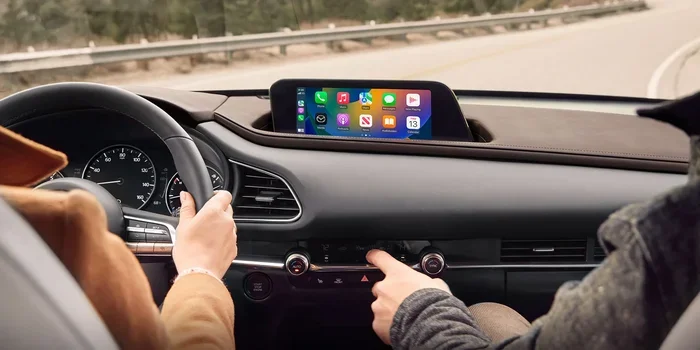
Yes, the Mazda CX-30 does come with Apple CarPlay, making it easy to connect your iPhone for navigation, music, and calls. This feature is available across most trim levels, though the setup method and connectivity type vary. Below, we break down everything you need to know about Apple CarPlay compatibility in the Mazda CX-30.
The Mazda CX-30 has become one of the most popular compact SUVs on the market. Buyers love its sleek design, sporty handling, and modern tech features. One question keeps popping up in search queries and owner forums: does the Mazda CX-30 have Apple CarPlay? The short answer is yes. But the full story is more interesting than a simple yes or no.
If you are shopping for a Mazda CX-30 or already own one, understanding how Apple CarPlay works in this vehicle is essential. The feature lets you access your iPhone’s most useful functions right from the car’s infotainment screen. You can make calls, send messages, listen to music, and get turn-by-turn navigation. All without taking your eyes off the road.
In this guide, we will walk you through everything you need to know. We will cover compatibility, setup, the differences between wireless and wired connections, and common troubleshooting tips. By the end, you will have a complete picture of how Apple CarPlay fits into the Mazda CX-30 experience.
Key Takeaways
- Apple CarPlay is standard on most Mazda CX-30 trims: You get seamless iPhone integration right out of the box.
- Both wireless and wired options exist: Depending on the trim, you can connect without cables or use a USB cord.
- Setup is simple and fast: Pairing your iPhone takes just a few steps and works automatically most of the time.
- Not all model years are identical: Newer CX-30 models offer improved Mazda Connect software and better smartphone integration.
- Troubleshooting is straightforward: Most Apple CarPlay not working issues have easy fixes you can do at home.
- Maintenance matters for tech features: Keeping your Mazda’s electrical system in shape helps CarPlay run smoothly.
📑 Table of Contents
- What Is Apple CarPlay and Why Does It Matter?
- Does the Mazda CX-30 Come With Apple CarPlay?
- How to Set Up Apple CarPlay on the Mazda CX-30
- Apple CarPlay Features You Can Use in the Mazda CX-30
- Common Apple CarPlay Issues and How to Fix Them
- How the Mazda CX-30 Compares to Competitors
- Maintaining Your Mazda CX-30’s Tech Features
- Is Apple CarPlay Worth It in the Mazda CX-30?
- Final Thoughts
What Is Apple CarPlay and Why Does It Matter?
Apple CarPlay is a smartphone integration system developed by Apple. It mirrors key functions from your iPhone onto your car’s display screen. Think of it as a safe bridge between your phone and your vehicle. Instead of holding your phone while driving, you interact with a simplified interface on the infotainment system.
The system supports a range of apps. Phone calls, text messages, music streaming, and navigation all work through CarPlay. Siri voice commands let you keep your hands on the wheel and eyes on the road. For many drivers, smartphone integration has become a must-have feature when buying a new car.
The Mazda CX-30 takes this integration seriously. The infotainment system is designed to work smoothly with Apple devices. Whether you use an older iPhone or the latest model, CarPlay compatibility is built into the experience. This makes the CX-30 a strong choice for iPhone users who want a seamless connection.
Does the Mazda CX-30 Come With Apple CarPlay?
The answer depends on a few factors. These include the model year, the trim level, and whether you are looking at a new or used vehicle. In general, most Mazda CX-30 models come equipped with Apple CarPlay. But the way it connects can differ between trims.
Standard vs. Optional Availability
On the base Mazda CX-30 trim, Apple CarPlay typically comes as a standard feature. Higher trims may include additional connectivity options like wireless Apple CarPlay or enhanced Mazda Connect software. The 2024 Mazda CX-30 continues this trend, offering CarPlay across nearly all trim levels.
Here is a quick breakdown of what to expect:
- Base trims: Wired Apple CarPlay via USB connection. This is the standard setup on most CX-30 models.
- Mid-level trims: Wireless Apple CarPlay may be available as part of a technology package.
- Higher trims: Full wireless connectivity with enhanced features like wireless charging and improved audio quality.
When shopping, always confirm the specific trim’s features. The Mazda CX-30 tech features can vary from one model year to the next. A quick check of the spec sheet will tell you exactly what you are getting.
Model Year Differences
Mazda updated the CX-30’s infotainment system over the years. Newer model years generally offer better Apple CarPlay compatibility and faster connection speeds. The 2022 and newer models tend to have the most refined experience. Earlier models from 2020 and 2021 also support CarPlay but may lack wireless connectivity on lower trims.
If you are considering a used CX-30, check the model year and trim carefully. A 2023 model will likely have a more polished infotainment system than a 2020 base model. This matters for daily convenience and overall user satisfaction.
How to Set Up Apple CarPlay on the Mazda CX-30
Setting up Apple CarPlay on the Mazda CX-30 is straightforward. The process takes only a minute or two. Here is how to get started step by step.
Wired Connection Setup
For trims that use a wired connection, follow these steps:
- Plug one end of a Lightning or USB-C cable into your iPhone.
- Connect the other end to the USB port in the Mazda CX-30.
- The infotainment screen should automatically detect your phone.
- Tap the CarPlay icon on the display.
- Follow any on-screen prompts to complete pairing.
Once connected, your favorite apps will appear on the car screen. You can switch between music, navigation, and phone calls with ease. The wired connection tends to be more stable and reliable than wireless in some cases.
Wireless Connection Setup
If your CX-30 trim supports wireless Apple CarPlay, the process is even simpler:
- Make sure Bluetooth is turned on in your iPhone settings.
- Start the Mazda CX-30 and go to the infotainment home screen.
- Select the CarPlay option from the menu.
- Your phone should pair automatically.
- Accept the connection prompt on both your phone and the car screen.
Wireless CarPlay is incredibly convenient. You do not need to dig for a cable every time you get in the car. The Mazda CX-30 handles wireless connections well, with fast pairing and minimal lag. This is one of the reasons the CX-30 stands out among compact SUVs.
Quick Tips for First-Time Setup
- Make sure your iPhone is updated to the latest iOS version. Older software can cause connection problems.
- Use a high-quality USB cable if you are going wired. Cheap cables sometimes fail to transfer data properly.
- Restart your phone and the car’s infotainment system if CarPlay does not appear right away.
- Check that your phone’s screen is unlocked during the initial pairing process.
These small steps can save you a lot of frustration. Most setup issues are easy to fix with a simple restart or cable swap.
Apple CarPlay Features You Can Use in the Mazda CX-30
Once CarPlay is connected, a world of convenience opens up. The Mazda CX-30’s display makes it easy to access all the key features. Here is what you can expect from a typical CarPlay session.
Navigation
Apple Maps, Google Maps, and Waze all work through CarPlay. You get real-time traffic updates, turn-by-turn directions, and estimated arrival times. The large infotainment screen on the CX-30 makes maps easy to read while driving. This is especially helpful on unfamiliar roads or during long road trips.
Music and Podcasts
Spotify, Apple Music, Pandora, and other streaming apps work seamlessly. You can control playback directly from the car screen or through steering wheel controls. The audio quality through the Mazda CX-30’s sound system is impressive. Music sounds clear and full, whether you are using CarPlay or listening to the radio.
Phone Calls and Messages
Hands-free calling and messaging are core CarPlay benefits. Siri can read your incoming texts aloud and let you dictate replies. You never need to touch your phone while driving. This is not just convenient, it is also one of the safest ways to stay connected on the road.
Third-Party Apps
CarPlay supports a growing list of third-party apps. Messaging apps like WhatsApp and Telegram work through Siri. Some navigation apps offer fuel price comparisons and parking location features. The Mazda CX-30’s system handles these apps smoothly without noticeable slowdowns.
Common Apple CarPlay Issues and How to Fix Them
Even with a reliable system like the Mazda CX-30, you may run into occasional hiccups. Apple CarPlay not working is a common search query, and for good reason. Let us look at the most frequent issues and their solutions.
CarPlay Won’t Connect
This is the most common problem. Try these fixes first:
- Unplug and replug the USB cable if you are using a wired connection.
- Toggle Bluetooth off and on for wireless connections.
- Restart your iPhone completely before trying again.
- Check that CarPlay is enabled in your iPhone settings under General > CarPlay.
Most connection issues resolve with one of these simple steps. If the problem persists, a factory reset of the infotainment system may help.
Connection Drops Frequently
Wireless CarPlay can sometimes disconnect, especially in areas with heavy Bluetooth traffic. Keeping your phone’s software updated helps. Also, deleting old paired devices from the car’s Bluetooth memory can improve stability.
Some drivers have found that clearing the car’s infotainment cache resolves frequent drops. This is a less common fix but worth trying if other solutions fail.
Audio or Screen Glitches
Occasionally, the CarPlay interface may freeze or the audio may cut out. A simple restart of both the phone and the car’s system usually fixes this. Make sure your cable is not damaged if you are using a wired setup. Faulty cables are a surprisingly common culprit for audio problems.
If you are dealing with tech issues regularly, it may be worth having a professional check the vehicle’s electrical system. Services like diagnostics at Jiffy Lube can help identify underlying electrical or connectivity problems that affect your car’s tech features.
How the Mazda CX-30 Compares to Competitors
The Mazda CX-30 is not the only compact SUV with Apple CarPlay. Several rivals offer similar features. Here is how the CX-30 stacks up against some popular alternatives.
| Feature | Mazda CX-30 | Honda HR-V | Toyota Corolla Cross |
|---|---|---|---|
| Apple CarPlay | Standard (wired + wireless on higher trims) | Standard (wired) | Standard (wired) |
| Wireless CarPlay | Available on mid-to-high trims | Not available | Limited availability |
| Infotainment Screen Size | 8.8 inches | 7 inches | 8 inches |
| Smartphone Integration | Excellent | Good | Good |
| Ease of Setup | Very Easy | Easy | Easy |
The Mazda CX-30 holds its own against competitors. The combination of wireless CarPlay availability and a large, crisp display gives it an edge. The Mazda Connect system is intuitive and responsive. This makes daily driving more enjoyable and less distracting.
One area where the CX-30 really shines is the overall user experience. The interface is clean and uncluttered. You can find what you need without digging through menus. This is not always the case with competing brands. The Mazda CX-30 technology package offers a polished, refined experience that feels premium.
Maintaining Your Mazda CX-30’s Tech Features
Keeping your Mazda CX-30 in good shape goes beyond oil changes and tire rotations. The infotainment system and connectivity features need attention too. Here are some tips to keep everything running smoothly.
Software Updates
Mazda periodically releases infotainment software updates. These can improve Apple CarPlay performance and add new features. Check with your dealer to see if your vehicle has any pending updates. Keeping the software current ensures the best experience.
USB Port Maintenance
If you use a wired connection, keep the USB ports clean. Dust and debris can build up over time and affect connectivity. A quick wipe with a dry cloth can make a big difference. If a port feels loose or intermittent, a dealer can inspect and repair it.
Battery Health
Your car’s battery plays a bigger role in tech features than most people realize. A weak battery can cause infotainment glitches and connectivity problems. If you notice electrical issues, it may be worth checking your battery. You can learn more about where to find quality car batteries in our guide on whether Autozone carries car key batteries.
Driving Habits and Tech Performance
How you drive can also affect your car’s electronic systems. Aggressive driving puts extra stress on the electrical components. Using features like sport mode can change how the car manages power. If you are curious about whether sport mode impacts fuel economy, check out our article on does sport mode save gas.
Taking care of the basics helps all your car’s systems perform better. This includes the infotainment system that powers your Apple CarPlay experience. A well-maintained Mazda CX-30 will reward you with years of reliable tech performance.
Is Apple CarPlay Worth It in the Mazda CX-30?
Absolutely. Apple CarPlay transforms the driving experience in the Mazda CX-30. It adds convenience, safety, and entertainment in a single package. The wireless option available on higher trims makes it even more appealing. You get a seamless, almost effortless connection every time you get behind the wheel.
For iPhone users, CarPlay is practically essential. It turns the Mazda CX-30’s infotainment system into a powerful, intuitive hub. Navigation, music, calls, and messaging all come together in one place. The smartphone integration in the CX-30 is among the best in its class.
Even if you primarily use Android, the Mazda CX-30 offers Android Auto as well. This means the vehicle caters to a wide range of smartphone users. The dual compatibility makes the CX-30 a versatile choice for any tech-savvy driver.
Final Thoughts
The Mazda CX-30 delivers Apple CarPlay in a way that is both practical and enjoyable. Whether you choose a wired or wireless setup depends on your trim level and personal preference. Both options work reliably and make daily driving more connected and safer.
The Mazda CX-30 has earned its reputation as a tech-friendly compact SUV. Apple CarPlay is just one of the many features that set it apart. From the intuitive infotainment interface to the robust connectivity options, this vehicle handles the modern driver’s needs with confidence.
If you are still on the fence about the CX-30, we encourage you to test drive one. Experience the Apple CarPlay connection firsthand. The difference it makes in daily driving is hard to ignore. Once you try it, you will wonder how you ever drove without it.