How Do I Cancel My Toyota Drive Connect Subscription
Cancelling your Toyota Drive Connect subscription is simple when you know the right steps. Whether you want to stop monthly charges, switch to a different plan, or just explore alternatives, this guide covers everything you need. You will learn how to cancel through the Toyota app, by phone, or online, plus what happens to your connected features afterward.
So you have been paying for Toyota Drive Connect and it is time to move on. Maybe you are not using the features enough to justify the cost. Or perhaps you found a better option that fits your needs. Whatever the reason, canceling a car subscription can feel confusing. The good news is that it does not have to be. This guide walks you through every step to cancel your Toyota Drive Connect subscription with confidence. You will learn what Toyota Drive Connect actually offers, why people cancel, and exactly how to stop the payments. Let us get started.
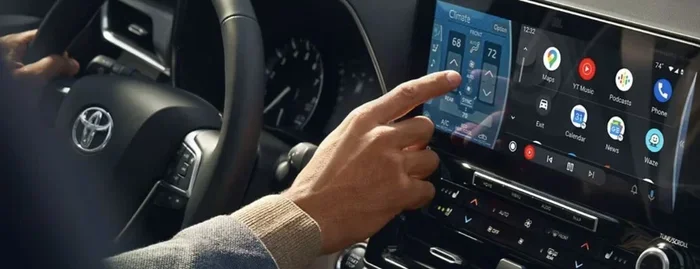
Toyota Drive Connect is a connected car service offered by Toyota. It lets you access features like remote start, GPS navigation, emergency assistance, and vehicle diagnostics right from your phone or car screen. The service works through the Toyota Connect app and a built-in modem in your vehicle. When you first buy a Toyota with this package, you often get a free trial period. After that, a monthly or annual fee kicks in.
The Toyota Connect app is the hub for all these features. You can lock and unlock your doors, check fuel levels, and even locate your car on a map. Some models also support over-the-air updates that keep your car software fresh. The Toyota Connect app makes it easy to manage these features from your smartphone. But not everyone needs all of these tools. That is perfectly fine.
People cancel Toyota Drive Connect for many reasons. The most common one is cost. Monthly fees add up over time, and some drivers feel they are not getting enough value. Others find that their phone handles everything they need. Google Maps, Apple CarPlay, and Android Auto can replace many of the navigation and connectivity features Toyota offers.
Another reason is that people sell their car or switch to a different vehicle. If you are planning to trade in your Toyota, canceling the subscription makes sense. You also might cancel if you are syncing your phone to a different car system that already has built-in features.
Some drivers simply do not use the connected services enough to justify the cost. If you only used the remote start feature a handful of times last year, paying monthly for the full package might not make sense. That is a smart financial decision, not a bad one.
Before you cancel, it helps to understand what you are giving up. Toyota Drive Connect comes with several useful features. Here is a quick look at what is included in most plans.
Remote Services
You can start your car from a distance, lock and unlock the doors, and honk the horn or flash the lights. These features are handy in cold weather or when you have forgotten where you parked.
Navigation and Traffic Updates
Built-in GPS with real-time traffic updates helps you avoid delays. The system can reroute you automatically based on current road conditions.
Emergency Assistance
In a crash or breakdown, the system can automatically contact emergency services. It shares your location with responders, which can be a lifesaver.
Vehicle Diagnostics
You can check your car’s health remotely. The system alerts you to low tire pressure, oil life, and other maintenance needs.
Wi-Fi Hotspot
Some plans include a Wi-Fi hotspot that keeps your passengers connected on the road. This is great for families and long road trips.
Now that you know what you are working with, let us get into the actual cancellation process. There are three main ways to cancel Toyota Drive Connect. You can do it through the app, online, or by phone. Each method works well, so pick the one that feels easiest for you.
Method One: Cancel Through the Toyota App
This is the fastest way to cancel. Open the Toyota Connect app on your phone. Log in with your account credentials. Go to the settings or subscription section. Look for an option that says Manage Subscription or Cancel Subscription. Follow the on-screen prompts to complete the cancellation. You should receive a confirmation message or email right away.
Method Two: Cancel Online Through Your Toyota Account
If you prefer using a computer, this method works great. Go to the Toyota website and log into your account. Navigate to the services or subscription section. Find your Toyota Drive Connect plan and select the option to cancel. You may need to answer a short survey about why you are leaving. This is optional but helpful for Toyota. Once you submit, save the confirmation page or screenshot for your records.
Method Three: Call Toyota Customer Support
Some people prefer talking to a real person. You can call Toyota customer service and request cancellation. Have your vehicle identification number, or VIN, ready. The representative will verify your account and process the cancellation. This method is especially helpful if you run into any issues with the app or website.
Method Four: Visit Your Local Toyota Dealer
You can also visit a Toyota dealership and ask the service desk to cancel your subscription. Bring your key fob and registration. The dealer can handle everything for you on the spot. This is a good option if you are already in for a service appointment.
No matter which method you choose, the process is straightforward. Toyota does not make it difficult to cancel. There is no long waiting period or complicated approval process. You simply submit your request and it goes through.
Timing matters when you cancel. If you cancel mid-cycle, you will likely keep access to Toyota Drive Connect until the end of your current billing period. You will not be charged again after that. However, if you cancel right before a renewal date, make sure you do it early enough. Otherwise, you might get charged for another month.
After you cancel Toyota Drive Connect, some things change right away. Other changes happen gradually. Here is what to expect.
First, your connected features will start to phase out. Remote start, GPS navigation, and emergency assistance will stop working once the subscription period ends. Your car will still run perfectly fine, of course. These features are extras, not essentials.
Second, you will no longer receive over-the-air software updates through the Toyota system. Your car will keep the software version it has at the time of cancellation. This is not a big deal for most drivers, but it is worth knowing.
Third, any stored preferences or settings tied to the Toyota Drive Connect account may become inaccessible. This includes saved locations, favorite radio stations, and phone pairings that were managed through the system.
Fourth, if you have a Wi-Fi hotspot included in your plan, that will stop working once the subscription lapses. You can still use your phone as a hotspot if needed.
Fifth, your car will still function normally in every other way. Brakes, engine, transmission, and all safety systems remain fully operational. Canceling Toyota Drive Connect does not affect your vehicle’s core performance.
If you are thinking about canceling but want to explore other options first, there are several paths worth considering. You might find that one of these alternatives solves your problem without requiring a full cancellation.
Switch to a Different Toyota Plan
Toyota sometimes offers different tiers of connected services. You might be able to downgrade to a cheaper plan that still gives you the features you actually use. Check the Toyota website or app for available plan options.
Use Your Smartphone Instead
Most of the features Toyota Drive Connect offers can be replaced by your phone. Google Maps handles navigation. Your phone handles remote start through aftermarket apps. You can use your phone’s hotspot instead of the car’s built-in Wi-Fi. This approach saves money and gives you more flexibility.
Explore Third-Party Connected Car Services
There are many third-party services that offer connected car features. Some are cheaper than Toyota Drive Connect. Others offer unique features that Toyota does not have. Researching your options can help you find a better fit for your needs and budget.
Pause Instead of Cancel
If you are not sure about canceling permanently, ask Toyota if you can pause your subscription. Some services allow you to suspend your plan for a few months and then reactivate it later. This is a great middle-ground option.
Mistakes happen, and they can cost you time and frustration. Here are common pitfalls to avoid when canceling your Toyota Drive Connect subscription.
Waiting Until the Last Minute: If your subscription renews on the first of the month and you cancel on the second, you have already been charged. Always cancel well before your renewal date to avoid an unwanted charge.
Not Saving Confirmation: Always save your cancellation confirmation email or screenshot. If there is ever a billing dispute, this is your proof that you canceled on time.
Forgetting to Remove Payment Methods: After canceling, double-check that your payment method on file has been removed or updated. This prevents any accidental future charges.
Assuming All Features Stop Immediately: As mentioned above, you usually keep access until the end of your billing cycle. Do not assume everything shuts off the moment you click cancel.
Not Checking for Early Termination Fees: While Toyota Drive Connect typically does not charge early termination fees, it is always smart to confirm this before canceling. A quick call to customer service can clear this up.
Skipping the Survey: Toyota sometimes asks why you are canceling. While it is optional, your feedback helps them improve their services. Plus, sometimes they offer a discount or incentive to stay if they hear your specific concern.
If you have gone through the steps above and still have questions, you are not alone. Here are answers to the most common questions about canceling Toyota Drive Connect.
Can I Cancel Toyota Drive Connect at Any Time?
Yes, you can cancel at any time. Toyota does not lock you into a long-term contract for the Drive Connect subscription. You are free to cancel whenever you want without penalty. Just be mindful of your billing cycle so you do not get charged for an extra month.
Will I Get a Refund After Canceling?
Toyota typically does not issue refunds for unused portions of a subscription. Once you cancel, you keep access until the end of the current billing period. After that, no further charges apply. If you have a special circumstance, it is worth calling customer service to ask about a refund.
How Do I Know My Toyota Drive Connect Has Been Successfully Canceled?
You should receive a confirmation email within a few minutes of submitting your cancellation request. You can also log into your Toyota account and check the subscription status. If it shows as canceled or inactive, you are all set.
Can I Reactivate Toyota Drive Connect After Canceling?
Yes, you can reactivate it. Simply log back into your Toyota account or app and resubscribe. Your previous settings and preferences may still be there, but it is a good idea to double-check everything after reactivating.
Does Canceling Toyota Drive Connect Affect My Car Warranty?
No, canceling Toyota Drive Connect has no effect on your vehicle warranty. The connected services are separate from the factory warranty. Your car remains fully covered under its original warranty terms.
What Should I Do If I Am Charged After Canceling?
If you see a charge after canceling, contact Toyota customer service right away. Provide your cancellation confirmation and reference number. Toyota typically resolves these billing issues quickly and will issue a refund if the charge was made in error.
Canceling your Toyota Drive Connect subscription does not have to be stressful. With the steps outlined in this guide, you can handle it quickly and confidently. Whether you cancel through the app, online, or by phone, the process is designed to be simple and straightforward. Remember to time your cancellation carefully, save your confirmation, and explore alternatives if you are not sure about letting go completely.
Toyota Drive Connect is a great service for many drivers. But it is not the right fit for everyone. That is perfectly okay. The most important thing is that you make the choice that works best for your budget and lifestyle. If you decide to come back to Toyota connected services later, you can always reactivate your subscription.
Take a moment today to review your subscription. Check your billing cycle. Decide which cancellation method feels easiest for you. Then go ahead and take action. You will be glad you did. And if you ever need help with any other Toyota-related questions, there are plenty of resources available to guide you through every step of the way.
Key Takeaways
- Easy Cancellation Options: You can cancel Toyota Drive Connect through the app, online portal, or by calling customer support.
- No Penalty for Canceling: Toyota typically does not charge a cancellation fee, but you may keep benefits until the billing cycle ends.
- Connected Features Stop After Cancellation: Services like remote start, GPS, and emergency alerts will no longer work once the subscription ends.
- Alternatives Exist: You can explore other connected car services or use your phone as a replacement for many Toyota Drive Connect features.
- Check Your Billing Cycle: Canceling before your renewal date ensures you do not get charged for another month.
- Keep Confirmation Records: Always save your cancellation confirmation email or reference number for future reference.
Frequently Asked Questions
What is How Do I Cancel My Toyota Drive Connect?
How Do I Cancel My Toyota Drive Connect is an important topic with many practical applications.