How Do I Disable the Collision Mitigation System on My Car
The collision mitigation system is a vital safety feature, but there are times when you may want to turn it off. Whether you are dealing with false alerts, sensor issues, or just prefer manual control, disabling this driver assistance system is possible on most vehicles. In this guide, we walk you through the exact steps for popular car brands, explain the risks involved, and help you make an informed decision about your vehicle safety settings.
You are driving down the road, and suddenly your car slams on the brakes for no reason. The collision mitigation system kicked in again, and you are left gripping the steering wheel with a start. It is frustrating, right? You are not alone. Many car owners find themselves asking the same question: how do I disable the collision mitigation system on my car?
The good news is that most vehicles today come with built-in options to turn off or adjust these safety features. Whether you drive a Honda, Toyota, Ford, or another brand, there is usually a way to manage your driver assistance system. In this guide, we will show you exactly how to do it. We will also talk about why people want to turn these systems off, what risks are involved, and how to make the best choice for your driving style.
Key Takeaways
- Disabling is possible: Most modern vehicles allow you to turn off the collision mitigation system through settings, buttons, or diagnostic tools.
- Brand-specific steps: Honda, Toyota, Ford, and other manufacturers have unique methods to disable automatic emergency braking and related features.
- False alerts are a common reason: Many drivers seek to turn off brake assist because of frequent false warnings from the radar sensor or camera system.
- There are risks: Turning off this active safety system removes a layer of protection that could prevent accidents.
- Re-enabling is easy: You can always turn the system back on through the same methods described in this guide.
- Professional help is an option: If you cannot find the disable option, a mechanic or dealership can assist with sensor calibration and settings.
📑 Table of Contents
- What Is a Collision Mitigation System?
- Why Do People Want to Disable It?
- How to Disable the Collision Mitigation System by Brand
- Step-by-Step Guide to Disabling the System
- Risks and Considerations of Turning It Off
- Common Mistakes When Disabling the System
- Expert Insights on Collision Mitigation Systems
- Can You Permanently Disable the System?
- How to Clean and Maintain Your Sensors
- Conclusion
What Is a Collision Mitigation System?
Before we dive into the disable process, let us understand what this system actually does. A collision mitigation system is an active safety feature designed to help prevent or reduce the severity of crashes. It uses a combination of radar sensors, cameras, and software to monitor the road ahead.
When the system detects an imminent forward collision, it can warn the driver and even apply the brakes automatically. This is often called automatic emergency braking or brake assist. Some systems also work alongside adaptive cruise control to maintain a safe following distance.
How Does It Work?
The system relies on hardware and software working together. Here is a simple breakdown:
- Radar sensor: Mounted in the front bumper, it scans the road ahead for obstacles.
- Camera: Usually placed near the rearview mirror, it detects lane markings and vehicles.
- Control unit: The brain of the system that processes data and decides when to intervene.
- Brake actuator: This component applies the brakes when the driver does not respond in time.
Together, these parts create a collision avoidance net that can react faster than a human. That is a great thing in theory. But in practice, these systems are not perfect.
Why Do People Want to Disable It?
It is important to understand that the collision mitigation system exists to save lives. However, there are several valid reasons why drivers want to turn off automatic braking or reduce the sensitivity of their driver assistance features.
False Alerts and Unnecessary Braking
This is the number one complaint. The system sometimes mistakes shadows, bridges, or overhead signs for obstacles. The result? Your car brakes hard for no reason. These false forward collision warnings can be annoying and even dangerous if they startle you at the wrong moment.
Sensor Obstruction or Malfunction
Heavy rain, snow, or dirt on the radar sensor can cause the system to malfunction. A dirty camera lens may lead to constant warnings. In these cases, drivers prefer to disable the brake assist temporarily until the sensor is cleaned or repaired.
Towing and Heavy Loads
If you pull a trailer or carry a heavy load, the adaptive cruise control and collision avoidance system may not calibrate correctly for the extra weight. Some drivers choose to turn off the collision mitigation system when towing to avoid erratic braking behavior.
Driver Preference
Some experienced drivers simply prefer to handle braking themselves. They feel that the active safety system interferes with their driving flow. This is a personal choice, and it is valid as long as the driver understands the trade-offs.
How to Disable the Collision Mitigation System by Brand
Every car manufacturer handles this differently. Below, we cover the most common brands and their specific methods to turn off automatic emergency braking and related features.
Honda: Disabling the Collision Mitigation Braking System
Honda vehicles come equipped with the Honda Collision Mitigation Braking System. Here is how to disable it:
- Press the CMBS button on the steering wheel or the lower left side of the instrument panel.
- Look for the CMBS indicator light on the dashboard.
- When the light turns off, the system is disabled.
- To re-enable it, press the same button again.
Quick Tip: On some Honda models, you may need to hold the button for a few seconds. Check your owner’s manual for the exact location of the button.
Toyota: Turning Off the Pre-Collision System
Toyota uses the Toyota Pre-Collision System. The method varies slightly by model:
- Press the PCS button: Located on the steering wheel or near the gear shifter.
- Check the dashboard display: A Pre-Collision System Off indicator will appear.
- Use the infotainment screen: On newer models, go to Settings > Vehicle Settings > Safety and toggle the system off.
Ford: Disabling Active Park Assist and Collision Warning
Ford vehicles use a slightly different approach:
- Go to Settings > Driver Assistance on the SYNC touchscreen.
- Select Pre-Collision Assist and toggle it off.
- Some Ford models have a physical button near the steering wheel for quick access.
Other Brands
For brands like Chevrolet, Nissan, Volkswagen, and Subaru, the process is similar. Look for a settings menu on the infotainment screen under safety or driver assistance. If you cannot find it, check the owner’s manual or consult the dealer.
Step-by-Step Guide to Disabling the System
Not sure where to start? Follow this general process that works for most vehicles with a collision mitigation system.
Step 1: Consult Your Owner’s Manual
This is the most important first step. Your owner’s manual will tell you exactly where the disable button is and what the indicator light looks like. Every car is slightly different, and the manual has the most accurate information for your specific model.
Step 2: Locate the Disable Button or Menu
Search for a button labeled CMBS, PCS, Pre-Collision, or Collision Warning. If there is no physical button, check the infotainment screen under the vehicle settings or safety menu.
Step 3: Turn Off the System
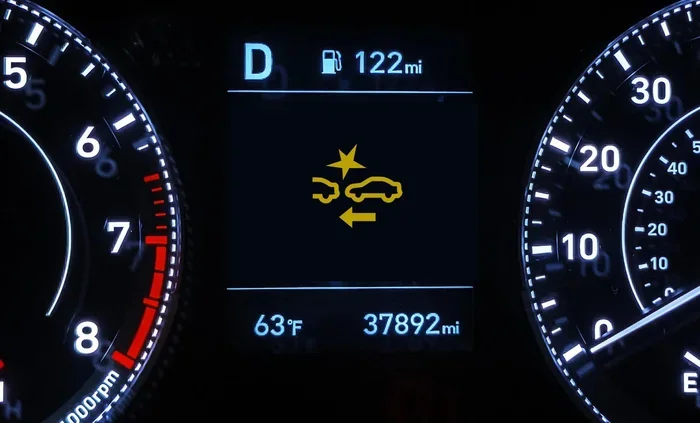
Press the button or toggle the setting. Watch for the warning light on the dashboard. When the light changes or turns off, the system is disabled. You may also see a message on the display confirming the change.
Step 4: Verify the System Is Off
Drive slowly in a safe area and test whether the automatic braking still activates. If it does not intervene, the system is successfully turned off. If it still activates, repeat the steps or consult a professional.
Step 5: Re-Enable When Ready
When you want the safety features back on, simply repeat the process. Press the same button or toggle the setting back on. The dashboard light will return, confirming the system is active again.
Risks and Considerations of Turning It Off
Before you decide to disable automatic emergency braking, you need to understand what you are giving up. The collision mitigation system is one of the most effective active safety features in modern vehicles.
Increased Risk of Rear-End Collisions
Studies show that automatic emergency braking significantly reduces rear-end crashes. When you turn it off, you lose this protection. You become solely responsible for reacting to sudden stops ahead.
No More Forward Collision Warnings
Even if you disable the automatic braking, some systems also turn off the forward collision warning. This means you will not get an audible or visual alert when a crash is imminent.
Insurance Implications
Some insurance companies offer discounts for vehicles equipped with collision avoidance technology. Disabling these features could affect your premiums. Check with your insurance provider before making changes.
Resale Value
Buyers increasingly look for vehicles with advanced driver assistance systems. Having these features turned off or removed could lower your car’s resale value.
When It Is Okay to Turn It Off
There are situations where temporarily disabling the system makes sense:
- Driving through deep snow or mud where sensors are obstructed.
- Towing a trailer that causes false alerts.
- Sensor malfunction or error codes on the dashboard.
- Participating in track days or off-road events.
In these cases, turning the system back on as soon as conditions improve is the safest approach.
Common Mistakes When Disabling the System
Many drivers make avoidable mistakes when trying to turn off the collision mitigation system. Here are the most common ones:
- Confusing the button with another control: Make sure you are pressing the right button. Some vehicles have similar-looking buttons for different functions.
- Not checking the dashboard indicator: Always confirm the system is off by checking the warning light or display message.
- Assuming the system is off after a reset: Some vehicles reset the driver assistance settings after a battery disconnect or software update. Always double-check.
- Ignoring sensor maintenance: If your system triggers false alerts, cleaning the radar sensor and camera might fix the issue without needing to disable anything.
- Forgetting to re-enable the system: It is easy to turn off the brake assist and forget to turn it back on. Make it a habit to check your settings regularly.
Expert Insights on Collision Mitigation Systems
Automotive safety experts generally recommend keeping the collision mitigation system enabled at all times. These active safety systems have been proven to reduce accident rates significantly. However, experts also acknowledge that the technology is not flawless.
“The key is understanding when the system works well and when it does not,” says a senior automotive safety engineer. “False alerts in heavy snow or when towing are legitimate concerns. Temporarily disabling the system in those conditions is reasonable, but drivers should always re-enable it when conditions improve.”
Experts also suggest that if you experience frequent false alerts, the better solution is often to service the sensors rather than disable the entire system. A dirty or misaligned radar sensor can usually be cleaned or recalibrated at a dealership.
Can You Permanently Disable the System?
Some drivers want a permanent solution. They do not want the collision mitigation system to activate ever again. Here is the honest answer: on most vehicles, you cannot permanently remove the system without aftermarket tools or professional sensor calibration.
Using an OBD2 diagnostic tool, a technician can access the vehicle safety settings and disable certain features at the software level. However, this may void your warranty and is not recommended by most manufacturers.
If you are considering a permanent disable, we strongly advise consulting a certified mechanic first. They can advise you on the risks and legality in your area.
How to Clean and Maintain Your Sensors
Sometimes the solution to false alerts is simpler than you think. Regular maintenance of your collision avoidance sensors can prevent the need to disable the system entirely.
- Clean the front radar sensor area with a soft cloth and gentle cleaner.
- Wipe the windshield camera near the rearview mirror gently.
- Remove snow, ice, or mud from the front bumper after winter driving.
- Have sensor calibration done during routine service visits.
These simple steps can keep your driver assistance system working properly and reduce false alerts significantly.
Conclusion
So, how do I disable the collision mitigation system on my car? The answer depends on your vehicle’s make and model, but the process is generally straightforward. Whether you use a steering wheel button, an infotainment menu, or a diagnostic tool, you can turn off the collision mitigation system in just a few steps.
That said, this is a safety feature designed to protect you and others on the road. We recommend keeping it enabled whenever possible. If you must turn it off, do so temporarily and re-enable it as soon as conditions allow. Regular sensor maintenance can also reduce false alerts and help you get the most out of your vehicle safety technology.
Take a few minutes today to locate the disable button or setting in your car. You will be glad you know where it is if you ever need it. Stay safe, stay informed, and enjoy the drive.
Frequently Asked Questions
Can I disable the collision mitigation system on any car?
Most modern vehicles allow you to turn off the collision mitigation system through a button or settings menu. However, the method varies by brand and model. Check your owner’s manual for specific instructions.
Will disabling the system void my warranty?
Temporarily turning off the driver assistance system through normal controls usually does not void your warranty. However, using aftermarket tools to permanently remove or modify the system may affect your coverage. Always check with your dealer first.
Why does my collision mitigation system keep activating for no reason?
False alerts are often caused by a dirty radar sensor or camera, heavy rain, snow, or sensor malfunction. Cleaning the sensors or having them recalibrated at a dealership can often resolve the issue without needing to disable the system.
Is it legal to disable the collision mitigation system?
In most regions, temporarily disabling the collision avoidance system through the manufacturer’s provided controls is legal. Permanently removing or tampering with active safety features may violate local regulations. Check your local laws before making permanent changes.
Can I disable just the automatic braking but keep the forward collision warning?
On some vehicles, yes. Certain driver assistance systems allow you to turn off the automatic braking while keeping the warning alerts active. Check your vehicle’s settings menu or owner’s manual for this option.
How do I know if the collision mitigation system is turned off?
Look for the dashboard indicator light or a message on the infotainment screen. When the system is disabled, the warning light will change or turn off, and you may see a confirmation message on the display.