How Do I Know If My Key Fob Needs a New Battery Today
Your key fob is telling you something when it starts acting strange. A weak key fob battery causes range issues, intermittent signals, and trouble starting your car. Replacing the battery is simple, affordable, and something you can do at home in minutes.
Your key fob is one of those small gadgets you barely think about until it stops working. Then suddenly, you’re standing in your driveway, pressing the button over and over, wondering why your car won’t respond. The most common culprit? A key fob battery that needs replacing.
Knowing how to tell if your key fob needs a new battery can save you time, money, and a lot of frustration. You don’t need to be a car expert to figure this out. In most cases, your key fob gives you clear warning signs long before it dies completely. This guide walks you through every sign, every step, and every tip you need to handle a key fob battery replacement with confidence.
Whether you drive a sedan, SUV, or truck, the process is nearly the same. The remote key fob relies on a small coin cell battery to send signals to your car. When that battery weakens, your key fob signal suffers. Let’s break down exactly what to look for and what to do about it.
Key Takeaways
- Warning signs are clear: Reduced range, inconsistent signal, and dashboard alerts all point to a dying key fob battery.
- Replacement is easy: Most key fobs use a common CR2032 coin cell battery you can swap in under five minutes.
- Battery life averages 3-4 years: But usage patterns and climate can shorten or extend that timeline.
- Don’t ignore the symptoms: A dead key fob can leave you stranded or locked out of your vehicle.
- Reset after replacement: Always reprogram your key fob after a battery swap to restore full functionality.
- Professional help is available: If DIY replacement feels intimidating, a mechanic can handle it quickly.
📑 Table of Contents
- Common Signs Your Key Fob Battery Is Dying
- How to Replace Your Key Fob Battery
- How Long Does a Key Fob Battery Last?
- What Happens When Your Key Fob Battery Dies Completely
- Tips to Extend Your Key Fob Battery Life
- Common Key Fob Battery Mistakes to Avoid
- Key Fob Battery Replacement Cost and Where to Buy
- Key Takeaways
- Conclusion
Common Signs Your Key Fob Battery Is Dying
Your key fob doesn’t just stop working one day without warning. It gives you clues. The trick is knowing what those clues mean. Here are the most common key fob symptoms that point to a low battery.
Reduced Range on the Remote
This is the number one sign. You used to unlock your car from 30 feet away. Now you need to stand right next to it. If you find yourself walking closer and closer to your vehicle before pressing the button, your key fob battery is losing power. The key fob range shrinks as the battery weakens.
Try this test. Stand at the far end of your driveway and press the unlock button. If your car doesn’t respond, try moving closer. The difference between your old range and your current range tells you a lot. A dead key fob might only work when you’re touching the door handle.
Intermittent or Unreliable Signals
Sometimes the fob works, and sometimes it doesn’t. You press the button once and nothing happens. You press it again and the car unlocks. This inconsistent behavior is a classic sign of a failing key fob battery. The voltage drops just enough to cause sporadic failures.
Pay attention to patterns. Does it work better when you’re close? Does it struggle more in cold weather? These details help confirm that the battery is the problem and not something else. Key fob troubleshooting starts with noticing these small inconsistencies.
Dashboard Warning Lights
Many modern vehicles have a key fob warning light on the dashboard. It looks like a small key or a fob icon. If you see this light, your car is telling you the fob battery is low. Don’t ignore it. This warning is designed to give you time to replace the battery before you’re left stranded.
Some cars also display a message on the instrument cluster. It might say something like “Key fob battery low” or “Replace key fob battery.” Check your owner’s manual to understand what your specific vehicle displays.
Push Button Start Won’t Engage
If your car uses push button start, a weak key fob battery can prevent the engine from starting. The system needs to detect the fob inside the cabin before it will allow ignition. When the battery is low, the detection fails. You might press the start button and get nothing.
This is especially frustrating because it can happen suddenly. One day your push button start works fine. The next day it doesn’t recognize the fob at all. If this happens, check the battery before assuming something more serious is wrong.
Key Fob Buttons Feel Different
You know how your key fob buttons feel when they work well. They have a crisp, responsive click. When the battery is low, the buttons might feel mushy or require extra pressure. This isn’t always the case, but it’s worth noting. If your car remote battery is dying, the reduced power affects the tactile response too.
Multiple Fobs Behave the Same Way
If you have more than one key fob for your vehicle, test both. If both fobs show the same symptoms, it’s almost certainly a battery issue. If only one fob has problems, the issue might be with that specific fob. This simple check helps you narrow down the cause quickly.
How to Replace Your Key Fob Battery
Replacing a key fob battery is one of the easiest maintenance tasks you can do. Most people complete it in under five minutes. You don’t need special tools or technical skills. Here’s exactly how to do it.
Step 1: Identify the Battery Type
Most key fobs use a CR2032 battery. This is a standard coin cell battery available at almost any store. However, some vehicles use different battery types. Check your owner’s manual or look up your specific fob model online. The battery type is printed on the old battery itself once you remove it.
Common battery types include:
- CR2032 – Most common, used in Ford, Toyota, Honda, and many others
- CR2025 – Slightly thinner, used in some BMW and Mercedes models
- CR1632 – Smaller, used in certain Subaru and Kia fobs
- CR2016 – Rare, found in older or compact fobs
Step 2: Open the Key Fob
Key fobs open in different ways depending on the model. Some have a small screw on the back. Others use a clip that you pry open with a flathead screwdriver. Some fobs split in half with no tools needed.
Work carefully. You don’t want to crack the plastic shell. If your fob has a screw, remove it first. If it clips together, insert a thin flat tool into the seam and gently twist. The two halves should separate with light pressure.
Step 3: Remove the Old Battery
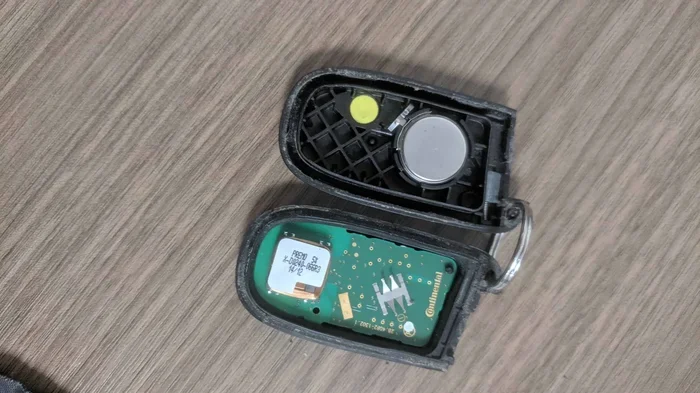
Once the fob is open, you’ll see the battery sitting in a small compartment. Note which side faces up. Take a photo if you need to remember the orientation. Use a small flathead screwdriver or your fingernail to gently pry the battery out. The old battery should pop out easily.
Dispose of the old battery properly. Don’t just throw it in the trash. Many stores have battery recycling bins. This is a small step that makes a big difference for the environment.
Step 4: Insert the New Battery
Take your new CR2032 battery (or whatever type your fob uses). Match the positive side (+) facing up, just like the old battery was positioned. Press the new battery firmly into place. It should sit flat and snug without any wiggling.
Make sure you don’t mix up positive and negative. Putting the battery in backwards will prevent the fob from working. Double-check the orientation before you close the fob.
Step 5: Close the Fob and Test
Snap the two halves of the fob back together. If there’s a screw, tighten it. Now test your key fob signal. Stand a few feet from your car and press the unlock button. The car should respond immediately. Test all buttons: lock, unlock, trunk release, and panic alarm.
If the fob still doesn’t work after replacing the battery, try resetting it. Some vehicles require you to reprogram the fob after a battery swap. Check your owner’s manual for the reset procedure.
When to See a Professional
Most key fob battery swaps are simple DIY jobs. But sometimes you need help. If your fob is damaged, cracked, or the buttons don’t work even with a new battery, the problem might be the fob itself, not the battery. In these cases, a professional can diagnose the issue.
If you’re not comfortable opening the fob, visit a dealership or trusted mechanic. They can replace the battery for a small fee. Keep in mind that a mechanic can hold your car until you pay for the service, so make sure you understand the cost upfront.
How Long Does a Key Fob Battery Last?
The average key fob battery lasts between three and four years. But this varies based on several factors. Understanding these factors helps you plan ahead and avoid getting caught off guard.
Factors That Affect Battery Life
- Frequency of use: Every time you press a button, the battery loses a small amount of power. Heavy users drain batteries faster.
- Distance from the vehicle: Standing far away and pressing the button forces the fob to transmit at higher power, draining the battery quicker.
- Climate and temperature: Extreme heat and cold both reduce battery performance. Cold weather is especially hard on coin cell batteries.
- Fob quality and model: Some fobs are more power-efficient than others. Newer models with proximity sensors may drain faster.
- Signal interference: If your fob is near other electronic devices, it may work harder to maintain a connection.
When to Replace Before It Dies
You don’t have to wait for the fob to stop working completely. Smart car owners replace the battery at the first sign of weakness. This prevents the inconvenience of a dead key fob at the worst possible moment. If you notice reduced range or intermittent signals, swap the battery right away.
Keep a spare CR2032 battery in your glove box. This way, you’re always prepared. A spare battery costs about a dollar and can save you from an expensive locksmith call.
What Happens When Your Key Fob Battery Dies Completely
A completely dead key fob is more than an inconvenience. It can leave you locked out of your car or unable to start the engine. Understanding what happens in this situation helps you prepare and respond calmly.
If your fob battery dies and your car has push button start, you won’t be able to start the engine normally. Most vehicles have a backup method. Look for a small slot near the start button or inside the steering column. You place the dead fob in this slot, and the car can read the fob’s chip even without battery power.
If your car uses a traditional key, you’ll have a physical key hidden inside the fob. Use this key to unlock the door manually. Once inside, you can usually start the car with the fob placed near the ignition or start button.
But what if you don’t have a physical backup? In that case, you might need roadside assistance or a locksmith. This is why it’s important to replace the battery at the first sign of weakness. Being proactive saves you from stressful situations.
For those wondering about alternatives when the fob completely fails, check out can a keyless car be started without the key for helpful guidance. Similarly, if you need to use a physical key as a backup, starting a keyless car with a key is often possible and worth knowing before you’re stuck in a parking lot.
Tips to Extend Your Key Fob Battery Life
You can take simple steps to make your key fob battery last longer. These small habits add up over time and keep your fob working reliably for years.
Don’t Press Buttons Unnecessarily
Every button press uses power. Don’t press the lock or unlock button multiple times out of habit. One firm press is all you need. This simple change reduces wear on both the battery and the fob’s internal contacts.
Keep the Fob Away from Other Electronics
Storing your fob next to your phone, laptop, or other electronic devices can cause signal interference. The fob may work harder to maintain a connection, draining the battery faster. Keep it in a dedicated pocket or compartment away from strong signals.
Store the Fob Properly in Cold Weather
Cold weather kills battery life. In winter, keep your fob inside your coat pocket close to your body. The warmth from your body helps maintain the battery’s voltage. Never leave the fob in your car overnight during freezing temperatures.
Clean the Fob Contacts
Dust and moisture can build up on the battery contacts inside the fob. This causes poor connections that mimic a dead battery. Every few months, open the fob and wipe the contacts with a dry cloth. This keeps the electrical connection clean and strong.
Use Quality Batteries
Cheap off-brand batteries might save a few cents, but they often don’t last as long. Stick with trusted brands like Energizer, Duracell, or Panasonic for your fob battery replacement. A quality battery ensures consistent performance and longer life.
Common Key Fob Battery Mistakes to Avoid
Even simple tasks come with pitfalls. Avoiding these common mistakes makes your key fob maintenance smoother and more effective.
Mixing Up Battery Orientation
Putting the battery in backwards is the most common mistake. The fob won’t work, and you might think the new battery is defective. Always check the orientation before closing the fob. The positive side should face up, matching the old battery’s position.
Using the Wrong Battery Type
Not all coin cell batteries are the same. A CR2032 is not interchangeable with a CR2025. The wrong size or voltage can damage your fob or fail to work. Always verify the battery type before purchasing a replacement.
Ignoring the Reset Step
After replacing the battery, some vehicles need a reset. The fob might not reconnect to the car automatically. Skipping this step leads to confusion and unnecessary worry. Always check your owner’s manual for the reprogramming procedure after a battery replacement key fob job.
Waiting Too Long to Replace
Some people wait until the fob stops working entirely. By then, you might be locked out or stranded. Replace the battery at the first sign of trouble. It takes five minutes and prevents a world of inconvenience.
Assuming It’s the Battery When It’s Not
Not every key fob problem is a battery issue. Water damage, worn-out buttons, and internal circuitry failures can cause the same symptoms. If you replace the battery and the fob still doesn’t work, the problem might be deeper than a dead cell.
Key Fob Battery Replacement Cost and Where to Buy
The cost of a key fob battery replacement is minimal. A single CR2032 battery costs between one and three dollars at most stores. If you visit a dealership or mechanic for the replacement, you might pay a service fee of twenty to fifty dollars. That fee covers their time and expertise.
You can buy replacement batteries at grocery stores, drugstores, auto parts stores, and online retailers. Keep a few spares on hand. You never know when you’ll need them.
If you’re dealing with a more complex issue than a simple battery swap, understanding your options matters. For instance, if you’re wondering about broader car affordability concerns, you might find value in can I afford a Tesla Model Y or can I afford a Tesla Model Y 2 if you’re considering a vehicle upgrade alongside your maintenance needs.
Key Takeaways
- Watch for reduced range: If you need to stand closer to your car for the fob to work, the battery is weakening.
- Intermittent signals mean trouble: Inconsistent performance is a clear sign of a low battery.
- Dashboard warnings are your friend: Don’t ignore the key fob battery low indicator on your dash.
- Replacement is quick and cheap: A five-minute swap with a $1 battery saves you from bigger headaches.
- Keep a spare battery handy: Store a CR2032 in your glove box for emergencies.
- Reset after swapping: Reprogram your fob after replacement to restore full functionality.
- Know your backup options: Understand how to start your car manually if the fob dies completely.
Conclusion
Your key fob battery is a small component that plays a huge role in your daily driving experience. When it starts to fail, your car becomes harder to unlock, harder to start, and less convenient overall. The good news is that diagnosing the problem and fixing it is straightforward.
Pay attention to the warning signs. Reduced range, inconsistent signals, and dashboard alerts all tell you it’s time to replace the battery. Keep a spare CR2032 battery on hand, and don’t wait until the fob stops working entirely. A little proactive maintenance goes a long way.
Replacing the battery takes just a few minutes and costs almost nothing. You save time, money, and the stress of being locked out. With the tips and steps in this guide, you have everything you need to handle a key fob battery replacement like a pro. Stay ahead of the problem, and your key fob will keep working reliably for years to come.
Remember, your car depends on that little fob more than you think. Treat it well, replace the battery when needed, and it will keep serving you without a hitch.
Frequently Asked Questions
How do I know which battery my key fob uses?
Check your vehicle’s owner manual for the exact battery type. Most key fobs use a CR2032 coin cell battery, but some models use CR2025 or CR1632. You can also look at the old battery once you open the fob to confirm the type before purchasing a replacement.
Can I replace my key fob battery myself?
Absolutely. Replacing a key fob battery is one of the simplest car maintenance tasks you can do. You just need a new battery, a small flathead screwdriver if needed, and about five minutes. Most fobs pop open easily, and the battery swaps out in seconds.
How much does it cost to replace a key fob battery?
A replacement battery costs between one and three dollars at most stores. If you visit a dealership or mechanic, you might pay a small service fee of twenty to fifty dollars. But doing it yourself costs almost nothing and takes just a few minutes.
Why does my key fob work sometimes but not others?
Intermittent key fob operation is a classic sign of a low battery. The voltage drops enough to cause unreliable signals but isn’t completely dead yet. Replace the battery as soon as you notice this pattern to avoid being locked out when it fails completely.
How long should a key fob battery last?
Most key fob batteries last between three and four years with normal use. However, heavy usage, extreme temperatures, and frequent long-range pressing can shorten that timeline. If you notice symptoms early, don’t wait to replace the battery.
What should I do if my key fob still doesn’t work after replacing the battery?
First, double-check that the battery is inserted correctly with the right orientation. If the fob still doesn’t work, try resetting it by holding the lock and unlock buttons together for a few seconds. If that doesn’t help, the fob itself may be damaged and need professional inspection or replacement.