How to Check Miles on Tesla and Get Accurate Results
Knowing how to check miles on Tesla is essential for every owner. Whether you want to track daily driving distance or plan long trips, your Tesla offers multiple ways to view mileage accurately. This guide covers the dashboard trip meter, the Tesla mobile app, and the energy consumption tools that help you get precise results every time.
If you own a Tesla or are thinking about buying one, you probably want to know how to check miles on Tesla correctly. Checking your mileage might seem simple, but Tesla offers several ways to view your distance, and each method gives you different information. Whether you are tracking your daily commute or planning a road trip, understanding your Tesla’s mileage tools helps you drive smarter and charge smarter.
Many new Tesla owners feel confused by the dashboard displays and the Tesla mobile app. They wonder which tool shows the real mileage and which one is just an estimate. This guide breaks everything down in plain language. You will learn exactly where to find your mileage, how to read each display, and how to use the data to improve your driving efficiency. Let us dive in.
Key Takeaways
- Trip Meter vs Odometer: Your Tesla displays both a trip meter and a permanent odometer on the dashboard.
- Mobile App Tracking: The Tesla mobile app lets you check mileage remotely and monitor energy usage on the go.
- Energy App Insights: The built-in energy app provides detailed data on miles per kWh and driving efficiency.
- Multiple Methods: You can check miles through the touchscreen, the mobile app, and even third-party tools.
- Accuracy Matters: Understanding how Tesla calculates range helps you plan trips and charging stops effectively.
- Regular Monitoring: Checking your mileage regularly helps you maintain your Tesla and improve driving habits.
📑 Table of Contents
- Understanding Your Tesla Dashboard
- Using the Tesla Mobile App to Check Miles
- How Tesla Calculates Your Range and Mileage
- Using the Energy App for Detailed Mileage Data
- Checking Mileage Through Third-Party Tools
- Common Mistakes People Make When Checking Tesla Mileage
- Expert Tips to Maximize Your Tesla Mileage Accuracy
- Conclusion
Understanding Your Tesla Dashboard
The Tesla dashboard is your first stop when you want to check miles. It is clean, simple, and easy to read. Unlike traditional cars with cluttered gauges, Tesla keeps things minimal. But that simplicity can confuse new owners who are used to seeing more information at a glance.
The Odometer
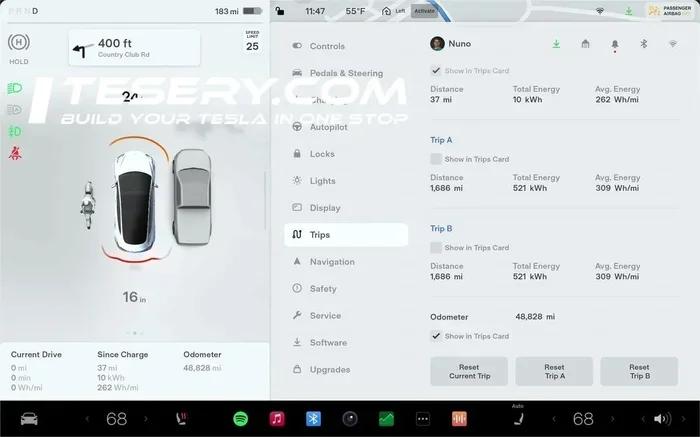
Your Tesla odometer shows the total miles the vehicle has traveled since it was manufactured. This number never resets. It is a permanent record of your car’s life. You can find the odometer reading in the Controls menu on the touchscreen. Go to Controls, then select Vehicle, and tap on Odometer. The number displayed there is your official mileage.
Why does the odometer matter? It affects your Tesla’s resale value. Buyers look at total mileage to judge wear and tear. It also matters for warranty tracking and for figuring out how much you have spent on your car per mile over time. Some owners even track this number to see how their driving habits change over months and years.
The Trip Meter
The trip meter is different from the odometer. It tracks distance for a specific journey. You can reset it whenever you want. Tesla actually offers two trip meters, Trip A and Trip B. This feature is incredibly useful for comparing different driving routes or tracking efficiency on separate trips.
For example, you might use Trip A for your daily commute and Trip B for weekend errands. By comparing the two, you can see which driving pattern uses less energy. To switch between Trip A and Trip B, tap the trip icon on the dashboard. To reset either one, hold the reset button for a few seconds. It is that simple.
Using the Tesla Mobile App to Check Miles
The Tesla mobile app is one of the best tools for checking your mileage remotely. You do not even need to be near your car to see how far you have driven. The app connects to your Tesla through Wi-Fi or cellular data and displays real-time information.
What the App Shows
When you open the Tesla app on your phone, the home screen shows your current range and recent energy usage. But to see detailed mileage data, you need to dig a little deeper. Go to the Vehicle tab, and you will see your current odometer reading and trip data. The app also shows your energy consumption in miles per kilowatt-hour, which is Tesla’s version of miles per gallon.
Some owners prefer checking their mileage through the app because it logs data over time. You can see trends in your driving and notice patterns you might miss on the dashboard alone. For instance, you might discover that your efficiency drops during winter months or when you carry extra passengers and cargo.
Setting Up Trip Tracking in the App
The Tesla app lets you set trip goals and track your progress. This is great for people who want to improve their driving efficiency. You can set a target for miles per kWh and see how close you are getting each day. Over time, this data helps you adjust your driving style and save energy.
To access trip tracking, open the app, go to the Energy section, and look at the trip history. Each trip shows your distance, energy used, and efficiency rating. This information is invaluable for anyone trying to reduce their charging costs or extend their range between stops.
How Tesla Calculates Your Range and Mileage
Understanding how Tesla calculates your range helps you trust the numbers on your screen. Tesla uses a complex algorithm that considers several factors to estimate how many miles you can still drive on a full charge.
Factors That Affect Your Range
Several things influence your Tesla’s range and mileage accuracy. Here are the key factors:
- Driving Speed: Higher speeds use more energy. Driving at 75 mph uses more battery than driving at 65 mph.
- Temperature: Cold weather reduces range because the battery works harder to stay warm. Hot weather can also affect efficiency.
- Terrain: Hilly roads use more energy than flat highways. Climbing mountains drains your battery faster.
- Tire Pressure: Underinflated tires create more rolling resistance, which reduces your range.
- Payload: Carrying heavy cargo or multiple passengers uses more energy.
- Use of Climate Control: Heating and cooling the cabin pulls power from the battery.
When you know these factors, you can better understand why your mileage readings might vary from day to day. Tesla’s range estimator adjusts in real time based on your current driving conditions. This is why your estimated range might show 320 miles on a cold morning but 340 miles on a warm afternoon.
Comparing Tesla to Hybrid Vehicles
Some people wonder how Tesla’s electric mileage compares to hybrid vehicles. Hybrids like the Ford Escape Hybrid switch between electric and gas power at certain speeds, which can affect their overall efficiency. Tesla vehicles run purely on electricity, which means their mileage calculations are more straightforward. You do not have to worry about switching between fuel sources.
For owners coming from a hybrid background, the transition to a Tesla is smooth because the car handles all the energy management for you. You just drive and let the Tesla optimize your efficiency. However, if you are curious about how different vehicle types compare in terms of fuel efficiency, you might find it interesting to explore resources like 1 Liter Petrol How Many Km Car to understand traditional fuel economy benchmarks.
Using the Energy App for Detailed Mileage Data
The Tesla Energy App is one of the most powerful tools for tracking your mileage and efficiency. It gives you a deeper look at how your car uses energy than the standard dashboard display.
What You Will Find in the Energy App
When you open the Energy app on your Tesla touchscreen, you see several key metrics. Here is what each one tells you:
- Range: The estimated miles you can still drive on your current charge.
- Energy Consumption: How many kilowatt-hours you are using per mile.
- Efficiency Score: A rating that compares your driving to other Tesla owners.
- Trip History: A log of previous trips with distance and energy data.
- Charger Status: Information about your current charging session and estimated time to full.
The Energy App is especially useful for long road trips. It helps you plan charging stops by showing you how much range you will have at each point along your route. You can also compare your efficiency with the Tesla navigation system’s built-in range estimator to make sure you are on track.
Quick Tips for Reading the Energy App
Here are some quick tips to get the most out of the Energy App. First, check it before every trip to see your starting efficiency. Second, compare your real-time consumption with the trip average to spot any sudden changes. Third, use the app’s trip planning feature to map out charging stops and avoid range anxiety on long journeys.
If you are curious about how your Tesla’s efficiency compares to traditional vehicles, you might also want to check out information about At What Speed Does A Hybrid Switch From Electric To Gas to understand how hybrid systems manage their fuel and electric power transitions.
Checking Mileage Through Third-Party Tools
Beyond the built-in Tesla tools, several third-party apps and devices can help you track your mileage. These tools often provide additional insights that the standard Tesla dashboard does not offer.
Popular Third-Party Options
Many Tesla owners use apps like ABRP (A Better Route Planner) or TeslaFi to track their mileage and charging habits. These apps connect to your Tesla through the API and pull detailed data about every trip you take. They can show you historical mileage trends, charging costs, and even predict when you will need maintenance based on your driving patterns.
Another option is to use a Bluetooth OBD adapter, though this is less common for Tesla vehicles since they do not use a traditional OBD-II port. Instead, most third-party tools rely on the Tesla API, which gives them access to all the same data the Tesla app uses.
When to Use Third-Party Tools
Third-party tools are most useful for owners who want detailed analytics. If you are tracking mileage for tax purposes or business use, these tools can generate reports that make tax time easier. For example, if you use your Tesla for work and want to deduct vehicle expenses, having detailed mileage logs is essential. You can learn more about deducting vehicle-related costs in our article on Can I Deduct Vehicle Sales Tax On My Federal Return.
Common Mistakes People Make When Checking Tesla Mileage
Even experienced Tesla owners sometimes make mistakes when checking their mileage. Avoiding these common errors helps you get more accurate results every time.
Mistake 1: Ignoring the Difference Between Range and Mileage
Many people confuse range with mileage. Range is how far you can still drive on your current charge. Mileage is how far you have already driven. Checking only the range number can give you a false sense of how much you have actually traveled.
Mistake 2: Not Resetting the Trip Meter
If you forget to reset your trip meter, your mileage data becomes inaccurate over time. Always reset Trip A and Trip B at the start of a new journey so you get clean data. This habit makes it much easier to track your efficiency and compare trips side by side.
Mistake 3: Relying Only on One Method
Using only the dashboard or only the mobile app limits your view. Cross-reference your data across multiple sources for the most accurate picture. The dashboard, the app, and third-party tools each offer a slightly different perspective on your mileage.
Mistake 4: Forgetting About Efficiency Factors
Your mileage numbers will change based on driving conditions. Do not panic if your range drops on a cold day or when you are carrying extra weight. Understanding the factors that affect efficiency helps you interpret your mileage data correctly.
Expert Tips to Maximize Your Tesla Mileage Accuracy
Getting the most accurate mileage readings from your Tesla comes down to a few simple habits. Follow these expert tips to improve your tracking accuracy.
- Calibrate Your Trip Meter Regularly: Reset your trip meter at the start of each month to establish a baseline for your monthly mileage.
- Keep Your Software Updated: Tesla regularly updates its range calculation algorithms. Keeping your software current ensures the most accurate readings.
- Use Scheduled Charging: Charging at consistent times helps Tesla’s system learn your driving patterns and provide better range estimates.
- Monitor Tire Pressure Monthly: Proper tire pressure improves efficiency and makes your mileage readings more reliable.
- Check Both Trip A and Trip B: Use both trip meters to compare different driving scenarios and find your most efficient route.
- Log Your Charging Sessions: Keeping a record of how much energy you add at each charging session helps you understand your true cost per mile.
- Review Energy App Data Weekly: A quick weekly review of your Energy App data helps you spot trends and make adjustments to your driving habits.
These habits take just a few minutes each week but pay off in better accuracy and improved driving efficiency. Over time, you will develop a deep understanding of your Tesla’s energy use and how to get the most out of every charge.
For those interested in comparing electric efficiency with traditional fuel economy, resources like 1 Litre Petrol How Many Km In Car can provide helpful context for understanding how electric vehicles like Tesla compare to petrol-powered cars in terms of energy efficiency.
Conclusion
Knowing how to check miles on Tesla gives you confidence and control over your driving experience. From the dashboard trip meter to the Tesla mobile app and the Energy App, you have multiple reliable ways to track your mileage accurately. Each method offers unique benefits, and using them together gives you the most complete picture of your driving habits.
Remember to avoid common mistakes like confusing range with mileage or forgetting to reset your trip meter. Use the expert tips in this guide to improve your accuracy and get the most out of your Tesla. Whether you are a new owner or a long-time Tesla driver, these tools and techniques help you drive smarter, charge smarter, and enjoy every mile.
Your Tesla is a sophisticated machine designed to give you real-time data about your driving. Take advantage of every tool available, and you will always know exactly where you stand. Happy driving, and may your range always be generous.
Frequently Asked Questions
How do I find my Tesla’s odometer reading?
To find your Tesla’s odometer, tap Controls on the touchscreen, then select Vehicle, and tap Odometer. The number displayed is your total lifetime mileage. This reading never resets and serves as your official mileage record.
Can I check my Tesla’s mileage from my phone?
Yes, the Tesla mobile app lets you check your mileage remotely. Open the app, go to the Vehicle tab, and you will see your current odometer reading and trip data. The app also tracks energy consumption and range estimates in real time.
What is the difference between Trip A and Trip B?
Trip A and Trip B are two separate trip meters on your Tesla dashboard. You can use them to track different journeys independently. For example, use Trip A for your daily commute and Trip B for weekend trips. You can reset either one at any time.
Why does my Tesla’s estimated range change throughout the day?
Tesla’s range estimator adjusts based on real-time driving conditions. Factors like temperature, speed, terrain, and climate control usage all affect your estimated range. Cold weather and highway driving at high speeds typically reduce your estimated range.
Are third-party mileage tracking apps safe for Tesla?
Most reputable third-party apps like ABRP and TeslaFi use Tesla’s official API and are safe to use. They provide additional analytics and historical data that the standard Tesla tools do not offer. Always download apps from trusted sources and check user reviews before connecting.
How often should I check my Tesla’s mileage?
Checking your mileage weekly is a good habit for most owners. Daily checks are helpful if you are tracking efficiency or planning long trips. Monthly checks of your odometer reading help you monitor long-term trends and maintain accurate records for insurance or tax purposes.
=== CONCLUSION ===
Checking miles on your Tesla does not have to be complicated. With the dashboard trip meter, the mobile app, and the Energy App, you have everything you need to track your mileage accurately and efficiently. Use the tips and tools in this guide to stay informed about your driving habits and energy usage. The more you understand your Tesla’s mileage data, the better you can drive, charge, and enjoy your electric vehicle every single day.