Do You Have To Reset The Light After An Oil Change
Yes, you typically need to reset the oil change light after an oil change to clear the maintenance reminder on your dashboard. The process is simple and usually takes less than a minute using your steering wheel buttons or infotainment system. Resetting the oil change light helps you track your next service interval accurately and keeps your car running smoothly.
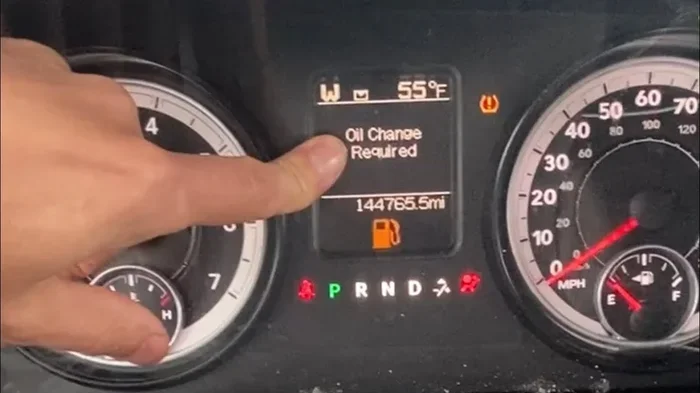
You just got your oil changed. The mechanic hands you the receipt, you pay, and you drive off feeling good about keeping your car in shape. But then you glance at the dashboard and see that little oil can icon or “CHANGE OIL” message still staring back at you.
It is a moment that catches almost every driver off guard. You think, “Wait, did the mechanic forget something?” The truth is simpler than you might think. Do you have to reset the light after an oil change? In most cases, yes. And the good news is that it is a quick, easy process you can do yourself in under two minutes.
Let us walk through everything you need to know about resetting your oil change light. We will cover why the light stays on, how to reset it for different vehicles, what to do if it will not turn off, and how to avoid common mistakes. By the end of this guide, you will feel confident handling this every time you get an oil change.
Key Takeaways
- Resetting the light is necessary: Most vehicles require a manual reset after an oil change to clear the maintenance reminder.
- Methods vary by car: Different makes and models use different reset procedures, often involving steering wheel buttons or the infotainment screen.
- Ignoring the light can cause issues: A stuck oil change reminder may confuse you about your actual maintenance schedule.
- Resetting is not the same as fixing a problem: If the light stays on after resetting, there may be an underlying issue that needs attention.
- Check your owner’s manual: Your vehicle’s manual has the exact reset steps for your specific model.
- Oil life monitoring systems differ: Some cars use percentage-based systems while others use simple mileage reminders.
📑 Table of Contents
- Why Does the Oil Change Light Stay On After an Oil Change?
- How to Reset the Oil Change Light: Step-by-Step for Common Vehicles
- What to Do If the Oil Change Light Will Not Turn Off
- How Often Should You Change Your Oil?
- Quick Tips for Managing Your Oil Change Light
- Common Mistakes People Make With Oil Change Lights
- Expert Insights on Oil Change Light Maintenance
- Conclusion
Why Does the Oil Change Light Stay On After an Oil Change?
Here is the thing most people do not realize. The oil change light is not a sensor that detects dirty oil. It is a maintenance reminder programmed by the car manufacturer. It tracks mileage or time since your last service and triggers a warning when you reach that interval.
When the mechanic drains the old oil and installs fresh oil, they do not have a way to reset your specific car’s computer system. That is your job. The light is simply doing what it was designed to do, which is remind you that service is due. Once you reset it, the system starts tracking from zero again.
Some modern vehicles use an oil life monitoring system that goes beyond simple mileage. These systems look at driving conditions, engine temperature, and other factors to estimate when your oil actually needs changing. Even with these advanced systems, a manual reset is still required after each oil change.
Types of Oil Change Reminder Systems
Not all oil change lights work the same way. Understanding your system helps you know what to expect. Here are the most common types:
- Mileage-based reminders: These trigger at a set mileage interval, usually every 5,000 to 7,500 miles. They are the simplest type and found in older vehicles.
- Time-based reminders: Some cars remind you based on time, such as every six months, regardless of mileage.
- Oil life percentage systems: These modern systems display a percentage that drops as you drive. When it hits zero or a low number, it is time for service. Common in newer Ford, GM, and Chrysler vehicles.
- Oil change indicator lights: These are simple on/off lights that illuminate when service is due and need to be manually turned off after an oil change.
How to Reset the Oil Change Light: Step-by-Step for Common Vehicles
The reset process depends on your vehicle’s make, model, and year. There is no one-size-fits-all method. Below we cover the most common reset procedures for popular brands.
Resetting the Oil Change Light on Toyota and Lexus
Toyota and Lexus vehicles use a straightforward reset process. Here is how to do it:
- Turn the ignition to the “ON” position without starting the engine. You do this by pressing the push button start without pressing the brake pedal, or by turning the key to the accessory position.
- Locate the odometer or trip meter display on the instrument cluster.
- Press and hold the trip meter reset button until you see the maintenance light flash or the oil life percentage begin to blink.
- Continue holding for about 10 to 15 seconds until the light resets.
- Turn the ignition off and then back on to confirm the light is cleared.
For some newer Toyota models with the multifunction display, the process involves navigating through the steering wheel controls to the maintenance menu and selecting “Reset Maintenance.”
Resetting the Oil Change Light on Honda and Acura
Honda and Acura vehicles follow a similar but slightly different procedure:
- Press and hold the trip meter select/reset stalk on the steering column.
- While holding it, turn the ignition to the “ON” position.
- Continue holding the stalk for about 10 seconds until the maintenance light begins to blink.
- Release the stalk and then press it again briefly to reset the indicator.
- Turn the ignition off and back on to verify the reset.
Some Honda models from 2016 onward use a menu-based system on the dashboard display. You navigate to the maintenance settings and select the option to reset the oil life indicator.
Resetting the Oil Change Light on Ford Vehicles
Ford vehicles, especially those with the information display screen, have their own reset method:
- Use the steering wheel arrow buttons to navigate to the “Settings” menu on the dashboard display.
- Scroll to “Vehicle Information” or “Maintenance” settings.
- Select “Oil Life Reset” or a similar option.
- Hold the OK button or follow the on-screen prompts to complete the reset.
- The oil life percentage should return to 100 percent.
For older Ford models without a screen, the process often involves cycling the ignition key in a specific pattern while pressing a button on the dashboard.
Resetting the Oil Change Light on Chevrolet and GMC
GM vehicles like Chevrolet and GMC use a system similar to Ford:
- Press the trip/reset button on the instrument cluster.
- Turn the key to the “ON/RUN” position.
- Press and hold the trip button until the oil life percentage starts to flash.
- Hold for several seconds until it resets to 100 percent.
- Turn the key off and back on to confirm.
If your vehicle has a touchscreen infotainment system, you can also reset the oil life through the vehicle settings menu under “Vehicle Maintenance.”
What to Do If the Oil Change Light Will Not Turn Off
Sometimes the light refuses to go away even after you follow the reset steps. This can be frustrating, but it usually has a simple explanation. Let us look at the most common reasons and solutions.
Common Reasons the Light Stays On
- The reset was not completed properly: You may not have held the button long enough or missed a step in the sequence. Try the reset process again carefully.
- The ignition position was wrong: Some vehicles require the key to be in a specific position for the reset to work. Check your owner’s manual for the exact position.
- A loose oil cap or sensor issue: If the oil cap is not tightened properly after the oil change, the pressure sensor may trigger a warning light that looks similar to the oil change light.
- The oil change was not completed: If the mechanic did not actually change the oil, the light would still be accurate. Double-check with your service provider.
- A deeper electrical or sensor problem: In rare cases, a faulty oil pressure sensor or wiring issue keeps the light illuminated.
When to See a Mechanic
If you have tried resetting the light two or three times and it still will not turn off, it is time to visit a service center or trusted mechanic. A persistent light could indicate a problem with the oil pressure sensor, a wiring issue, or a deeper engine concern. Do not ignore it. Driving with an unresolved warning light is never a good idea.
Also, if you notice other warning lights alongside the oil change light, such as a check engine light or an oil pressure warning, pull over safely and inspect your vehicle. You should also check whether you can safely drive to a nearby service location. Sometimes the oil pressure light and the maintenance light look similar but mean very different things.
How Often Should You Change Your Oil?
The oil change light is your guide, but it is not the only factor to consider. Understanding your vehicle’s oil change needs helps you stay ahead of maintenance and avoid surprises.
The 3,000-Mile Myth
You have probably heard that you need to change your oil every 3,000 miles. That advice used to be standard for older vehicles. Modern engines and synthetic oils have changed the game significantly. Most new vehicles today can go between 5,000 and 10,000 miles between oil changes, depending on the type of oil used and driving conditions.
Synthetic vs. Conventional Oil
The type of oil you use plays a big role in how often you need to change it:
- Conventional oil: Typically requires a change every 3,000 to 5,000 miles. It is more affordable but breaks down faster.
- Synthetic blend: Lasts about 5,000 to 7,500 miles. A good middle ground for many drivers.
- Full synthetic oil: Can last 7,500 to 15,000 miles depending on the brand and your vehicle. It offers the best protection and longevity.
Always check what your vehicle manufacturer recommends. You can find this information in your owner’s manual or on the oil cap under the hood. Following the recommended interval keeps your engine healthy and your warranty intact.
Driving Conditions That Shorten Oil Life
Even if your car says you have a long interval between changes, certain driving conditions can shorten your oil life significantly:
- Stop-and-go city driving
- Extreme hot or cold weather
- Towing heavy loads or trailers
- Short trips under five miles
- Driving on dusty or unpaved roads
If you regularly experience any of these conditions, you may want to change your oil more frequently than the system recommends. Think of it as extra insurance for your engine.
Quick Tips for Managing Your Oil Change Light
Here are some practical tips that make dealing with the oil change light much easier:
- Reset the light immediately after the oil change: Do not wait until you get home. Do it right there in the service bay while everything is fresh in your mind.
- Write down the reset date and mileage: Keep a small notebook in your glove box or use your phone to track when your next oil change is due.
- Do not ignore the light even if you just changed the oil yourself: Self-service oil changes still require a manual reset. The car does not know you did the work.
- Keep your owner’s manual accessible: Store it in the glove box or save a digital copy on your phone. You never know when you will need the reset instructions.
- Check for recalls or technical bulletins: Some vehicles have known issues with their oil change reminder systems. A quick search for your specific model year can save you headaches.
Common Mistakes People Make With Oil Change Lights
Even the most careful drivers make mistakes when it comes to oil change lights. Here are the most common ones and how to avoid them:
Mistake 1: Ignoring the Light Until It Gets Annoying
We get it. A blinking dashboard light is annoying, and it is tempting to just ignore it. But the oil change light exists to protect your engine. Ignoring it for too long can lead to degraded oil performance, reduced fuel economy, and eventually engine damage. If the light comes on, schedule your oil change within the next few hundred miles at most.
Similarly, if you notice other warning lights or unusual behavior after driving, it is worth investigating. For instance, if your car starts acting strangely after a service visit, you might want to check whether the service itself caused any issues. Sometimes a car won’t start right after turning off, or other symptoms appear that are worth looking into.
Mistake 2: Confusing the Oil Change Light with the Oil Pressure Light
These two lights look different but mean very different things. The oil change light is a maintenance reminder. The oil pressure light is a serious warning that means your engine has low oil pressure and you should stop driving immediately. If you see a red oil can icon or a “LOW OIL PRESSURE” message, pull over safely and check your oil level right away.
Mistake 3: Forgetting to Reset After a DIY Oil Change
If you change your own oil at home, you might assume the light will just go away on its own. It will not. You must manually reset the system using the same steps we outlined above. Make this part of your oil change routine so you never forget.
Mistake 4: Assuming the Mechanic Will Reset It
Even if you take your car to a shop, do not assume they will reset the light. Some shops do it as part of their service. Others expect you to do it yourself. Always confirm and ask them to show you how to reset it if you are unsure.
Expert Insights on Oil Change Light Maintenance
We asked experienced mechanics about the most common questions they hear about oil change lights. Here is what they had to say:
“The number one mistake I see is people who never reset the light after an oil change,” says a senior technician with over 15 years of experience. “They come back in six months wondering why the light is still on, and they have already gone thousands of miles past their due date.”
“Another common issue,” he adds, “is people who reset the light but do not actually change the oil. The light goes off, but the old oil is still in the engine. This is worse than not resetting at all because the driver thinks the car was serviced when it was not.”
These insights highlight why understanding the oil change process matters. The light is a tool to help you stay on track. But it only works if you use it correctly.
If you are dealing with other dashboard warnings, it helps to understand what they mean and when to act. For example, if you see a traction control warning or a Trac Off indicator, you may wonder whether it is safe to keep driving. Similarly, knowing the difference between a maintenance reminder and a serious engine warning can save you time and money.
Some drivers also ask about the relationship between oil changes and other car issues. For example, can low oil or old oil cause your car to overheat? The answer is yes, and it is one reason why staying on top of oil changes matters so much. If your vehicle does overheat, understanding what to do next is important for your safety and your car’s longevity.
Conclusion
Do you have to reset the light after an oil change? Yes, in almost all cases. The oil change light is a maintenance reminder, not a sensor that detects dirty oil. After your oil change, take a moment to reset it using the steps for your specific vehicle. It is a simple process that keeps your maintenance schedule accurate and your dashboard clear of false warnings.
Remember to check your owner’s manual for the exact reset procedure. If the light will not turn off after multiple attempts, visit a service center to rule out any underlying issues. And most importantly, do not ignore the light when it comes on in the first place. Staying current with your oil changes is one of the simplest and most effective ways to protect your engine and keep your car running strong for years to come.
Take a few minutes after your next oil change to reset that light. Your future self will thank you when the dashboard stays clean and your maintenance schedule stays on track.
Frequently Asked Questions
Do I need to reset the oil change light if I go to a dealership?
It depends on the dealership. Many service departments reset the light as part of their oil change service. However, it is always a good idea to confirm with them before you leave. If they do not reset it, you can do it yourself using the steps in your owner’s manual.
Can I drive with the oil change light on?
Yes, you can safely drive short distances with the oil change light on. It is a maintenance reminder, not an emergency warning. However, you should not delay your oil change for too long, as old oil loses its effectiveness and can harm your engine over time.
What happens if I never reset the oil change light?
Nothing terrible will happen immediately. The light will simply stay on, which can be annoying and make it harder to notice other important warnings. Over time, it also means you lose track of when your next oil change is actually due, which could lead to going too long between services.
Does resetting the oil change light also reset the oil life percentage?
Yes, on vehicles that use an oil life monitoring system, resetting the light also brings the oil life percentage back to 100 percent. This restarts the tracking system so it can monitor your oil condition accurately until the next service interval.
How do I know which reset method is right for my car?The best way is to consult your owner’s manual. It contains the exact reset procedure for your specific make, model, and year. You can also search online for your vehicle year and “oil change light reset” to find video tutorials and step-by-step guides.
Will the oil change light come back if I don’t change the oil?
Yes, the light is designed to return based on your mileage or driving conditions. If you reset the light but do not actually change the oil, the system will eventually trigger the reminder again. This is why it is important to reset the light only after a real oil change has been completed.
=== FAQS ===