Does Mazda 3 Have Apple CarPlay Heres What You Need To Know
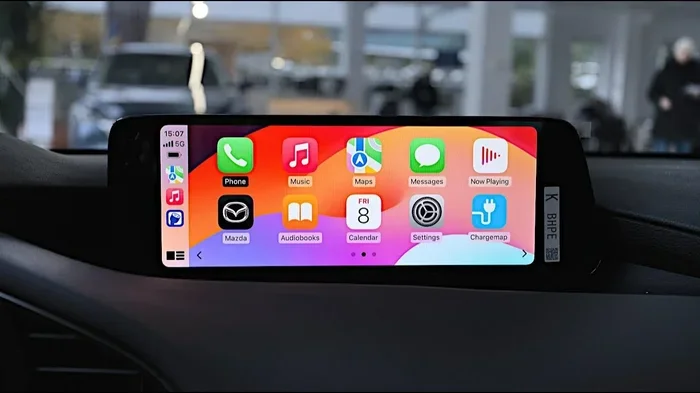
Yes, the Mazda 3 does offer Apple CarPlay, but availability depends on your model year and trim level. Whether you drive a 2019 model or the latest 2024 Mazda 3, you can get wireless or wired smartphone integration that makes driving safer and more connected. In this guide, we break down everything you need to know about Mazda 3 Apple CarPlay, from setup to troubleshooting.
Key Takeaways
- Apple CarPlay is available on most Mazda 3 models from 2019 onward, with newer trims offering wireless connectivity.
- Trim level matters — higher trims like the Premium and Grand Touring come with Apple CarPlay standard.
- Setup is simple and only takes a few minutes using either a USB cable or wireless connection.
- Mazda’s infotainment system supports both Apple CarPlay and Android Auto on most recent models.
- Older model years may need a retrofit kit or software update to gain Apple CarPlay support.
- Voice control and Siri work seamlessly with Mazda 3’s Apple CarPlay integration.
📑 Table of Contents
- Does Mazda 3 Have Apple CarPlay?
- Which Mazda 3 Model Years Support Apple CarPlay?
- Which Mazda 3 Trims Include Apple CarPlay?
- How to Set Up Apple CarPlay on Your Mazda 3
- What Features Does Apple CarPlay Offer in the Mazda 3?
- Common Apple CarPlay Issues and How to Fix Them
- Mazda 3 Apple CarPlay vs. Other Car Brands
- Tips to Get the Most Out of Apple CarPlay on Your Mazda 3
- Do You Need Apple CarPlay If You Already Have Built-In Navigation?
- Can You Add Apple CarPlay to an Older Mazda 3?
- Final Thoughts on Mazda 3 Apple CarPlay
Does Mazda 3 Have Apple CarPlay?
If you are shopping for a Mazda 3 or already own one, you have probably wondered about smartphone compatibility. The short answer is yes. The Mazda 3 offers Apple CarPlay on most model years and trim levels. But the details matter. Not every Mazda 3 comes with the same tech features, and understanding what you get can save you time and frustration.
Apple CarPlay lets you mirror your iPhone on your car display screen. You get access to maps, music, messages, and phone calls without taking your eyes off the road. It is one of the most popular car technology features today, and Mazda has made it available on the 3 for several years now.
In this article, we will walk you through everything you need to know. We will cover which years have it, which trims include it, how to set it up, and what to do if it is not working. Whether you are a current Mazda 3 owner or thinking about buying one, this guide has you covered.
Let us dive in and explore the world of Mazda 3 Apple CarPlay in detail.
What Is Apple CarPlay and Why Does It Matter?
Apple CarPlay is a smart phone integration system made by Apple. It projects your iPhone interface onto your car display screen. This means you can use your favorite apps safely while driving. You can make calls, send texts, get directions, and listen to music — all through your car’s infotainment system.
The system uses a simple and familiar interface. The icons are large and easy to tap. Siri voice control lets you keep your hands on the wheel and your eyes on the road. This is why smartphone integration has become a must-have feature for most car buyers today.
For Mazda 3 owners, Apple CarPlay means your phone and your car work together beautifully. You do not need to fumble with cables or struggle to read small text on your phone screen while driving. Everything is displayed clearly on the car display screen right in front of you.
Which Mazda 3 Model Years Support Apple CarPlay?
Mazda started offering Apple CarPlay on the Mazda 3 around 2019. Before that, the car relied on older infotainment systems that did not support this feature. Here is a quick breakdown by model year.
2019 Mazda 3
The 2019 Mazda 3 was one of the first years to offer Apple CarPlay. It came as part of the Mazda infotainment system update. The system used a rotary controller in the center console, and Apple CarPlay was available on higher trim levels.
2020 and 2021 Mazda 3
These years continued the Apple CarPlay support with minor improvements. The 2021 model year also introduced Android Auto support on many trims. Both systems worked through a wired USB connection in most cases.
2022 and Newer Mazda 3
The 2022 Mazda 3 brought a major upgrade. It introduced a larger display screen and wireless Apple CarPlay on select trims. This was a big deal because wireless connection means no cables to plug in. The 2023 and 2024 models carry on this tradition with even smoother performance.
Which Mazda 3 Trims Include Apple CarPlay?
Not every trim level on the Mazda 3 comes with Apple CarPlay. The availability depends on the trim and the model year. Here is a general breakdown.
Base Trims
The base trims, such as the 2.0 S on the sedan, may not include Apple CarPlay as standard. In some years, it was available as part of a technology package. You should check the specific features list for your model year.
Mid-Level Trims
Mid-level trims like the Preferred trim on the sedan or the GS trim on the hatchback often include Apple CarPlay. These trims are a sweet spot for buyers who want good tech features without paying for the top-end package.
Higher Trims
The Premium, Grand Touring, and Signature trims almost always come with Apple CarPlay as standard. These trims also offer wireless connectivity, premium audio systems, and other tech upgrades. If you want the full Mazda 3 technology package, a higher trim is the way to go.
| Trim Level | Apple CarPlay | Wireless | USB Port |
|---|---|---|---|
| 2.0 S | Sometimes | No | Yes |
| Preferred | Yes | Some years | Yes |
| Grand Touring | Yes | Yes | Yes |
| Signature | Yes | Yes | Yes |
Keep in mind that these details can vary by model year. Always check the window sticker or the Mazda website for the exact features on a specific vehicle.
How to Set Up Apple CarPlay on Your Mazda 3
Setting up Apple CarPlay on your Mazda 3 is straightforward. Whether you use a wired or wireless connection, the process takes just a few minutes. Here is how to get started.
Wired Apple CarPlay Setup
For wired connection, follow these steps:
- Plug one end of a Lightning cable into your iPhone.
- Connect the other end to the USB port in your Mazda 3.
- The car display screen should light up with the Apple CarPlay interface.
- If it does not appear, go to the infotainment settings and select Apple CarPlay.
- Follow the on-screen prompts to complete the setup.
Using a cable is reliable and fast. It also charges your phone while you drive. Just make sure you use a quality cable that supports data transfer, not just power.
Wireless Apple CarPlay Setup
For wireless connection on supported models:
- Make sure Bluetooth is turned on in both your iPhone and your Mazda 3.
- Go to the infotainment settings on your car display screen.
- Select Apple CarPlay and choose the wireless option.
- Your iPhone should connect automatically when you get in the car.
Wireless Apple CarPlay is incredibly convenient. You do not have to dig for cables or worry about them getting tangled. It is one of the best car technology upgrades you can get.
Quick Tips for a Smooth Setup
- Make sure your iPhone is updated to the latest iOS version.
- Restart your phone and the infotainment system if the connection fails.
- Use an Apple-certified cable for wired connections.
- Delete old Apple CarPlay pairings from your car if you switch phones.
These small steps can make a big difference. A smooth setup means you can get to navigation and music without any hassle every time you start the car.
What Features Does Apple CarPlay Offer in the Mazda 3?
Once Apple CarPlay is connected, you get access to a range of useful features. These are designed to keep you connected and safe while driving.
Maps and Navigation
Apple Maps works seamlessly with Mazda 3 Apple CarPlay. You get turn-by-turn directions right on the car display screen. You can also use Google Maps or Waze if you prefer those apps. This is a huge upgrade over the stock navigation system in many Mazda 3 models.
Music and Podcasts
Apple Music, Spotify, and other audio apps are fully supported. You can control playback from the car display screen or through voice commands. The car audio system in the Mazda 3 pairs well with these apps, giving you clear and rich sound.
Phone Calls and Messages
Siri lets you make calls and send texts using voice commands. You do not need to touch your phone at all. This is one of the biggest safety benefits of Apple CarPlay. You stay focused on the road while staying connected.
Third-Party Apps
Apple CarPlay supports a wide range of third-party apps. Popular apps like WhatsApp, Spotify, Pandora, and Waze all work with the system. The Mazda 3 infotainment system makes it easy to switch between apps using the car display screen or the rotary controller.
Common Apple CarPlay Issues and How to Fix Them
Even though Apple CarPlay is generally reliable, you may run into issues from time to time. Here are the most common problems Mazda 3 owners face and how to solve them.
Apple CarPlay Not Connecting
If Apple CarPlay does not connect, try these steps first. Unplug and replug the USB cable. Restart your iPhone. Turn off Bluetooth and turn it back on. If you are using wireless, delete the car pairing from your iPhone and reconnect.
Sometimes a simple restart of the infotainment system fixes the problem. Turn the car off, wait 30 seconds, and turn it back on. This refreshes the system and often resolves connection issues.
Apple CarPlay Keeps Disconnecting
If your connection drops frequently, the USB cable might be faulty. Try a different cable. Also, make sure your iPhone is not in low power mode, as this can interfere with the connection. On wireless models, check that both devices have enough battery.
Screen Freezes or Runs Slowly
A slow or frozen display can happen if the infotainment system is overloaded. Close background apps on your iPhone. Restart the car display screen by holding the power button for 10 seconds. If the problem continues, a Mazda dealer can perform a software update.
It is also worth noting that keeping your car well maintained helps the overall tech experience. For example, if you are dealing with other car performance questions, you might wonder does your car run better with a new serpentine belt — and the answer is often yes, fresh belts help everything run smoother.
Mazda 3 Apple CarPlay vs. Other Car Brands
How does Mazda 3 Apple CarPlay stack up against the competition? Let us look at a few other popular models in the compact sedan and hatchback segment.
Mazda 3 vs. Honda Civic
Both the Honda Civic and Mazda 3 offer Apple CarPlay and Android Auto. The Mazda 3 often gets praised for its more intuitive infotainment interface. The rotary controller on older models takes some getting used to, but many drivers prefer it to touchscreen-only systems.
Mazda 3 vs. Toyota Corolla
The Toyota Corolla also supports Apple CarPlay on most trims. However, the Mazda 3 tends to offer a more premium feel in the cabin. The display screen quality and responsiveness are both strong on the Mazda 3.
Mazda 3 vs. Hyundai Elantra
The Hyundai Elantra offers a long list of standard tech features. Apple CarPlay comes standard on most Elantra trims. The Mazda 3 matches this in terms of connectivity but may lag slightly in screen size on base trims.
Overall, the Mazda 3 holds its own in the smartphone integration category. It is not the only car with Apple CarPlay, but it is one of the best at delivering a smooth and user-friendly experience.
Tips to Get the Most Out of Apple CarPlay on Your Mazda 3
Once you have Apple CarPlay set up, there are a few things you can do to enhance your experience. These tips help you get the most from the system every time you drive.
Use Siri for Hands-Free Operation
Siri is your best friend when using Apple CarPlay. Say “Hey Siri” to send a text, make a call, or get directions without touching your phone. This keeps your hands on the wheel and your focus on driving. The Mazda 3’s microphone system picks up voice commands clearly, even in noisy conditions.
Customize Your Home Screen
Apple CarPlay lets you pin your favorite apps to the home screen. You can rearrange them so the ones you use most are easy to find. This is a small feature that makes a big difference in daily use.
Keep Your iPhone Charged
Using Apple CarPlay can drain your phone battery, especially on long drives. If you are using wired CarPlay, the cable charges your phone at the same time. For wireless use, consider a car charger that works well with your iPhone.
Also, if you are into car audio upgrades, you might want to look into 3 way car speakers to complement the system and get even better sound quality from your music apps.
Explore the Mazda Connect System
Mazda’s infotainment system, called Mazda Connect, works hand in hand with Apple CarPlay. Take some time to explore the settings. You can adjust display brightness, change audio preferences, and set up Bluetooth devices. Getting familiar with the system makes daily use much more enjoyable.
Consider Your Driving Habits
If you like to switch between driving modes, you might wonder if does sport mode save gas. The truth is, sport mode is about performance, not fuel economy. But it does change how the car responds, and it can affect how the infotainment system behaves in some cases. Understanding these small details helps you get the full picture of your Mazda 3.
Do You Need Apple CarPlay If You Already Have Built-In Navigation?
This is a great question that many Mazda 3 owners ask. If your car comes with a built-in navigation system, do you really need Apple CarPlay? The answer is probably yes.
Built-in navigation systems are often outdated. They may not have real-time traffic updates or the latest map data. Apple CarPlay gives you access to current maps through apps like Google Maps and Waze. These apps are constantly updated and offer features that most factory navigation systems cannot match.
Also, Apple CarPlay gives you access to your entire phone ecosystem. Music, podcasts, messaging, and even ride-sharing apps all work through the system. The built-in navigation can only do so much. Apple CarPlay expands what your car can do dramatically.
Some drivers also rely on adaptive cruise control and other driver-assist features. If you are curious about maintaining these systems, you might ask do you have to calibrate adaptive cruise control — and the answer is yes, periodic calibration helps these systems work properly.
Can You Add Apple CarPlay to an Older Mazda 3?
If you own an older Mazda 3 that does not have Apple CarPlay, all is not lost. There are aftermarket solutions available. Several companies make Apple CarPlay retrofit kits that work with the Mazda 3’s existing infotainment system.
These kits typically include a new head unit that replaces the factory radio. They support both wired and wireless Apple CarPlay. Installation can be done by a professional or a handy DIYer. Prices vary, but most kits range from $200 to $600 depending on the brand and features.
Before buying a retrofit kit, make sure it is compatible with your specific Mazda 3 model year. Some kits work only with certain infotainment systems. Reading reviews and checking compatibility lists is always a smart move.
Another option is to use a Bluetooth adapter that supports CarPlay. These are less invasive and do not require replacing the head unit. They may not offer the same seamless experience as a full retrofit, but they are a budget-friendly alternative.
If you are also concerned about other aspects of car ownership, it is worth noting that maintaining your vehicle properly helps everything run better. For instance, keeping up with regular maintenance can prevent issues that might affect your tech features. If you are curious about service options, you might wonder does Jiffy Lube do diagnostics — and they do offer basic diagnostic services at many locations.
Final Thoughts on Mazda 3 Apple CarPlay
The Mazda 3 is a strong choice for anyone who wants a car with modern tech features. Apple CarPlay support is available on most model years and trim levels, making it easy to stay connected on the road. Whether you use a wired or wireless connection, the experience is smooth and intuitive.
Higher trims like the Grand Touring and Signature offer the full package, including wireless Apple CarPlay and premium audio. Even base trims can get this feature with the right technology package. And for owners of older models, aftermarket retrofit kits provide a practical upgrade path.
Setting up Apple CarPlay is quick and easy. Once it is running, you will wonder how you ever drove without it. Maps, music, messages, and calls all come together in one convenient interface. It makes every drive safer and more enjoyable.
If you are in the market for a compact sedan or hatchback with great tech features, the Mazda 3 should be at the top of your list. Combined with a new serpentine belt and regular maintenance, a Mazda 3 with Apple CarPlay is a winning combination for daily driving and road trips alike.
Take the time to explore your infotainment settings, customize your home screen, and get comfortable with Siri voice commands. You will wonder how you ever managed without this level of car technology in your daily commute.
Frequently Asked Questions
Does every Mazda 3 come with Apple CarPlay?
No, not every Mazda 3 comes with Apple CarPlay standard. Availability depends on your model year and trim level. Higher trims like the Grand Touring and Signature include it as standard, while base trims may require a technology package or aftermarket installation.
Can I use wireless Apple CarPlay on the Mazda 3?
Yes, wireless Apple CarPlay is available on select Mazda 3 trims from 2022 onward. It allows you to connect your iPhone without a USB cable, making the experience more convenient and clutter-free.
How do I know if my Mazda 3 has Apple CarPlay?
Check your infotainment system settings for an Apple CarPlay option. You can also look at the window sticker if you are buying used, or check the Mazda website for your specific model year and trim.
Can I use Android Auto instead of Apple CarPlay?
Yes, many Mazda 3 models support both Apple CarPlay and Android Auto. This gives you flexibility regardless of which smartphone you use. Check your owner’s manual for compatibility details.
Is Apple CarPlay safe to use while driving?
Apple CarPlay is designed to be safe. It uses Siri voice commands so you can keep your hands on the wheel. The interface is simplified and easy to read, reducing distractions while you drive.
What should I do if Apple CarPlay keeps disconnecting in my Mazda 3?
Try using a different USB cable or restarting both your iPhone and the infotainment system. Make sure your software is up to date. If the problem persists, a visit to a Mazda dealer for a system check may be needed.
=== CONCLUSION ===
Does Mazda 3 have Apple CarPlay? Yes, it does. The Mazda 3 offers Apple CarPlay across most model years and trim levels, giving drivers a seamless way to connect their iPhones to the car’s infotainment system. From navigation to music to hands-free messaging, Apple CarPlay makes every drive more connected and safer.
Whether you have a 2019 model or the latest 2024 Mazda 3, there is a good chance your car supports this feature. Higher trims offer wireless connectivity, while older models may need a USB cable or an aftermarket upgrade. The setup process is simple, and the benefits are immediate.
Take a few minutes to explore Apple CarPlay on your Mazda 3. Customize your apps, use Siri for hands-free control, and enjoy the convenience of having your phone right on the car display screen. It is one of the best tech features available in a compact car, and it is well worth taking advantage of.