How Do You Use System Navigation to Boost Productivity
System navigation in your car is one of the easiest ways to save time and stay focused on the road. This guide walks you through setting up your car GPS, using smart routing features, and avoiding common mistakes that waste fuel and minutes. You will learn practical tips to make your daily drives faster, smoother, and far more productive.
Key Takeaways
- Set Up Your System Right: A proper setup saves time and makes every drive smoother from day one.
- Use Voice Commands: Hands-free navigation keeps your eyes on the road and boosts safety.
- Plan Routes Smartly: Real-time traffic updates and fuel-efficient routing cut your commute time significantly.
- Avoid Common Mistakes: Wrong settings and outdated maps are the top reasons drivers lose time and money.
- Keep Your System Updated: Regular maintenance of your car navigation ensures accurate directions and better performance.
📑 Table of Contents
What Is System Navigation and Why Does It Matter?
System navigation refers to the built-in GPS and mapping tools found in modern cars. These systems help you find the best routes, avoid traffic, and reach your destination with ease. Whether you drive a new sedan or a classic model, understanding your car’s navigation tools can change the way you drive.
Many drivers ignore their car’s navigation system. They rely on phone apps instead. But a dedicated system navigation setup offers bigger screens, better voice control, and seamless integration with your car’s dashboard. When you use it the right way, it becomes a powerful productivity tool.
Think about all the time you spend driving each week. Whether it is your daily commute, school runs, or weekend trips, every minute behind the wheel counts. A well-used navigation system can shave off minutes from every trip. Over a month, that adds up to hours saved.
The best part? You do not need to be a tech expert. Once you learn the basics, using your car’s GPS navigation becomes second nature. This guide will show you exactly how to get the most out of your system.
Setting Up Your Car Navigation System for Success
Start with the Basics
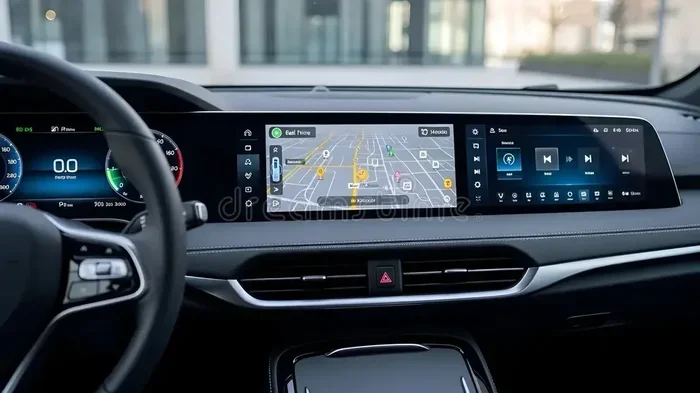
Before you can use your system navigation effectively, you need to set it up properly. Most modern cars come with a built-in infotainment screen. This is the control center for your car’s GPS, music, and settings.
First, make sure your car’s date, time, and location settings are correct. These details help the GPS lock onto satellites faster. Next, connect your phone if your system supports Apple CarPlay or Android Auto. This gives you access to apps like Google Maps and Waze right on your car screen.
If your car has a 7 inch music system for car, you already have a great foundation. These screens are large enough to show maps clearly and are easy to read while driving. Make sure your system is updated to the latest software version. Updates often include new map data and faster processing speeds.
Create Your Preferred Routes
One of the best productivity hacks is saving your frequent routes. Whether it is your daily commute or the route to your gym, save them in your navigation system. This way, you skip the step of typing in an address every single time.
Most systems let you save multiple favorite destinations. Use this feature. Label each route clearly so you can pick the right one at a glance. Some systems even learn your habits over time and suggest routes based on your past drives.
Using Navigation to Boost Daily Productivity
Plan Your Route Before You Start
Productivity starts before you turn the key. Take a minute to check your route on the navigation screen before you pull out of the driveway. Look for any road closures, construction zones, or heavy traffic areas.
Many car navigation systems now offer real-time traffic updates. These alerts tell you about jams, accidents, and road work as they happen. You can then choose a better route and avoid sitting in traffic. This simple habit can save you 10 to 20 minutes on a typical commute.
Here are some quick steps to plan ahead:
- Check traffic conditions on your car screen before starting the engine.
- Choose the route with the least traffic, not always the shortest distance.
- Save alternate routes for your most common drives.
- Set your next destination while parked, never while driving.
Use Voice Commands to Stay Focused
One of the biggest advantages of modern car navigation is voice control. Instead of typing an address, you simply say where you want to go. This keeps your hands on the wheel and your eyes on the road.
Most system navigation setups support natural language commands. You can say things like “Navigate to the nearest gas station” or “Take me home.” The system understands and responds quickly. Practice a few voice commands during your first week of use. Soon, it will feel completely natural.
Voice commands also let you control other features without touching the screen. You can change the radio station, adjust volume, or even send a text message using your car’s hands-free navigation features. This multi-tasking ability is a huge productivity booster.
Leverage Fuel-Efficient Routing
Did you know your navigation system can help you save fuel? Many modern GPS systems offer fuel-efficient route options. These routes avoid steep hills, heavy traffic, and frequent stops. The result is better mileage and lower fuel costs.
If you want to understand how far your car can go on a litre of fuel, check out how 1 litre petrol how many km in car is calculated. Navigation systems that factor in fuel economy can adjust your route to maximize efficiency. This is especially helpful for long drives or daily commutes.
Here are simple ways your car navigation helps with fuel savings:
- Avoiding traffic jams reduces idle time and fuel waste.
- Smoother routes mean fewer hard brakes and accelerations.
- Fuel-efficient routing can improve your overall km per litre numbers.
- Real-time traffic data helps you skip congested roads entirely.
Advanced Navigation Features You Should Know About
Lane Assist and Junction Views
Modern navigation systems go beyond simple turn-by-turn directions. Many now offer lane assist, which shows you the correct lane for your next turn. Junction views give you a clear picture of complex highway interchanges before you reach them.
These features are incredibly helpful, especially in unfamiliar cities. They reduce stress and help you make safe lane changes at the right moment. When you use these tools, you drive with more confidence and less hesitation. That confidence translates directly into a smoother, faster drive.
Integration with Your Car’s Infotainment
Your navigation system works best when it is fully integrated with your car’s infotainment setup. This means your music, calls, and directions all work together on one screen. A well-connected system lets you switch between functions without losing your place.
For example, you can get driving directions while listening to your favorite playlist. When a turn comes up, the navigation voice gently takes over. After the turn, your music fades back in. This seamless experience keeps you relaxed and focused throughout the drive.
Some drivers upgrade their car audio to a quality unit like a 7 inch music system for car to improve both sound and map visibility. These systems often pair beautifully with factory navigation tools and create a premium driving experience.
Offline Maps and Downloaded Data
One feature many drivers overlook is offline map support. Your car’s navigation system can store map data locally. This means you still get directions even in areas with no cell signal. Rural roads, mountain passes, and underground parking garages become much easier to navigate with offline maps.
Make sure your offline maps are up to date. Most systems let you download the latest map packs through Wi-Fi. Set a reminder to update your maps every few months. Fresh map data means accurate addresses, new roads, and better route suggestions.
Common Navigation Mistakes and How to Avoid Them
Relying Too Much on the Screen
The biggest mistake drivers make is staring at the navigation screen instead of the road. Even a quick glance away from the road can be dangerous. Your car’s system navigation should support your driving, not distract you from it.
Use audio cues whenever possible. Most navigation systems announce turns clearly through your car speakers. Trust these voice prompts. Keep your eyes on the road and only glance at the screen when you need to confirm a direction.
Ignoring Map Updates
Outdated maps lead to wrong directions and wasted time. Roads change, new businesses open, and old routes get rerouted. If your navigation system has not been updated in over a year, you are probably missing important changes in your area.
Most manufacturers offer free map updates for the first few years. After that, some charge a fee. Check your car manufacturer’s website for the latest update process. It usually involves a USB drive or a Wi-Fi connection. Taking 15 minutes to update your maps can save you hours of frustration down the road.
Not Adjusting Settings to Your Needs
Every driver is different. Your navigation settings should match your preferences and driving style. Some people prefer the fastest route, while others want the shortest distance. Some want to avoid toll roads, while others do not mind them.
Take a few minutes to explore your system’s settings menu. Adjust preferences for:
- Route type: fastest, shortest, or fuel-efficient.
- Avoidances: tolls, highways, ferries, and unpaved roads.
- Voice guidance volume and language preferences.
- Display brightness and map orientation (north-up or direction-up).
These small adjustments make a big difference in how smoothly your navigation system works for you every day.
Keeping Your Navigation System in Top Shape
Regular Software Updates
Just like your phone, your car’s navigation system needs regular software updates. These updates fix bugs, improve performance, and add new features. Check for updates at least once a month, especially if your system connects to Wi-Fi.
A well-maintained system runs faster and gives more accurate directions. It also reduces the chances of freezing or crashing during a drive. A few minutes of maintenance each month goes a long way toward keeping your GPS navigation running smoothly.
Clean Your Screen and Sensors
Dust and grime on your navigation screen make maps hard to read. Use a soft microfiber cloth to gently clean the screen every week. Avoid harsh chemicals that can damage the display coating.
If your car has a roof-mounted GPS antenna, make sure it stays clean and unobstructed. Snow, dirt, or even a poorly placed phone mount can interfere with satellite signals. A clean system is a fast and accurate system.
Know When to Seek Professional Help
Some navigation problems need expert attention. If your system consistently loses signal, shows wrong locations, or freezes frequently, it may need professional diagnosis. Do not try to open or repair the unit yourself. A qualified technician can quickly identify and fix hardware or software issues.
Also, if you are thinking about upgrading your car’s tech, consider how a new unit might improve your overall driving experience. Sometimes a simple hardware upgrade brings a world of new features and better reliability.
Conclusion
Using your car’s system navigation the right way is one of the simplest steps you can take to boost daily productivity. From setting up your routes in advance to using voice commands and fuel-efficient directions, every feature has a purpose. The key is to engage with your system regularly and keep it updated.
Small habits make a big difference. Check your route before you drive. Trust your voice prompts. Keep your maps fresh. Avoid common mistakes like screen distraction and outdated data. Over time, these habits become automatic, and you will wonder how you ever drove without them.
Your car’s navigation system is more than a map. It is a productivity tool that saves you time, fuel, and stress. Take a few minutes today to explore your settings and get to know your system. You will be amazed at how much smoother and smarter your drives become.
Frequently Asked Questions
What is system navigation in a car?
System navigation refers to the built-in GPS and mapping tools in your car’s infotainment system. It provides turn-by-turn directions, real-time traffic updates, and route planning to help you reach your destination efficiently and safely.
How do I update the maps on my car navigation system?
Most car navigation systems allow map updates through Wi-Fi or a USB connection. Check your car manufacturer’s website or infotainment settings for the update process. Regular updates ensure you have the latest roads, addresses, and points of interest.
Can my car navigation system help me save fuel?
Yes, many modern navigation systems offer fuel-efficient routing options. These routes avoid heavy traffic, steep hills, and frequent stops, which helps improve your overall fuel economy and reduces unnecessary fuel consumption.
Is it safe to use navigation while driving?
It is safe when you use hands-free features like voice commands and audio prompts. Avoid typing addresses or looking at the screen while the car is moving. Set your destination before you start driving, and let your system navigation guide you through audio directions.
What should I do if my car navigation loses signal?
First, check if your GPS antenna is clean and unobstructed. Restarting the infotainment system often resolves temporary signal loss. If the problem persists, your maps may need updating, or the unit may need professional inspection.
How does voice command navigation work in cars?
Voice command navigation lets you speak destinations and commands through your car’s microphone. The system processes your speech and provides directions without you needing to touch the screen. This keeps your hands on the wheel and eyes on the road, making every drive safer and more productive.
=== INTERNAL LINKS ===