Does a 2004 Toyota Camry Have Bluetooth Connectivity
The 2004 Toyota Camry does not come with factory Bluetooth connectivity built into the original audio system. However, there are several aftermarket solutions that can bring modern wireless features to your vehicle. Whether you want hands-free calling, wireless music streaming, or both, upgrading your 2004 Toyota Camry with Bluetooth technology is straightforward and affordable.
When you think about car technology, the 2004 Toyota Camry might not be the first vehicle that comes to mind for modern connectivity. But here is the thing — even older cars can get smart upgrades that make your daily drive more convenient. If you have been asking yourself whether your 2004 Camry supports wireless audio streaming or hands-free calling, you are in the right place. Let us break down everything you need to know about Bluetooth connectivity in this popular sedan.
The 2004 Toyota Camry was a reliable and well-loved vehicle during its time. It offered comfort, fuel efficiency, and a solid driving experience. But when it came to car technology and wireless connectivity, the 2004 model year was still in an era before Bluetooth became standard in most vehicles. Understanding what your Camry offers out of the box — and what you can add — helps you make the best decision for your driving needs.
Key Takeaways
- The 2004 Toyota Camry lacks factory Bluetooth: The original factory radio in this model year does not include built-in Bluetooth connectivity or wireless streaming capabilities.
- Aftermarket Bluetooth adapters work great: FM transmitters and Bluetooth adapters can easily add wireless functionality to your Camry’s existing audio system.
- Multiple upgrade paths exist: You can choose from simple plug-and-play devices or full stereo replacements depending on your budget and needs.
- AUX and cassette adapters offer alternatives: Even without Bluetooth, you can connect your phone using auxiliary cables or cassette adapters for wired connectivity.
- Professional installation is optional: Many Bluetooth solutions are DIY-friendly and can be installed at home with basic tools.
- Hands-free calling improves safety: Adding Bluetooth allows you to make and receive calls without taking your hands off the wheel.
📑 Table of Contents
The Factory Audio System in the 2004 Toyota Camry
Before we dive into Bluetooth options, it helps to understand what the factory audio system in a 2004 Camry actually provides. The original setup was designed for its time and served drivers well, but it lacked the wireless features we take for granted today.
What the Factory Radio Offers
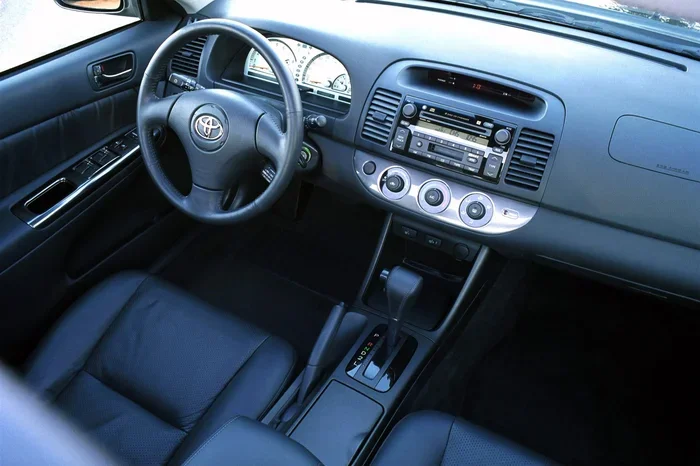
The standard factory radio in the 2004 Toyota Camry included a CD player, AM/FM radio, and in some models, a cassette player. These were the go-to ways to listen to music during that era. The head unit also featured basic controls for volume, tuning, and disc playback. There was no USB port, no auxiliary input, and certainly no wireless streaming capability.
Toyota equipped the Camry with a solid but basic car audio system that prioritized reliability over modern convenience features. The speakers were decent for the price range, and the overall sound quality was acceptable for most passengers. But if you wanted to listen to music from your phone, you were out of luck without some kind of workaround.
Understanding the 2004 Camry’s Technology Era
The year 2004 was a transitional period for vehicle connectivity. Bluetooth had just started appearing in luxury vehicles and high-end trim levels. Toyota did not make Bluetooth connectivity standard in the Camry lineup until later model years. The 2004 Camry was built in a time when drivers still relied on CDs, radio, and cassette tapes for their entertainment.
Even advanced features like hands-free technology were rare in mainstream sedans during this period. The idea of wirelessly streaming music from your phone to your car speakers was still a few years away from becoming commonplace. This context is important because it explains why the 2004 Camry does not have Bluetooth built in.
Bluetooth Features in the 2004 Camry
Did Toyota Include Bluetooth as Standard?
The short answer is no. Does a 2004 Toyota Camry have Bluetooth connectivity? Not from the factory. Toyota did not offer a built-in Bluetooth option in the 2004 Camry’s audio system. There was no wireless pairing capability, no hands-free calling integration, and no way to stream music from a phone to the car speakers without additional hardware.
This might seem like a big limitation today, but it was completely normal for the time. Most cars on the road in 2004 did not have Bluetooth. The technology was still finding its footing in the automotive world. Toyota focused its efforts on improving fuel economy, reliability, and comfort features rather than car entertainment system connectivity.
Which Trim Levels Had Advanced Features?
The 2004 Camry came in several trim levels, including the CE, LE, and SE. Even the higher-end trims did not include factory Bluetooth as an option. The LE and SE models offered upgraded sound systems and additional comfort features, but wireless connectivity was simply not part of the package.
Some features that were available included upgraded speakers, leather seating, and automatic climate control. But when it came to audio connectivity options and wireless technology, all 2004 Camry models were essentially the same. If you wanted to connect your phone, you needed an aftermarket solution.
Aftermarket Bluetooth Solutions for the 2004 Camry
The good news is that you have plenty of options for adding Bluetooth connectivity to your 2004 Toyota Camry. Aftermarket technology has come a long way, and there are solutions to fit every budget and technical comfort level.
FM Transmitters and Wireless Adapters
An FM transmitter is one of the simplest and most affordable ways to add wireless capability to your Camry. These small devices plug into your car’s cigarette lighter or power port and broadcast audio over an FM frequency. You pair your phone with the transmitter, tune your radio to the matching frequency, and enjoy your music wirelessly.
FM transmitters work well for basic needs, but they do have some limitations. The audio quality is not as crisp as a direct connection, and you might experience interference from local radio stations. Still, for drivers who want a quick and easy solution, an FM transmitter is a great starting point.
When shopping for an FM transmitter, look for models that support Bluetooth pairing and offer multiple frequency options. Some higher-end units also include USB charging ports and built-in microphones for hands-free calling. These extras make the device more versatile and convenient for daily use.
Auxiliary Input and Cassette Adapters
If you prefer a wired connection for better audio quality, you have two main options. An auxiliary cable can connect directly to your phone’s headphone jack and plug into an available input on your car stereo. However, the 2004 Camry’s factory radio does not have an AUX port, so this option requires an adapter.
For Camry models with a cassette player, a cassette adapter is a clever workaround. This device sits inside the cassette slot and plays audio through a connected cable. It delivers better sound quality than an FM transmitter and does not require any batteries or charging. Many drivers of older Toyotas still rely on cassette adapters as their primary audio connection method.
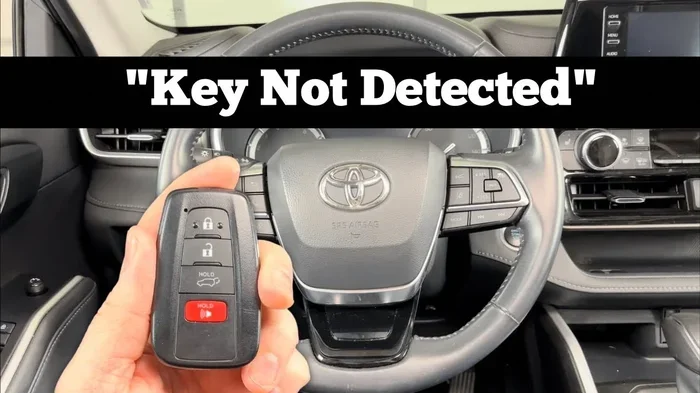
You might also consider programming a keyless key fob yourself if you want to explore other electronic upgrades for your Camry. Understanding your car’s electronic systems helps when installing aftermarket devices.
Upgrading Your Factory Radio
The most comprehensive solution is to replace your factory radio with an aftermarket stereo that includes built-in Bluetooth. Modern head units offer wireless streaming, hands-free calling, USB charging, and even smartphone integration features like Apple CarPlay or Android Auto.
Upgrading your stereo is a bigger project, but it delivers the best results. A new car audio system transforms your driving experience and brings your 2004 Camry into the modern era. You get clearer sound, more connectivity options, and a cleaner dashboard look.
When choosing a new stereo, consider features like touch-screen displays, steering wheel controls, and backup camera compatibility. These additions make your daily commute more enjoyable and safer. If you are also interested in other car technology upgrades, you might want to look into whether Jiffy Lube can help with diagnostics for your vehicle’s electronic systems before making any major changes.
How to Add Bluetooth to Your 2004 Camry
Step-by-Step Installation Options
Adding Bluetooth connectivity to your 2004 Toyota Camry is easier than you might think. Here is a breakdown of the main installation paths:
- FM Transmitter: Plug into the power port, pair your phone, and tune to the correct frequency. This is the simplest method and requires no permanent modifications to your vehicle.
- Cassette Adapter: Insert the adapter into the cassette slot, connect your phone via cable, and enjoy improved audio quality. This works well for models with a cassette player.
- Auxiliary Adapter: Use an AUX-to-cassette or AUX-to-CD adapter to connect your phone to the factory radio. This provides a direct wired connection for better sound.
- Full Stereo Replacement: Remove the factory head unit, install a new Bluetooth-enabled stereo, and connect your wiring harness. This is the most involved option but delivers the best results.
Each option has its own advantages. The FM transmitter is the easiest and cheapest, while a full stereo replacement offers the most features and the best audio quality. Choose the method that fits your budget, technical skills, and how much you use your phone in the car.
Cost Considerations
The cost of adding Bluetooth to your 2004 Camry varies widely depending on the solution you choose. Here is a rough breakdown:
- FM Transmitter: $15 to $50. The most budget-friendly option with decent results.
- Cassette Adapter: $10 to $30. A simple and effective solution for cassette-equipped models.
- Auxiliary Adapter Kit: $20 to $60. Provides a cleaner connection than FM transmitters.
- Aftermarket Stereo: $100 to $400+ depending on features and brand. The most comprehensive upgrade.
- Professional Installation: $50 to $150 extra if you prefer not to DIY. Many local shops can handle the job quickly.
Keep in mind that investing in a better car entertainment system pays off in long-term enjoyment and convenience. A quality Bluetooth stereo can last for years and adds significant value to your driving experience.
Comparing Bluetooth Options for Older Toyota Models
Factory vs Aftermarket
When comparing factory features to aftermarket upgrades, the difference is clear. The 2004 Camry’s factory radio was built for simplicity and reliability. It did what it needed to do without any fancy wireless features. Aftermarket solutions, on the other hand, bring modern hands-free technology to your older vehicle.
Factory systems have the advantage of being designed specifically for your car. Everything fits perfectly and integrates seamlessly. Aftermarket options give you more features and flexibility, but they require some setup and adjustment. Most drivers find that the benefits of adding Bluetooth far outweigh any minor installation effort.
If you are also curious about other technology features in older Toyotas, you might wonder if a keyless car can be started without the key. Understanding how your car’s electronic systems work helps you make better decisions about upgrades and modifications.
Which Solution Is Right for You?
The best Bluetooth solution for your 2004 Camry depends on your needs and budget. If you just want to take calls hands-free, an FM transmitter or basic Bluetooth adapter will do the job. If you want to stream music with decent quality, an auxiliary adapter or cassette adapter is a solid choice.
For drivers who want the full experience — wireless streaming, clear call quality, and modern features — a stereo replacement is the way to go. Think about how often you use your phone in the car and what features matter most to you. This will guide you toward the right solution.
Sometimes the simplest approach works best. Many Camry owners stick with a cassette adapter or FM transmitter because they are easy to use and do not require any permanent changes to the vehicle. Others go all in with a new stereo and enjoy a completely transformed audio experience.
Expert Tips for Car Audio Upgrades
Adding Bluetooth connectivity to your 2004 Toyota Camry is a rewarding project, but a few expert tips can make the process smoother and the results better.
First, always check your car’s wiring before purchasing any adapter or stereo. Knowing what connections are available saves time and prevents compatibility issues. If you are unsure about your car’s electrical system, a quick visit to a local shop for diagnostics can clarify what options are available.
Second, invest in quality cables and adapters. Cheap accessories can introduce static, reduce audio quality, and break down quickly. Spending a little more on reliable components pays off in the long run. Third, take advantage of online tutorials and forums where Camry owners share their upgrade experiences.
Finally, consider your overall driving habits. If you spend a lot of time on the road, a full stereo upgrade with Bluetooth is worth the investment. If you only need occasional connectivity, a simple FM transmitter or cassette adapter is perfectly sufficient. The goal is to enhance your driving experience without overcomplicating things.
Understanding your vehicle’s technology also helps with other decisions. For example, knowing how to get a new key and fob for my car becomes easier when you are already familiar with your Camry’s electronic systems. This kind of knowledge builds confidence and saves money over time.
Conclusion
So, does a 2004 Toyota Camry have Bluetooth? The answer is no — not from the factory. The 2004 Camry was built in an era before wireless connectivity became standard in mainstream vehicles. However, that does not mean you are stuck with outdated audio options.
Adding Bluetooth connectivity to your 2004 Toyota Camry is entirely possible and more affordable than you might think. Whether you choose a simple FM transmitter, a cassette adapter, or a full stereo replacement, you can enjoy hands-free calling and wireless music streaming in your daily driver. The right solution depends on your budget, your technical comfort level, and how much you value modern connectivity features.
Take the time to explore your options, compare prices, and choose the solution that fits your lifestyle. Your 2004 Camry has plenty of life left in it, and a few smart upgrades can make it feel like a modern vehicle again. Start with one small change and enjoy the difference it makes every time you get behind the wheel.
Frequently Asked Questions
Can I add Bluetooth to a 2004 Toyota Camry if it has a cassette player?
Yes, a cassette adapter is one of the easiest ways to add connectivity to a Camry with a cassette player. The adapter plugs into the cassette slot and connects to your phone via a cable. It delivers better sound quality than an FM transmitter and costs very little.
Is it hard to install a Bluetooth stereo in a 2004 Camry?
It is not difficult if you are comfortable with basic car electronics. Most aftermarket stereos use a standard dash kit and wiring harness that matches the 2004 Camry. You can find detailed installation guides online, or you can have a local shop handle the job for a reasonable fee.
Will an FM transmitter damage my 2004 Camry’s radio?
No, an FM transmitter will not damage your radio. It simply broadcasts audio over an FM frequency that your car stereo picks up. The device plugs into your power port and does not interfere with your existing electrical system.
What is the best Bluetooth adapter for a 2004 Toyota Camry?
The best adapter depends on your needs and budget. For simple hands-free calling, a basic FM transmitter works well. For better audio quality, a cassette adapter or auxiliary adapter is a better choice. If you want full features, replacing the factory stereo with a modern Bluetooth head unit is the top option.
Can I use Apple CarPlay or Android Auto in a 2004 Camry?
Yes, but only with an aftermarket stereo upgrade. The factory radio in the 2004 Camry does not support smartphone integration. However, many modern aftermarket head units include Apple CarPlay and Android Auto, giving you full access to your phone’s features through your car’s display.
How much does it cost to add Bluetooth to a 2004 Toyota Camry?
The cost ranges from about $10 for a cassette adapter to $400 or more for a premium aftermarket stereo. FM transmitters fall in the $15 to $50 range, and professional installation adds $50 to $150. Most drivers find a mid-range solution that balances cost and quality for their needs.