How Do I Open My Key Fob A Complete Step by Step Guide
Opening your key fob is simpler than you think and knowing how to do it saves time and money. This guide walks you through every step, from prying open the casing to replacing the battery and reprogramming your key fob. Whether you have a remote key, smart key, or transponder key, you will find clear instructions that work.
Have you ever stood by your car, pressing the button on your key fob over and over, wondering why it just will not respond? You are not alone. Millions of drivers face key fob issues every year, and the first step to fixing them is understanding how your little remote device actually works. Opening a key fob might seem tricky, but it is really quite straightforward once you know what you are doing.
This guide gives you a full walkthrough on how to open your key fob, replace the battery, troubleshoot common problems, and keep your car key working like new. We will cover everything from basic remote key models to modern smart key systems. Whether your key fob stopped working after the battery died or you simply want to learn more about your car remote, you are in the right place.
Before we dive in, let us quickly talk about why key fob maintenance matters. A well-maintained key fob keeps your car secure, lets you unlock doors from a distance, and makes daily driving smoother. Many people ignore their key fob until it fails completely, and that is when things get frustrating. A little knowledge goes a long way.
Key Takeaways
- Know your key fob type: Understanding whether you have a standard remote, smart key, or push-button start fob helps you choose the right opening method.
- Opening a key fob is easy: With a small flathead screwdriver or a coin, most key fobs pop open in seconds without damage.
- Battery replacement is routine: A CR2032 or CR2025 battery lasts 2-4 years and swapping it out takes under five minutes.
- Troubleshooting saves money: Many key fob issues are simple fixes like battery swaps or signal reset, not costly repairs.
- When in doubt, seek help: A dealership or locksmith can handle complex key fob programming or water damage cases.
📑 Table of Contents
- What Is a Key Fob and How Does It Work?
- Common Types of Key Fobs and Their Designs
- Step-by-Step Guide to Opening Your Key Fob
- Key Fob Battery Replacement: When and How Often
- Troubleshooting Common Key Fob Problems
- When to Replace Your Key Fob Instead of Repairing It
- Expert Tips for Extending Your Key Fob Lifespan
- Key Takeaways
What Is a Key Fob and How Does It Work?
A key fob is a small handheld device that communicates wirelessly with your car. It sends a coded signal to the vehicle’s car security system, telling it to lock, unlock, or even start the engine. Most modern key fobs use a transponder key chip or radio frequency identification (RFID) technology to authenticate the signal.
When you press a button on your key fob, it sends a unique encrypted code. Your car receives that code and checks it against the stored code in its computer. If they match, the car responds. This is why two key fobs from different cars do not work interchangeably. Each one is programmed specifically for your vehicle.
There are three main types of key fobs you might encounter:
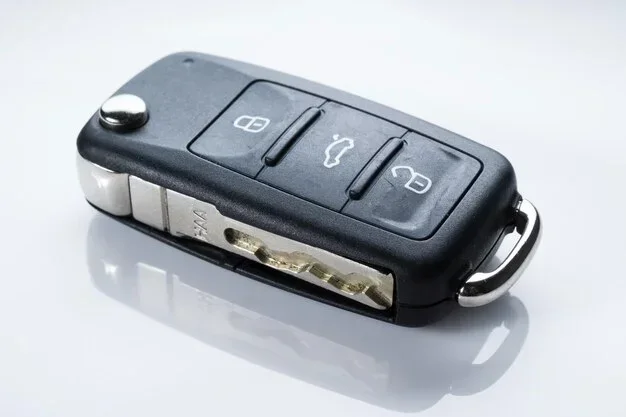
- Standard Remote Key: This is the classic type with buttons for lock, unlock, and sometimes a panic alarm. It usually has a physical key blade hidden inside.
- Smart Key or Proximity Key: This electronic key works without pressing any button. You just walk up to your car and the doors unlock automatically. To start the engine, you push the push button start.
- Remote Start Key Fob: This type lets you start your car from a distance, which is especially useful in cold weather. Some remote start fobs also include trunk release and window control buttons.
Understanding which type you have helps you open and maintain it correctly. A smart key fob often has a slimmer design and no removable battery compartment in the same way a standard remote does. Each type has its own quirks, and we will explore them below.
Common Types of Key Fobs and Their Designs
Not all key fobs look the same. Car manufacturers design them differently based on the vehicle model, year, and features. Knowing the design of your key fob makes opening it much easier.
Traditional Key Fob with Visible Seams
These are the most common key fobs found in older and mid-range vehicles. They have a clear seam running along the middle where the two halves of the casing meet. You can usually spot a small notch or groove near the key blade release button. This is your entry point for opening the fob.
Many traditional car remote fobs use a CR2032 battery, which is easy to find and inexpensive. The casing is typically made of durable plastic, and the internal components are held in place with a small circuit board and a few screws or clips.
Slim Smart Key Fobs
Smart key fobs are becoming standard on newer vehicles. They are slim, often button-less, and may look more like a credit card or a sleek metal fob. Opening these requires a bit more care because the design is more compact. Some smart fobs have a small release latch or a sliding cover that reveals the mechanical key blade inside.
Rugged Key Fobs with Protective Covers
Some vehicles come with key fobs that have extra protective layers. These key fob covers shield the device from drops, water, and everyday wear. If your fob has a rubber or silicone sleeve, you will need to remove it before opening the casing underneath.
Step-by-Step Guide to Opening Your Key Fob
Now let us get to the heart of the matter. Here is a detailed, step-by-step process for opening your key fob safely. Follow these steps carefully to avoid damaging the casing or the internal electronics.
Step 1: Gather Your Tools
You do not need much to open a key fob. Here is what you should have ready:
- A small flathead screwdriver or a plastic prying tool
- A coin (a dime or penny works for some models)
- A soft cloth or towel to place your fob on
- Your replacement battery (usually CR2032 or CR2025)
- A clean, dry workspace
Using a plastic prying tool is always better than metal because it prevents scratches and electrical damage. You can find these tools at any electronics store or online. Keep your workspace clean and well-lit so you do not lose any small parts.
Step 2: Locate the Seam or Notch
Flip your key fob over and look closely at the edges. You should see a thin seam where the two halves of the casing join. Some fobs have a small arrow or triangle near the seam that indicates where to insert your tool. If your fob has a key blade, check the side where the blade slides out, as there is often a release button there too.
Step 3: Gently Pry Open the Casing
Insert your flathead screwdriver or plastic tool into the seam. Apply gentle, even pressure. Do not force it. Most key fobs use clips that pop open with light pressure. Work your way around the seam, releasing each clip one at a time.
If your fob uses a coin slot instead of a seam, insert a coin into the slot and twist gently. This method is common in certain Toyota and Honda models. The coin acts as a lever to release the internal latch.
Once you feel the clips release, carefully separate the two halves. Place the fob face-down on your cloth so the buttons do not fall out.
Step 4: Remove the Old Battery
Inside the key fob, you will see the battery sitting in a small compartment. It is usually held in place by a tiny metal clip or simply resting in a slot. Use the tip of your screwdriver to gently lift the clip or pry the battery out. Note the orientation of the battery, so you insert the new one the same way.
The most common key fob battery types are:
- CR2032: 3-volt battery, most common in standard remotes
- CR2025: Slightly thinner, used in slimmer fob designs
- CR2016: Even thinner, found in some older models
Step 5: Insert the New Battery
Place your new battery in the compartment with the positive side (marked +) facing up. Press it firmly until it sits flat. Make sure it is not loose or tilted. A poorly seated battery is one of the most common reasons a key fob still does not work after replacement.
Step 6: Reassemble the Key Fob
Align the two halves of the casing carefully. Press them together evenly until you hear all the clips click into place. Do not press on the buttons while reassembling, as this can push them out of their slots. Once the fob is fully closed, test the buttons to make sure everything works.
Key Fob Battery Replacement: When and How Often
Replacing the battery in your key fob is the single most common maintenance task. Most key fob batteries last between two and four years, depending on how often you use the remote. If you notice your key fob range getting shorter or the buttons feeling less responsive, it is probably time for a new battery.
Here are some signs your key fob battery is dying:
- The remote key works only when you are very close to the car
- You need to press the button multiple times for it to respond
- The LED light on the fob is dim or does not light up at all
- The car does not recognize the fob for push button start
- You hear a warning beep on the dashboard about the key fob battery
Most drivers can replace a key fob battery at home in under five minutes. It costs just a few dollars for the battery itself. However, if you are uncomfortable doing it yourself, any locksmith or car dealership can handle it for a small fee. Keeping spare batteries in your glove box is a smart habit that saves you from getting stranded.
Troubleshooting Common Key Fob Problems
Sometimes replacing the battery does not fix the problem. If your key fob still does not work after a fresh battery, there are several things you can check before calling a professional.
Signal Interference
Believe it or not, other electronic devices can interfere with your key fob signal. If you keep your key fob in the same pocket as your phone, the phone’s electromagnetic field can disrupt the signal. Try moving your fob away from electronic devices and test it again.
Water Damage
If your key fob has been dropped in water or exposed to heavy rain, internal corrosion can damage the circuit board. Remove the battery immediately if the fob gets wet, and let it dry completely before reinserting the battery. For severe water damage, you may need a key fob replacement or professional repair.
Frozen or Stuck Buttons
In extremely cold weather, the buttons on your key fob can stick or become unresponsive. This is usually temporary. Warm the fob up by holding it in your hands for a few minutes, and the buttons should return to normal.
Programming Issues
If you recently replaced your key fob or the battery died for a long time, the fob may need to be reprogrammed. Each vehicle has a specific reprogramming procedure, which you can find in your owner’s manual. For key fob programming that requires specialized equipment, visit your dealership or a trusted locksmith.
While you are looking after your car, you might also want to check other maintenance items. For instance, understanding your fuel economy helps you monitor overall vehicle health. You can learn about 1 litre petrol how many km in your car to track efficiency, or explore 1 liter petrol mileage for more detailed fuel consumption insights.
When to Replace Your Key Fob Instead of Repairing It
There comes a point when opening and fixing your key fob is no longer the best option. If the internal circuit board is damaged, the buttons are physically worn out, or the fob has been through significant water damage, a full replacement may be more cost-effective.
Here are some signs you need a key fob replacement:
- The fob casing is cracked or broken beyond repair
- Buttons do not respond even after battery replacement
- The fob has been submerged in water and does not work after drying
- The transponder key chip inside the fob is faulty
- Your vehicle’s car security system does not recognize the fob
A new key fob can cost anywhere from $50 to $400 depending on your vehicle make and model. Smart key fobs tend to be more expensive because of their advanced technology. Before purchasing a replacement, check if your insurance or roadside assistance covers key fob costs. Some dealerships also offer warranty coverage for fobs that fail within the first year.
If you decide to buy a replacement, make sure it is compatible with your vehicle. You can purchase OEM fobs directly from the dealership or aftermarket options online. After buying a new fob, you will need to have it programmed to your car. Many locksmiths offer this service at a fraction of the dealership price.
Taking care of your key fob also means protecting it from physical damage. A good key fob cover or protective sleeve can extend the life of your device significantly. These covers absorb shocks, prevent scratches, and keep moisture out. They are inexpensive and available for almost every key fob model on the market.
Remember, your key fob is one of the most used components of your daily driving routine. Treat it well, replace the battery on schedule, and it will serve you reliably for years. A little attention now saves you from the frustration of a dead fob when you are rushing out the door.
Expert Tips for Extending Your Key Fob Lifespan
Want to get the most out of your key fob? Here are some expert-backed tips that make a real difference:
- Replace the battery proactively. Do not wait until the fob stops working. Swap the battery every two to three years to avoid being caught off guard.
- Keep the fob away from strong magnets. Magnets can interfere with the internal electronics and the transponder key chip, causing signal problems.
- Store the fob properly. When not in use, keep it in a dedicated spot away from direct sunlight, heat sources, and moisture.
- Clean the contacts regularly. Over time, dust and grime can build up on the battery contacts. A quick wipe with a dry cloth keeps the connection strong.
- Update firmware when possible. Some modern smart key systems allow firmware updates through the dealership. These updates can improve range and responsiveness.
- Carry a spare fob. Having a backup car key means you are never stranded if your primary fob fails unexpectedly.
These simple habits add up over time and keep your key fob performing at its best. A little prevention goes a long way toward avoiding the hassle of a malfunctioning car remote.
Key Takeaways
- Know your key fob type: Understanding whether you have a standard remote, smart key, or push-button start fob helps you choose the right opening method.
- Opening a key fob is easy: With a small flathead screwdriver or a coin, most key fobs pop open in seconds without damage.
- Battery replacement is routine: A CR2032 or CR2025 battery lasts 2-4 years and swapping it out takes under five minutes.
- Troubleshooting saves money: Many key fob issues are simple fixes like battery swaps or signal reset, not costly repairs.
- When in doubt, seek help: A dealership or locksmith can handle complex key fob programming or water damage cases.
Frequently Asked Questions
Can I open my key fob without any tools?
Yes, in many cases you can use a coin instead of a screwdriver. Some key fob models have a coin slot designed specifically for opening the casing. Just insert a dime or penny into the slot and twist gently to release the clips.
How do I know which battery my key fob needs?
Check your vehicle’s owner manual or look at the old battery once you open the fob. Most key fobs use a CR2032 battery, but some slim models require a CR2025. The battery type is always printed on the current battery itself.
Is it safe to open my key fob myself?
Absolutely. Opening a key fob is a simple process that does not require any special skills. Just be gentle with the clips and avoid using metal tools that could scratch the circuit board. If you follow the steps carefully, you will not damage the fob.
What should I do if my key fob still does not work after replacing the battery?
Try resetting the fob by holding the lock and unlock buttons together for five to ten seconds. If that does not work, the issue may be with the transponder key chip or the car security system. In that case, a dealership or locksmith can help with key fob programming or diagnostics.
How much does a key fob replacement cost?
The cost varies widely depending on your vehicle. A basic remote key fob typically costs $50 to $100, while advanced smart key fobs can range from $150 to $400. Programming fees at a dealership may add another $50 to $100 to the total.
Can water damage permanently destroy a key fob?
It depends on the severity of the exposure. If you act quickly and dry the fob thoroughly after it gets wet, there is a good chance it will survive. However, prolonged exposure to moisture can corrode the circuit board, which may require a full key fob replacement.
=== CONCLUSION ===
Opening your key fob does not have to be intimidating. With the right tools and a little patience, you can handle it in minutes. From removing the casing to swapping out the key fob battery and troubleshooting signal issues, this guide has covered everything you need to know. Your car remote is a small but essential part of your daily life, and keeping it in good working order makes every drive smoother.
Remember to replace your battery proactively, protect your fob from damage, and seek professional help when the situation calls for it. Whether you drive a vehicle with a push button start or a traditional remote key, these tips apply across the board. Now that you know exactly how to open and maintain your key fob, you are better equipped to handle any issue that comes your way. Keep this guide bookmarked, share it with fellow drivers, and enjoy the peace of mind that comes with a fully functional key fob. Happy driving!